2V0-651 Exam Details
-
Exam Code
:2V0-651 -
Exam Name
:VMware Certified Professional 6 - Desktop and Mobility Beta -
Certification
:VMware Certifications -
Vendor
:VMware -
Total Questions
:110 Q&As -
Last Updated
:Dec 24, 2024
VMware 2V0-651 Online Questions & Answers
-
Question 91:
An administrator has provisioned a web application to a group of users. Users have reported that the application is not visible in the Applications tab when the user launches Workspace Portal. Which steps must the administrator take to ensure the application is entitled properly?
A. Verify that the application is SAML-enabled. Verify that the application is entitled to a directory service-based Workspace Portal group or user.
B. Verify that the application is set to Automatic. Verify that the application is entitled to a directory service-based Workspace Portal group or user.
C. Verify that the application is set to User-Activated. Verify that the application is entitled to a local Workspace Portal group or user.
D. Verify that the Workspace Portal client is installed on the endpoint. Verify that the application is entitled to a local Workspace Portal group or user. -
Question 92:
An administrator needs to provide access to applications for users regardless of whether the users have network access. Which two VMware components should the administrator choose? (Choose two.)
A. VMware Workspace
B. VMware ThinApp
C. VMware Horizon View
D. VMware Mirage -
Question 93:
An administrator is attempting to configure a new linked-clone pool to use software 3D rendering and notices that the 3D Renderer option is unavailable.
The pool settings are as follows:

Default display protocol is set to PCoIP.
Allow users to choose protocol is set to Yes.
Max resolution of any one monitor is set to 1920 x 1200.
Max number of monitors is set to 2.
Which setting change should the administrator make to allow the 3D Renderer to be enabled?
A. Change the Default display protocol setting to RDP.
B. Change the Allow users to choose protocol setting to No.
C. Change the Max resolution of any one monitor setting to 2560 x 1600.
D. Change the Max number of monitors setting to 1. -
Question 94:
An administrator needs to set up SSL certificates that are signed by a third-party Certificate Authority for the View Connection and security servers. Which two configuration steps must the administrator complete? (Choose two.)
A. Modify the certificate friendly name to vdm.
B. Run the sviconfig ReplaceCertificate utility to bind the new certificate.
C. Modify the certificate friendly name to view.
D. Import the SSL certificate into the Windows local system certificate store on the View servers. -
Question 95:
Refer to the Exhibit.
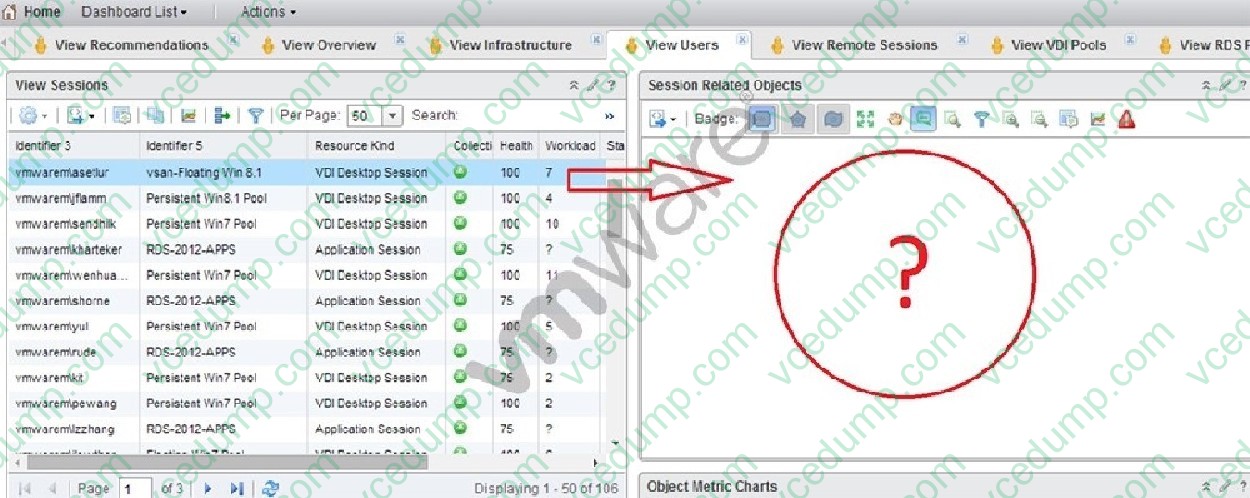
An administrator has successfully deployed vCenter Operations for Horizon. The administrator logs into the custom dashboard, finds a list of active users on the View Users tab, and clicks on one of them.
The Health tree widget does not update, as shown in the exhibit.
What has been changed in vCenter Operations for Horizon configuration to result in the dashboar d issue?
A. Interaction between the Active User Sessions widget and the Health tree widget was removed.
B. Reporting in the Health tree widget was changed from on to off.
C. Interaction between the Metric Sparkline widget and the Health tree widget was removed.
D. Reporting in the Active User Sessions widget was changed from on to off. -
Question 96:
An administrator is creating a pool of desktops for a group of developers. The administrator needs to provide control to a user from the group to manage the recompose and refresh operations. The user's controls must apply only to the developer pool.
What should the administrator do?
A. Create a developer folder, add the developer pool, and assign a user with the Inventory Administrators role to the folder.
B. Create the developer pool and assign the Manage Desktops global privilege to the virtual desktops.
C. Create the developer pool and assign the Inventory Control global privilege to the virtual desktops.
D. Create a developer folder, add the desktops, and assign a user with the Manage Desktops role to the folder. -
Question 97:
After creating an Upload policy for a group of users, an administrator has found a significant increase in storage usage by Mirage. After further investigation, the administrator finds that the increase is a result of users storing personal MP3 libraries on the system.
What should the administrator do to prevent these files from being protected while allowing the users to store the files on the system?
A. Add a Rule to the User Area for MP3 files in the Upload policy.
B. Create a Collection labeled Exclude MP3s.
C. Add a Rule Exception to the Unprotected Area for MP3 files in the Upload policy.
D. Add a Rule to the Unprotected Area for MP3 files in the Upload policy. -
Question 98:
An administrator has asked the help desk to reset a virtual desktop in newly created Desktop Pool B. The help desk user logs in to the View Administrator, but only the previously existing Desktop Pool A is available. What is causing this issue?
A. Help desk user accounts can only be assigned to a single pool at a time.
B. The help desk user's account does not have the appropriate permissions in vCenter Server.
C. The help desk user cannot see Desktop Pool B because provisioning is disabled on the pool.
D. The help desk user's account has only been granted privileges to see Desktop Pool A. -
Question 99:
An organization has a View deployment with a Dedicated Full Clone Pool of Windows 7 desktops. Users connect to the desktops using a Zero Client with firmware 4.1.2. Periodically, the desktops display a black screen after inactivity or after
they go to sleep mode. The View Connection Manager indicates the desktops are Connected.
An administrator finds the following PCoIP log messages:
and
What should the administrator do to resolve the issue?
A. Configure the virtual desktop power management option Turn Off Display to Never.
B. Configure the virtual desktop power management option Sleep to Never.
C. Configure the virtual desktop power management option Turn Off Hard Disk to Never.
D. Configure the virtual desktop power management option PCI Express Link State Power Management to Off. -
Question 100:
Which prerequisite must an administrator verify before installing a View Connection server?
A. Internet Information Services (IIS)
B. Dynamic IP address
C. Apache Web Server
D. Static IP address
Related Exams:
-
1V0-21.20
Associate VMware Data Center Virtualization -
1V0-31.21
Associate VMware Cloud Management and Automation -
1V0-41.20
Associate VMware Network Virtualization -
1V0-61.21
Associate VMware Digital Workspace -
1V0-71.21
Associate VMware Application Modernization -
1V0-81.20
Associate VMware Security -
2V0-11.24
VMware Cloud Foundation 5.2 Administrator -
2V0-11.25
VMware Cloud Foundation 5.2 Administrator -
2V0-13.24
VMware Cloud Foundation 5.2 Architect -
2V0-13.25
VMware Cloud Foundation 9.0 Architect
Tips on How to Prepare for the Exams
Nowadays, the certification exams become more and more important and required by more and more enterprises when applying for a job. But how to prepare for the exam effectively? How to prepare for the exam in a short time with less efforts? How to get a ideal result and how to find the most reliable resources? Here on Vcedump.com, you will find all the answers. Vcedump.com provide not only VMware exam questions, answers and explanations but also complete assistance on your exam preparation and certification application. If you are confused on your 2V0-651 exam preparations and VMware certification application, do not hesitate to visit our Vcedump.com to find your solutions here.