CompTIA 220-1201 Online Practice
Questions and Exam Preparation
220-1201 Exam Details
Exam Code
:220-1201
Exam Name
:CompTIA A+ Certification: Core 1
Certification
:CompTIA Certifications
Vendor
:CompTIA
Total Questions
:598 Q&As
Last Updated
:May 28, 2026
CompTIA 220-1201 Online Questions &
Answers
Question 521:
A financial institution ' s application sends a notification to customers when a nearby store accepts contactless payments.
Which of the following should be enabled so the application works as intended? (Select two)
A. MDM B. Contact syncing C. Bluetooth D. Hotspot E. NFC F. Location services
E. NFC F. Location services
Explanation
The correct answers are E. NFC and
F. Location services. According to CompTIA A+ Core 1 220-1201 objectives under Mobile Devices and Security: NFC (Near-Field Communication): Enables the device to communicate with contactless payment terminals, which is essential for detecting nearby stores that accept contactless payments. Location services: Allows the application to determine the user's geographic location so it can provide notifications only when the user is near a participating store. Why the other options are incorrect:
A. MDM (Mobile Device Management): Manages device policies but does not enable location-based notifications or contactless payments.
B. Contact syncing: Synchronizes contacts; unrelated to payment notifications.
C. Bluetooth: Can be used for some proximity services, but NFC is required for contactless payment detection.
D. Hotspot: Provides internet access; not required for proximity detection in this context.
References:
CompTIA A+ Core 1 (220-1201) Exam Objectives - Mobile Devices: "Given a scenario, configure mobile device features including NFC and location services for apps that interact with external devices or services." Mike Meyers' CompTIA A+ Certification Guide, 13th Edition, Chapter on Mobile Device Features and Proximity-Based Services.
Question 522:
A technician replaced a failed PSU on a high-end workstation PC. Now, the PC fails to POST and does not stay turned on for more than five seconds.
Which of the following power connections was most likely forgotten during installation?
A. 5V B. 12V C. 120V D. 220V
B. 12V
Explanation
The issue described suggests the 12V CPU power connector was likely forgotten during installation. The 12V power rail is essential for the operation of high-end workstation components, including the CPU. Without the 12V connection, the system will fail to POST and may power off shortly after being turned on.
References:
220-1101 (Core 1), Section 3.5: Explains power supply requirements and troubleshooting scenarios related to component connections.
Question 523:
A user visits the desk to report that a smartphone takes more than a day to fully charge. The user has already tested multiple wall outlets and swapped the charging cable, but the results are the same.
Which of the following should the technician do FIRST?
A. Verify the power rating of the charger. B. Ensure all unnecessary connectivity features are disabled. C. Check that all missing smartphone OS updates are applied. D. Complete a factory reset of the phone
A. Verify the power rating of the charger.
Explanation
A smartphone that takes more than a day to fully charge may be due to a charger that is not powerful enough. The technician should verify that the charger is rated for the smartphone's battery capacity and that it is providing the correct voltage and amperage 123.
Question 524:
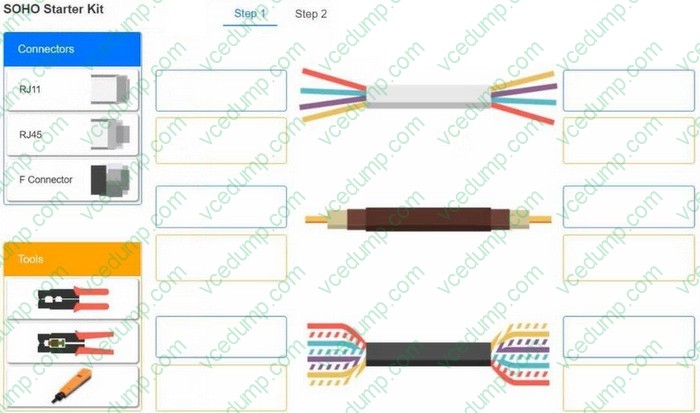
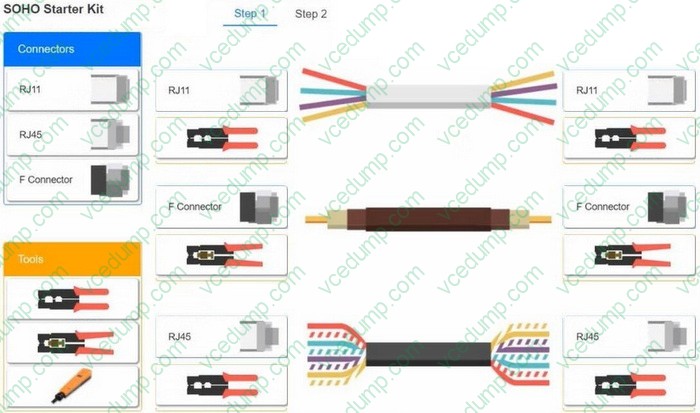
A small ISP has hired a new technician. Joe, the new technician, is being trained to configure customers' home networks. The training instructor gives the technician a starter kit with cables, cable ends, and other network equipment and asks him to build a working network.
The computer should be connected to have Internet connectivity and the phone should be connected to have a dial tone.
INSTRUCTIONS
Use the appropriate cables, cable ends, tools and equipment to configure the network and connect all components accordingly.
There are 2 steps and the simulation starts on step 1.
If at any time you would like to bring back the initial state of the simulation, please click the Reset All button.
Select and Place:
Explanation:
Question 525:
A user brings an older laptop to the help desk and reports issues with the keyboard. Upon inspection, the technician does not see any external damage but notices that many keystrokes da not register in a word processor. The laptop works fine when the technician tests it with an external keyboard.
Which of the following actions would MOST likely resolve the issue?
A. Disable the sticky keys feature. B. Clean the keyboard. C. Reset the BIOS settings to default. D. Charge the laptop.
B. Clean the keyboard.
Explanation
B. Clean the keyboard. In this scenario, the laptop works fine when the technician tests it with an external keyboard, but many keystrokes do not register in a word processor when the internal keyboard is used. This suggests that the issue may be related to the internal keyboard and not the software or hardware settings. Cleaning the keyboard is a simple and effective solution to address common issues such as dirt, debris, or stuck keys that can prevent the keyboard from functioning correctly. Disabling the sticky keys feature will not likely resolve the issue, as it is designed to assist users who have difficulty pressing multiple keys simultaneously. Resetting the BIOS settings to default may resolve certain hardware or software issues, but it is unlikely to address an issue with a physical component such as the keyboard. Charging the laptop may resolve some performance issues that are related to a low battery, but it is not likely to resolve an issue with the keyboard.
Question 526:
A human resources department uses a network shared with other departments to produce a variety of printed resources for legal retention. The human resources department only wants Its members to have access to these materials.
Which of the following should the technician Implement?
A. Security groups B. Audit logs C. Time-of-day access D. Print server
A. Security groups
Explanation
Security groups are used to manage access permissions to network resources, ensuring only authorized HR department members can access the shared materials.
Why Not B (Audit logs): Audit logs monitor activity but do not restrict access.
Why Not C (Time-of-day access): Time-of-day access limits when users can access resources but doesn't specify user permissions.
Why Not D (Print server): A print server manages print jobs but does not control file access.
References:
Core 2 (220-1102), Section 2.5, access control and permissions.
Question 527:
Which of the following standards supports MIMO technology?
A. 802.11a B. 802.11b C. 802.11g D. 802.11n
D. 802.11n
Explanation
The 802.11n wireless networking standard supports Multiple Input Multiple Output (MIMO) technology. MIMO technology uses multiple antennas on both the transmitting and receiving devices to improve wireless performance by increasing the amount of data that can be transmitted simultaneously. 802.11a, 802.11b, and 802.11g do not support MIMO technology.
An administrator is configuring a server to host several virtual machines. The administrator configures the server and is ready to begin provisioning the virtual machines.
Which of the following should the administrator utilize to complete this task?
A. Device manager B. Disk management C. Hypervisor D. Virtual LAN
C. Hypervisor
Explanation
To provision and run multiple virtual machines on a physical server, the administrator must use a hypervisor. A hypervisor is the virtualization layer that creates, runs, and manages virtual machines by abstracting physical hardware resources such as CPU, RAM, storage, and network adapters into virtual resources presented to each VM. Once the server is configured with the required hardware support (such as sufficient RAM/CPU capacity and virtualization features enabled in firmware), the hypervisor is the component that enables VM creation, allocation of resources, virtual disk creation, and VM lifecycle actions like start, stop, suspend, snapshots, and virtual networking configuration. Device Manager is used to view and manage hardware devices and drivers on an operating system, but it is not a VM provisioning tool. Disk Management can partition and format disks, which may support storage preparation, but it does not create or run VMs. A Virtual LAN is a network segmentation method at Layer 2 and may be used in VM networking designs, but it does not provide virtualization itself. Therefore, the correct tool for provisioning virtual machines is the hypervisor.
Question 529:
A technician has just installed a new SSD into a computer, but the drive is not appearing.
Which of the following is most likely the reason's?
A. The SSD is faulty and should be replaced by the manufacturer B. The SSD has not been properly formatted and is not readable C. The SSD is incompatible with the motherboard D. The SSD has not boon installed properly and should be reseated
D. The SSD has not boon installed properly and should be reseated
Explanation
Improper seating is the most common reason an SSD isn't recognized. Ensuring it is correctly connected resolves the issue.
Why Not A (Faulty SSD): A faulty SSD is possible but less likely than an installation issue.
Why Not B (Not formatted): Formatting affects data usability, not drive detection.
Why Not C (Incompatibility): SSD compatibility issues are rare with modern hardware.
Which of the following protocol ports is used for secure remote access to a network device?
A. 21 B. 22 C. 23 D. 25
B. 22
Explanation
Port 22 is used by SSH (Secure Shell), which is the standard protocol for secure remote administration of network devices such as switches, routers, firewalls, and Linux-based systems. CompTIA A+ Core 1 emphasizes knowing common ports and selecting secure management methods. SSH provides encrypted communication for both authentication and the session data, protecting usernames, passwords, and command output from being intercepted by packet sniffers. This makes it the preferred choice over older remote access methods.
In contrast, port 23 is Telnet, which is also used for remote terminal access but sends traffic in cleartext, making it insecure and generally discouraged in modern environments. Port 21 is FTP control traffic, used for file transfers and typically not secure unless paired with FTPS or replaced by SFTP (which actually runs over SSH on port 22). Port 25 is SMTP, used for sending email between mail servers and is unrelated to remote device management. Therefore, for secure remote access to a network device, SSH on port 22 is the correct answer.
Nowadays, the certification exams become more and more important and required by more and more
enterprises when applying for a job. But how to prepare for the exam effectively? How to prepare
for the exam in a short time with less efforts? How to get a ideal result and how to find the
most reliable resources? Here on Vcedump.com, you will find all the answers.
Vcedump.com provide not only CompTIA exam questions,
answers and explanations but also complete assistance on your exam preparation and certification
application. If you are confused on your 220-1201 exam preparations
and CompTIA certification application, do not hesitate to visit our
Vcedump.com to find your solutions here.