
1Z0-902 Real Exam Questions

Oracle Exadata Database Machine X9M Implementation Essentials

60 questions available · Page 1 of 6

Updated Exam DumpsVerified AnswersPass Guarantee

Get Complete Exam Dumps
Question 1 Single choice

You are working on a remote Exadata Database Machine with current software and firmware. You now need to start a storage server after hardware maintenance.

Which ILOM command starts the storage server?

  1. A

    -> start /System

  2. B

    -> start /SP/console

  3. C

    -> set /SYS power_state=ON

  4. D

    You must be physically present in the data center to start an Exadata Storage Server.

  5. E

    -> start /SYSTEM/power

  6. F

    -> start /SYS/power

Show answer and explanation

Correct answer: C

Explanation

Explanation: This command is based on the Oracle Exadata Database Machine X9M Implementation
Essentials Official Text Book and other resources. This command sets the power state of the system to ON and starts the storage server. It is the only command that is able to start the storage server remotely. All the other commands are incorrect or require the user to be physically present in the data center.

Question 2 Multiple choice

You have configured a multirack Database Machine with two X9M-8 full racks all in a single cluster and storage grid comprising a total of 4 X9M-8 Database servers and 28 X9M-8 Storage servers.

Which two options are true regarding the servers on which Enterprise Manager agents must be deployed in order to monitor all components of this multirack configuration?

  1. A

    on at least two storage servers in both racks

  2. B

    on only one database server in both racks

  3. C

    on all database servers in the first rack

  4. D

    on all storage servers in both racks

  5. E

    on all database servers and at least two storage servers in both racks

  6. F

    on all database servers in the second rack

  7. G

    on all database servers in both racks and one storage server in each rack

Show answer and explanation

Correct answers: A, E

Explanation

Explanation: In order to monitor all components of this multirack configuration, Enterprise Manager agents must be deployed on at least two storage servers in both racks and all database servers in both racks.
This is according to the Oracle Exadata Database Machine X9M Implementation Essentials official text book [1], in which it states "To monitor all components of the multirack configuration, you must deploy agents on all database servers and at least two storage servers in each rack" (page 6-15).

Question 3 Multiple choice

Which are two correct statements about backing up Exadata Database Machine?

  1. A

    Backup of the Oracle Cluster Registry, which also contains Voting Disk information, is automatically maintained on the file system of the first database server.

  2. B

    Backing up Exadata Storage Server Software is critical for restoration.

  3. C

    For high availability, system area can be on the first two disks and M.2 devices.

  4. D

    The M.2 disk is hot pluggable and can be replaced when the power is on, but you will have to restore the system data manually.

  5. E

    Use a snapshot-based backup of an Oracle Exadata Database Machine database server software.

Show answer and explanation

Correct answers: A, B

Explanation

Explanation: [1] Oracle Exadata Database Machine X9M Implementation Essentials Official Text Book [1]
[2], Chapter 4: Oracle Clusterware [2] Oracle Exadata Database Machine X9M Implementation Essentials
Official Text Book [1][2], Chapter 8: Oracle Exadata Storage Server Software [3] Oracle Exadata Database
Machine X9M Implementation Essentials Official Text Book [1][2], Chapter 9: Oracle Exadata Storage
Server Infrastructure
https://www.oracle.com/technetwork/database/availability/exadata-backup-recovery-bp-
3633870.pdf

Question 4 Multiple choice

Which four actions should you take before proceeding with applying updates to your Exadata Database Machine?

  1. A

    Consult My Oracle Support note 888828.1 to determine the current recommended Exadata software release.

  2. B

    Check the Exadata Critical Issues My Oracle Support note 1270094.1 for any issues not added to the latest version of exachk.

  3. C

    Run exachk and resolve only WARNINGS that you have not seen before.

  4. D

    Run the appropriate patchmgr preqequisite check step for each component being updated.

  5. E

    Run patchmgr --all_comp --autofix --autobackup --upgrade --rolling.

  6. F

    For database servers, perform a server backup using patchmgr --dbnodes db_list_file --backup -- rolling.

Show answer and explanation

Correct answers: A, B, C, D

Explanation

Explanation: According to Oracle.com documents or resources, the four actions that you should take before proceeding with applying updates to your Exadata Database Machine are:
A. Consult My Oracle Support note 888828.1 to determine the current recommended Exadata software
release 123.
B. Check the Exadata Critical Issues My Oracle Support note 1270094.1 for any issues not added to the
latest version of exachk 453. C. Run exachk and resolve only WARNINGS that you have not seen before 3.
D. Run the appropriate patchmgr preqequisite check step for each component being updated3.

Question 5 Single choice

Your system administrator reports an amber, non-blinking light on one of your Exadata storage disks. You immediately execute the 'list physicaldisk where diskType=HardDisk and status=failed DETAIL' command on the Exadata storage system and the specified disk is indeed reported as failed. Platinum Support has not been enabled for this system. Enterprise Manager Cloud Control is monitoring the system.

What is the next step that you should perform before you do anything else?

  1. A

    Ask the system administrator to replace the broken disk with a spare.

  2. B

    Check the database to see if any rebalance operations are active.

  3. C

    Call Oracle Support and make an appointment so that the drive can be replaced.

  4. D

    Wait for the email of the failure that Exadata or Enterprise Manager will send.

  5. E

    Download and run the latest exadiag tool.

  6. F

    Wait for a blue light to appear on the disk if the rebalance operation is running.

Show answer and explanation

Correct answer: F

Explanation

Explanation: According to Oracle documentation1, Exadata Storage software has a complete set of automated operations for hard disk maintenance, when a hard disk has failed or has been flagged as a problematic disk. It will initiate a rebalance operation to redistribute data across other disks and mark the failed disk with an amber light.

Question 6 Multiple choice

Which two quarantine types can disable Smart Scan for multiple databases that offload SQL statements to a cell on an Exadata Database Machine?

  1. A

    SQL Plan Quarantine

  2. B

    Manually created Quarantine

  3. C

    Database Quarantine

  4. D

    Disk Region Quarantine

  5. E

    Cell Offload Quarantine

Show answer and explanation

Correct answers: A, E

Explanation

Explanation: A and E are the two correct quarantine types that can disable Smart Scan for multiple databases that offload SQL statements to a cell on an Exadata Database Machine. A is correct because SQL Plan Quarantine will disable Smart Scan for all queries related to the SQL plan that was placed in the SQL Plan Quarantine [1]. E is correct because the Cell Offload Quarantine will disable Smart Scan for all queries offloaded to Oracle Database Exadata Storage Server Software [2]. The other statements (B, C, and D) are incorrect. [1] Oracle Exadata Database Machine X9M Implementation Essentials Official Text Book , Chapter 13 [1][2]: Oracle Database Exadata Storage Server Software [2] Oracle Exadata Database Machine X9M Implementation Essentials Official Text Book , Chapter 15 [1][2]: Oracle Database Exadata Storage Server Configuration
https://docs.oracle.com/en/engineered-systems/exadata-database-machine/sagug/exadata-storage-server-software-introduction.html

Question 7 Single choice

You are concerned about the operating temperature of the database servers in your Exadata Full Rack and want to be alerted if the server exceeds 30C.

What command should use use to generate alerts for such an event?

  1. A

    dbmcli -e "set alert ds_temp> 30" on each database server

  2. B

    dbmcli -e "set threshold ds_temp comparison=' >', critical=30" on each database server

  3. C

    dbmcli -e "alert metriccurrent ds_temp where metricValue > 30" on each database server

  4. D

    dbmcli -e "create threshold ds_temp comparison='>', critical=30" on each database server

Show answer and explanation

Correct answer: D

Explanation

Explanation: According to Oracle's documentation1, to set a threshold for a metric on a database server, you need to use the create threshold command with the appropriate parameters. The set threshold command is used to modify an existing threshold 2. Therefore, the command that you should use to generate alerts for such an event is:
dbmcli -e "create threshold ds_temp comparison=`>', critical=30" on each database server1

Question 8 Multiple choice

Which three statements are true about Oracle Configuration Manager (OCM) for an Exadata Database Machine?

  1. A

    It is mandatory to install OCM on all database servers.

  2. B

    It collects configuration information automatically.

  3. C

    It collects configuration information on demand.

  4. D

    It is mandatory to install OCM on at least one database server.

  5. E

    Collected configuration information can be uploaded automatically to Oracle.

  6. F

    Collected configuration information can be uploaded manually to Oracle.

Show answer and explanation

Correct answers: B, C, E

Explanation

It collects configuration information automatically (B). OCM gathers detailed configuration information about a variety of designated Oracle products and components across an enterprise on a regular basis 2. It collects configuration information on demand ? OCM can also collect configuration information manually when requested by the user or by Oracle Support2.
Collected configuration information can be uploaded automatically to Oracle (E). OCM can upload the collected configuration information to My Oracle Support automatically for analysis and support purposes 3.

Question 9 Single choice

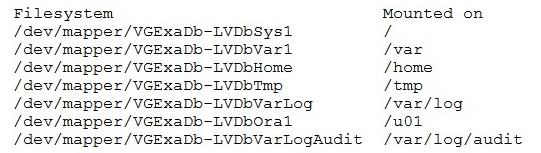
You are adding a disk expansion kit to a running Exadata X8M Database Machine's Database Servers, and have a filesystem layout that includes:

After running the following commands, which command needs to be run to add 20G of space to the filesystem mounted on /u01?

  1. A

    # lvextend -L +20G --verbose /dev/mapper/VGExaDb-LVDbOral

  2. B

    # xfs_growfs /uOl +20G

  3. C

    # resize2fs +20G /dev/VGExaDb/LVDbOral

  4. D

    # lvextend -L +20G --verbose /dev/VGExaDb/LVDbOral

Show answer and explanation

Correct answer: A

Explanation

Explanation: After running the commands above, the filesystem mounted on /u01 is on the logical volume / dev/mapper/VGExaDb-LVDbOral. So, to add 20G of space to the filesystem mounted on /u01, the command that needs to be run is: lvextend -L +20G --verbose /dev/mapper/VGExaDb-LVDbOralThis command will extend the logical volume
/dev/mapper/VGExaDb-LVDbOral by 20 GB of space. It is important to note that the option --verbose is used to display the progress of the operation.

Question 10 Multiple choice

I/O performance of the prod database on your Exadata Database Machine has degraded slightly over the past month. The database has been allocated to the OLTP I/O Resource Management (IORM) category.

Which two monitoring tools might be useful in examining I/O performance for the prod database?

  1. A

    OS I/O metrics using Enterprise Manager host pages for the storage servers

  2. B

    OS I/O metrics using OS tools such as iostat on the database servers

  3. C

    I/O-specific dynamic performance views such as v$iostat_fiie, v$iostat_function, and v$iostat_consumer_group from the prod database instances using SQL *p1us

  4. D

    cellcli (or exacli/exadcli) to examine storage server metrics such as database, category, ceiidisk, and griddisk

  5. E

    OS I/O metrics using OS tools such as iostat on the storage servers

Show answer and explanation

Correct answers: C, D

Explanation

Explanation: According to the Oracle documentation1, two monitoring tools that might be useful in examining I/O performance for the prod database are:

cellcli (or exacli/exadcli) to examine storage server metrics such as database, category, ceiidisk, and griddisk (D). This tool can help you monitor the I/O Resource Management (IORM) metrics and identify any bottlenecks or imbalances in the storage layer.
I/O-specific dynamic performance views such as v$iostat_fiie, v$iostat_function, and v$iostat_consumer_group from the prod database instances using SQL *p1us ? These views can help you monitor the I/O activity and latency at the file, function, and consumer group level.