Oracle 1Z0-151 Online Practice
Questions and Exam Preparation
1Z0-151 Exam Details
Exam Code
:1Z0-151
Exam Name
:Oracle Fusion Middleware 11g: Build Applications with Oracle Forms
Certification
:Oracle Certifications
Vendor
:Oracle
Total Questions
:90 Q&As
Last Updated
:Jul 09, 2026
Oracle 1Z0-151 Online Questions &
Answers
Question 1:
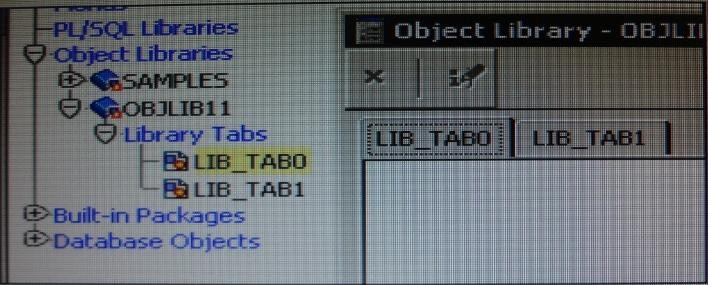
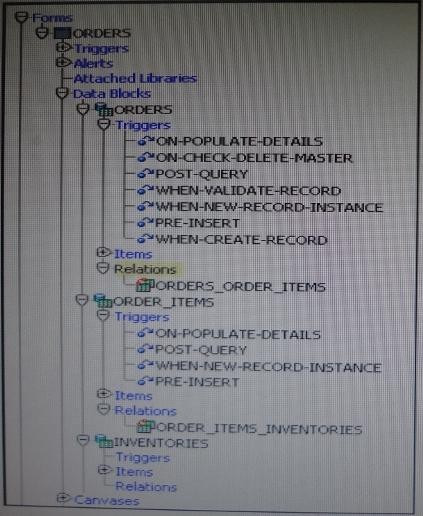
You have the Orders form open in Forms Builder. You create an object group in the Orders form and try to drag various components in the Object Navigator to the object group.
Which two components will you be unable to place in the object group?
A. the Orders block of the Orders form B. the Order_CV canvas of the Orders form C. the When-New-Item- instance trigger of the Order_Items.Quantity item in the Orders form D. the When-New Form-instance trigger of the Orders form E. the Product_id item in the Order_Items block of the Orders form
C. the When-New-Item- instance trigger of the Order_Items.Quantity item in the Orders form E. the Product_id item in the Order_Items block of the Orders form
C: Object libraries can contain individual items; for example, iconic buttons. The smallest unit accepted in an object group is a block.
E: Including a block in an object group also includes its items, the item-level triggers, the block- level triggers and the relations. You cannot use any of these objects in an object group without the block.
Incorrect answers:
A: Including a block in an object group also includes its items, the item-level triggers, the block- level triggers and the relations
Note: An object group is a logical container for a set of Forms Builder objects. You need to define an object group when you want to package related objects for copying or subclassing in another module or if you want to bundle numerous objects into higher-level building blocks that you can use again in another application. You can package the various objects in an object group and copy the entire bundle in one operation.
Question 2:
Which symbol when used in an object's Property Palette, indicates an inherited property that has been changed?
A. Option A B. Option B C. Option C D. Option D
C. Option C
Question 3:
When tabbing through items in the Employees form, users should not be able to navigate to the Salary text item. If they need to update the item, they will have to explicitly navigate to it by using the mouse.
Which property setting accomplishes this requirement?
A. Enabled = Yes; Keyboard Navigable = No B. Enabled = No; Keyboard Navigable = Yes C. Enabled = Yes; Keyboard Navigable = Yes D. Enabled = No; Keyboard Navigable = No E. Automatic Skip = Yes
C. Enabled = Yes; Keyboard Navigable = Yes
*
Keyboard Navigable property Description Determines whether the end user or the application can place the input focus in the item during default navigation. When set to Yes for an item, the item is navigable. When set to No, Form Builder skips over the item and enters the next navigable item in the default navigation sequence. The default navigation sequence for items is defined by the order of items in the Object Navigator. Applies to all items except chart items and display items
*
Default Yes Usage Notes If Enabled or Visible is set to No (PROPERTY_FALSE for runtime), then the items' or item instance's Keyboard navigable property is effectively false. At runtime, when the Enabled property is set to PROPERTY_FALSE, the Keyboard_Navigable property is also set to PROPERTY_FALSE. However, if the Enabled property is subsequently set back to PROPERTY_TRUE, the keyboard Navigable property is NOT set to PROPERTY_TRUE, and must be changed explicitly.
Question 4:
You want to display fields of a form module on multiple layouts that are visible simultaneously, what can enable you to achieve this?
A. multiple content canvases that display in the same window B. one content canvas that displays in multiple windows C. multiple content canvases that display in multiple windows D. multiple forms, because you cannot have multiple content canvases in the same form that are visible simultaneously
A. multiple content canvases that display in the same window
There is a basic difference between canvas and windows is that a canvas is placeholder for several controls. A window may contain several canvases.
Question 5:
The Order Entry application contains several forms. The inventories form uses an LOV that is based on a record group that queries the Warehouses table to return a warehouse ID. Several of the forms use LOVs that are based on the same query. You decide to centralize the creation of the record group to the entry form of the application, which opens all the other forms, for example, to open the inventories form, there is a When-Button Pressed trigger on the inventories button with the following code;
OPEN _FORM ('inventories');
in a When-New-Form-instance trigger for the entry form, you create the warehouse_rg record group by using the CREATE_GROUP_QUERY built in with the following arguments:
('warehouse_rg' , 'SELECT ALL WAREHOUSE.WAREHOUSE_ID, WAREHOUSE.WAREHOUSE_NAME FORM WAREHOUSE order by warehouse_name);
You also populate the record group in this trigger.
What must you do to make this record group available to the inventories form and the other forms?
A. in the When-New-Form-instance trigger for the entry form, add a values for the SCOPE argument of CREATE_GROUP_QUERY. B. in the entry form, move the record group code to the end of the When-Button-Pressed triggers for the buttons that open other forms, so that the record group is created and populated immediately after OPEN_FORM is called. C. in the entry form, move the record group code to the beginning of the When-Button-Pressed triggers for the button that open other forms, so that the record group is created and populated just before OPEN_FORM is called. D. in the When-Button_Pressed triggers of the entry from the buttons that open other forms, add a value for the SESSION argument of OPEN_FORM. E. in the other forms, refer to the record group as: global.warehouse_rg.
A. in the When-New-Form-instance trigger for the entry form, add a values for the SCOPE argument of CREATE_GROUP_QUERY.
Note: The CREATE_GROUP_FROM_QUERY built-in is a function and must be invoked as part of an expression. For example:
DECLARE
rg_id RecordGroup;
BEGIN
rg_id := CREATE_GROUP_FROM_QUERY ('employee_rg', 'SELECT id,first_name,last_name,sal FROM employee');
END;
Question 6:
Which statement is true about flexible code?
A. It is designed for reuse. B. It typically includes hard-coded object names. C. It is more difficult to maintain. D. It is more difficult to write, so it decreases developer productivity. E. It is specific to a particular module.
A. It is designed for reuse.
Question 7:
You must be careful when coding a When-Button-Pressed trigger, because it does not accept restricted built-ins.
A. True B. False
B. False
The When-Button-Pressed trigger:
*
Fires when the operator clicks a button
*
Accepts restricted and unrestricted built-ins
*
Is used to provide convenient navigation, and to display LOVs and many other frequently used functions
Question 8:
View the Exhibit.
The DBA has added a 30-character Cust_Middle_Name field to the Customers table and wants you to add it to the Customers form. It should be on the same line as the as the first and last names, which are on the Name tab page of the Tab_Customer canvas that appears in the Layout Editor as shown in the Exhibit. The Tab_Customer tabbed canvas is displayed on the Customer_CV content canvas as shown in the Exhibit.
What must you do to accommodate the additional label and text item and to display the middle name?
A. increase the Width property of the Customer_CV canvas only. B. increase the Width property of the Tab_Customer canvas only. C. increase the Width properties of only the Customer_CV canvas and the Tab_Customer canvas. D. increase the Width properties of the Customer_CV canvas, the Tab_Customer canvas, and the name tab page.
C. increase the Width properties of only the Customer_CV canvas and the Tab_Customer canvas.
Question 9:
You have designed a form with two content canvases. The window for the first canvas was created implicitly, and you have not changed its default properties.
You want users to be able to navigate between the canvases easily while viewing both simultaneously. Therefore, you create a second window, changing only its name from the default properties.
However, when you test the form, you find that you are unable to close either window. What must you do to provide this functionality?
A. Change the second window to a modal window. B. Code a When-Window-Closed trigger for each window. C. Set Close Allowed to Yes for both windows. D. Set Hide on Exit to Yes for both windows.
A. Change the second window to a modal window.
Note:
Modal and Modeless Windows in Oracle Forms
A window in oracle forms is a container for all visual objects that make up a Forms application. You can create two different type of windows in oracle forms. Lets have a brief comparisons between these two types of windows.
*
Modal Window:
A modal window is a restricted window that the user must respond to before moving the input focus to another window. Modal windows:
Must be dismissed before control can be returned to a modeless window Become active as soon as they display
Require a means of exit or dismissal
*
Modeless Window:
A modeless window is an unrestricted window that the user can exit freely. Modeless windows:
Can display many at once
Are not necessarily active when displayed
Are the default window type
Question 10:
What happens when you click Run Form Debug in Forms Builder?
A. The form runs on your local machine by using a debug executable client. B. The form runs in a three-tier environment by using the application server URL that you specify in runtime preferences. C. The form runs in a three tier environment by using the [debug] configuration in the FORMSWEB.CFG file. D. The form runs in a simulated three-tier environment by using an applet viewer that is included with the product to enable debugging.
B. The form runs in a three-tier environment by using the application server URL that you specify in runtime preferences.
Directly from the class materials from Oracle: As in the case when you run a form from Forms Builder with the Run Form button, the Run Form Debug button runs the form in a three-tier environment. It takes its settings from the Preferences window that you access by selecting Edit > Preferences from the main menu and clicking the Runtime tab.
Nowadays, the certification exams become more and more important and required by more and more
enterprises when applying for a job. But how to prepare for the exam effectively? How to prepare
for the exam in a short time with less efforts? How to get a ideal result and how to find the
most reliable resources? Here on Vcedump.com, you will find all the answers.
Vcedump.com provide not only Oracle exam questions,
answers and explanations but also complete assistance on your exam preparation and certification
application. If you are confused on your 1Z0-151 exam preparations
and Oracle certification application, do not hesitate to visit our
Vcedump.com to find your solutions here.