1Z0-117 Real Exam Questions

Oracle Database 11g Release 2: SQL Tuning Exam

125 questions available · Page 1 of 13

Updated Exam DumpsVerified AnswersPass Guarantee

Get Complete Exam Dumps
Question 1 Single choice

You need to migrate database from oracle Database 10g to 11g. You want the SQL workload to start the 10g plans in the 11g database instance and evolve better plans.

Examine the following steps:
1. Capture the pre-Oracle Database 11g plans in a SQL Tuning Set (STS)
2. Export the STS from the 10g system.
3. Import the STS into Oracle Database 11g.
4. Set the OPTIMIZER_FEATURES_ENABLE parameter to 10.2.0.
5. Run SQL Performance Analyzer for the STS.
6. Set the OPTIMIZER_FEATURES_ENABLE parameter to 11.2.0.
7. Rerun the SQL Performance Analyzer for the STS.
8. Set OPTIMIZER_CAPTURE_SQL_PLAN_BASELINE to TRUE.
9. Use DBMS_SPM.EVOLVE_SQL_BASELINE function to evolve the plans.
10. Set the OPTIMIZER_USE_SQL_PLAN_BASELINE to TRUE.

Identify the required steps in the correct order.

  1. A

    1, 2, 3, 4, 5, 6, 7,

  2. B

    4, 8, 10

  3. C

    1, 2, 3, 4, 8, 10

  4. D

    1, 2, 3, 6, 9, 5

  5. E

    1, 2, 3, 5, 9, 10

Show answer and explanation

Correct answer: C

Explanation

Step 1: (1)
Step 2: (2)
Step 3: (3)
Step 4: (4)
By setting the parameter OPTIMIZER_FEATURES_ENABLE to the 10g version used before the upgrade, you should be able to revert back to the same execution plans you had prior to the upgrade.
Step 5: (8)
OPTIMIZER_CAPTURE_SQL_PLAN_BASELINES
In Oracle Database 11g a new feature called SQL Plan Management (SPM) has been introduced to guarantees any plan changes that do occur lead to better performance. When OPTIMIZER_CAPTURE_SQL_PLAN_BASELINES is set to TRUE (default FALSE) Oracle will
automatically capture a SQL plan baseline for every repeatable SQL statement on the system. The execution plan found at parse time will be added to the SQL plan baseline as an accepted plan.

Step 6: (10)
OPTIMIZER_USE_SQL_PLAN_BASELINES enables or disables the use of SQL plan baselines stored in SQL Management Base. When enabled, the optimizer looks for a SQL plan baseline for the SQL statement being compiled. If one is found in SQL Management Base, then the optimizer will cost each of the baseline plans and pick one with the lowest cost.

Question 2 Multiple choice

You executed the following statement:

Which three statements are true about EXPLAIN PLAN?

  1. A

    The execution plan is saved in PLAN_TABLE without executing the query.

  2. B

    The execution plan for the query is generated and displayed immediately as the output.

  3. C

    The execution plan generated may not necessarily be the execution plan used during query execution.

  4. D

    The execution plan is saved in DBA_HIST_SQL_PLAN without executing the query.

  5. E

    The execution plan generated can be viewed using the DBMS_XPLAIN.DISPLAY function.

  6. F

    The execution plan generated can be fetched from the library cache by using the DBMS_XPLAIN.DISPLAY function.

Show answer and explanation

Correct answers: A, C, E

Explanation

* (A, not D): The explain plan process stores data in the PLAN_TABLE.
* EXPLAIN PLAN

The EXPLAIN PLAN method doesn't require the query to be run (A), greatly reducing the time it takes to get an execution plan for long-running queries compared to AUTOTRACE.

E: Use the DBMS_XPLAN.DISPLAY function to display the execution plan.

* The DBMS_XPLAN package provides an easy way to display the output of the EXPLAIN PLAN command in several, predefined formats. You can also use the DBMS_XPLAN package to display the plan of a statement stored in the Automatic Workload Repository (AWR) or stored in a SQL tuning set. It further provides a way to display the SQL execution plan and SQL execution runtime statistics for cached SQL cursors based on the information stored in the V$SQL_PLAN and
V$SQL_PLAN_STATISTICS_ALL fixed views.

Note:
*
First the query must be explained.

SQL> EXPLAIN PLAN FOR
2 SELECT * 3 FROM emp e, dept d 4 WHERE e.deptno = d.deptno
5 AND e.ename = 'SMITH';

Explained.

SQL>
Then the execution plan displayed. (not B)

SQL> @$ORACLE_HOME/rdbms/admin/utlxpls.sql
Plan Table
-------------------------------------------------------------------------------- | Operation | Name | Rows | Bytes| Cost | Pstart| Pstop |
-------------------------------------------------------------------------------- | SELECT STATEMENT | | | | | | |
| NESTED LOOPS | | | | | | |
| TABLE ACCESS FULL |EMP | | | | | |
| TABLE ACCESS BY INDEX RO|DEPT | | | | | |
| INDEX UNIQUE SCAN |PK_DEPT | | | | | |
--------------------------------------------------------------------------------

8 rows selected.

SQL>
For parallel queries use the "utlxplp.sql" script instead of "utlxpls.sql".

Question 3 Single choice

A new application module is deployed on middle tier and is connecting to your database. You want to monitor the performance of the SQL statements generated from the application.

To accomplish this, identify the required steps in the correct order from the steps given below:

1. Use DBNMS_APPLICATION_INFO to set the name of the module
2. Use DBMS_MONITOR.SERV_MOD_ACT_STAT_ENABLE to enable statistics gathering for the module.
3. Use DBMS_MONITOR.SERV_MOD_ACT_TRACE_ENABLE to enable tracing for the service
4. Use the trcsess utility to consolidate the trace files generated.
5. Use the tkprof utility to convert the trace files into formatted output.

  1. A

    1, 2, 3, 4, 5

  2. B

    2, 3, 1, 4, 5

  3. C

    3, 1, 2, 4, 5

  4. D

    1, 2, 4, 5

  5. E

    1, 3, 4, 5

  6. F

    2, 1, 4, 5

Show answer and explanation

Correct answer: A

Explanation

Note:
* Before tracing can be enabled, the environment must first be configured to enable gathering of statistics.
* (gather statistics): DBMS_MONITOR.SERV_MOD_ACT_STAT_ENABLE
Enables statistic gathering for a given combination of Service Name, MODULE and ACTION

* DBMS_MONITOR.SERV_MOD_ACT_TRACE_ENABLE
Enables SQL tracing for a given combination of Service Name, MODULE and ACTION globally unless an instance_name is specified.

dbms_monitor.serv_mod_act_trace_enable(
service_name IN VARCHAR2,
module_name IN VARCHAR2 DEFAULT ANY_MODULE, action_name IN VARCHAR2 DEFAULT ANY_ACTION,
waits IN BOOLEAN DEFAULT TRUE, binds IN BOOLEAN DEFAULT FALSE,
instance_name IN VARCHAR2 DEFAULT NULL, plan_stat IN VARCHAR2 DEFAULT NULL);
SELECT instance_name
FROM gv$instance;

exec dbms_monitor.serv_mod_act_trace_enable('TESTSERV', dbms_monitor.all_modules, dbms_monitor.all_actions, TRUE, TRUE, 'orabase');

exec dbms_monitor.serv_mod_act_trace_disable('TESTSERV', dbms_monitor.all_modules, dbms_monitor.all_actions, 'orabase');

* When solving tuning problems, session traces are very useful and offer vital information. Traces are simple and straightforward for dedicated server sessions, but for shared server sessions, many processes are involved. The trace pertaining to the user session is scattered across different trace files belonging to different processes. This makes it difficult to get a complete picture of the life cycle of a session.
Now there is a new tool, a command line utility called trcsess to help read the trace files. The trcsess command-line utility consolidates trace information from selected trace files, based on specified criteria. The criteria include session id, client id, service name, action name and module name.

* Once the trace files have been consolidated (with trcsess), tkprof can be run against the consolidated trace file for reporting purposes.

Question 4 Single choice

The following parameter values are set for the instance:

OPTIMIZER_CAPTURE_SQL_BASELINE = FALSE
OPTIMIZER_USESQL_PLAN_BASELINE = TRUE

The SQL plan baseline for a SQL statement contains an accepted plan.

You want to add a new plan automatically as an accepted plan to the existing SQL plan baseline.

Examine the following tasks.

1. Set the OPTIMIZER_CAPTURE_SQL_PLAN_BASELINE parameter to TRUE.
2. Evolve the new plan.
3. Fix the existing accepted plan.
4. Manually load the new plan.

Identify the task(s) that must be performed to accomplish this.

  1. A

    1, 2, and 3

  2. B

    4 and 3

  3. C

    1, 4, and 3

  4. D

    Only 4

  5. E

    1, 2, 4, and 3

  6. F

    1 and 2

Show answer and explanation

Correct answer: D

Explanation

Manual Plan Loading
Manual plan loading can be used in conjunction with, or as an alternative to automatic plan capture. The load operations are performed using the DBMS_SPM package, which allows SQL plan baselines to be loaded from SQL tuning sets or from specific SQL statements in the cursor cache. Manually loaded statements are flagged as accepted by default. If a SQL plan baseline is present for a SQL statement, the plan is added to the baseline, otherwise a new baseline is created.

Note:
* The value of the OPTIMIZER_CAPTURE_SQL_PLAN_BASELINES parameter, whose default value is FALSE, determines if the system should automatically capture SQL plan baselines. When set to TRUE, the system records a plan history for SQL statements. The first plan for a specific statement is automatically flagged as accepted. Alternative plans generated after this point are not used until it is verified they do not cause performance degradations. Plans with acceptable performance are added to the SQL plan baseline during the evolution phase.

* Managing SQL plan baselines involves three phases:

Capturing SQL Plan Baselines
Selecting SQL Plan Baselines
Evolving SQL Plan Baselines

* Evolving SQL Plan Baselines

Evolving a SQL plan baseline is the process by which the optimizer determines if non-accepted plans in the baseline should be accepted. As mentioned previously, manually loaded plans are automatically marked as accepted, so manual loading forces the evolving process. When plans are loaded automatically, the baselines are evolved using the EVOLVE_SQL_PLAN_BASELINE function, which returns a CLOB reporting its results.

References:
SQL Plan Management in Oracle Database 11g Release 1

Question 5 Multiple choice

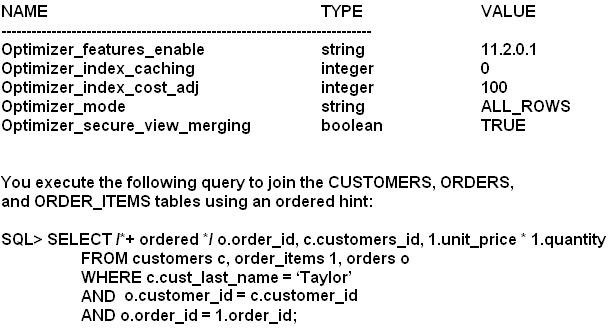
View the code sequence:

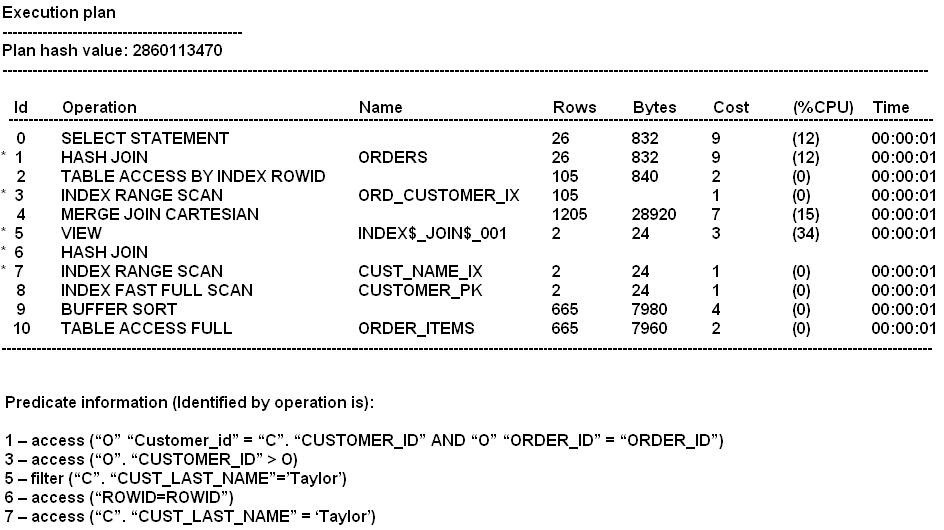
Examine the Exhibit to view the execution plan.

Which two statements are true about the query execution?

  1. A

    The optimizer joins specified tables in the order as they appear in the FROM clause.

  2. B

    The CUSTOMERS and ORDERS tables are joined first and the resultant is then joined with rows returned by the ORDER_ITEMS table.

  3. C

    The CUSTOMERS and ORDER_ITEMS tables are joined first the resultant is then joined with rows by the ORDERS table.

  4. D

    The optimizer has chosen hash join as an access method as the OPTIMIZER_MODE parameter is set to FIRST_ROWS.

Show answer and explanation

Correct answers: C, D

Explanation

The first executed join is in line 6.
The second executed join is in line 1.

Incorrect:
A: Line 7 and 8 are executed first.

Question 6 Single choice

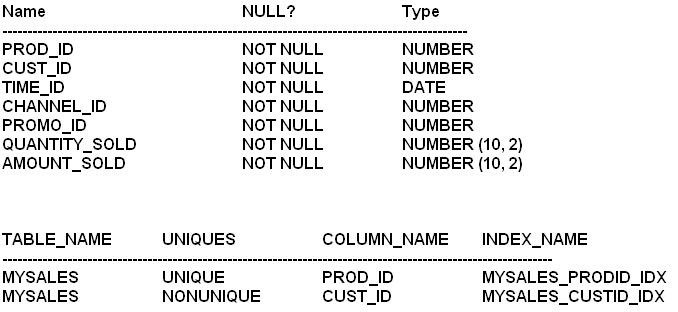
View the Exhibit1 and examine the structure and indexes for the MYSALES table.

The application uses the MYSALES table to insert sales record. But this table is also extensively used for generating sales reports. The PROD_ID and CUST_ID columns are frequently used in the WHERE clause of the queries. These columns are frequently used in WHERE clause of the queries. These columns have few distinct values relative to the total number of rows in the table.

View exhibit 2 and examine one of the queries and its auto trace output.

What should you do to improve the performance of the query?

  1. A

    Use the INDEX_COMBINE hint in the query.

  2. B

    Create composite index involving the CUST_ID and PROD_ID columns.

  3. C

    Gather histograms statistics for the CUST_ID and PROD_ID columns.

  4. D

    Gather index statistics for the MYSALES_PRODID_IDX and MYSALES_CUSTID_IDX indexes.

Show answer and explanation

Correct answer: D

Explanation

Note:
* Statistics quantify the data distribution and storage characteristics of tables, columns, indexes, and partitions.
* INDEX_COMBINE
Forces a bitmap index access path on tab.
Primarily this hint just tells Oracle to use the bitmap indexes on table tab. Otherwise Oracle will choose the best combination of indexes it can think of based on the statistics. If it is ignoring a bitmap index that you think would be helpful, you may specify that index plus all of the others taht you want to be used. Note that this does not force the use of those indexes, Oracle will still make cost based choices.
* Histograms Opportunities
Any column used in a where clause with skewed data Histograms are NOT just for indexed columns.
Adding a histogram to an un-indexed column that is used in

Question 7 Single choice

Your database has the OLTP_SRV service configured for an OLTP application running on a middle tier. This service is used to connect to the database by using connection pools. The application has three modules. You enabled tracing at the service by executing the following command:

SQL exec DBMS_MONITOR.SERV_MOD_ACT_TRACE_ENABLE (`OLTP_SRV');

What is the correct method of consolidating the trace files generated by the procedure?

  1. A

    Use all trace files as input for the tkprof utility to consolidate the trace files for a module.

  2. B

    Use one trace file at a time as input for the trcess utility and use tkprof utility to consolidate all the output files for a module.

  3. C

    Use the trcess utility to consolidate all trace files into a single output file, which can then be processed by the tkprof utility.

  4. D

    Use the tkprof utility to consolidate the trace files and create an output that can directly be used for diagnostic purposes.

Show answer and explanation

Correct answer: C

Explanation

Note:

* Oracle provides the trcsess command-line utility that consolidates tracing information based on specific criteria.

The SQL Trace facility and TKPROF are two basic performance diagnostic tools that can help you monitor applications running against the Oracle Server.

Note: SERV_MOD_ACT_TRACE_ENABLE Procedure
Enables SQL tracing for a given combination of Service Name, MODULE and ACTION globally unless an instance_name is specified

References:
Oracle Database Performance Tuning Guide

Question 8 Single choice

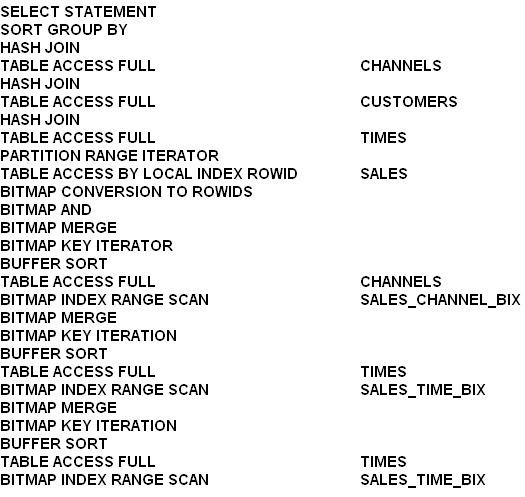
Partial details of an execution plan.

Which statement correctly describes the BITMAP AND operation?

  1. A

    It produces a bitmap, representing dimension table rows from all dimension tables that join with qualified fact table rows.

  2. B

    It produces a concentration of the bitmaps for all dimension tables.

  3. C

    It produces a bitmap, representing fact table rows that do not join with qualified dimension table rows from all dimension tables.

  4. D

    It produces a bitmap, representing fact table rows that join with qualified dimension table rows from all dimension tables.

Show answer and explanation

Correct answer: D

Explanation

Example:

Additional set operations will be done for the customer dimension and the product dimension. At this point in the star query processing, there are three bitmaps.
Each bitmap corresponds to a separate dimension table, and each bitmap represents the set of rows of the fact table that satisfy that individual dimension's constraints.

These three bitmaps are combined into a single bitmap using the bitmap AND operation. This final bitmap represents the set of rows in the fact table that satisfy all of the constraints on the dimension table.

References:
Oracle Database Data Warehousing Guide, Star Transformation with a Bitmap Index

Question 9 Multiple choice

Which three are tasks performed in the hard parse stage of a SQL statement executions?

  1. A

    Semantics of the SQL statement are checked.

  2. B

    The library cache is checked to find whether an existing statement has the same hash value.

  3. C

    The syntax of the SQL statement is checked.

  4. D

    Information about location, size, and data type is defined, which is required to store fetched values in variables.

  5. E

    Locks are acquired on the required objects.

Show answer and explanation

Correct answers: B, D, E

Explanation

Parse operations fall into the following categories, depending on the type of statement submitted and the result of the hash check:

A) Hard parse

If Oracle Database cannot reuse existing code, then it must build a new executable version of the application code. This operation is known as a hard parse, or a library cache miss. The database always perform a hard parse of DDL.

During the hard parse, the database accesses the library cache and data dictionary cache numerous times to check the data dictionary. When the database accesses these areas, it uses a serialization device called a latch on required objects so that their definition does not change (see "Latches"). Latch contention increases statement execution time and decreases concurrency.

B) Soft parse
A soft parse is any parse that is not a hard parse. If the submitted statement is the same as a reusable SQL statement in the shared pool, then Oracle Database reuses the existing code. This reuse of code is also called a library cache hit.

Soft parses can vary in the amount of work they perform. For example, configuring the session cursor cache can sometimes reduce the amount of latching in the soft parses, making them "softer."

In general, a soft parse is preferable to a hard parse because the database skips the optimization and row source generation steps, proceeding straight to execution.

Incorrect:
A, C: During the parse call, the database performs the following checks:

Syntax Check

Semantic Check

Shared Pool Check

The hard parse is within Shared Pool check.

References:
Oracle Database Concepts 11g, SQL Parsing

Question 10 Multiple choice

Your database supports a workload consisting of three categories of SQL statements:

Statements that should execute in less than one minute Statement that may execute for up to 15 minutes Statements that may be executed for more than 15 minutes

You set PARALLEL_DEGREE_POLICY to Auto.

You plan to prioritize queued statements by using the Database Resource manager.

Which two are true about parallelism prioritization by a consumer group?

  1. A

    PARALLEL_TARGET_PERCENTAGE is used to prioritize a consumer group's use of the overall PARALLEL_SERVER_TARGET.

  2. B

    Queuing is done for a consumer group exceeding its percentage, even if the number of busy PX servers in the instance has not reached PARALLEL_SERVERS_TARGET.

  3. C

    PARALLEL_TARGET_PERCENTAGE us used to prioritize a consumer group's use of the overall SPAN CLASS = `OracleCode'>
    PARALLEL_MAX_SERVERS.

  4. D

    Having separate queues for consumer groups requires the use of management attributes (MGMT_P1, MGMT_P2 etc. . . )

  5. E

    Separate queue timeout using PARALLEL_QUEUE_TIMEOUT require the use of management attributes (MGMT_P1, MGMT_P2 etc . . . groups)

Show answer and explanation

Correct answers: A, D

Explanation

A: Parallel Target Percentage

It is possible for a single consumer group to launch enough parallel statements to use all the available parallel servers. If this happens, when a high-priority parallel statement from a different consumer group is run, no parallel servers are available to allocate to this group. You can avoid such a scenario by limiting the number of parallel servers that can be used by a particular consumer group.

Use the PARALLEL_TARGET_PERCENTAGE directive attribute to specify the maximum percentage of the parallel server pool that a particular consumer group can use. The number of parallel servers used by a particular consumer group is counted as the sum of the parallel servers used by all sessions in that consumer group.

Incorrect:

Not B: PARALLEL_SERVERS_TARGET specifies the number of parallel server processes allowed to run parallel statements before statement queuing will be used. When the parameter PARALLEL_DEGREE_POLICY is set to AUTO, Oracle will queue SQL statements that require parallel execution, if the necessary parallel server processes are not available. Statement queuing will begin once the number of parallel server processes active on the system is equal to or greater
than PARALLEL_SERVER_TARGET.
Not C: Would be true if we replace PARALLEL_MAX_SERVERS with PARALLEL_SERVER_TARGET.
Not E: The PARALLEL_QUEUE_TIMEOUT directive attribute enables you to specify the maximum time, in seconds, that a parallel statement can wait in the parallel statement queue before it is timed out. The PARALLEL_QUEUE_TIMEOUT attribute can be set for each consumer group. This attribute is applicable even if you do not specify other management attributes (mgmt_p1, mgmt_p2, and so on) in your resource plan.
Note:
* PARALLEL_DEGREE_POLICY
AUTO
Enables automatic degree of parallelism, statement queuing, and in-memory parallel execution.

* The PARALLEL_TARGET_PERCENTAGE attribute enables you to specify when parallel statements from a consumer group can be queued. Oracle Database maintains a separate parallel statement queue for each consumer group.

* PARALLEL_SERVERS_TARGET specifies the number of parallel server processes allowed to run parallel statements before statement queuing will be used.
When the parameter PARALLEL_DEGREE_POLICY is set to AUTO, Oracle will queue SQL statements that require parallel execution, if the necessary parallel server processes are not available. Statement queuing will begin once the number of parallel server processes active on the system is equal to or greater than PARALLEL_SERVER_TARGET.

By default, PARALLEL_SERVER_TARGET is set lower than the maximum number of parallel server processes allowed on the system (PARALLEL_MAX_SERVERS) to ensure each parallel statement will get all of the parallel server resources required and to prevent overloading the system with parallel server processes.

Note that all serial (non-parallel) statements will execute immediately even if statement queuing has been activated.

* Oracle Database Resource Manager (the Resource Manager) enables you to optimize resource allocation among the many concurrent database sessions.

The elements of the Resource Manager are:

/ Resource consumer group A group of sessions that are grouped together based on resource requirements. The Resource Manager allocates resources to resource consumer groups, not to individual sessions.

/ Resource plan A container for directives that specify how resources are allocated to resource consumer groups. You specify how the database allocates resources by activating a specific resource plan.

/ Resource plan directive Associates a resource consumer group with a particular plan and specifies how resources are to be allocated to that resource consumer group.