
1Z0-1084-22 Real Exam Questions

Oracle Cloud Infrastructure 2022 Developer Professional

72 questions available · Page 1 of 8

Updated Exam DumpsVerified AnswersPass Guarantee

Get Complete Exam Dumps
Question 1 Multiple choice

Which two handle Oracle Functions authentication automatically?

  1. A

    Oracle Cloud Infrastructure SDK

  2. B

    cURL

  3. C

    Oracle Cloud Infrastructure CLl

  4. D

    Signed HTTP Request

  5. E

    Fn Project CLI

Show answer and explanation

Correct answers: C, E

Explanation

Fn Project CLI you can create an Fn Project CLI Context to Connect to Oracle Cloud Infrastructure and specify -- provider oracle This option enables Oracle Functions to perform authentication and authorization using Oracle Cloud Infrastructure request signing, private keys, user groups, and policies that grant permissions to those user groups.

Question 2 Single choice

Which is NOT a valid option to execute a function deployed on Oracle Functions?

  1. A

    Send a signed HTTP requests to the function's invoke endpoint

  2. B

    Invoke from Oracle Cloud Infrastructure CLI

  3. C

    Invoke from Docker CLI

  4. D

    Trigger by an event in Oracle Cloud Infrastructure Events service

  5. E

    Invoke from Fn Project CLI

Show answer and explanation

Correct answer: C

Explanation

You can invoke a function that you've deployed to Oracle Functions in different ways: Using the Fn Project CLI.
Using the Oracle Cloud Infrastructure CLI.
Using the Oracle Cloud Infrastructure SDKs.
Making a signed HTTP request to the function's invoke endpoint. Every function has an invoke endpoint.
Each of the above invokes the function via requests to the API. Any request to the API must be authenticated by including a signature and the OCID of the compartment to which the function belongs in the request header. Such a request is referred to as a 'signed' request. The signature includes Oracle Cloud Infrastructure credentials in an encrypted form.

Question 3 Multiple choice

Which two "Action Type" options are NOT available in an Oracle Cloud Infrastructure (OCI) Events rule definition?

  1. A

    Notifications

  2. B

    Functions

  3. C

    Streaming

  4. D

    Email

  5. E

    Slack

Show answer and explanation

Correct answers: D, E

Explanation

https://docs.cloud.oracle.com/en-us/iaas/Content/Events/Concepts/eventsoverview.htm
ACTIONS
Event Rules must also specify an action to trigger when the filter finds a matching event. Actions are responses you define for event matches. You set up select Oracle Cloud Infrastructure services that the Events service has established as actions. The resources for these services act as destinations for matching events. When the filter in the rule finds a match, the Events service delivers the matching event to one or more of the destinations you identified in the rule. The destination service that receives the event then processes the event in whatever manner you defined. This delivery provides the automation in your environment. You can only deliver events to certain Oracle Cloud Infrastructure services with a rule. Use the following services to create actions: Notifications Streaming Functions

Question 4 Single choice

You have a containerized app that requires an Autonomous Transaction Processing (ATP) Database.

Which option is not valid for o from a container in Kubernetes?

  1. A

    Enable Oracle REST Data Services for the required schemas and connect via HTTPS.

  2. B

    Create a Kubernetes secret with contents from the instance Wallet files. Use this secret to create a volume mounted to the appropriate path in the application deployment manifest.

  3. C

    Use Kubernetes secrets to configure environment variables on the container with ATP instance OCID, and OCI API credentials. Then use the CreateConnection API endpoint from the service runtime.

  4. D

    Install the Oracle Cloud Infrastructure Service Broker on the Kubernetes cluster and deploy serviceinstance and serviceBinding resources for ATP. Then use the specified binding name as a volume in the application deployment manifest.

Show answer and explanation

Correct answer: A

Explanation

https://blogs.oracle.com/developers/creating-an-atp-instance-with-the-oci-service-broker
https://blogs.oracle.com/cloud-infrastructure/integrating-oci-service-broker-with-autonomous-
transaction-processing-in-the-real-world

Question 5 Single choice

A leading insurance firm is hosting its customer portal in Oracle Cloud Infrastructure (OCI) Container Engine for Kubernetes with an OCI Autonomous Database. Their support team discovered a lot of SQL injection attempts and cross-site scripting attacks to the portal, which is starting to affect the production environment.

What should they implement to mitigate this attack?

  1. A

    Network Security Lists

  2. B

    Network Security Groups

  3. C

    Network Security Firewall

  4. D

    Web Application Firewall

Show answer and explanation

Correct answer: D

Explanation

Oracle Cloud Infrastructure Web Application Firewall (WAF) is a cloud-based, Payment Card Industry (PCI) compliant, global security service that protects applications from malicious and unwanted internet traffic. WAF can protect any internet facing endpoint, providing consistent rule enforcement across a customer's applications.
WAF provides you with the ability to create and manage rules for internet threats including Cross-Site Scripting (XSS), SQL Injection and other OWASP-defined vulnerabilities. Unwanted bots can be mitigated while tactically allowed desirable bots to enter. Access rules can limit based on geography or the signature of the request.

Question 6 Single choice

A service you are deploying to Oracle infrastructure (OCI) Container En9ine for Kubernetes (OKE) uses a docker image from a private repository.

Which configuration is necessary to provide access to this repository from OKE?

  1. A

    Add a generic secret on the cluster containing your identity credentials. Then specify a registrycredentials property in the deployment manifest.

  2. B

    Create a docker-registry secret for OCIR with API key credentials on the cluster, and specify the imagepullsecret property in the application deployment manifest.

  3. C

    Create a docker-registry secret for OCIR with identity Auth Token on the cluster, and specify the image pull secret property in the application deployment manifest.

  4. D

    Create a dynamic group for nodes in the cluster, and a policy that allows the dynamic group to read repositories in the same compartment.

Show answer and explanation

Correct answer: C

Explanation

Pulling Images from Registry during Deployment During the deployment of an application to a Kubernetes cluster, you'll typically want one or more images to be pulled from a Docker registry. In the application's manifest file you specify the images to pull, the registry to pull them from, and the credentials to use when pulling the images. The manifest file is commonly also referred to as a pod spec, or as a deployment.yaml file (although other filenames are allowed). If you want the application to pull images that reside in Oracle Cloud Infrastructure Registry, you have to perform two steps:
- You have to use kubectl to create a Docker registry secret. The secret contains the Oracle Cloud
Infrastructure credentials to use when pulling the image. When creating secrets, Oracle strongly recommends you use the latest version of kubectl
To create a Docker registry secret: 1- If you haven't already done so, follow the steps to set up the cluster's kubeconfig configuration file and (if necessary) set the KUBECONFIG environment variable to point to the file. Note that you must set up your own kubeconfig file. You cannot access a cluster using a kubeconfig file that a different user set up. 2- In a terminal window, enter:
$ kubectl create secret docker-registry <secret-name> --docker-server=<region-key>.ocir.io --docker- username='<tenancy-namespace>/<oci-username>' --docker-password='<oci-auth-token>' --docker-
email='<email-address>' where:
<secret-name> is a name of your choice, that you will use in the manifest file to refer to the secret .
For example, ocirsecret
<region-key> is the key for the Oracle Cloud Infrastructure Registry region you're using. For example, iad.
See Availability by Region. ocir.io is the Oracle Cloud Infrastructure Registry name. <tenancy-namespace> is the auto-generated Object Storage namespace string of the tenancy containing the repository from which the application is to pull the image (as shown on the Tenancy Information page). For example, the namespace of the acme-dev tenancy might be ansh81vru1zp. Note that for some older tenancies, the namespace string might be the same as the tenancy name in all lower-case letters (for example, acme-dev).
<oci-username> is the username to use when pulling the image. The username must have access to the tenancy specified by <tenancy-name>. For example, [email protected] . If your tenancy is federated with
Oracle Identity Cloud Service, use the format oracleidentitycloudservice/<username> <oci-auth-token> is the auth token of the user specified by <oci-username>. For example, k]j64r{1sJSSF-;)K8 <email-address>
is an email address. An email address is required, but it doesn't matter what you specify. For example, [email protected]
- You have to specify the image to pull from Oracle Cloud Infrastructure Registry, including the repository location and the Docker registry secret to use, in the application's manifest file.
Question 7 Single choice

In a Linux environment, what is the default locations of the configuration file that Oracle Cloud Infrashtructure CLI uses for profile information?

  1. A

    /etc/.oci/config

  2. B

    /usr/local/bin/config

  3. C

    SHOME/.oci/config

  4. D

    /usr/bin/oci/config

Show answer and explanation

Correct answer: C

Explanation

By default, the Oracle Cloud Infrastructure CLI configuration file is located at ~/.oci/config. You might already have a configuration file as a result of installing the Oracle Cloud Infrastructure CLI.

Question 8 Multiple choice

Which two are benefits of distributed systems?

  1. A

    Privacy

  2. B

    Security

  3. C

    Ease of testing

  4. D

    Scalability

  5. E

    Resiliency

Show answer and explanation

Correct answers: D, E

Explanation

distributed systems of native-cloud like functions that have a lot of benefit like Resiliency and availability Resiliency and availability refers to the ability of a system to continue operating, despite the failure or sub-optimal performance of some of its components.
In the case of Oracle Functions: The control plane is a set of components that manages function definitions. The data plane is a set of components that executes functions in response to invocation requests. For resiliency and high availability, both the control plane and data plane components are distributed across different availability domains and fault domains in a region. If one of the domains ceases to be available, the components in the remaining domains take over to ensure that function definition management and execution are not disrupted.
When functions are invoked, they run in the subnets specified for the application to which the functions belong. For resiliency and high availability, best practice is to specify a regional subnet for an application (or alternatively, multiple AD-specific subnets in different availability domains). If an availability domain specified for an application ceases to be available, Oracle Functions runs functions in an alternative availability domain.
Concurrency and Scalability
Concurrency refers to the ability of a system to run multiple operations in parallel using shared resources.
Scalability refers to the ability of the system to scale capacity (both up and down) to meet demand. In the case of Functions, when a function is invoked for the first time, the function's image is run as a container on an instance in a subnet associated with the application to which the function belongs. When the function is executing inside the container, the function can read from and write to other shared resources and services running in the same subnet (for example, Database as a Service). The function can also read from and write to other shared resources (for example, Object Storage), and other Oracle Cloud Services.
If Oracle Functions receives multiple calls to a function that is currently executing inside a running container, Oracle Functions automatically and seamlessly scales horizontally to serve all the incoming requests. Oracle Functions starts multiple Docker containers, up to the limit specified for your tenancy. The default limit is 30 GB of RAM reserved for function execution per availability domain, although you can request an increase to this limit. Provided the limit is not exceeded, there is no difference in response time (latency) between functions executing on the different containers.

Question 9 Multiple choice

Which two are required to enable Oracle Cloud Infrastructure (OCI) Container Engine for Kubernetes (OKE) cluster access from the kubect1 CLI?

  1. A

    An SSH key pair with the public key added to cluster worker nodes

  2. B

    Install and configure the OCI CLI

  3. C

    OCI Identity and Access Management Auth Token

  4. D

    Tiller enabled on the OKE cluster

  5. E

    A configured OCI API signing key pair

Show answer and explanation

Correct answers: B, E

Explanation

Setting Up Local Access to Clusters
To set up a kubeconfig file to enable access to a cluster using a local installation of kubectl and the Kubernetes Dashboard: Step 1: Generate an API signing key pair Step 2: Upload the public key of the API signing key pair Step 3: Install and configure the Oracle Cloud Infrastructure CLI Step 4: Set up the kubeconfig file Step 5: Verify that kubectl can access the cluster

Question 10 Single choice

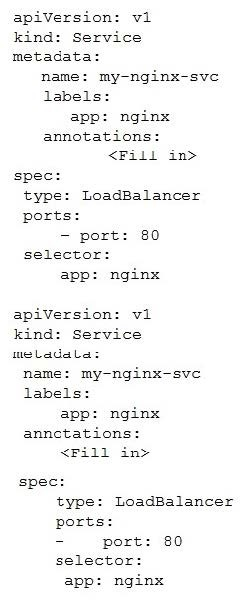
In the sample Kubernetes manifest file below, what annotations should you add to create a private load balancer In oracle Cloud infrastructure Container Engine for Kubermetes?

  1. A

    service.beta.kubernetes.io/oci-load-balancer-private:"true"

  2. B

    service.beta.kubernetes.io/oci-load-balancer-private: "true"
    service.beta.kubernetes.io/oci-load-balancer-subnet1: "ocid1.subnet.oc1..aaaaa....vdfw"

  3. C

    service.beta.kubernetes.io/oci-load-balancer-internal: "true"

  4. D

    service.beta.kubernetes.io/oci-load-balancer-internal: "true"
    service.beta.kubernetes.io/oci-load-balancer-subnet1: "ocid1.subnet.oc1..aaaaa....vdfw"

Show answer and explanation

Correct answer: D

Explanation

https://docs.cloud.oracle.com/en-us/iaas/Content/ContEng/Tasks/contengcreatingloadbalancer.htm?TocPath=Services%7CExample%20Network%20Resource%20Configuration%7CUpgrading%20the%20Version%20of%20Kubernetes%20Running%20on%20a%20Master%20Node%7C_____2

Creating Internal Load Balancers in Public and Private Subnets You can create Oracle Cloud Infrastructure load balancers to control access to services running on a cluster: When you create a 'custom' cluster, you select an existing VCN that contains the network resources to be used by the new cluster. If you want to use load balancers to control traffic into the VCN, you select existing public or private subnets in that VCN to host the load balancers. When you create a 'quick cluster', the VCN that's automatically created contains a public regional subnet to host a load balancer. If you want to host load balancers in private subnets, you can add private subnets to the VCN later.

Alternatively, you can create an internal load balancer service in a cluster to enable other programs running in the same VCN as the cluster to access services in the cluster. You can host internal load balancers in public subnets and private subnets.
To create an internal load balancer hosted on a public subnet, add the following annotation in the metadata section of the manifest file:
service.beta.kubernetes.io/oci-load-balancer-internal: "true"
To create an internal load balancer hosted on a private subnet, add both following annotations in the metadata section of the manifest file:
service.beta.kubernetes.io/oci-load-balancer-internal: "true" service.beta.kubernetes.io/oci-load-balancer- subnet1: "ocid1.subnet.oc1..aaaaaa....vdfw" where ocid1.subnet.oc1..aaaaaa....vdfw is the OCID of the private subnet.