You have the following compartment structure in your tenancy. Root compartment->Training- >Training-
subl ->Training-sub2 You create a policy in the root compartment to allow the default admin for the account
(Administrators) to manage block volumes in compartment Training-sub2.
What policy would you write to meet this requirement?
Show answer and explanation
Correct answer: C
a policy statement must specify the compartment for which access is being granted (or the tenancy).
Where you create the policy determines who can update the policy. If you attach the policy to the compartment or its parent, you can simply specify the compartment name. If you attach the policy further up the hierarchy, you must specify the path. The format of the path is each compartment name (or OCID) in the path, separated by a colon:
<compartment_level_1>:<compartment_level_2>: . . . <compartment_level_n> For example, assume you have a three-level compartment hierarchy, shown here:
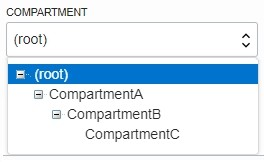
You want to create a policy to allow NetworkAdmins to manage VCNs in CompartmentC. If you want to attach this policy to CompartmentC or to its parent, CompartmentB, write this policy statement: Allow group NewtworkAdmins to manage virtual-network-family in compartment CompartmentC.
However, if you want to attach this policy to CompartmentA (so that only administrators of CompartmentA can modify it), write this policy statement that specifies the path: Allow group NewtworkAdmins to manage virtual-network-family in compartment CompartmentB:CompartmentC
To attach this policy to the tenancy, write this policy statement that specifies the path from CompartmentA to CompartmentC: Allow group NewtworkAdmins to manage virtual-network-family in compartment CompartmentA:CompartmentB:CompartmentC