1D0-635 Real Exam Questions

CIW JavaScript Specialist

55 questions available · Page 1 of 6

Updated Exam DumpsVerified AnswersPass Guarantee

Get Complete Exam Dumps
Question 1 Single choice

Maria, a 22-year old student, is testing her JavaScript application, which includes the following code:

Assuming Maria enters truthful information, what is the value of z after executing this code?

  1. A

    No value ?error in line 1 due to missing var keyword for userAge.

  2. B

    No value ?error in line 1 due to multiple declarations in one line.

  3. C

    Maria "is" 22 "years old"

  4. D

    Maria is 22 years old

Show answer and explanation

Correct answer: D

Question 2 Single choice

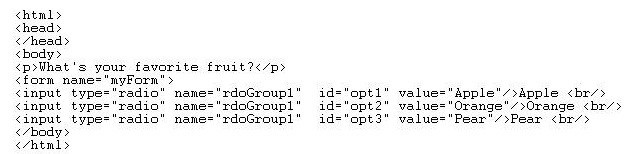
Consider the following code:

Which statement could be used to determine the value of the first radio button?

  1. A

    document.rdoGroup1.value

  2. B

    document.myForm.rdoGroup1[0].value

  3. C

    document.getElementById(rdoGroup1).value

  4. D

    document.getElementById("rdoGroup1").value

Show answer and explanation

Correct answer: B

Question 3 Single choice

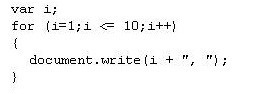
Consider the following code:

What output will appear in the browser when you run this script?

  1. A

    "1, 2, 3, 4, 5, 6, 7, 8, 9"

  2. B

    1, 2, 3, 4, 5, 6, 7, 8, 9, 10,

  3. C

    1, 2, 3, 4, 5, 6, 7, 8, 9,

  4. D

    "1, 2, 3, 4, 5, 6, 7, 8, 9, 10"

Show answer and explanation

Correct answer: B

Question 4 Single choice

In an X/HTML form, which script block will retrieve an input value and display it back without errors or warnings?

  1. A

    <script type="text/javascript">function ShowEntry() {var inp = document.getElementById("i");var s =
    inp.value;

  2. B

    value = s; }</script><input id="i" onchange="ShowEntry()" /><br />You entered: <span id="d"></span>

  3. C

    <script type="text/javascript">function ShowEntry() {document.getElementById("i");var s =

  4. D

    innerHTML;document.getElementsByName("d").innerHTML = s; }</script><input id="i"
    onchange="ShowEntry()" /><br />You entered: <span id="d"></span>

  5. E

    <script type="text/javascript">function ShowEntry() {var inp = document.getElementById("i");var s =
    inp.value;document.getElementsbyName("d").innerHTML = s; }</script><input id="inp"
    onchange="ShowEntry()" /><br />You entered: <span id="d"></span>

  6. F

    <script type="text/javascript">function ShowEntry() {var inp = document.getElementById("i");var s =
    inp.value;document.getElementById("d").innerHTML = s; }</script><input id="i" onchange="ShowEntry
    ()" /><br />You entered: <span id="d"></span>

Show answer and explanation

Correct answer: D

Question 5 Single choice

How is the alert() method different from prompt() and confirm()?

  1. A

    The alert() method generates a modal dialog box, which requires user action before the next JavaScript instruction can be executed,whereas prompt() and confirm() do not.

  2. B

    The alert() method requires only one parameter, whereas prompt() and confirm() require two parameters.

  3. C

    The alert() method requires two parameters, whereas prompt() and confirm() require only one parameter.

  4. D

    The prompt() and confirm() methods return a value, whereas alert() does not.

Show answer and explanation

Correct answer: D

Question 6 Single choice

Consider the following message displayed in a pop-up window: Welcome to the CIW Web site!

Which line of code will deliver the pop-up window that displays this message?

  1. A

    <a href="http://www.CIWcertified.com" onclick()="alert('Welcome to the CIW Web site!')">CIW Web
    site</a>

  2. B

    <a href="http://www.CIWcertified.com" onclick="alert('Welcome to the CIW Web site!')">CIW Web
    site</a>

  3. C

    <a onclick="http://www.CIWcertified.com","CIW Web site", ('Welcome to the CIW Web site!')" />

  4. D

    <a onclick()="http://www.CIWcertified.com","CIW Web site", ('Welcome to the CIW Web site!')" />

Show answer and explanation

Correct answer: B

Question 7 Single choice

Consider the following code using a checkbox object:
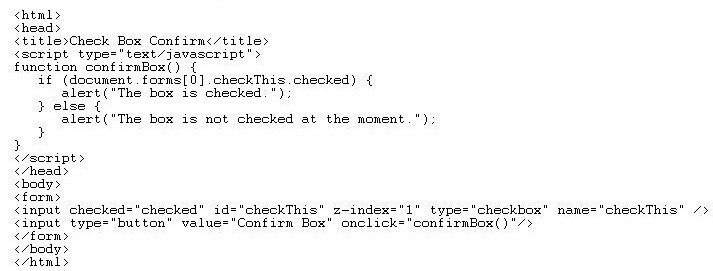
Which checkbox property was used by JavaScript?

  1. A

    checked

  2. B

    onclick()

  3. C

    checkThis

  4. D

    z-index

Show answer and explanation

Correct answer: A

Question 8 Single choice

Which statement about the JavaScript form object is true?

  1. A

    The JavaScript form object has no relationship to the X/HTML <form> element.

  2. B

    You can use a single instance of the form object to represent multiple forms on a Web page.

  3. C

    The form object cannot be used to access the individual field elements that compose the form.

  4. D

    The JavaScript form object is available when the X/HTML <form></form> tags are present in the X/
    HTML document.

Show answer and explanation

Correct answer: D

Question 9 Single choice

Which statement will correctly call a JavaScript function without error?

  1. A

    var myFunction()

  2. B

    initiate myFunction()

  3. C

    call myFunction()

  4. D

    myFunction()

Show answer and explanation

Correct answer: D

Question 10 Single choice

Assuming the function <body onload="DisplayName()"> is called, which script block will display Hello Joe in the document window after you enter the name Joe?

  1. A

    <script type="text/javascript">function DisplayName(void){var YourName = window.prompt("What is
    your name?","Please enter your name");document.write("Hello " + YourName);}</script>

  2. B

    <script type="text/javascript">function DisplayName(){var YourName = window.prompt("What is your
    name?","Please enter your name");document.write("Hello " + YourName);}</script>

  3. C

    <script type="text/javascript">function DisplayName(void){var YourName = document.prompt("What is
    your name?",Please enter your name);document.write("Hello " + YourName);}</script>

  4. D

    <script type="text/javascript">function DisplayName(){var YourName = document.prompt("What is your
    name?","Please enter your name");document.write("Hello " + yourname);}</script>

Show answer and explanation

Correct answer: B