156-915.65 Exam Details
-
Exam Code
:156-915.65 -
Exam Name
:Accelerated CCSE NGX R65 -
Certification
:Checkpoint Certifications -
Vendor
:CheckPoint -
Total Questions
:204 Q&As -
Last Updated
:May 28, 2026
CheckPoint 156-915.65 Online Questions & Answers
-
Question 171:
What must a public hospital Security Administrator do to comply with new health-care legislation requirements for logging all traffic accepted through the perimeter Security Gateway?
A. Define two log servers on the VPN-1 NGX R65 Gateway object. Enable "Log Implied Rules" on the first log server. Enable "Log Rule Base" on the second log server. Use Eventia Reporter to merge the two log server records into the same database for HIPPA log audits.
B. Install the "View Implicit Rules" package using SmartUpdate.
C. In Global Properties > Reporting Tools check the box "Enable tracking all rules (including rules marked as 'None' in the Track column). Send these logs to a secondary log server for a complete logging history. Use your normal log server for standard logging for troubleshooting.
D. Check the "Log Implied Rules Globally" box on the VPN-1 NGX R65 Gateway object. -
Question 172:
A third shift Security Administrator configured and installed a new Security Policy early this morning. When you arrive, he tells you that he has been receiving complaints that Internet access is very slow. You suspect the Security Gateway virtual memory might be the problem. How would you check this using SmartConsole?
A. SmartView Monitor
B. SmartView Tracker
C. Eventia Analyzer
D. This information can only be viewed with fw ctl pstat command from the CLI. -
Question 173:
You want to establish a VPN, using Certificates. Your VPN will exchange Certificates with an external partner. Which of the following activities should you dc first?
A. Exchange exported CAkeys and uses them to create a new server object to represent your partner's Certificate Authority (CA).
B. Manually import your partner's Access Control List.
C. Manually import your partner's Certificate Revocation List.
D. Create a new logical-server object to represent your partner's CA. -
Question 174:
You are establishing a ClusterXL environment, with the following topology: VIP internal cluster IP = 172.16.10.3; VIP external cluster IP = 192.168.10.3 ClusterMember1:4NICs,3enabled: hme(): 192.168.10.1/24, hmel: 10.10.10.1/24, qfe2:
172.16.10.1/24 Cluster Member 2: 5 NICs, 3 enabled; hme3: 192.168.10.2/24, hmel:
10.10.10.2/24, hme2: 172.16.10.2/24 External interfaces 192.168.10.1 and 192.168.10.2 connect to a VLAN switch. The upstream router connects to the same VLAN switch. Internal interfaces 172.16.10.1 and 172.16.10.2 connect to a hub.
10.10.10.0 is the synchronization network. The SmartCenter Server is located on the internal network with IP 172.16.10.3. What is the problem with this configuration?
A. There is an IP address conflict.
B. Cluster members cannot use the VLAN switch. They must use hubs.
C. The Cluster interface names must be identical across all cluster members.
D. The SmartCenter Server must be in the dedicated synchronization network, not the internal network. -
Question 175:
An NGXR65 HA cluster contains two members with external interfaces 172.28.108.1 and 172.28.108.2. The internal interfaces are 10.4.8.1 and 10.4.8.2. The external cluster VIP address is 172.28.108.3 and the internal cluster VIP address is
10.4.8.3. The synchronization interfaces are 192.168.1.1 and 192.168.1.2. The Security Administrator discovers State Synchronization is not working properly. The cphaprob if command output displays shows:What is causing the State Synchronization problem?
A. The synchronization network has been defined as "Network Objective: Cluster + 1st sync" with an IP address 192.168.1.3 defined in the NGX cluster object's topology. This configuration is supported in NGX and therefore the above screenshot is not relevant to the sync problem.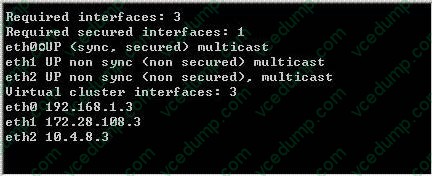
B. The synchronization interface on the individual NGX cluster member object's Topology tab is enabled with "Cluster Interface". Disable this setting.
C. The synchronization network has a cluster VIP address (192.168.1.3) defined in the NGX cluster object's topology. Remove the 192.168.1.3 VIP interface from the cluster topology.
D. Another cluster is using 192.168.1.3 as one of the unprotected interfaces. -
Question 176:
Which of the following statements about file-type recognition in Content Inspection is TRUE?
A. A scan failure will only occur if the antivirus engine fails to initialize.
B. Antivirus status is monitored using SmartView Tracker.
C. The antivirus engine acts as a proxy, caching the scanned file before delivering it to the client.
D. All file types are considered "at risk", and are not subject to the whims of the Administrator or the Security Policy -
Question 177:
Which VPN-1 NGX R65 component displays the number of packets accepted, rejected, and dropped on a specific Security Gateway, in real time?
A. SmartUpdate
B. SmartView Monitor
C. SmartView Status
D. Eventia Analyzer -
Question 178:
You are running the licensejjpgrade tool on your SecurePlatform Gateway. Which of the following can you NOT do with the upgrade tool?
A. Simulate the license-upgrade process.
B. Perform the actual license-upgrade process.
C. View the status of currently installed licenses.
D. View the licenses in the SmartUpdate License Repository. -
Question 179:
Your bank's distributed VPN-1 NGX R65 installation has Security Gateways up for renewal. Which SmartConsole application will tell you which Security Gateways have licenses that will expire within the next 30 days?
A. SmartUpdate
B. SmartViewTracker
C. SmartDashboard
D. SmattPortal -
Question 180:
How do you block some seldom-used FTP commands, such as CWD, and FIND from passing through the Gateway?
A. Use FTP Security Server settings in SmartDefense
B. Add the restricted commands to the aftpd.conf file in the SmartCenter Server.
C. Configure the restricted FTP commands in the Security Servers screen of the Global properties.
D. Enable FTP Bounce checking in SmartDefense.
Related Exams:
-
156-110
Check Point Certified Security Principles Associate (CCSPA) -
156-115.80
Check Point Certified Security Master - R80 -
156-215
Check Point Security Administration NGX -
156-215.1
Check Point Certified Security Administrator NGX -
156-215.70
Check Point Certified Security Administrator R70 -
156-215.71
Check Point Certified Security Administrator R71 -
156-215.75
Check Point Certified Security Administrator -
156-215.80
Check Point Certified Security Administrator (CCSA) -
156-215.81
Check Point Certified Security Administrator - R81 (CCSA) -
156-215.81.20
Check Point Certified Security Administrator - R81.20 (CCSA)
Tips on How to Prepare for the Exams
Nowadays, the certification exams become more and more important and required by more and more enterprises when applying for a job. But how to prepare for the exam effectively? How to prepare for the exam in a short time with less efforts? How to get a ideal result and how to find the most reliable resources? Here on Vcedump.com, you will find all the answers. Vcedump.com provide not only CheckPoint exam questions, answers and explanations but also complete assistance on your exam preparation and certification application. If you are confused on your 156-915.65 exam preparations and CheckPoint certification application, do not hesitate to visit our Vcedump.com to find your solutions here.