156-915.65 Exam Details
-
Exam Code
:156-915.65 -
Exam Name
:Accelerated CCSE NGX R65 -
Certification
:Checkpoint Certifications -
Vendor
:CheckPoint -
Total Questions
:204 Q&As -
Last Updated
:May 28, 2026
CheckPoint 156-915.65 Online Questions & Answers
-
Question 161:
How do you verify a VPN Tunnel Interface (VTI) is configured properly?
A. vpn shell display interface detailed
B. vpn shell show interface detailed
C. vpn shell display detailed
D. vpn shell show detailed -
Question 162:
Which of the following is TRUE concerning unnumbered VPN Tunnel Interfaces (VTIs)?
A. VTIs cannot be assigned a proxy interface
B. Local IP addresses are not configured, remote IP addresses are configured
C. VTIs are only supported on SecurePlatform
D. VTI specific additional local and remote IP addresses are not configured -
Question 163:
A VPN Tunnel Interface (VTI) is defined on SecurePlatform Pro as: vpn shell interface add numbered 10.10.0.1 10.10.0.2 madrid.cp What do you know about this VTI?
A. The VTI name is "madrid.cp".
B. The peer Security Gateway's name is "madrid.cp"
C. 10.10.0.1 is the local Gateway's internal interface, and 10.10.0.2 is the internal interface of the remote Gateway
D. The local Gateway's object name is "madrid.cp". -
Question 164:
You plan to migrate an NG with Application Intelligence (Al) R55 SmartCenter Server on Windows to VPN-1 NGX R65. You also plan to upgrade four VPN-1 Pro Gateways at remote offices, and one local VPN-1 Pro Gateway at your company's headquarters. The SmartCenter Server configuration must be migrated. What is the correct procedure to migrate the configuration?
A. 1. Upgrade the five remote Gateways via SmartUpdate. 2. Upgrade the SmartCenter Server, using the NGX R65 CD.
B. 1. From the VPN-1 NGX R65 CD on the SmartCenter Server, select "Upgrade". 2. Reboot after installation and upgrade all licenses via SmartUpdate. 3. Reinstall all gateways using NGX R65 and install a policy.
C. 1. From the VPN-1 NGX R65 CD in the SmartCenter Server, select "Export". 2. Install VPN-1 NGX R65 on a new PC using the option "Installation using imported configuration". 3. Reboot after installation and upgrade all licenses via SmartUpdate. 4. Upgrade software on all five remote Gateways via SmartUpdate.
D. 1. Copy the $FWDIR\conf directory from the SmartCenter Server. 2. Save directory contents to another file server. 3. Uninstall the SmartCenter Server, and install a new SmartCenter Server. 4. Move the saved directory contents to $FWDIR\conf replacing the default installation files. 5. Reinstall all gateways using VPN-1 NGX R65 and install a Security Policy. -
Question 165:
Users are not prompted for authentication when they access their Web servers, even though you have created an HTTP rule via User Authentication. Why?
A. Users must use the SecuRemote Client, to use the User Authentication Rule.
B. YOU have forgotten to place the User Authentication Rule before the Stealth Rule.
C. You checked the "cache password on desktop" option in Global Properties.
D. Another rule that accepts HTTP without authentication exists in the Rule Base. -
Question 166:
Match the ClusterXL Modes with their configurations
A. A2.B3.C4.D 1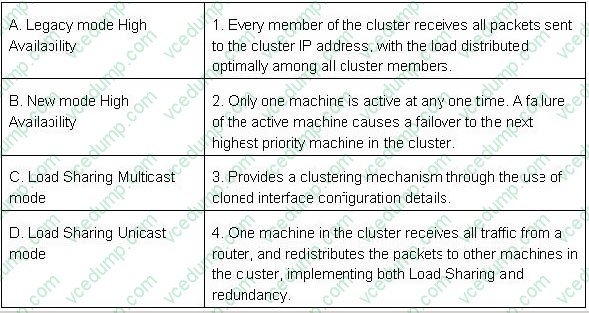
B. A2.B3.C 1.D4
C. A3,B2,C4,D 1
D. A3.B2.C 1.D4 -
Question 167:
Your online bookstore has customers connecting to a variety of Web servers to place or change orders, and check order status. You ran penetration tests through the Security Gateway, to determine if the Web servers were protected from a recent series of cross-site scripting attacks. The penetration testing indicated the Web servers were still vulnerable. You have checked every box in the Web Intelligence tab, and installed the Security Policy. What else might you do to reduce the vulnerability?
A. Configure the Security Gateway protecting the Web servers as a Web server.
B. The penetration software you are using is malfunctioning and is reporting a false- positive.
C. Check the "Web Intelligence" box in the SmartDefense > HTTP Protocol Inspection.
D. Check the "Products > Web Server" box on the host node objects representing your Web servers. -
Question 168:
Which of these components does NOT require a VPN-1 NGX R65 license?
A. Check Point Gateway
B. SmartCenterServer
C. SmartConsole
D. SmartUpdate upgrading/patching -
Question 169:
Match the ClusterXL Modes with their configurations
A. A2.B3.C4.D 1
B. A2.B3.C 1.D4
C. A3,B2,C4,D 1
D. A3.B2.C 1.D4 -
Question 170:
How do you define a service object for a TCP port range?
A. Manage Services, New Other, Provide name and define Protocol: x-y
B. Manage Services, New TCP, Provide name and define Port: x-y
C. Manage Services, New Other, Provide name and define Protocol: 17, Range: x-y
D. Manage Services, New Group, Provide name and Add all service ports for range individually to the group object
Related Exams:
-
156-110
Check Point Certified Security Principles Associate (CCSPA) -
156-115.80
Check Point Certified Security Master - R80 -
156-215
Check Point Security Administration NGX -
156-215.1
Check Point Certified Security Administrator NGX -
156-215.70
Check Point Certified Security Administrator R70 -
156-215.71
Check Point Certified Security Administrator R71 -
156-215.75
Check Point Certified Security Administrator -
156-215.80
Check Point Certified Security Administrator (CCSA) -
156-215.81
Check Point Certified Security Administrator - R81 (CCSA) -
156-215.81.20
Check Point Certified Security Administrator - R81.20 (CCSA)
Tips on How to Prepare for the Exams
Nowadays, the certification exams become more and more important and required by more and more enterprises when applying for a job. But how to prepare for the exam effectively? How to prepare for the exam in a short time with less efforts? How to get a ideal result and how to find the most reliable resources? Here on Vcedump.com, you will find all the answers. Vcedump.com provide not only CheckPoint exam questions, answers and explanations but also complete assistance on your exam preparation and certification application. If you are confused on your 156-915.65 exam preparations and CheckPoint certification application, do not hesitate to visit our Vcedump.com to find your solutions here.