100-150 Real Exam Questions

Cisco Certified Support Technician (CCST) Networking

50 questions available · Page 1 of 5

Updated Exam DumpsVerified AnswersPass Guarantee

Get Complete Exam Dumps
Question 1 Single choice

A Cisco switch is not accessible from the network. You need to view its running configuration.

Which out-of-band method can you use to access it?

  1. A

    SNMP

  2. B

    Console

  3. C

    SSH

  4. D

    Telnet

Show answer and explanation

Correct answer: B

Explanation

When a Cisco switch is not accessible from the network, the recommended out-of-band method to access its running configuration is through the console port . Out-of-band management involves accessing the network device through a dedicated management channel that is not part of the data network. The console port provides direct access to the switch's Command Line Interface (CLI) without using the network, which is essential when the switch cannot be accessed remotely via the network.

Question 2 Single choice

Which command is used to save the current configuration of a Cisco router or switch so that it is applied after a reboot?

  1. A

    write memory

  2. B

    copy running-config startup-config

  3. C

    save config

  4. D

    write save

Show answer and explanation

Correct answer: B

Explanation

The copy running-config startup-config command saves the current running configuration to the startup configuration file, ensuring it persists after a reboot.

Question 3 Single choice

You need to connect a computer's network adapter to a switch using a 1000BASE-T cable.

Which connector should you use?

  1. A

    Coax

  2. B

    RJ-11

  3. C

    OS2 LC

  4. D

    RJ-45

Show answer and explanation

Correct answer: D

Explanation

1000BASE-T Cable: This refers to Gigabit Ethernet over twisted-pair cables (Cat 5e or higher).

Connector: RJ-45 connectors are used for Ethernet cables, including those used for 1000BASE-T.

Coax: Used for cable TV and older Ethernet standards like 10BASE2.
RJ-11: Used for telephone connections.

OS2 LC: Used for fiber optic connections.

Question 4 Hotspot

HOTSPOT

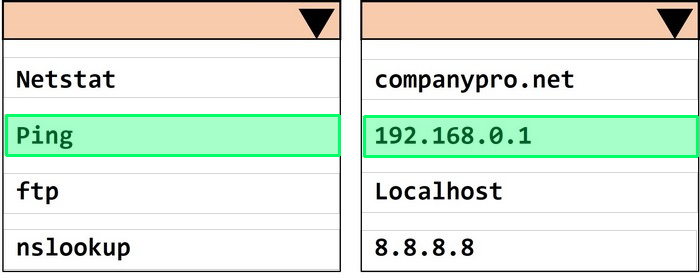
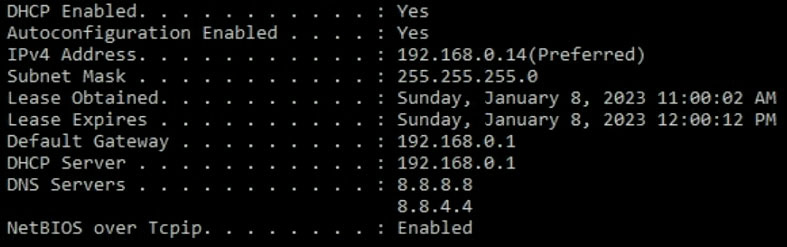
Computers in a small office are unable to access companypro.net. You run the ipconfig command on one of the computers. The results are shown in the exhibit.

You need to determine if you can reach the router.

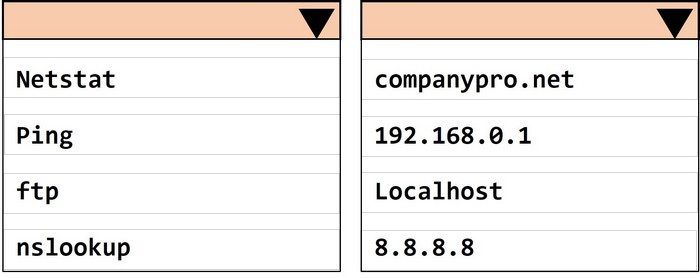
Which command should you use? Complete the command by selecting the correct options from each drop-down lists.

stem image

Question diagram
Show answer and explanation
Correct answer diagram
Explanation

To determine if you can reach the router, you should use the ping command followed by the IP address of the router. The ping command is a network utility used to test the reachability of a host on an Internet Protocol (IP) network and to measure the round-trip time for messages sent from the originating host to a destination computer. 28 of 49
The Default Gateway in the ipconfig results is typically the router's IP address in a home or small office network. In this case, the Default Gateway is 192.168.0.1 , which is the address you would ping to check connectivity to the router.

How to Use the Ping Command Testing Network Connectivity with the Ping Command
To determine if you can reach the router, you should use the ping command with the IP address of the router.
Command: ping
Target: 192.168.0.1
So, the completed command is:
ping 192.168.0.1
Step by Step Comprehensive and Detailed Explanation: ping: The ping command sends ICMP Echo Request messages to the target IP address and waits for an Echo Reply. It is commonly used to test the reachability of a network device. 192.168.0.1: This is the IP address of the default gateway (the router) as shown in the ipconfig output.
Pinging this address will help determine if the computer can communicate with the router.

References:
Using the ping Command: ping Command Guide

Question 5 Single choice

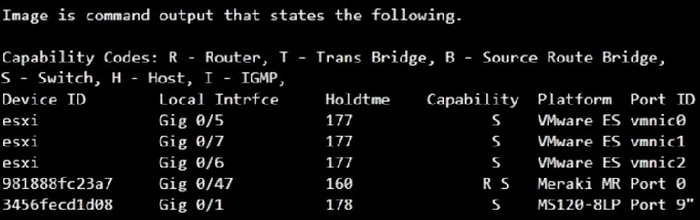
Which command will display the following output?

  1. A

    show mac-address-table

  2. B

    show cdp neighbor

  3. C

    show inventory

  4. D

    show ip interface

Show answer and explanation

Correct answer: B

Explanation

The command that will display the output provided, which includes capability codes, local interface details, device IDs, hold times, and platform port ID capabilities, is the show cdp neighbor command. This command is used in Cisco devices to display current information about neighboring devices detected by Cisco Discovery Protocol (CDP), which includes details such as the interface through which the neighbor is connected, the type of device, and the port ID of the device.

Question 6 Single choice

A user initiates a trouble ticket stating that an external web page is not loading. You determine that other resources both internal and external are still reachable.

Which command can you use to help locate where the issue is in the network path to the external web page?

  1. A

    ping -t

  2. B

    tracert

  3. C

    ipconfig/all

  4. D

    nslookup

Show answer and explanation

Correct answer: B

Explanation

The tracert command is used to determine the route taken by packets across an IP network. When a user reports that an external web page is not loading, while other resources are accessible, it suggests there might be an issue at a certain point in the network path to the specific web page. The tracert command helps to diagnose where the breakdown occurs by displaying a list of routers that the packets pass through on their way to the destination. It can identify the network segment where the packets stop progressing, which is valuable for pinpointing where the connectivity issue lies.

References:
Cisco CCST Networking Certification FAQs ?CISCONET Training Solutions, Command
Prompt (CMD): 10 network-related commands you should know, Network Troubleshooting Commands Guide: Windows, Mac & Linux - Comparitech, How to Use the Traceroute and Ping Commands to Troubleshoot Network, Network Troubleshooting Techniques: Ping, Traceroute, PathPing.
Tracert Command: This command is used to determine the path packets take to reach a destination. It lists all the hops (routers) along the way and can help identify where the delay or failure occurs.
Ping -t: This command sends continuous ping requests and is useful for determining if a host is reachable but does not provide path information.
Ipconfig /all: This command displays all current TCP/IP network configuration values and can be used to verify network settings but not to trace a network path.
Nslookup: This command queries the DNS to obtain domain name or IP address mapping, useful for DNS issues but not for tracing network paths.
Question 7 Single choice

Which type of attack occurs when an attacker sends a large number of TCP SYN packets without completing the three-way handshake?

  1. A

    ARP poisoning

  2. B

    DNS spoofing

  3. C

    SYN flood

  4. D

    Man-in-the-middle attack

Show answer and explanation

Correct answer: C

Explanation

A SYN flood attack occurs when an attacker overwhelms a target system with a large number of incomplete TCP handshake requests, exhausting resources and preventing legitimate connections.

Question 8 Single choice

Which Cisco IOS command will allow an administrator to remotely access a switch using SSH?

  1. A

    line console 0

  2. B

    ip domain-lookup

  3. C

    ip ssh enable

  4. D

    transport input ssh

Show answer and explanation

Correct answer: D

Explanation

The command transport input ssh under the VTY lines ensures that SSH access is enabled for remote management.

Question 9 Multiple choice

Which two layers of the OSI model are combined into a single layer in the TCP/IP model? (Choose 2.)

  1. A

    Application

  2. B

    Transport

  3. C

    Network

  4. D

    Data Link

  5. E

    Presentation

  6. F

    Session

Show answer and explanation

Correct answers: A, E

Explanation

In the TCP/IP model, the Application layer encompasses the functions of the OSI model's Application, Presentation, and Session layers. The Transport and Network layers remain the same, while the Data Link and Physical layers are combined into a single layer called the Network Access layer.

Question 10 Single choice

Which address is included in the 192.168.200.0/24 network?

  1. A

    192.168.199.13

  2. B

    192.168.200.13

  3. C

    192.168.201.13

  4. D

    192.168.1.13

Show answer and explanation

Correct answer: B

Explanation

192.168.200.0/24 Network: This subnet includes all addresses from 192.168.200.0 to 192.168.200.255.
The /24 indicates a subnet mask of 255.255.255.0, which allows for 256 addresses. 192.168.199.13: This address is in the 192.168.199.0/24 subnet, not the 192.168.200.0/24 subnet. 192.168.200.13: This address is within the 192.168.200.0/24 subnet. 192.168.201.13: This address is in the 192.168.201.0/24 subnet, not the 192.168.200.0/24 subnet. 192.168.1.13: This address is in the 192.168.1.0/24 subnet, not the 192.168.200.0/24 subnet.