Overview
ADatum Corporation is a consulting company in Montreal.
ADatum recently acquired a Vancouver-based company named Litware, Inc.
Existing Environment
ADatum Environment
The on-premises network of ADatum contains an Active Directory Domain Services (AD DS) forest named adatum.com.
ADatum has a Microsoft 365 E5 subscription. The subscription contains a verified domain that syncs with the adatum.com AD DS domain by using Microsoft Entra Connect.
ADatum has a Microsoft Entra tenant named adatum.com. The tenant has Security defaults disabled.
The tenant contains the users shown in the following table.
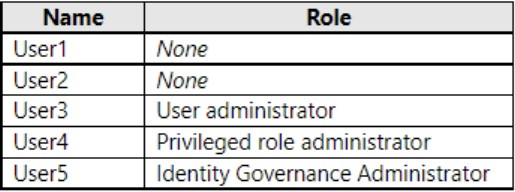
The tenant contains the users assigned roles as shown in the following table.
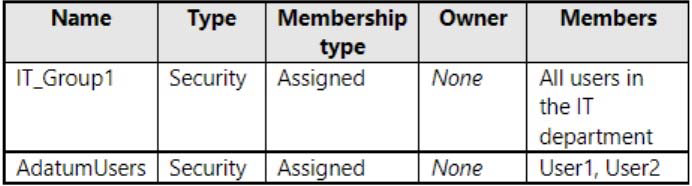
Litware Environment
Litware has an AD DS forest named litware.com.
Problem Statements
ADatum identifies the following issues:
- Multiple users in the sales department have up to five devices. The sales department users report that sometimes they must contact the support department to join their devices to the Microsoft Entra tenant because they have reached their device limit.
- A recent security incident reveals that several users leaked their credentials, a suspicious browser was used for a sign-in, and resources were accessed from an anonymous IP address.
- When you attempt to assign the Cloud Device Administrators role to IT_Group1, the group does NOT appear in the selection list.
- Anyone in the organization can invite guest users, including other guests and non-administrators.
- The helpdesk spends too much time resetting user passwords.
- Users currently use only passwords for authentication.
Requirements
Planned Changes
ADatum plans to implement the following changes:
- Configure self-service password reset (SSPR).
- Configure multi-factor authentication (MFA) for all users.
- Configure an access review for an access package named Package1.
- Require admin approval for application access to organizational data.
- Sync the AD DS users and groups of litware.com with the Microsoft Entra tenant.
- Ensure that only users that are assigned specific admin roles can invite guest users.
- Increase the maximum number of devices that can be joined or registered to Microsoft Entra ID to 10.
Technical Requirements
ADatum identifies the following technical requirements:
- Users assigned the User administrator role must be able to request permission to use the role when needed for up to one year.
- Users must be prompted to register for MFA and provided with an option to bypass the registration for a grace period.
- Users must provide one authentication method to reset their password by using SSPR.
Available methods must include:
- Email
- Phone
- Security questions
- The Microsoft Authenticator app
Trust relationships must NOT be established between the adatum.com and litware.com AD DS domains.
The principle of least privilege must be used.