HOTSPOT
You have a Microsoft 365 E5 subscription that contains three groups named Group1, Group2, and Group3, and the users shown in the following table.

You create a Conditional Access policy named CA1 that has the following settings:
Users
- Include
- Users and groups: Group1
- Exclude
- Users and groups: Group2
- Directory roles: Global Administrator
Target resources
- Include: All cloud apps
Access controls
- Grant: Require multifactor authentication (MFA)
You create a Conditional Access policy named CA2 that has the following settings:
Users
- Include
- Users and groups: Group2
- Exclude
- Users and groups: Group3
Target resources
- Include: All cloud apps
Access controls
- Grant: Block access
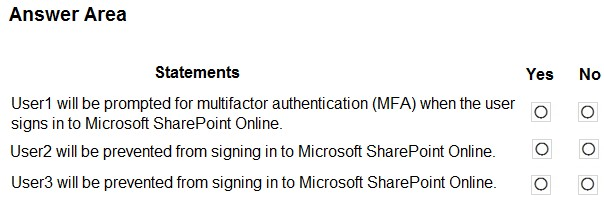
For each of the following statements, select Yes if the statement is true. Otherwise, select No.
NOTE: Each correct selection is worth one point.
- Access controls -- Grant: Block access.
For each of the following statements, select Yes if the statement is true. Otherwise, select No.
NOTE: Each correct selection is worth one point.
Select the correct area(s) on the image.