CompTIA XK0-006 Online Practice
Questions and Exam Preparation
XK0-006 Exam Details
Exam Code
:XK0-006
Exam Name
:CompTIA Linux+
Certification
:CompTIA Certifications
Vendor
:CompTIA
Total Questions
:178 Q&As
Last Updated
:Jul 14, 2026
CompTIA XK0-006 Online Questions &
Answers
Question 141:
Which of the following best describes a use case for playbooks in a Linux system?
A. To provide a set of tasks and configurations to deploy an application B. To provide the instructions for implementing version control on a repository C. To provide the security information required for a container D. To provide the storage volume information required for a pod
A. To provide a set of tasks and configurations to deploy an application
Explanation
In the context of Linux automation and orchestration, playbooks are most commonly associated with configuration management tools such as Ansible , which is explicitly referenced in the CompTIA Linux+ V8 objectives. Playbooks are written in YAML and are designed to define a series of tasks, configurations, and desired system states that should be applied to one or more Linux systems in a repeatable and automated manner.
A primary use case for playbooks is application deployment and system configuration automation . Playbooks allow administrators to specify tasks such as installing packages, configuring services, managing users, setting permissions, deploying application files, and starting or enabling services. This aligns directly with option A , which accurately describes playbooks as a method to provide a set of tasks and configurations required to deploy an application consistently across environments.
The remaining options are not accurate representations of playbook functionality. Option B refers to version control implementation, which is handled by tools like Git and is not the purpose of playbooks themselves, although playbooks may be stored in version control systems. Option C describes container security information, which is typically managed through container runtime configurations, secrets, or security policies rather than playbooks. Option D refers to storage volume information for a pod, which is specific to Kubernetes manifests and not a general Linux playbook use case.
According to Linux+ V8 documentation, automation tools and playbooks help reduce human error, improve consistency, and support Infrastructure as Code (IaC) practices. Playbooks are a key mechanism for orchestrating multi-step operations across multiple systems, making them essential for modern Linux system administration.
Question 142:
In the echo "profile-$num-$name" line of a shell script, the variable $num seems to not be expanding during execution.
Which of the following notations ensures the value is expanded?
A. echo "profile-$(num)-$name" B. echo 'profile-$num-$name' C. echo "profile-'$num'-$name" D. echo "profile-${num}-$name"
D. echo "profile-${num}-$name"
Explanation
Shell variable expansion is a fundamental scripting concept included in Linux+ V8 objectives. In Bash and similar shells, variables are expanded only when they are interpreted within double quotes or unquoted contexts, and sometimes explicit syntax is required to avoid ambiguity.
The correct notation is ${num}, as shown in option D. Using curly braces around the variable name ensures the shell correctly identifies the variable boundary, especially when it is adjacent to other characters. This guarantees proper expansion of the variable's value.
The other options are incorrect. Single quotes prevent variable expansion entirely. The $(...) syntax is used for command substitution, not variable expansion. Quoting the variable name itself also prevents expansion.
Linux+ V8 documentation emphasizes ${VAR} notation as a best practice in shell scripting for clarity and correctness.
Question 143:
DRAG DROP
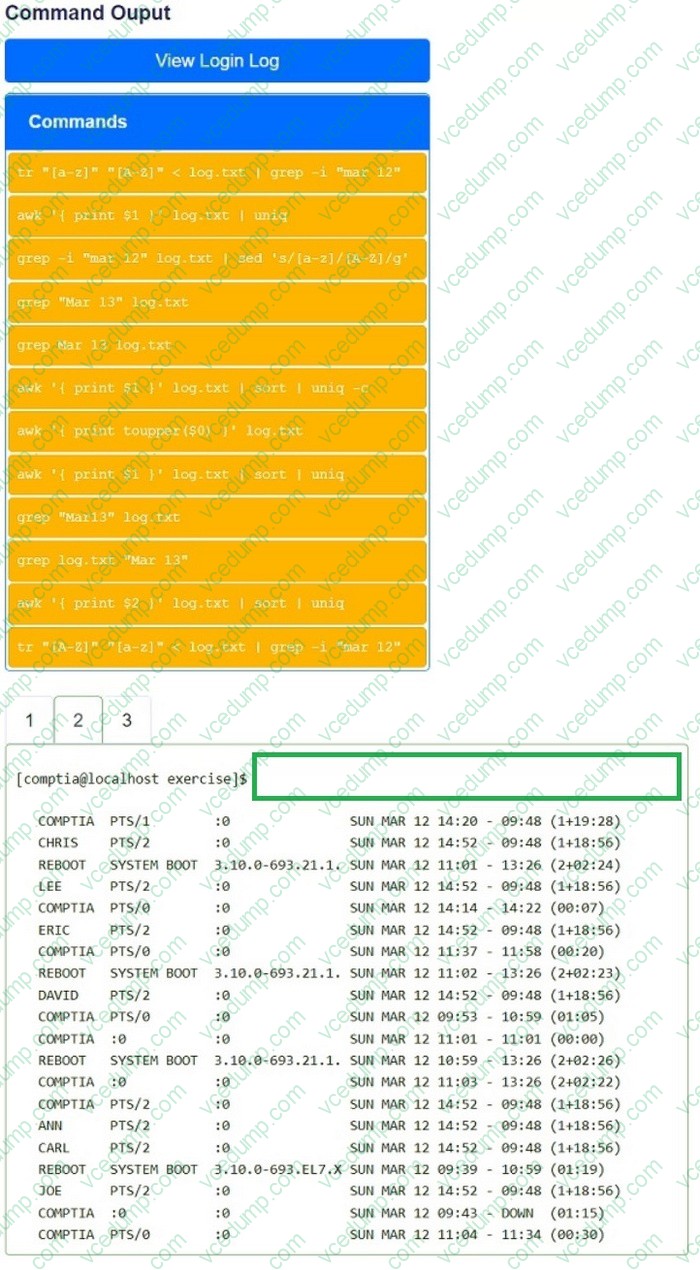
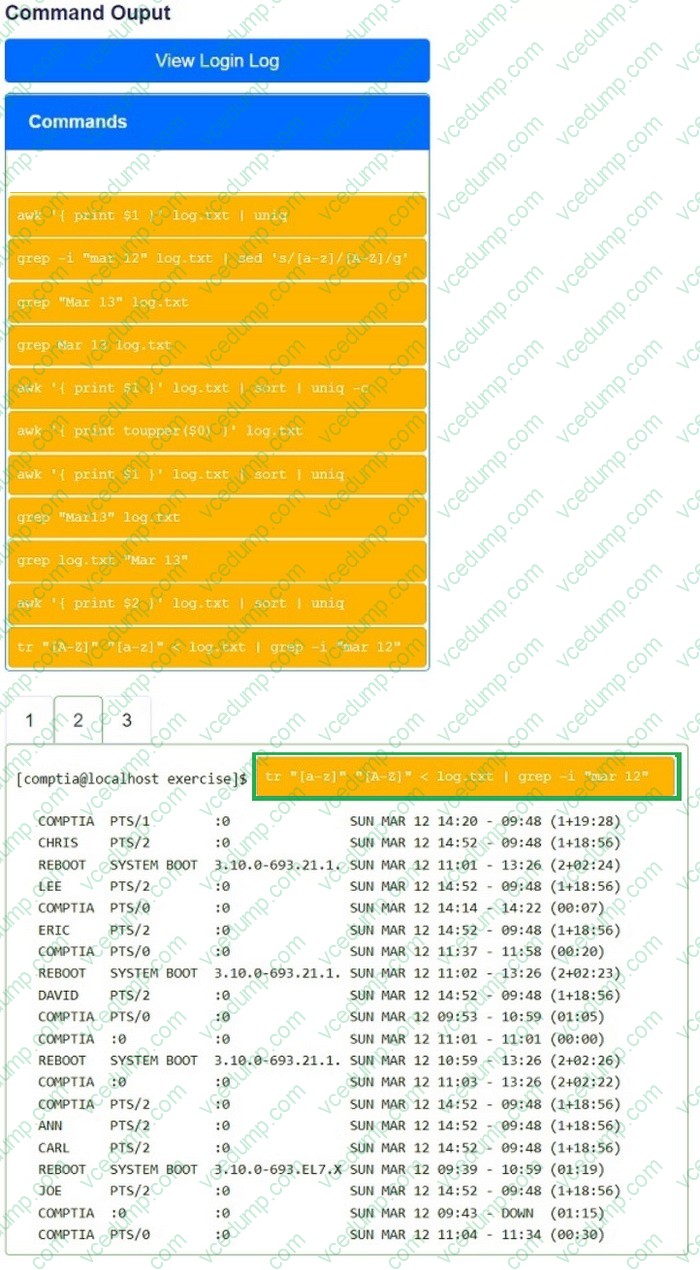
You have been asked to parse a log file of logins to determine various information about who is logging in and when.
INSTRUCTIONS
Open and inspect the Login log file.
Drag and drop the correct commands onto the output that was generated from that command.
Tokens can be used only once and not all will be used.
If at any time you would like to bring back the initial state of the simulation, please click the Reset All button.
Select and Place:
Question 144:
A Linux software developer wants to use AI to optimize source code used in a commercial product.
Which of the following steps should the developer take first?
A. Research which available AI chatbots are best at optimizing source code. B. Verify that the company has a policy governing the use of AI in software development. C. Install a private LLM to use on the internal network for source code optimization. D. Use open-source LLMs that undergo regular security reviews by the community.
B. Verify that the company has a policy governing the use of AI in software development.
Explanation
Linux+ V8 emphasizes security, compliance, and governance when introducing new automation technologies, including AI. Before using AI tools to optimize commercial source code, the developer must ensure that such usage complies with organizational policies.
Option B is correct because verifying company policy is the first and most critical step. AI tools may introduce risks such as intellectual property leakage, licensing conflicts, or regulatory violations. Many organizations restrict how source code can be shared with external systems, including AI services.
The other options are premature. Selecting tools or deploying models should only occur after policy approval. Linux+ V8 highlights governance-first approaches when adopting automation technologies.
Question 145:
A systems administrator wants to review the amount of time the NetworkManager service took to start.
Which of the following commands accomplishes this goal?
A. resolvectl B. journalctl C. systemctl daemon-reload D. systemd-analyze blame
D. systemd-analyze blame
Explanation
System boot performance analysis is an important system management task included in Linux+ V8. When administrators need to determine how long services take to start during boot, systemd analysis tools are required.
The correct command is systemd-analyze blame . This command lists all systemd services and shows how long each one took to initialize during the boot process. It is commonly used to identify slow-starting services that may impact system startup performance, including NetworkManager.
The other options are incorrect. resolvectl is used for DNS resolution management and provides no service timing information. journalctl can display logs but does not provide a clear, summarized service startup timing report. systemctl daemon-reload only reloads systemd unit files and does not perform analysis.
Linux+ V8 documentation explicitly references systemd-analyze blame as the correct tool for diagnosing service startup delays.
Question 146:
Users report that they are unable to reach the company website https://www.comptia.org. A systems administrator confirms the issue with the following command:
# curl https://www.comptia.org
curl: (7) Failed to connect to www.comptia.org port 443: No route to host
The administrator logs in to the company's web server to check its configuration and sees the following output:
default via 172.31.1.1 dev eth0 proto dhcp src 65.21.187.65 metric 100
10.0.6.0/24 dev dummy0 proto kernel scope link src 10.0.6.65 metric 550
172.17.0.0/16 dev docker0 proto kernel scope link src 172.17.0.1
172.18.0.0/16 dev br-28ac2eaeeca1 proto kernel scope link src 172.18.0.1
172.19.0.0/16 dev br-fb3897555ca3 proto kernel scope link src 172.19.0.1 linkdown 172.31.1.1 dev eth0 proto dhcp scope link src 65.21.187.65 metric 100
192.168.224.0/20 dev br-e949ab177d79 proto kernel scope link src 192.168.224.1 linkdown
192.168.240.0/20 dev br-6adf72ac0ae3 proto kernel scope link src 192.168.240.1 linkdown
Which of the following is causing the issue?
A. The web server's interface has no link. B. The default route on the web server is incorrect. C. HTTPS traffic is not allowed through the web server firewall. D. User IP addresses are rejected by the firewall.
C. HTTPS traffic is not allowed through the web server firewall.
Explanation
The curl error "No route to host" suggests that the server is unreachable on port 443 (HTTPS).
The firewall-cmd --list-all output shows the active firewall rules:
The routing table (ip route output) appears correct, as the default route is properly set to 172.31.1.1 via eth0. This rules out option B. Option A is incorrect because eth0 is active and configured (default via 172.31.1.1 dev eth0), meaning the network interface is not down. Option D is misleading because the firewall rules are only rejecting SSH traffic from specific IP addresses, not HTTPS traffic.
Fixing the Issue:
To allow HTTPS traffic, the administrator should enable HTTPS in the firewall:
# firewall-cmd --add-service=https --permanent
# firewall-cmd --reload
This will allow HTTPS (port 443) through the firewall.
References:
CompTIA Linux+ Official Documentation
firewalld Documentation - Red Hat
Linux Firewall Configuration - CompTIA Security+ Guide
Question 147:
An administrator logs in to a Linux server and notices the clock is 37 minutes fast.
Which of the following commands will fix the issue?
A. hwclock B. ntpdate C. timedatectl D. ntpd -q
B. ntpdate
Explanation
The ntpdate command synchronizes the system clock with a remote NTP server immediately, correcting any significant time drift. This is ideal for one-time corrections.
For example:
bash
CopyEdit
ntpdate pool.ntp.org
Other options:
A. hwclock reads or sets the hardware clock, but does not sync with network time.
C. timedatectl can set the time manually or manage time settings, but does not immediately sync with a remote NTP server.
D. ntpd -q can also sync the clock once, but ntpdate is designed specifically for immediate synchronization and is more straightforward for one-time corrections.
A Linux administrator wants to add a user to the Docker group without changing the user's primary group.
Which of the following commands should the administrator use to complete this task?
A. sudo groupmod docker user B. sudo usermod -g docker user C. sudo usermod -aG docker user D. sudo groupmod -G docker user
C. sudo usermod -aG docker user
Explanation
User and group management is a core System Management topic in CompTIA Linux+ V8. When adding a user to an additional group-such as the docker group-care must be taken not to alter the user's primary group.
The correct command is sudo usermod -aG docker user . The -G option specifies a supplementary group, and the -a (append) option ensures the user is added to the group without removing existing group memberships . This is especially important because omitting -a would overwrite the user's supplementary groups.
Option B , usermod -g docker user, changes the user's primary group , which is not desired. Options A and D misuse groupmod, which is intended for modifying group properties, not user membership.
Linux+ V8 documentation explicitly warns that failing to use -a with -G can unintentionally remove a user from all other supplementary groups, potentially causing access issues.
Question 149:
A Linux administrator needs to create and then connect to the app-01-image container.
Which of the following commands accomplishes this task?
A. docker run -it app-01-image B. docker start -td app-01-image C. docker build -ic app-01-image D. docker exec -dc app-01-image
A. docker run -it app-01-image
Explanation
Comprehensive and Detailed 250 to 350 words of Explanation From Linux+ V8 documents:
Container lifecycle management is a core topic within the Automation, Orchestration, and Scripting domain of CompTIA Linux+ V8. Administrators must understand the difference between creating containers, starting containers, and executing commands within running containers.
The correct command is docker run -it app-01-image . The docker run command performs three actions at once : it creates a new container from the specified image, starts the container, and optionally attaches the administrator's terminal to it. The -i option keeps standard input open, while the -t option allocates a pseudo- terminal (TTY). Together, these options allow the administrator to interactively connect to the container immediately after it is created.
The other options are incorrect for the following reasons. docker start is used only to start an existing stopped container and does not create a new container from an image. Additionally, -t and -d are not valid options for attaching an interactive terminal during container startup. docker build is used to build a Docker image from a Dockerfile and cannot be used to create or connect to a container. docker exec is used to run commands inside an already running container and therefore cannot be used to create a container.
Linux+ V8 documentation emphasizes that docker run is the primary command used when administrators want to instantiate containers from images and interact with them. This command is commonly used during testing, development, and troubleshooting workflows.
Question 150:
A Linux administrator needs to check the content of a log file that is appending data as the file grows.
Which of the following commands should the administrator use to accomplish this task?
A. tail -f log.txt B. tail -v log.txt C. tail -c log.txt D. tail log.txt
Nowadays, the certification exams become more and more important and required by more and more
enterprises when applying for a job. But how to prepare for the exam effectively? How to prepare
for the exam in a short time with less efforts? How to get a ideal result and how to find the
most reliable resources? Here on Vcedump.com, you will find all the answers.
Vcedump.com provide not only CompTIA exam questions,
answers and explanations but also complete assistance on your exam preparation and certification
application. If you are confused on your XK0-006 exam preparations
and CompTIA certification application, do not hesitate to visit our
Vcedump.com to find your solutions here.