CompTIA XK0-005 Online Practice
Questions and Exam Preparation
XK0-005 Exam Details
Exam Code
:XK0-005
Exam Name
:CompTIA Linux+
Certification
:CompTIA Certifications
Vendor
:CompTIA
Total Questions
:476 Q&As
Last Updated
:May 25, 2026
CompTIA XK0-005 Online Questions &
Answers
Question 371:
A non-privileged user is attempting to use commands that require elevated account permissions, but the commands are not successful. Which of the following most likely needs to be updated?
A. /etc/passwd B. /etc/shadow C. /etc/sudoers D. /etc/bashrc
C. /etc/sudoers
Explanation
The /etc/sudoers file is used to configure the sudo command, which allows non-privileged users to execute commands that require elevated account permissions1. The file contains a list of users and groups that are allowed to use sudo, and the commands they can run with it. The file also defines the security policy for sudo, such as whether a password is required, how long the sudo session lasts, and what environment variables are preserved or reset. The /etc/passwd file is used to store information about the user accounts on the system, such as their username, user ID, home directory, and login shell. The /etc/shadow file is used to store the encrypted passwords for the user accounts, along with other information such as password expiration and aging. These files are not directly related to the sudo command, and updating them will not grant a user elevated account permissions. The /etc/bashrc file is used to set up the environment for the bash shell, such as aliases, functions, variables, and options. This file is executed whenever a new bash shell is started, and it affects all users on the system. However, this file does not control the sudo command or its configuration, and updating it will not allow a user to use commands that require elevated account permissions.
Question 372:
A Linux systems administrator receives reports from various users that an application hosted on a server has stopped responding at similar times for several days in a row. The administrator logs in to the system and obtains the following output:
Output 1:

Output 2:

Output 3:

Which of the following should the administrator do to provide the BEST solution for the reported issue?
A. Configure memory allocation policies during business hours and prevent the Java process from going into a zombie state while the server is idle. B. Configure a different nice value for the Java process to allow for more users and prevent the Java process from restarting during business hours. C. Configure more CPU cores to allow for the server to allocate more processing and prevent the Java process from consuming all of the available resources. D. Configure the swap space to allow for spikes in usage during peak hours and prevent the Java process from stopping due to a lack of memory.
D. Configure the swap space to allow for spikes in usage during peak hours and prevent the Java process from stopping due to a lack of memory.
Explanation
Based on the output of the image sent by the user, the system requires more swap space to allow for spikes in usage during peak hours and prevent the Java process from stopping due to a lack of memory. The output shows that there is only 0 MB of swap space available on the system, which means that there is no room for swapping out memory pages when physical memory is full or low. The output also shows that there is only 793 MB of available memory on the system, which may not be enough to handle high- demand applications such as Java. This may cause Java to stop working due to insufficient memory or trigger an OutOfMemoryError exception. Configuring more swap space on the system would help to alleviate this issue by providing more virtual memory for applications and improving performance. Configuring memory allocation policies during business hours will not help to solve this issue, as it will not increase the amount of available memory or swap space on the system. Configuring a different nice value for Java process will not help to solve this issue, as it will only affect its scheduling priority, not its memory consumption or allocation. Configuring more CPU cores will not help to solve this issue, as it will only increase processing power, not memory capacity or availability.
References: CompTIA Linux+ (XK0-005) Certification Study Guide, Chapter 15: Managing Memory and Process Execution, page 468.
Question 373:
An administrator completes maintenance on a server but cannot remount the logical volume. Given the following output:
# mount /dev/data/files /opt/data/
mount: /opt/data: special device /dev/data/files does not exist.
Which of the following commands should the administrator execute to resolve the issue?
A. vgchange -ay data B. lvscan --all C. vgimport data D. lvchange -ay /dev/data/files
A. vgchange -ay data
Explanation
The error message indicates that the logical volume is inactive, which is why the device /dev/data/files does not exist at the time of mounting.
Option A (Correct): vgchange -ay data activates all logical volumes within the data volume group, making them available for mounting.
Option B: lvscan scans for logical volumes but does not activate them.
Option C: vgimport is used to import volume groups from other systems, which is not applicable here.
Option D: lvchange -ay is used to activate individual logical volumes, but the volume group must be active first.
CompTIA Linux+ XK0-005 Official Guide ?Chapter on LVM Management.
Question 374:
Which of the following concepts describes the approach of keeping all configurations in a repository?
A. Inventory B. Infrastructure as Code C. Orchestration D. Agentless deployment
B. Infrastructure as Code
Explanation
Question 375:
Which of the following Git commands would send committed changes to a remote repository?
A. git stash B. git commit -a C. git push origin master D. git add .
C. git push origin master
Explanation
git push origin master pushes committed changes to the remote repository. git stash temporarily saves changes but does not push them. git commit -a commits changes but does not send them to the remote repository. git add . stages changes but does not commit or push them.
CompTIA Linux+ Official Study Guide, Chapter on Git and Version Control
Question 376:
Which of the following commands should a technician use to create an administrative account for the username Joe?
A. sudo useradd -G wheel joe B. sudo useradd joe; sudo passwd -l joe C. sudo useradd joe; sudo cat key.pem > ~/.ssh/authorized_keys D. sudo useradd joe; groupadd admin joe
A. sudo useradd -G wheel joe
Explanation
The -G wheel option adds the user joe to the wheel group, which is a special group that allows users to execute administrative commands using sudo. This is the correct way to create a user with administrative privileges in many Linux distributions, including Red Hat- based ones.
Question 377:
An administrator is investigating an issue on a Linux-based router where packets enter the machine but are not sent to their destinations in the 10.0.6.0/24 subnet. The administrator inspects the following output from the diagnostic commands:
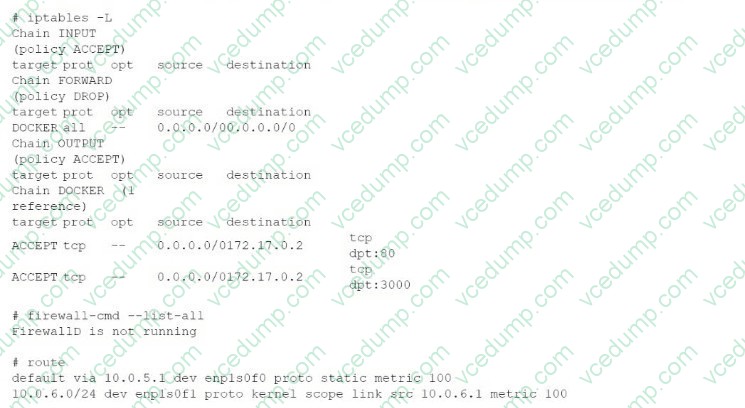
Which of the following commands should the administrator run to enable the routing?
A. ip route add 10.0.6.0/24 via 10.0.6.1 B. iptables -P FORWARD ACCEPT C. systemctl enable --now firewalld D. systemctl restart network
B. iptables -P FORWARD ACCEPT
Explanation
Question 378:
A Linux administrator is trying to remove the ACL from the file /home/user/data. txt but receives the following error message:

Given the following analysis:
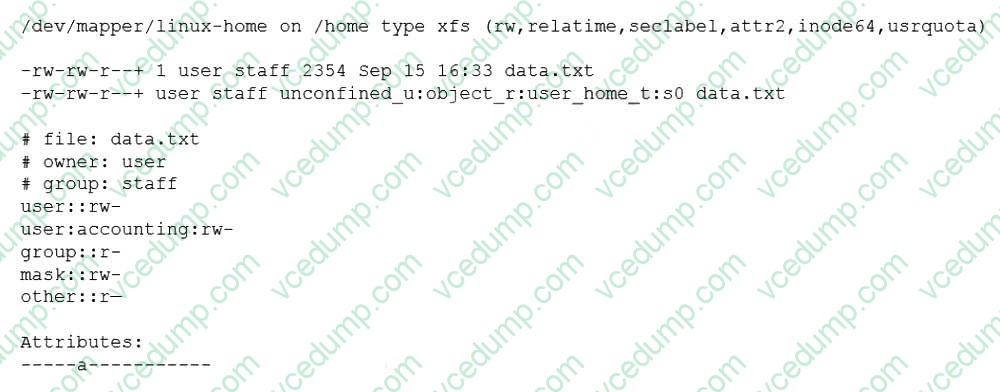
Which of the following is causing the error message?
A. The administrator is not using a highly privileged account. B. The filesystem is mounted with the wrong options. C. SELinux file context is denying the ACL changes. D. File attributes are preventing file modification.
D. File attributes are preventing file modification.
Explanation
File attributes are preventing file modification, which is causing the error message. The output of lsattr /home/user/data.txt shows that the file has the immutable attribute (i) set, which means that the file cannot be changed, deleted, or renamed. The command setfacl -b /home/user/data.txt tries to remove the ACL from the file, but fails because of the immutable attribute. The administrator needs to remove the immutable attribute first by using the command chattr -i /home/ user/data.txt and then try to remove the ACL again. The other options are incorrect because they are not supported by the outputs. The administrator is using a highly privileged account, as shown by the # prompt. The filesystem is mounted with the correct options, as shown by the output of mount | grep /home. SELinux file context is not denying the ACL changes, as shown by the output of ls - Z /home/user/data.txt.
References: CompTIA Linux+ (XK0-005) Certification Study Guide, Chapter 11: Managing Files and Directories, pages 357-358.
Question 379:
A systems administrator needs to integrate a new storage array into the company's existing storage pool. The administrator wants to ensure that the server is able to detect the new storage array. Which of the following commands should the administrator use to ensure that the new storage array is presented to the systems?
A. lsscsi B. lsusb C. lsipc D. lshw
A. lsscsi
Explanation
Question 380:
A DevOps engineer needs to allow incoming traffic to ports in the range of 4000 to 5000 on a Linux server. Which of the following commands will enforce this rule?
A. iptables -f filter -I INPUT -p tcp --dport 4000:5000 -A ACCEPT B. iptables -t filter -A INPUT -p tcp --dport 4000:5000 -j ACCEPT C. iptables filter -A INPUT -p tcp --dport 4000:5000 -D ACCEPT D. iptables filter -S INPUT -p tcp --dport 4000:5000 -A ACCEPT
B. iptables -t filter -A INPUT -p tcp --dport 4000:5000 -j ACCEPT
Explanation
The command iptables -t filter -A INPUT -p tcp --dport 4000:5000 -j ACCEPT will enforce the rule of allowing incoming traffic to ports in the range of 4000 to 5000 on a Linux server. The iptables command is a tool for managing firewall rules on Linux systems. The -t option specifies the table to operate on, in this case filter, which is the default table that contains the rules for filtering packets. The -A option appends a new rule to the end of a chain, in this case INPUT, which is the chain that processes the packets that are destined for the local system. The -p option specifies the protocol to match, in this case tcp, which is the transmission control protocol. The --dport option specifies the destination port or port range to match, in this case 4000:5000, which is the range of ports from 4000 to 5000. The -j option specifies the target to jump to if the rule matches, in this case ACCEPT, which is the target that allows the packet to pass through. The command iptables -t filter -A INPUT -p tcp --dport 4000:5000 -j ACCEPT will add a new rule to the end of the INPUT chain that will accept the incoming TCP packets that have a destination port between 4000 and 5000. This command will enforce the rule and allow the traffic to the specified ports. This is the correct command to use to accomplish the task. The other options are incorrect because they either use the wrong options (-f instead of - t or -D instead of -A) or do not exist (iptables filter -A INPUT -p tcp --dport 4000:5000 -D ACCEPT or iptables filter -S INPUT -p tcp --dport 4000:5000 -A ACCEPT).
References: CompTIA Linux+ (XK0-005) Certification Study Guide, Chapter 18: Securing Linux Systems, page 543.
Nowadays, the certification exams become more and more important and required by more and more
enterprises when applying for a job. But how to prepare for the exam effectively? How to prepare
for the exam in a short time with less efforts? How to get a ideal result and how to find the
most reliable resources? Here on Vcedump.com, you will find all the answers.
Vcedump.com provide not only CompTIA exam questions,
answers and explanations but also complete assistance on your exam preparation and certification
application. If you are confused on your XK0-005 exam preparations
and CompTIA certification application, do not hesitate to visit our
Vcedump.com to find your solutions here.