CompTIA XK0-005 Online Practice
Questions and Exam Preparation
XK0-005 Exam Details
Exam Code
:XK0-005
Exam Name
:CompTIA Linux+
Certification
:CompTIA Certifications
Vendor
:CompTIA
Total Questions
:476 Q&As
Last Updated
:Jul 13, 2026
CompTIA XK0-005 Online Questions &
Answers
Question 311:
A Linux administrator booted up the server and was presented with a non-GUI terminal. The administrator ran the command systemct1 isolate graphical.target and rebooted the system by running systemct1 reboot, which fixed the issue. However, the next day the administrator was presented again with a non-GUI terminal. Which of the following is the issue?
A. The administrator did not reboot the server properly. B. The administrator did not set the default target to basic.target. C. The administrator did not set the default target to graphical.target. D. The administrator did not shut down the server properly.
C. The administrator did not set the default target to graphical.target.
Explanation
The issue is that the administrator did not set the default target to graphical.target. A target is a unit of systemd that groups together other units by a common purpose or state. The graphical.target is a target that starts the graphical user interface (GUI) along with other services. The administrator used the command systemct1 isolate graphical.target to switch to this target temporarily, but this does not change the default target that is activated at boot time. To make this change permanent, the administrator should have used the command systemct1 set-default graphical.target, which creates a symbolic link from /etc/systemd/system/default.target to /usr/lib/systemd/system/graphical.target. The other options are not correct explanations for the issue. The administrator did reboot the server properly by using systemct1 reboot, which shuts down and restarts the system cleanly. The administrator did not need to set the default target to basic.target, which is a minimal target that only starts essential services. The administrator did not shut down the server improperly, which could have caused file system corruption or data loss, but not affect the default target.
References: systemct1(1) - Linux manual page; How to Change Runlevels (targets) in SystemD
Question 312:
A Linux administrator has set up a new DNS forwarder and is configuring all internal servers to use the new forwarder to look up external DNS requests. The administrator needs to modify the firewall on the server for the DNS forwarder to allow the internal servers to communicate to it and make the changes persistent between server reboots. Which of the following commands should be run on the DNS forwarder server to accomplish this task?
A. ufw allow out dns B. systemct1 reload firewalld C. iptables -A OUTPUT -p udp -ra udp -dport 53 -j ACCEPT D. flrewall-cmd --zone-public --add-port-53/udp --permanent
D. flrewall-cmd --zone-public --add-port-53/udp --permanent
Explanation
The command that should be run on the DNS forwarder server to accomplish the task is firewall-cmd --zone=public --add-port=53/udp --permanent. The firewall-cmd command is a tool for managing firewalld, which is a firewall service that provides dynamic and persistent network security on Linux systems. The firewalld uses zones and services to define the rules and policies for the network traffic. The zones are logical groups of network interfaces and sources that have the same level of trust and security. The services are predefined sets of ports and protocols that are associated with certain applications or functions. The --zone=public option specifies the zone name that the rule applies to. The public zone is the default zone that represents the untrusted network, such as the internet. The --add-port=53/udp option adds a port and protocol to the zone. The 53 is the port number that is used by the DNS service. The udp is the protocol that is used by the DNS service. The --permanent option makes the change persistent across reboots. The command firewall-cmd --zone=public --add-port=53/udp --permanent will modify the firewall on the server for the DNS forwarder to allow the internal servers to communicate to it and make the changes persistent between server reboots. This is the correct command to use to accomplish the task. The other options are incorrect because they either do not modify the firewall on the server for the DNS forwarder (ufw allow out dns or systemct1 reload firewalld) or do not use the correct syntax for the command (iptables -A OUTPUT -p udp -ra udp -dport 53 -j ACCEPT instead of iptables -A OUTPUT - p udp -ra udp --dport 53 -j ACCEPT).
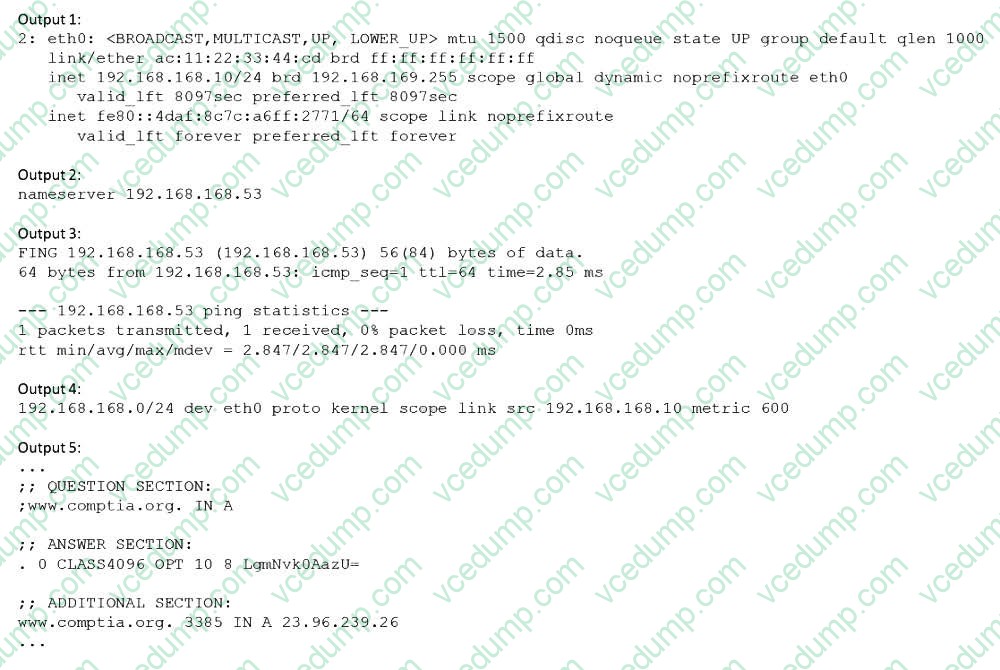
Users have been unable to reach www.comptia.org from a Linux server. A systems administrator is troubleshooting the issue and does the following: Based on the information above, which of the following is causing the issue?
A. The name www.comptia.org does not point to a valid IP address. B. The server 192.168.168.53 is unreachable. C. No default route is set on the server. D. The network interface eth0 is disconnected.
B. The server 192.168.168.53 is unreachable.
Explanation
The issue is caused by the server 192.168.168.53 being unreachable. This server is the DNS server configured in the /etc/resolv.conf file, which is used to resolve domain names to IP addresses. The ping command shows that the server cannot be reached, and the nslookup command shows that the name www.comptia.org cannot be resolved using this server. The other options are incorrect because:
The name www.comptia.org does point to a valid IP address, as shown by the nslookup command using another DNS server (8.8.8.8). The default route is set on the server, as shown by the ip route command, which shows a default gateway of 192.168.168.1. The network interface eth0 is connected, as shown by the ip link command, which shows a state of UP for eth0.
References: CompTIA Linux+ Study Guide, Fourth Edition, page 457-458, 461-462.
Question 314:
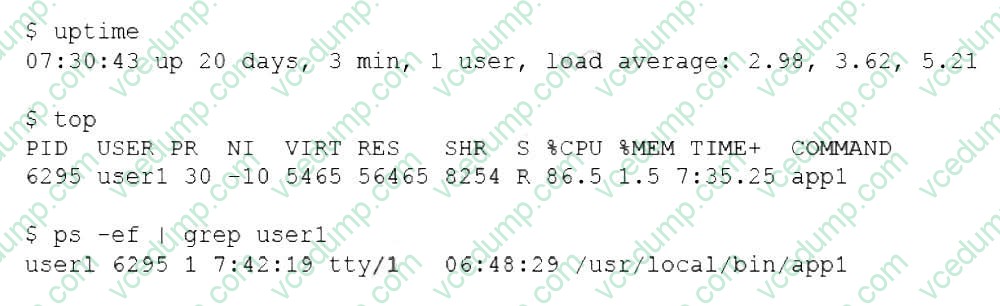
A Linux administrator is troubleshooting the root cause of a high CPU load and average.
Which of the following commands will permanently resolve the issue?
A. renice -n -20 6295 B. pstree -p 6295 C. iostat -cy 1 5 D. kill -9 6295
D. kill -9 6295
Explanation
The command that will permanently resolve the issue of high CPU load and average is kill -9 6295. This command will send a SIGKILL signal to the process with the PID 6295, which is the process that is consuming 99.7% of the CPU according to the top output. The SIGKILL signal will terminate the process immediately and free up the CPU resources. The kill command is used to send signals to processes by PID or name. The other options are not correct commands for resolving this issue. The renice -n -20 6295 command will change the priority (niceness) of the process with PID 6295 to -20, which is the highest priority possible. This will make the process more CPU-intensive, not less. The renice command is used to change the priority of running processes. The pstree - p 6295 command will show a tree of processes with PID 6295 as the root. This will not affect the CPU load or average, but only display information. The pstree command is used to display a tree of processes. The iostat -cy 1 5 command will show CPU and disk I/O statistics for 5 iterations with an interval of 1 second. This will also not affect the CPU load or average, but only display information. The iostat command is used to report CPU and I/O statistics.
References: CompTIA Linux+ (XK0-005) Certification Study Guide, Chapter
11: Troubleshooting Linux Systems; kill(1) - Linux manual page; renice(1) - Linux manual page; pstree(1) - Linux manual page; iostat(1) - Linux manual page
Question 315:
Users report that they cannot access some files located in the /opt/finapp directory after a power outage caused an unexpected server restart. A Linux administrator examines the following filesystem details and system logs: # mount | grep finapp /dev/mapper/rhel-opt_finapp on /opt/finapp type xfs (rw,relatime,seclabel,attr2,inode64,logbufs=8,logbsize=32k,noquota) # lsblk NAME MAJ:MIN RM SIZE RO TYPE MOUNTPOINT sda 8:0 0 931.5G 0 disk sda1 8:1 0 1G 0 part /boot sda2 8:2 0 930.5G 0 part rhel-root 253:0 0 30.5G 0 lvm / rhel-opt_finapp 253:1 0 900G 0 lvm /opt/finapp # grep opt_finapp /var/log/messages XFS (opt_finapp): Corruption detected in inode 3645, extent tree Which of the following commands should the administrator run in an attempt to fix the filesystem?
A. fdisk /dev/mapper/rhel-opt_finapp B. xfs_repair /dev/mapper/rhel-opt_finapp C. lvcreate -L900G -n opt_finapp rhel D. fsck.ext4 /dev/mapper/rhel-opt_finapp
B. xfs_repair /dev/mapper/rhel-opt_finapp
Explanation
For repairing XFS filesystems, the appropriate command is xfs_repair. Since the /opt/finapp directory resides on an XFS filesystem (indicated in the mount output), xfs_repair is suitable for diagnosing and fixing corruption in XFS inodes and extent trees. Using fdisk or fsck.ext4 is not appropriate for XFS filesystems, as these commands are intended for partitioning and ext4 filesystems, respectively.
CompTIA Linux+ Study Guide.
Question 316:
A Linux administrator is providing a new Nginx image from the registry to local cache. Which of the following commands would allow this to happen?
A. docker pull nginx B. docker attach nginx C. docker commit nginx D. docker import nginx
A. docker pull nginx
Explanation
The command that would allow this to happen is docker pull nginx. Docker is a software platform that allows the administrator to create, run, and manage containers on Linux systems. Containers are isolated and lightweight environments that can run applications and services without affecting the host system. Docker uses images to create containers, which are files that contain the code, libraries, dependencies, and configuration of the applications and services. Docker uses a registry to store and distribute images, which is a service that hosts and serves images. Docker Hub is the default public registry that provides a large number of official and community images. Nginx is a popular web server and reverse proxy that can run as a container. The command docker pull nginx will download the latest version of the Nginx image from the Docker Hub registry to the local cache, which is the storage location for the images on the host system. This will allow the administrator to provide a new Nginx image from the registry to the local cache. This is the correct command to use to accomplish the task. The other options are incorrect because they either do not download an image from the registry (docker attach nginx or docker commit nginx) or do not exist (docker import nginx).
References: CompTIA Linux+ (XK0- 005) Certification Study Guide, Chapter 19: Managing Cloud and Virtualization Technologies, page 571.
Question 317:
Joe, a user, is unable to log in to the Linux system. Given the following output:
Which of the following commands would resolve the issue?
A. usermod -s /bin/bash joe B. pam_tally2 -u joe -r C. passwd -u joe D. chage -E 90 joe
B. pam_tally2 -u joe -r
Explanation
The command pam_tally2 -u joe -r will resolve the issue of Joe being unable to log in to the Linux system. The pam_tally2 command is a tool for managing the login counter for the PAM (Pluggable Authentication Modules) system. PAM is a framework for managing authentication and authorization on Linux systems. PAM allows the administrator to define the rules and policies for accessing various system resources and services, such as login, sudo, ssh, or cron. PAM also supports different types of authentication methods, such as passwords, tokens, biometrics, or smart cards. PAM can be used to implement login restrictions, such as limiting the number of failed login attempts, locking the account after a certain number of failures, or enforcing a minimum or maximum time between login attempts. The pam_tally2 command can display, reset, or unlock the login counter for the users or hosts. The -u joe option specifies the user name that the command should apply to. The -r option resets the login counter for the user. The command pam_tally2 -u joe - r will reset the login counter for Joe, which will unlock his account and allow him to log in to the Linux system. This will resolve the issue of Joe being unable to log in to the Linux system. This is the correct command to use to resolve the issue. The other options are incorrect because they either do not unlock the account (usermod -s /bin/bash joe or passwd -u joe) or do not affect the login counter (chage -E 90 joe).
Which of the following is a function of a bootloader?
A. It initializes all the devices that are required to load the OS. B. It mounts the root filesystem that is required to load the OS. C. It helps to load the different kernels to initiate the OS startup process. D. It triggers the start of all the system services.
C. It helps to load the different kernels to initiate the OS startup process.
Explanation
A function of a bootloader is to help load the different kernels to initiate the OS startup process. A bootloader is a program that runs when the system is powered on and prepares the system for booting the OS. A bootloader can load different kernels, which are the core components of the OS, and pass the control to the selected kernel. A bootloader can also provide a menu for the user to choose which kernel or OS to boot. This is a correct function of a bootloader. The other options are incorrect because they are either functions of the kernel (initialize devices or mount root filesystem) or functions of the init system (trigger the start of system services).
References: CompTIA Linux+ (XK0-005) Certification Study Guide, Chapter 8: Managing the Linux Boot Process, page 265.
Question 319:
A Linux administrator modified the SSH configuration file. Which of the following commands should be used to apply the configuration changes?
A. systemct1 stop sshd B. systemct1 mask sshd C. systemct1 reload sshd D. systemct1 start sshd
C. systemct1 reload sshd
Explanation
The systemct1 reload sshd command can be used to apply the configuration changes of the SSH server daemon without restarting it. This is useful to avoid interrupting existing connections. The systemct1 stop sshd command would stop the SSH server daemon, not apply the changes. The systemct1 mask sshd command would prevent the SSH server daemon from being started, not apply the changes. The systemct1 start sshd command would start the SSH server daemon if it is not running, but it would not apply the changes if it is already running.
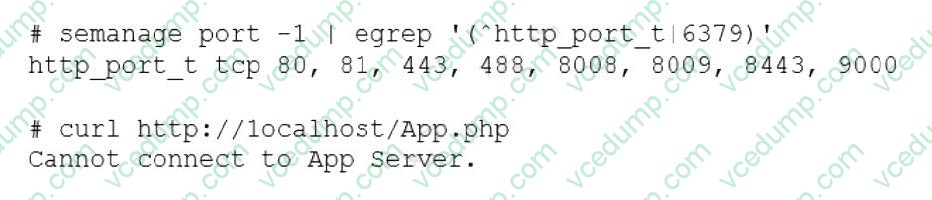
An administrator deployed a Linux server that is running a web application on port 6379/tcp.
SELinux is in enforcing mode based on organization policies.
The port is open on the firewall.
Users who are trying to connect to a local instance of the web application receive Error 13, Permission denied.
The administrator ran some commands that resulted in the following output:
Which of the following commands should be used to resolve the issue?
A. semanage port -d -t http_port_t -p tcp 6379 B. semanage port -a -t http_port_t -p tcp 6379 C. semanage port -a http_port_t -p top 6379 D. semanage port -l -t http_port_tcp 6379
B. semanage port -a -t http_port_t -p tcp 6379
Explanation
The command semanage port -a -t http_port_t -p tcp 6379 adds a new port definition to the SELinux policy and assigns the type http_port_t to the port 6379/tcp. This allows the web application to run on this port and accept connections from users. This is the correct way to resolve the issue. The other options are incorrect because they either delete a port definition (-d), use the wrong protocol (top instead of tcp), or list the existing port definitions (-l).
References: CompTIA Linux+ (XK0-005) Certification Study Guide, Chapter 18: Securing Linux Systems, page 535.
Nowadays, the certification exams become more and more important and required by more and more
enterprises when applying for a job. But how to prepare for the exam effectively? How to prepare
for the exam in a short time with less efforts? How to get a ideal result and how to find the
most reliable resources? Here on Vcedump.com, you will find all the answers.
Vcedump.com provide not only CompTIA exam questions,
answers and explanations but also complete assistance on your exam preparation and certification
application. If you are confused on your XK0-005 exam preparations
and CompTIA certification application, do not hesitate to visit our
Vcedump.com to find your solutions here.