CompTIA XK0-005 Online Practice
Questions and Exam Preparation
XK0-005 Exam Details
Exam Code
:XK0-005
Exam Name
:CompTIA Linux+
Certification
:CompTIA Certifications
Vendor
:CompTIA
Total Questions
:476 Q&As
Last Updated
:Jul 13, 2026
CompTIA XK0-005 Online Questions &
Answers
Question 21:
Which of the following can be used as a secure way to access a remote termi-nal?
A. TFTP B. SSH C. SCP D. SFTP
B. SSH
Explanation
SSH, or Secure Shell, is a protocol that allows you to access a remote terminal or virtual machine securely over an encrypted connection. You can use SSH to run commands, transfer files, or tunnel network traffic on a remote system. To use SSH, you need an SSH client program on your local system and an SSH server program on the remote system. You also need to authenticate yourself using a username and password or a public/private key pair. SSH is widely used by system administrators, developers, and engineers to remotely manage Linux servers and other devices. The other options are not correct answers. TFTP, or Trivial File Transfer Protocol, is a simple protocol that allows you to transfer files between systems, but it does not provide any security or encryption features. SCP, or Secure Copy Protocol, is a protocol that uses SSH to securely copy files between systems, but it does not provide a remote terminal access. FTP, or File Transfer Protocol, is another protocol that allows you to transfer files between systems, but it also does not provide any security or encryption features.
Question 22:
A new Linux systems administrator just generated a pair of SSH keys that should allow connection to the servers. Which of the following commands can be used to copy a key file to remote servers? (Choose two.)
A. wget B. ssh-keygen C. ssh-keyscan D. ssh-copy-id E. ftpd F. scp
D. ssh-copy-id F. scp
Explanation
The commands ssh-copy-id and scp can be used to copy a key file to remote servers. The command ssh-copy-id copies the public key to the authorized_keys file on the remote server, which allows the user to log in without a password. The command scp copies files securely over SSH, which can be used to transfer the key file to any location on the remote server. The other options are incorrect because they are not related to copying key files. The command wget downloads files from the web, the command ssh-keygen generates key pairs, the command ssh-keyscan collects public keys from remote hosts, and the command ftpd is a FTP server daemon.
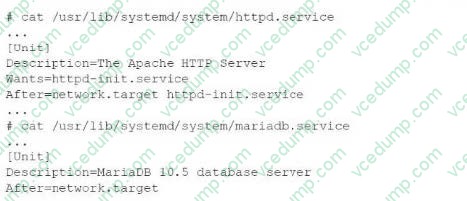
A web application that uses a database for managing logins needs to be set up so that the database is running before the web server starts. A Linux administrator, who is troubleshooting the issue, reviews systemd unit files:
Which of the following should the Linux administrator do to ensure the database starts first?
A. Enable the HTTPD service using the httpd command. B. Add mariadb.service to the Wants for the HTTPD service configuration C. Add Before=httpd.service to the MariaDB configuration. D. Add mariadb. service to the HTTPD service configuration.
C. Add Before=httpd.service to the MariaDB configuration.
Explanation
Question 24:
A Linux administrator wants to find out whether files from the wget package have been altered since they were installed. Which of the following commands will provide the correct information?
A. rpm -i wget B. rpm -qf wget C. rpm -F wget D. rpm -V wget
D. rpm -V wget
Explanation
The command that will provide the correct information about whether files from the wget package have been altered since they were installed is rpm -V wget. This command will use the rpm utility to verify an installed RPM package by comparing information about the installed files with information from the RPM database. The verification process can check various attributes of each file, such as size, mode, owner, group, checksum, capabilities, and so on. If any discrepancies are found, rpm will report them using a single letter code for each attribute. The other options are not correct commands for verifying an installed RPM package. The rpm -i wget command is invalid because -i is used to install a package from a file, not to verify an installed package. The rpm -qf wget command will query which package owns wget as a file name or path name, but it will not verify its attributes. The rpm -F wget command will freshen (upgrade) an already installed package with wget as a file name or path name, but it will not verify its attributes.
References: rpm(8) - Linux manual page; Using RPM to Verify Installed Packages
Question 25:
After system startup, the X Window System GUI login interface is not displaying. Which of the following commands ensures that the GUI is started during the system startup process?
A. systemctl isolate graphical.target B. systemctl unmask xwindow.service C. systemctl enable xwindow.service D. systemctl set-default graphical.target
D. systemctl set-default graphical.target
Explanation
Question 26:
A Linux administrator is configuring a log collector agent to monitor logs in /var/log/collector. The agent is reporting that it cannot write to the directory. The agent runs as the logger user account. The administrator runs a few commands and reviews the following output: makefile Output 1: drwxr-xr-x. 1 root root 0 Oct 20:13 collector Output 2: file: /var/log/collector owner: root
Which of the following is the best way to resolve the issue?
A. setfacl -Rm u:logger:rwx /var/log/collector B. usermod -aG root logger C. chmod 644 /var/log/collector D. chown -R logger/var/log
A. setfacl -Rm u:logger:rwx /var/log/collector
Explanation
The issue is that the logger user does not have write permissions to /var/log/collector. Using setfacl (Access Control Lists) allows fine-grained control over file permissions, granting the logger user the necessary read-write access to the directory without changing the owner or group.
Question 27:
An administrator transferred a key for SSH authentication to a home directory on a remote server. The key file was moved to .ssh/authorized_keys location in order to establish SSH connection without a password. However, the SSH command still asked for the password.
Given the following output:
Which of the following commands would resolve the issue?
A. restorecon .ssh/authorized_keys B. ssh_keygen -t rsa -o .ssh/authorized_keys C. chown root:root .ssh/authorized_keys D. chmod 600 .ssh/authorized_keys
D. chmod 600 .ssh/authorized_keys
Explanation
The command that would resolve the issue is chmod 600 .ssh/authorized_keys. This command will change the permissions of the .ssh/authorized_keys file to 600, which means that only the owner of the file can read and write it. This is necessary for SSH key authentication to work properly, as SSH will refuse to use a key file that is accessible by other users or groups for security reasons. The output of ls -l shows that currently the .ssh/authorized_keys file has permissions of 664, which means that both the owner and group can read and write it, and others can read it. The other options are not correct commands for resolving the issue. The restorecon .ssh/authorized_keys command will restore the default SELinux security context for the .ssh/authorized_keys file, but this will not change its permissions or ownership. The ssh_keygen -t rsa -o .ssh/authorized_keys command is invalid because ssh_keygen is not a valid command (the correct command is ssh-keygen), and the -o option is used to specify a new output format for the key file, not the output file name. The chown root:root .ssh/authorized_keys command will change the owner and group of the .ssh/authorized_keys file to root, but this will not change its permissions or make it accessible by the user who wants to log in with SSH key authentication.
References: How to Use Public Key Authentication with SSH; chmod(1) - Linux manual page
Question 28:
While inspecting a recently compromised Linux system, the administrator identified a number of processes that should not have been running:
Which of the following commands should the administrator use to terminate all of the identified processes?
A. pkill -9 -f "upload*.sh" B. kill -9 "upload*.sh" C. killall -9 -upload*.sh" D. skill -9 "upload*.sh"
A. pkill -9 -f "upload*.sh"
Explanation
The pkill -9 -f "upload*.sh" command will terminate all of the identified processes. This command will send a SIGKILL signal (-9) to all processes whose full command line matches the pattern "upload*.sh" (-f). This signal will force the processes to terminate immediately without giving them a chance to clean up or save their state. The kill -9 "upload*.sh" command is invalid, as kill requires a process ID (PID), not a pattern. The killall -9 "upload*.sh" command is incorrect, as killall requires an exact process name, not a pattern. The skill -9 "upload*.sh" command is incorrect, as skill requires a username or a session ID (SID), not a pattern.
References: CompTIA Linux+ (XK0-005) Certification Study Guide, Chapter
15: Managing Memory and Process Execution, page 470.
Question 29:
A Linux administrator is creating a primary partition on the replacement hard drive for an application server. Which of the following commands should the administrator issue to verify the device name of this partition?
A. sudo fdisk /dev/sda B. sudo fdisk -s /dev/sda C. sudo fdisk -l D. sudo fdisk -h
C. sudo fdisk -l
Explanation
The command sudo fdisk -l should be issued to verify the device name of the partition. The sudo command allows the administrator to run commands as the superuser or another user. The fdisk command is a tool for manipulating disk partitions on Linux systems. The -l option lists the partitions on all disks or a specific disk. The command sudo fdisk -l will show the device names, sizes, types, and other information of the partitions on all disks. The administrator can identify the device name of the partition by looking at the output. This is the correct command to use to accomplish the task. The other options are incorrect because they either do not list the partitions (sudo fdisk /dev/sda or sudo fdisk -h) or do not exist (sudo fdisk -s /dev/sda).
A systems administrator intends to use a UI-JID to mount a new partition per-manently on a Linux system. Which of the following commands can the adminis-trator run to obtain information about the UUlDs of all disks attached to a Linux system?
A. fcstat B. blkid C. dmsetup D. Isscsi
B. blkid
Explanation
To obtain information about the UUIDs of all disks attached to a Linux system, the administrator can run the command blkid (B). This will display the block device attributes, including the UUID, label, type, and partition information. The other commands are not related to this task.
References:
[CompTIA Linux+ Study Guide], Chapter 5: Managing Filesystems and Logical Volumes, Section: Identifying Disks by UUID
Nowadays, the certification exams become more and more important and required by more and more
enterprises when applying for a job. But how to prepare for the exam effectively? How to prepare
for the exam in a short time with less efforts? How to get a ideal result and how to find the
most reliable resources? Here on Vcedump.com, you will find all the answers.
Vcedump.com provide not only CompTIA exam questions,
answers and explanations but also complete assistance on your exam preparation and certification
application. If you are confused on your XK0-005 exam preparations
and CompTIA certification application, do not hesitate to visit our
Vcedump.com to find your solutions here.