SC-200 Real Exam Questions

Microsoft Security Operations Analyst

406 questions available · Page 1 of 41

Updated Exam DumpsVerified AnswersPass Guarantee

Get Complete Exam Dumps
Case Study 2

Overview

Litware Inc. is a renewable company.

Litware has offices in Boston and Seattle. Litware also has remote users located across the United States.
To access Litware resources, including cloud resources, the remote users establish a VPN connection to either office.

Existing Environment

Identity Environment

The network contains an Active Directory forest named litware.com that syncs to an Azure Active Directory
(Azure AD) tenant named litware.com.

Microsoft 365 Environment

Litware has a Microsoft 365 E5 subscription linked to the litware.com Azure AD tenant. Microsoft Defender for Endpoint is deployed to all computers that run Windows 10. All Microsoft Cloud App Security built-in anomaly detection policies are enabled.

Azure Environment

Litware has an Azure subscription linked to the litware.com Azure AD tenant. The subscription contains resources in the East US Azure region as shown in the following table.

Network Environment

Each Litware office connects directly to the internet and has a site-to-site VPN connection to the virtual networks in the Azure subscription.

On-premises Environment

The on-premises network contains the computers shown in the following table.

Current problems

Cloud App Security frequently generates false positive alerts when users connect to both offices simultaneously.

Planned Changes

Litware plans to implement the following changes:

1. Create and configure Azure Sentinel in the Azure subscription.
2. Validate Azure Sentinel functionality by using Azure AD test user accounts.

Business Requirements

Litware identifies the following business requirements:

1. The principle of least privilege must be used whenever possible.
2. Costs must be minimized, as long as all other requirements are met.
3. Logs collected by Log Analytics must provide a full audit trail of user activities.
4. All domain controllers must be protected by using Microsoft Defender for Identity.

Azure Information Protection Requirements

All files that have security labels and are stored on the Windows 10 computers must be available from the Azure Information Protection - Data discovery dashboard.

Microsoft Defender for Endpoint requirements

All Cloud App Security unsanctioned apps must be blocked on the Windows 10 computers by using Microsoft Defender for Endpoint.

Microsoft Cloud App Security requirements

Cloud App Security must identify whether a user connection is anomalous based on tenant-level data.

Azure Defender Requirements

All servers must send logs to the same Log Analytics workspace.

Azure Sentinel Requirements

Litware must meet the following Azure Sentinel requirements:

1. Integrate Azure Sentinel and Cloud App Security.
2. Ensure that a user named admin1 can configure Azure Sentinel playbooks.
3. Create an Azure Sentinel analytics rule based on a custom query. The rule must automatically initiate the execution of a playbook.
4. Add notes to events that represent data access from a specific IP address to provide the ability to

reference the IP address when navigating through an investigation graph while hunting.
5. Create a test rule that generates alerts when inbound access to Microsoft Office 365 by the Azure AD test user accounts is detected. Alerts generated by the rule must be grouped into individual incidents, with one incident per test user account.

Question 1 Single choice

Which rule setting should you configure to meet the Azure Sentinel requirements?

  1. A

    From Set rule logic, turn off suppression.

  2. B

    From Analytics rule details, configure the tactics.

  3. C

    From Set rule logic, map the entities.

  4. D

    From Analytics rule details, configure the severity.

Show answer and explanation

Correct answer: C

Explanation

Check any analytics rules, after you map the entities under the "Set rule logic" tab, then you can enable the "Alert grouping" under "Incident settings" by selecting "Enabled", then select "Grouping alerts into a single incident if the selected entity types and details match:" and select the entities from the drop down menu.

Question 2 Hotspot

HOTSPOT

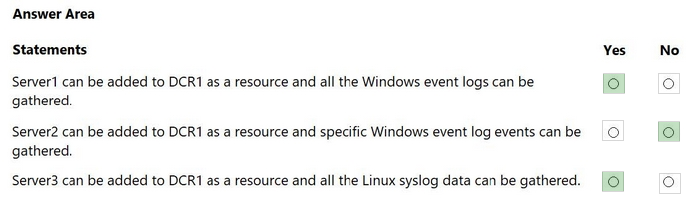
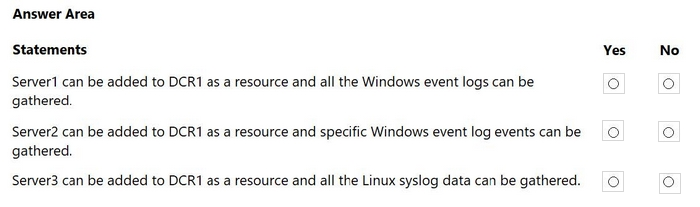
Your on-premises network contains a Hyper-V cluster. The cluster contains the virtual machines shown in the following table.

You have a Microsoft Sentinel workspace named SW1.

You have a data collection rule (DCR) that has the following configurations:

1. Name: DCR1
2. Destination: SW1
3. Platform type: All
4. Data collection endpoint: None
5. Data source: Windows event logs, Linux syslog

For each of the following statements, select Yes if the statement is true. Otherwise, select No.

NOTE: Each correct selection is worth one point.

Question diagram
Show answer and explanation
Correct answer diagram
Question 3 Single choice

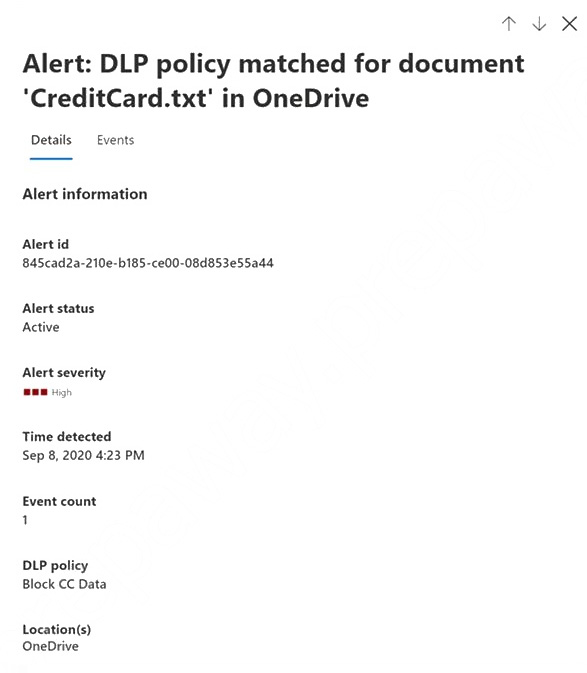
You have a Microsoft 365 subscription. The subscription uses Microsoft 365 Defender and has data loss prevention (DLP) policies that have aggregated alerts configured.

You need to identify the impacted entities in an aggregated alert.

What should you review in the DLP alert management dashboard of the Microsoft 365 compliance center?

  1. A

    the Events tab of the alert

  2. B

    the Sensitive Info Types tab of the alert

  3. C

    Management log

  4. D

    the Details tab of the alert

Show answer and explanation

Correct answer: C

Explanation

Advanced DLP alert options are configured in the existing DLP policy authoring workflow. These provideeligibleDLP customers with the ability to tailor how they organize and display DLP policy enforcement event alertswith the information they need to investigate and address DLP policy violations quickly. Historical workflow information for alerts is available in the Management log

Note: Advanced alert configuration options: These options are part of the DLP policy authoring flow. Use them to create rich alert configurations. You can create a single-event alert or an aggregated alert, based on the number of events or the size of the leaked data.

Incorrect:
* the Events tab of the alert
Select the Events tab to view all of the events associated with the alert. You can choose a particular event to view its details.

* . the Sensitive Info Types tab of the alert
Select the Sensitive Info Types tab to view details about the sensitive information types detected in the content. Details include confidence and count.

* the Details tab of the alert

References:
https://techcommunity.microsoft.com/t5/security-compliance-and-identity/announcing-microsoft-endpoint-dlp-general-availability/ba-p/1814010
https://learn.microsoft.com/en-us/microsoft-365/compliance/dlp-configure-view-alerts-policies

Question 4 Hotspot

HOTSPOT

You have a Microsoft 365 E5 subscription that uses Microsoft Defender for Endpoint.

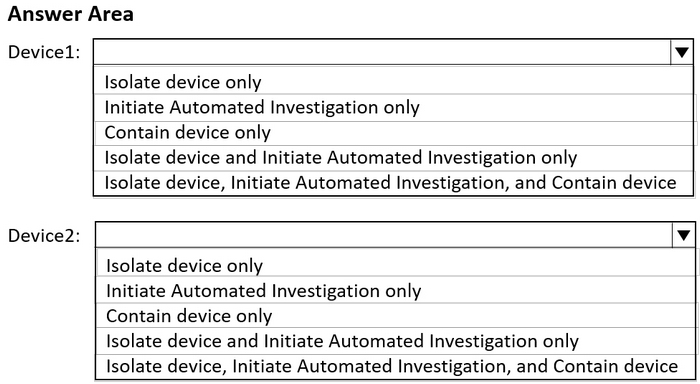
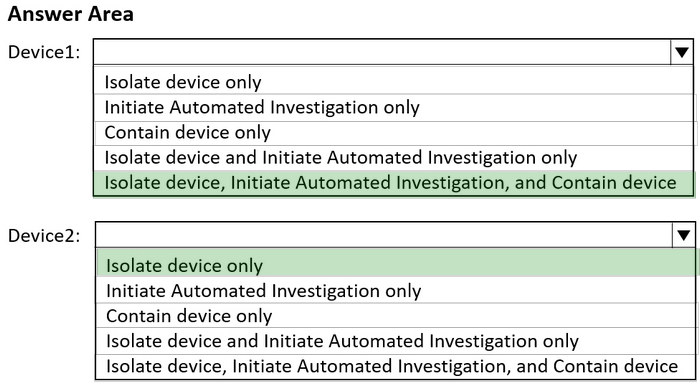
You have the on-premises devices shown in the following table.

You are preparing an incident response plan for devices infected by malware.

You need to recommend response actions that meet the following requirements:

1. Block malware from communicating with and infecting managed devices.
2. Do NOT affect the ability to control managed devices.

Which actions should you use for each device? To answer, select the appropriate options in the answer area.

NOTE: Each correct selection is worth one point.

Question diagram
Show answer and explanation
Correct answer diagram
Question 5 Single choice

You have a Microsoft 365 subscription that has Microsoft 365 Defender enabled.

You need to identify all the changes made to sensitivity labels during the past seven days.

What should you use?

  1. A

    the Incidents blade of the Microsoft 365 Defender portal

  2. B

    the Alerts settings on the Data Loss Prevention blade of the Microsoft 365 compliance center

  3. C

    Activity explorer in the Microsoft 365 compliance center

  4. D

    the Explorer settings on the Email & collaboration blade of the Microsoft 365 Defender portal

Show answer and explanation

Correct answer: C

Explanation

Labeling activities are available in Activity explorer.

For example:
Sensitivity label applied
This event is generated each time an unlabeled document is labeled or an email is sent with a sensitivity label.

It is captured at the time of save in Office native applications and web applications. It is captured at the time of occurrence in Azure Information protection add-ins. Upgrade and downgrade labels actions can also be monitored via the Label event type field and filter.

References:
https://docs.microsoft.com/en-us/microsoft-365/compliance/data-classification-activity-explorer-available-events?view=o365-worldwide

Question 6 Single choice

Note: This section contains one or more sets of questions with the same scenario and problem. Each question presents a unique solution to the problem. You must determine whether the solution meets the stated goals. More than one solution in the set might solve the problem. It is also possible that none of the solutions in the set solve the problem.

After you answer a question in this section, you will NOT be able to return. As a result, these questions do not appear on the Review Screen.

You have a Microsoft 365 subscription.

You have 1,000 Windows devices that have a third-party antivirus product installed and Microsoft Defender

Antivirus in passive mode.

You need to ensure that the devices are protected from malicious artifacts that were undetected by the
third-party antivirus product.

Solution: You configure Controlled folder access.

Does this meet the goal?

  1. A

    Yes

  2. B

    No

Show answer and explanation

Correct answer: B

Question 7 Single choice

You have an Azure subscription that uses Microsoft Defender for Cloud and contains a resource group named RG1. RG1. You need to configure just in time (JIT) VM access for the virtual machines in RG1. The solution must meet the following

1. Limit the maximum request time to two hours.
2. Limit protocol access to Remote Desktop Protocol (RDP) only.
3. Minimize administrative effort.

What should you use?

  1. A

    Azure AD Privileged Identity Management (PIM)

  2. B

    Azure Policy

  3. C

    Azure Front Door

  4. D

    Azure Bastion

Show answer and explanation

Correct answer: A

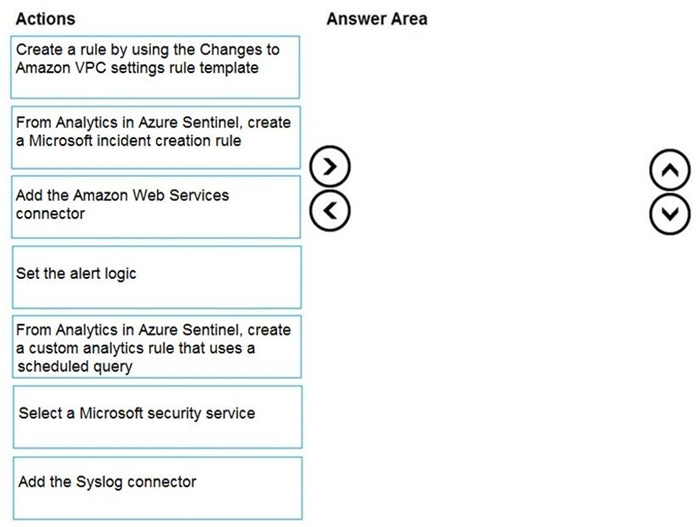
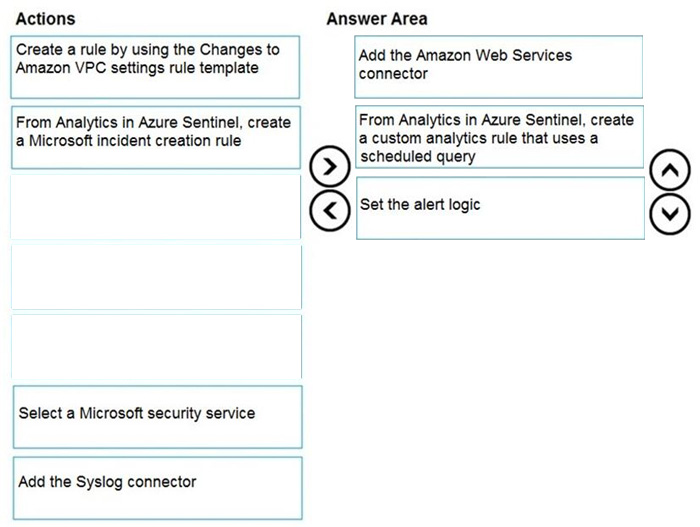
Question 8 Drag & drop

DRAG DROP

You need to use an Azure Sentinel analytics rule to search for specific criteria in Amazon Web Services (AWS) logs and to generate incidents.

Which three actions should you perform in sequence? To answer, move the appropriate actions from the list of actions to the answer area and arrange them in the correct order.

Question diagram
Show answer and explanation
Correct answer diagram
Explanation

References:
https://docs.microsoft.com/en-us/azure/sentinel/detect-threats-custom

Question 9 Hotspot

HOTSPOT

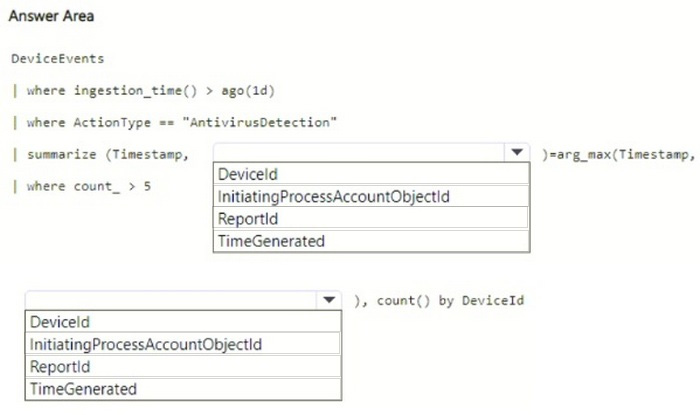
You have a Microsoft 365 subscription that uses Microsoft Defender XDR.

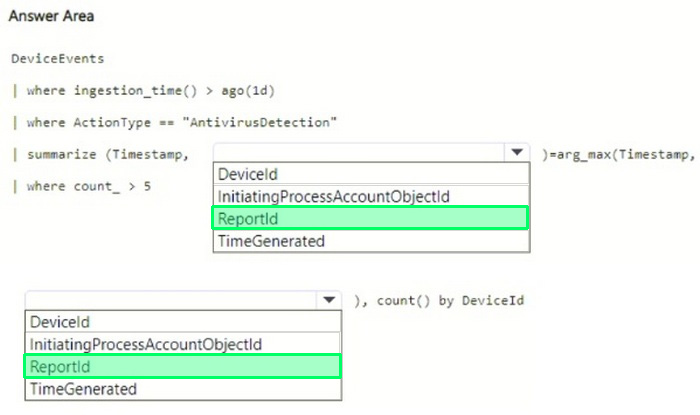
You need to create a custom detection rule that will identify devices that had more than five antivirus detections within the last 24 hours.

How should you complete the query? To answer, select the appropriate options in the answer area.

NOTE: Each correct selection is worth one point.

Question diagram
Show answer and explanation
Correct answer diagram
Question 10 Single choice

Your company has a single office in Istanbul and a Microsoft 365 subscription.

The company plans to use conditional access policies to enforce multi-factor authentication (MFA).

You need to enforce MFA for all users who work remotely.

What should you include in the solution?

  1. A

    a fraud alert

  2. B

    a user risk policy

  3. C

    a named location

  4. D

    a sign-in user policy

Show answer and explanation

Correct answer: C

Explanation

References:
https://docs.microsoft.com/en-us/azure/active-directory/conditional-access/location-condition