SC-100 Exam Details
-
Exam Code
:SC-100 -
Exam Name
:Microsoft Cybersecurity Architect -
Certification
:Microsoft Certifications -
Vendor
:Microsoft -
Total Questions
:350 Q&As -
Last Updated
:Jul 12, 2026
Microsoft SC-100 Online Questions & Answers
-
Question 111:
You have an Azure subscription that contains multiple network security groups (NSGs), multiple virtual machines, and an Azure Bastion host named bastion1.
Several NSGs contain rules that allow direct RDP access to the virtual machines by bypassing bastion1.
You need to ensure that the virtual machines can be accessed only by using bastion1. The solution must prevent the use of NSG rules to bypass bastion1.
What should you include in the solution?
A. Azure Virtual Network Manager connectivity configurations
B. Azure Virtual Network Manager security admin rules
C. Azure Firewall application rules
D. Azure Firewall network rules -
Question 112:
HOTSPOT
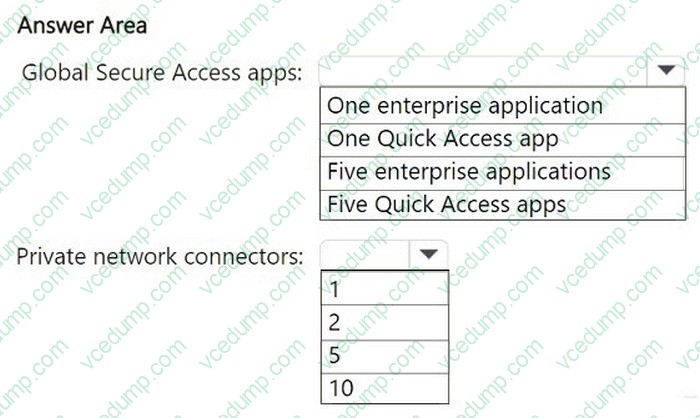
Your on-premises network contains an Active Directory Domain Services (AD DS) domain with a group named Group1 and five servers running Windows Server. Each server hosts a standalone app used by the members of Group1.
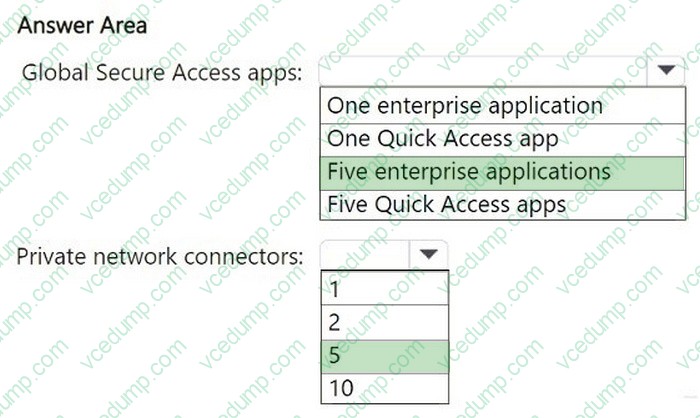
You have a Microsoft Entra tenant that syncs with the domain and plan to manage access to the apps by deploying Global Secure Access. A Conditional Access policy will be used to enforce security controls for all connections to the apps.
You need to recommend a Global Secure Access app and Microsoft Entra private network connector configuration for the planned deployment. The solution must minimize administrative effort and ensure high availability.
What is the minimum number of Global Secure Access apps and private network connectors you should recommend?
To answer, select the appropriate options in the answer area.
Each correct selection is worth one point.
-
Question 113:
You are designing a ransomware response plan that follows Microsoft Security Best Practices.
You need to recommend a solution to limit the scope of damage of ransomware attacks without being locked out.
What should you include in the recommendation?
A. device compliance policies
B. Privileged Access Workstations (PAWs)
C. Customer Lockbox for Microsoft Azure
D. emergency access accounts -
Question 114:
HOTSPOT
You have an on-premises datacenter named Site1.
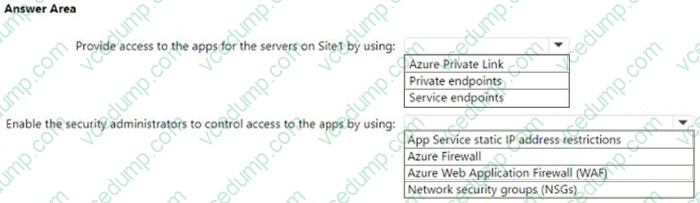
You have an Azure subscription that contains a virtual network named VNet1 and multiple Azure App Service apps. Site1 is connected to VNet1 by using a Site-to-Site (P2S) VPN connection. The apps are accessed by using public internet connections.
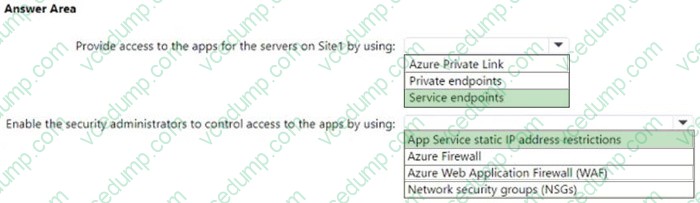
You need to recommend a solution for providing secure access to the apps. The solution must meet the following requirements:
1. Servers on Site1 must use a VPN connection to access the apps.
2. Access to the apps must be restricted to specific servers on Site1.
3. Security administrators for VNet1 must be able to control which servers can access the apps.
4. Costs must be minimized.
What should you include in the recommendation? To answer, select the appropriate options in the answer area.
NOTE: Each correct selection is worth one point.
-
Question 115:
Your company develops several applications that are accessed as custom enterprise applications in Azure AD.
You need to recommend a solution to prevent users on a specific list of countries from connecting to the applications.
What should you include in the recommendation?
A. activity policies in Microsoft Defender for Cloud Apps
B. sign-in risk policies in Azure AD Identity Protection
C. Azure AD Conditional Access policies
D. device compliance policies in Microsoft Endpoint Manager
E. user risk policies in Azure AD Identity Protection -
Question 116:
Note: This question is part of a series of questions that present the same scenario. Each question in the series contains a unique solution that might meet the stated goals. Some question sets might have more than one correct solution, while others might not have a correct solution.
After you answer a question in this section, you will NOT be able to return to it. As a result, these questions will not appear in the review screen.
Your on-premises network contains an e-commerce web app that was developed in Angular and Node,js. The web app uses a MongoDB database.
You plan to migrate the web app to Azure. The solution architecture team proposes the following architecture as an Azure landing zone.

You need to provide recommendations to secure the connection between the web app and the database. The solution must follow the Zero Trust model.
Solution: You recommend implementing Azure Front Door with Azure Web Application Firewall (WAF).
Does this meet the goal?
A. Yes
B. No -
Question 117:
HOTSPOT
You have an Azure SQL database named DB1 that contains customer information.
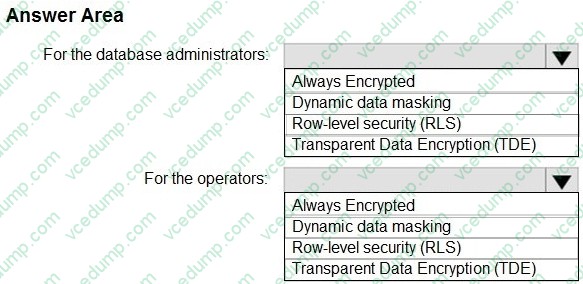
A team of database administrators has full access to DB1.
To address customer inquiries, operators in the customer service department use a custom web app named App1 to view the customer information.
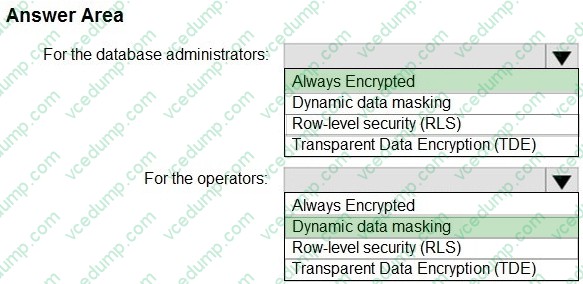
You need to design a security strategy for DB1. The solution must meet the following requirement:
1. When the database administrators access DB1 by using SQL management tools, they must be prevented from viewing the content of the CreditCard attribute of each customer record.
2. When the operators view customer records in App1, they must view only the last four digits of the CreditCard attribute.
What should you include in the design? To answer, select the appropriate options in the answer area.
NOTE: Each correct selection is worth one point.
-
Question 118:
You have an Azure subscription. The subscription contains 200 virtual machines that run Windows Server 2022 and are protected by using Microsoft Defender for Servers Plan 1. You have an Amazon Web Services (AWS) subscription.
To the AWS subscription, you plan to deploy 100 virtual machines that run Windows Server 2022.
You need to recommend which agent to deploy to the virtual machines in the AWS subscription.
The solution must meet the following requirements:
1. Provide consistent workload protection across all cloud platforms.
2. Minimize the number of agents deployed to each virtual machine.
What should you recommend?
A. the log Analytics agent
B. the Azure Connected Machine agent
C. the Microsoft Defender for Endpoint agent
D. the Azure Monitor Agent -
Question 119:
You are designing security for an Azure landing zone.
Your company identifies the following compliance and privacy requirements:
1. Encrypt cardholder data by using encryption keys managed by the company.
2. Encrypt insurance claim files by using encryption keys hosted on-premises.
Which two configurations meet the compliance and privacy requirements? Each correct answer presents part of the solution.
NOTE: Each correct selection is worth one point.
A. Store the cardholder data in an Azure SQL database that is encrypted by using Microsoft-managed keys.
B. Store the insurance claim data in Azure Blob storage encrypted by using customer-provided keys.
C. Store the cardholder data in an Azure SQL database that is encrypted by using keys stored in Azure Key Vault Managed HSM.
D. Store the insurance claim data in Azure Files encrypted by using Azure Key Vault Managed HSM. -
Question 120:
HOTSPOT
You have a Microsoft Entra tenant named contoso.com that syncs with an Active Directory Domain Services (AD DS) domain named corp.contoso.com.
The domain contains 100 devices that have the following configurations:
1. Hybrid joined
2. Enrolled in Microsoft Intune.
3. Disabled built-in local administrator account.
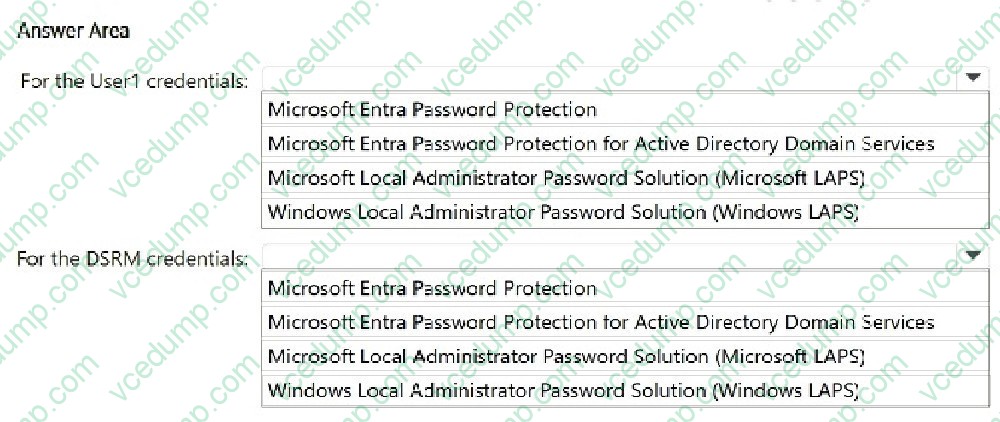
4. Contain a local user account named User1 that is a member of the local administrators group.
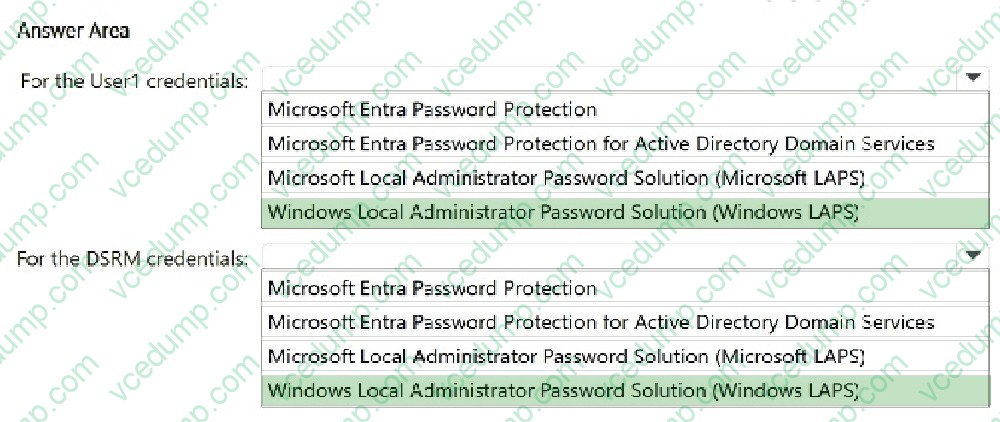
You need to recommend a solution that meets the following requirements:
1. Ensures that the Directory Services Restore Mode (DSRM) credentials of each domain controller are backed up to the AD DS database
2. Ensures that the password of User1 changes automatically every 60 days
3. Ensures that the credentials of User1 are stored in an encrypted store
4. Prevents the User1 password from being changed manually
5. Whenever possible, stores all credentials in contoso.com
6. Minimizes administrative effort.
What should you include in the recommendation? To answer, select the appropriate options in the answer area.
NOTE: Each correct selection is worth one point.
Related Exams:
-
62-193
Technology Literacy for Educators -
70-243
Administering and Deploying System Center 2012 Configuration Manager -
70-355
Universal Windows Platform – App Data, Services, and Coding Patterns -
77-420
Excel 2013 -
77-427
Excel 2013 Expert Part One -
77-725
Word 2016 Core Document Creation, Collaboration and Communication -
77-726
Word 2016 Expert Creating Documents for Effective Communication -
77-727
Excel 2016 Core Data Analysis, Manipulation, and Presentation -
77-728
Excel 2016 Expert: Interpreting Data for Insights -
77-731
Outlook 2016 Core Communication, Collaboration and Email Skills
Tips on How to Prepare for the Exams
Nowadays, the certification exams become more and more important and required by more and more enterprises when applying for a job. But how to prepare for the exam effectively? How to prepare for the exam in a short time with less efforts? How to get a ideal result and how to find the most reliable resources? Here on Vcedump.com, you will find all the answers. Vcedump.com provide not only Microsoft exam questions, answers and explanations but also complete assistance on your exam preparation and certification application. If you are confused on your SC-100 exam preparations and Microsoft certification application, do not hesitate to visit our Vcedump.com to find your solutions here.