PROFESSIONAL-CLOUD-NETWORK-ENGINEER Exam Details
-
Exam Code
:PROFESSIONAL-CLOUD-NETWORK-ENGINEER -
Exam Name
:Professional Cloud Network Engineer -
Certification
:Google Certifications -
Vendor
:Google -
Total Questions
:333 Q&As -
Last Updated
:Jul 12, 2026
Google PROFESSIONAL-CLOUD-NETWORK-ENGINEER Online Questions & Answers
-
Question 291:
You have recently taken over responsibility for your organization's Google Cloud network security configurations. You want to review your Cloud Next Generation Firewall (Cloud NGFW) configurations to ensure that there are no rules allowing ingress traffic to your VMs and services from the internet. You want to avoid manual work.
What should you do?
A. Export all your Cloud NGFW rules into a CSV file and search for 0.0.0.0/0.
B. Use Firewall Insights, and enable insights for Overly permissive rules.
C. Run Connectivity Tests from multiple external sources to confirm that traffic is not allowed to ingress to your most critical services in Google Cloud.
D. Review Network Analyzer insights on the VPC network category. -
Question 292:
Your organization mandates that all internal IP addresses used by all database VMs must be statically allocated. While analyzing your VPC IP address allocations, you observed that the database VMs do not have static IP addresses. You need to configure the VPC to follow your organization's mandate without causing any disruption to current operations.
What should you do?
A. Promote the internal IP addresses to static assignments for all database VMs.
B. Create a firewall rule to allow only traffic to the IP addresses allocated to your database VMs.
C. Define a maintenance window to shut down the database VMs one at a time, promote the internal IP address to a static assignment, and restart the VM.
D. Define an organization policy to allow only statically allocated IP addresses for VMs. Ensure the prefix matches your database VMs. -
Question 293:
You have the following routing design. You discover that Compute Engine instances in Subnet-2 in the asia-southeast1 region cannot communicate with compute resources on-premises.
What should you do?
A. Configure a custom route advertisement on the Cloud Router.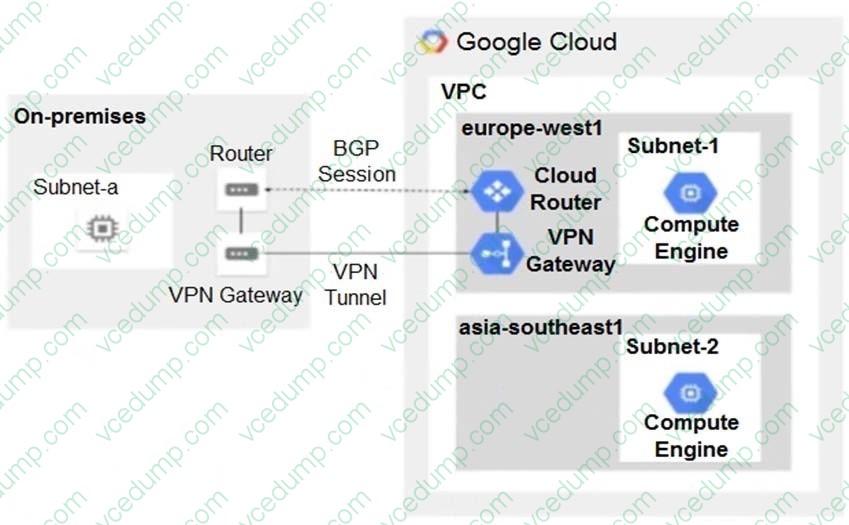
B. Enable IP forwarding in the asia-southeast1 region.
C. Change the VPC dynamic routing mode to Global.
D. Add a second Border Gateway Protocol (BGP) session to the Cloud Router. -
Question 294:
You are the network administrator responsible for hybrid connectivity at your organization. Your developer team wants to use Cloud SQL in the us-west1 region in your Shared VPC. You configured a Dedicated Interconnect connection and a Cloud Router in us-west1, and the connectivity between your Shared VPC and on-premises data center is working as expected. You just created the private services access connection required for Cloud SQL using the reserved IP address range and default settings. However, your developers cannot access the Cloud SQL instance from on-premises. You want to resolve the issue.
What should you do?
A. 1. Modify the VPC Network Peering connection used for Cloud SQL, and enable the import and export of routes.2. Create a custom route advertisement in your Cloud Router to advertise the Cloud SQL IP address range.
B. 1. Change the VPC routing mode to global.2. Create a custom route advertisement in your Cloud Router to advertise the Cloud SQL IP address range.
C. 1. Create an additional Cloud Router in us-west2.2. Create a new Border Gateway Protocol (BGP) peering connection to your on-premises data center.3. Modify the VPC Network Peering connection used for Cloud SQL, and enable the import and export of routes.
D. 1. Change the VPC routing mode to global.2. Modify the VPC Network Peering connection used for Cloud SQL, and enable the import and export of routes. -
Question 295:
You are troubleshooting connectivity issues between Google Cloud and a public SaaS provider. The connectivity between the two environments is through the public internet. Your users are reporting intermittent connection errors when using
TCP to connect; however, ICMP tests show no failures. According to users, errors occur around the same time every day. You want to troubleshoot and gather information by using Google Cloud tools that are most likely to provide insights to what is occurring within Google Cloud.
What should you do?
A. Create a Connectivity Test. Review the results for configuration issues in the VPC routing table.
B. Enable and review Cloud Logging for Cloud Armor. Look for logs with errors that match the destination IP address of the public SaaS provider.
C. Enable and review Cloud Logging on your Cloud NAT Gateway. Look for logs with errors that match the destination IP address of the public SaaS provider.
D. Enable the Firewall Insights API. Set the Deny rule insights observation period to one day. Review Insight results to assure there are no firewall rules denying traffic. -
Question 296:
You are troubleshooting an application in your organization's Google Cloud network that is not functioning as expected. You suspect that packets are getting lost somewhere. The application sends packets intermittently at a low volume from a Compute Engine VM to a destination on your on-premises network through a pair of Cloud Interconnect VLAN attachments. You validated that the Cloud Next Generation Firewall (Cloud NGFW) rules do not have any deny statements blocking egress traffic, and you do not have any explicit allow rules. Following Google-recommended practices, you need to analyze the flow to see if packets are being sent correctly out of the VM to isolate the issue.
What should you do?
A. Create a packet mirroring policy that is configured with your VM as the source and destined to a collector. Analyze the packet captures.
B. Enable VPC Flow Logs on the subnet that the VM is deployed in with SAMPLE_RATE = 1.0, and run a query in Logs Explorer to analyze the packet flow.
C. Verify the network/attachment/egress_dropped_packets_count Cloud Interconnect VLAN attachment metric.
D. Enable Firewall Rules Logging on your firewall rules and review the logs. -
Question 297:
You are managing the integration of a newly acquired company. The main corporate VPC (vpc-corp) and the acquired company's VPC (vpc-acquired) have overlapping subnet CIDR ranges. You need to enable a private connection that allows the monitoring service in vpc-corp to initiate traffic to application servers in vpc-acquired while preventing all other connections.
What should you do?
A. Create a Network Connectivity Center hub. On the vpc-acquired spoke, configure Private NAT to translate its addresses for inbound traffic.
B. Create a Network Connectivity Center hub, connect both VPCs as spokes, and deploy a proxy instance in the hub.
C. Deploy Cloud NAT gateway in vpc-corp. Configure Cloud NAT to translate traffic outbound. Configure an external load balancer in vpc-acquired to accept the connections from Cloud NAT.
D. Create a Network Connectivity Center hub. On the vpc-corp spoke, configure Private NAT to translate its source address range for outbound traffic. -
Question 298:
In order to provide subnet level isolation, you want to force instance-A in one subnet to route through a security appliance, called instance-B, in another subnet.
What should you do?
A. Create a more specific route than the system-generated subnet route, pointing the next hop to instance-B with no tag.
B. Create a more specific route than the system-generated subnet route, pointing the next hop to instance-B with a tag applied to instance-A.
C. Delete the system-generated subnet route and create a specific route to instance-B with a tag applied to instance-A.
D. Move instance-B to another VPC and, using multi-NIC, connect instance-B's interface to instance-A's network. Configure the appropriate routes to force traffic through to instance-A. -
Question 299:
You need to configure a static route to an on-premises resource behind a Cloud VPN gateway that is configured for policy-based routing using the gcloud command.
Which next hop should you choose?
A. The default internet gateway
B. The IP address of the Cloud VPN gateway
C. The name and region of the Cloud VPN tunnel
D. The IP address of the instance on the remote side of the VPN tunnel -
Question 300:
You manage a multi-tenant Google Kubernetes Engine (GKE) cluster where multiple teams deploy applications into a shared namespace.
- One team has deployed a two-tier application with a frontend deployment and a backend deployment, identified by the labels app:frontend and app:backend, respectively.
- Another team runs an analytics service, labeled app:analytics, in the same namespace.
You must implement a security rule stating that only Pods from the frontend deployment are allowed to connect to the backend Pods on TCP port 8080. You also must ensure that all other traffic to the backend Pods, including from the analytics pods, must be blocked while minimizing operational overhead.
What should you do?
A. Create a VPC firewall rule with a high priority to deny ingress traffic on port 8080 for all GKE nodes.
B. Install Istio on the cluster, and configure an AuthorizationPolicy to only allow requests from the frontend's service account to the backend service.
C. Create a NetworkPolicy that selects the Pods with the app:backend label and includes an ingress rule that denies traffic from Pods with the app:analytics label.
D. Create a NetworkPolicy that selects Pods with the app:backend label and includes an ingress rule that only allows traffic on TCP port 8080 from Pods with the app:frontend label.
Related Exams:
-
ADWORDS-DISPLAY
Google AdWords: Display Advertising -
ADWORDS-FUNDAMENTALS
Google AdWords: Fundamentals -
ADWORDS-MOBILE
Google AdWords: Mobile Advertising -
ADWORDS-REPORTING
Google AdWords: Reporting -
ADWORDS-SEARCH
Google AdWords: Search Advertising -
ADWORDS-SHOPPING
Google AdWords: Shopping Advertising -
ADWORDS-VIDEO
Google AdWords: Video Advertising -
APIGEE-API-ENGINEER
Apigee Certified API Engineer -
ASSOCIATE-ANDROID-DEVELOPER
Associate Android Developer (Kotlin and Java) -
ASSOCIATE-CLOUD-ENGINEER
Associate Cloud Engineer
Tips on How to Prepare for the Exams
Nowadays, the certification exams become more and more important and required by more and more enterprises when applying for a job. But how to prepare for the exam effectively? How to prepare for the exam in a short time with less efforts? How to get a ideal result and how to find the most reliable resources? Here on Vcedump.com, you will find all the answers. Vcedump.com provide not only Google exam questions, answers and explanations but also complete assistance on your exam preparation and certification application. If you are confused on your PROFESSIONAL-CLOUD-NETWORK-ENGINEER exam preparations and Google certification application, do not hesitate to visit our Vcedump.com to find your solutions here.