PROFESSIONAL-CLOUD-NETWORK-ENGINEER Exam Details
-
Exam Code
:PROFESSIONAL-CLOUD-NETWORK-ENGINEER -
Exam Name
:Professional Cloud Network Engineer -
Certification
:Google Certifications -
Vendor
:Google -
Total Questions
:333 Q&As -
Last Updated
:Jul 12, 2026
Google PROFESSIONAL-CLOUD-NETWORK-ENGINEER Online Questions & Answers
-
Question 201:
Your organization has two applications running in separate Google Cloud VPC networks (vpc-a and vpc-b) in different projects. You need to establish a secure, private, and encrypted connection between these two VPCs to allow for inter-VPC communication. You must ensure the solution provides high availability and uses dynamic routing.
What should you do?
A. Configure VPC Network Peering between the two networks, and adjust firewall rules on both sides to allow the required traffic flow between specific subnets.
B. In vpc-a, deploy an internal Application Load Balancer for your application. Use Private Service Connect to publish this service in vpc-a and create a PSC consumer endpoint in vpc-b.
C. In each VPC, deploy a Classic VPN gateway and use a pre-shared key for authentication. Configure static routes to direct traffic to the other VPC.
D. In each VPC, deploy an HA VPN gateway and a Cloud Router. Create two VPN tunnels on each gateway, and configure BGP sessions for dynamic routing. -
Question 202:
You are planning a Google Kubernetes Engine (GKE) cluster deployment for a new application that will have varying compute requirements throughout the day. The application will serve different microservices, each potentially requiring different machine types and GPU configurations. You need a scalable and efficient solution that allows you to manage different types of worker nodes independently within the same cluster.
What should you do?
A. Create multiple node pools within the GKE cluster. Configure each node pool with specific machine types and auto-scaling settings to match the varying compute needs of different microservices.
B. Provision the GKE cluster with a single default node pool using a general-purpose machine type. Enable the cluster autoscaler to add or remove nodes based on overall CPU utilization.
C. Create a single default node pool within the GKE cluster, and implement Pod affinity and anti-affinity rules to schedule microservices on specific nodes based on their resource requirements.
D. Deploy separate GKE clusters for each microservice, each with a single node pool, to isolate compute resources and manage them independently. -
Question 203:
You need to ensure your personal SSH key works on every instance in your project. You want to accomplish this as efficiently as possible.
What should you do?
A. Upload your public ssh key to the project Metadata.
B. Upload your public ssh key to each instance Metadata.
C. Create a custom Google Compute Engine image with your public ssh key embedded.
D. Use gcloud compute ssh to automatically copy your public ssh key to the instance. -
Question 204:
You have the networking configuration shown in the diagram. Two VLAN attachments associated with two Dedicated Interconnect connections terminate on the same Cloud Router (mycloudrouter). The Interconnect connections terminate on two separate on-premises routers. You advertise the same prefixes from the Border Gateway Protocol (BGP) sessions associated with each of the VLAN attachments. You notice an asymmetric traffic flow between the two Interconnect connections.
Which of the following actions should you take to troubleshoot the asymmetric traffic flow?
A. From the Google Cloud console, navigate to Cloud Logging to view VPC Flow Logs and review the results.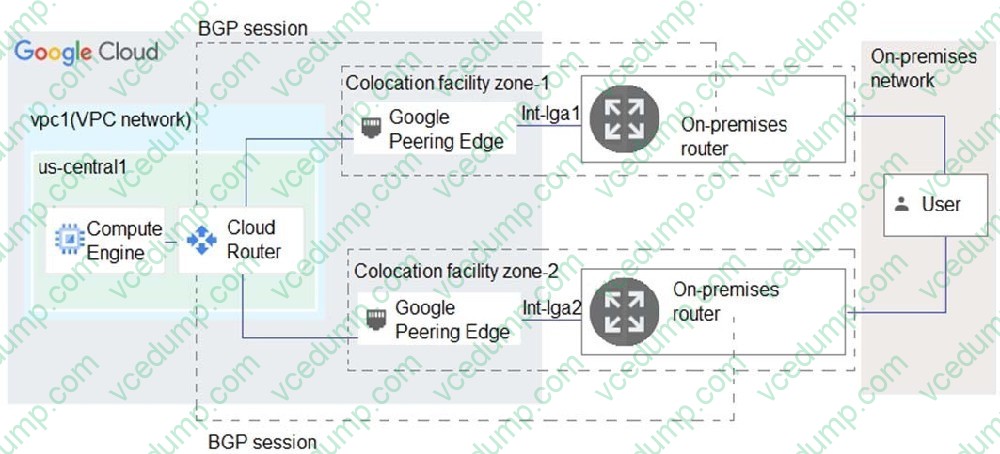
B. From the Cloud CLI, run gcloud compute --project PROJECT_ID routers get-status mycloudrouter --region REGION and review the results.
C. From the Google Cloud console, navigate to the Hybrid Connectivity, select the Cloud Router, and view BGP sessions.
D. From the Cloud CLI, run gcloud compute routers describe mycloudrouter --region REGION and review the results. -
Question 205:
You have enabled HTTP(S) load balancing for your application, and your application developers have reported that HTTP(S) requests are not being distributed correctly to your Compute Engine Virtual Machine instances. You want to find data about how the request are being distributed.
Which two methods can accomplish this? (Choose two.)
A. On the Load Balancer details page of the GCP Console, click on the Monitoring tab, select your backend service, and look at the graphs.
B. In Stackdriver Error Reporting, look for any unacknowledged errors for the Cloud Load Balancers service.
C. In Stackdriver Monitoring, select Resources > Metrics Explorer and search for https/request_bytes_count metric.
D. In Stackdriver Monitoring, select Resources > Google Cloud Load Balancers and review the Key Metrics graphs in the dashboard.
E. In Stackdriver Monitoring, create a new dashboard and track the https/backend_request_count metric for the load balancer. -
Question 206:
You have two VPCs: VPC A in Project A and VPC B in Project
B. The VPCs are peered, and each VPC has VM instances in four zones. You are using the Network Intelligence Center Performance Dashboard to investigate the packet loss for traffic flows that start in VPC A and terminate in VPC B. You need the reported packet loss metric to have at least a 90% confidence level.
What should you do?
A. Ensure that each zone in each of the VPC networks has at least 10 compute instances. Look in Project A for the reported metric.
B. Ensure that each zone in each of the VPC networks has at least 9 compute instances. Look in Project B for the reported metric.
C. Ensure that each zone in each of the VPC networks has at least 9 compute instances. Look in Project A for the reported metric.
D. Ensure that each zone in each of the VPC networks has at least 10 compute instances. Look in Project B for the reported metric. -
Question 207:
You have deployed a proof-of-concept application by manually placing instances in a single Compute Engine zone. You are now moving the application to production, so you need to increase your application availability and ensure it can autoscale.
How should you provision your instances?
A. Create a single managed instance group, specify the desired region, and select Multiple zones for the location.
B. Create a managed instance group for each region, select Single zone for the location, and manually distribute instances across the zones in that region.
C. Create an unmanaged instance group in a single zone, and then create an HTTP load balancer for the instance group.
D. Create an unmanaged instance group for each zone, and manually distribute the instances across the desired zones. -
Question 208:
Your company deployed Cloud Next Generation Firewall Enterprise (Cloud NGFW Enterprise). You have already created a CA pool and a CA in Certificate Authority Service. You need to enable TLS inspection.
What should you do?
A. Grant the network security service agent service account the privateca.certificateRequester role. Create a TLS inspection policy linking to the CA pool. Configure your VPC endpoint associations to use the TLS inspection policy. Flip the TLS inspection flag in your firewall policy rules to true.
B. Grant the network security service agent service account the privateca.poolReader role. Create a TLS inspection policy linking to the CA pool. Configure your VPC endpoint associations to use the TLS inspection policy. Flip the TLS inspection flag in your firewall policy rules to true.
C. Grant the network security service agent service account the privateca.certificateRequester role. Create a trust config in Certificate Manager Flip the TLS inspection flag in your firewall policy rules to true.
D. Grant the network security service agent service account the privateca.certificateRequester role. Create a trust config in Certificate Manager. Flip the TLS inspection flag in your firewall policy rules to true. -
Question 209:
Your organization wants to deploy HA VPN over Cloud Interconnect to ensure encryption-in-transit over the Cloud Interconnect connections. You have created a Cloud Router and two encrypted VLAN attachments that have a 5 Gbps capacity and a BGP configuration. The BGP sessions are operational. You need to complete the deployment of the HA VPN over Cloud Interconnect.
What should you do?
A. Create an HA VPN gateway and associate the gateway with your two encrypted VLAN attachments. Configure the HA VPN Cloud Router, peer VPN gateway resources, and HA VPN tunnels. Use the same encrypted Cloud Router used for the Cloud Interconnect tier.
B. Enable MACsec on Partner Interconnect.
C. Enable MACsec for Cloud Interconnect on the VLAN attachments.
D. Create an HA VPN gateway and associate the gateway with your two encrypted VLAN attachments. Create a new dedicated HA VPN Cloud Router, peer VPN gateway resources, and HA VPN tunnels. -
Question 210:
You have a Cloud Storage bucket in Google Cloud project XYZ. The bucket contains sensitive data. You need to design a solution to ensure that only instances belonging to VPCs under project XYZ can access the data stored in this Cloud Storage bucket.
What should you do?
A. Configure Private Google Access to privately access the Cloud Storage service using private IP addresses.
B. Configure a VPC Service Controls perimeter around project XYZ, and include storage.googleapis.com as a restricted service in the service perimeter.
C. Configure Cloud Storage with projectPrivate Access Control List (ACL) that gives permission to the project team based on their roles.
D. Configure Private Service Connect to privately access Cloud Storage from all VPCs under project XYZ.
Related Exams:
-
ADWORDS-DISPLAY
Google AdWords: Display Advertising -
ADWORDS-FUNDAMENTALS
Google AdWords: Fundamentals -
ADWORDS-MOBILE
Google AdWords: Mobile Advertising -
ADWORDS-REPORTING
Google AdWords: Reporting -
ADWORDS-SEARCH
Google AdWords: Search Advertising -
ADWORDS-SHOPPING
Google AdWords: Shopping Advertising -
ADWORDS-VIDEO
Google AdWords: Video Advertising -
APIGEE-API-ENGINEER
Apigee Certified API Engineer -
ASSOCIATE-ANDROID-DEVELOPER
Associate Android Developer (Kotlin and Java) -
ASSOCIATE-CLOUD-ENGINEER
Associate Cloud Engineer
Tips on How to Prepare for the Exams
Nowadays, the certification exams become more and more important and required by more and more enterprises when applying for a job. But how to prepare for the exam effectively? How to prepare for the exam in a short time with less efforts? How to get a ideal result and how to find the most reliable resources? Here on Vcedump.com, you will find all the answers. Vcedump.com provide not only Google exam questions, answers and explanations but also complete assistance on your exam preparation and certification application. If you are confused on your PROFESSIONAL-CLOUD-NETWORK-ENGINEER exam preparations and Google certification application, do not hesitate to visit our Vcedump.com to find your solutions here.