NSE5_FMG-7.0 Exam Details
-
Exam Code
:NSE5_FMG-7.0 -
Exam Name
:Fortinet NSE 5 - FortiManager 7.0 -
Certification
:Fortinet Certifications -
Vendor
:Fortinet -
Total Questions
:72 Q&As -
Last Updated
:Jul 09, 2026
Fortinet NSE5_FMG-7.0 Online Questions & Answers
-
Question 51:
When an installation is performed from FortiManager, what is the recovery logic used between FortiManager and FortiGate for an FGFM tunnel?
A. After 15 minutes, FortiGate will unset all CLI commands that were part of the installation that caused the tunnel to go down.
B. FortiManager will revert and install a previous configuration revision on the managed FortiGate.
C. FortiGate will reject the CLI commands that will cause the tunnel to go down.
D. FortiManager will not push the CLI commands as a part of the installation that will cause the tunnel to go down. -
Question 52:
In addition to the default ADOMs, an administrator has created a new ADOM named Training for FortiGate devices. The administrator authorized the FortiGate device on FortiManager using the Fortinet Security Fabric. Given the administrator's actions, which statement correctly describes the expected result?
A. The FortiManager administrator must add the authorized device to the Training ADOM using the Add Device wizard only.
B. The authorized FortiGate will be automatically added to the Training ADOM.
C. The authorized FortiGate will appear in the root ADOM.
D. The authorized FortiGate can be added to the Training ADOM using FortiGate Fabric Connectors. -
Question 53:
What is the purpose of the Policy Check feature on FortiManager?
A. To find and provide recommendation to combine multiple separate policy packages into one common policy package
B. To find and merge duplicate policies in the policy package
C. To find and provide recommendation for optimizing policies in a policy package
D. To find and delete disabled firewall policies in the policy package -
Question 54:
Which of the following statements are true regarding reverting to previous revision version from the revision history? (Choose two.)
A. To push these changes to a managed device, it required an install operation to the managed FortiGate.
B. Reverting to a previous revision history will generate a new version ID and remove all other history versions.
C. Reverting to a previous revision history will tag the device settings status as Auto-Update.
D. It will modify device-level database -
Question 55:
View the following exhibit:
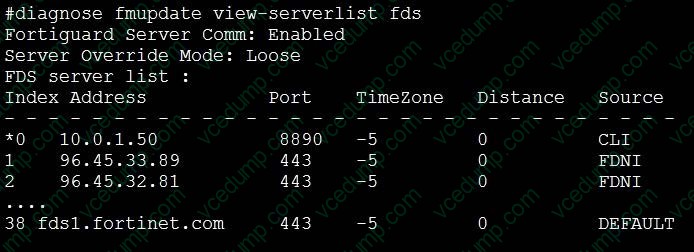
How will FortiManager try to get updates for antivirus and IPS?
A. From the list of configured override servers with ability to fall back to public FDN servers
B. From the configured override server list only
C. From the default server fdsl.fortinet.com
D. From public FDNI server with highest index number only -
Question 56:
An administrator configures a new firewall policy on FortiManager and has not yet pushed the changes to the managed FortiGate. In which database will the configuration be saved?
A. Device-level database
B. Revision history database
C. ADOM-level database
D. Configuration-level database -
Question 57:
View the following exhibit.
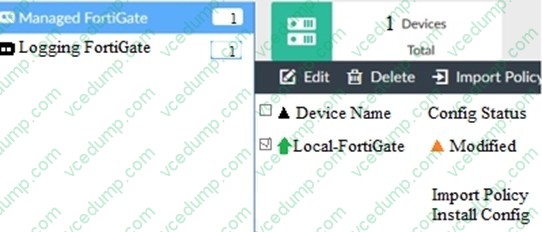
When using Install Config option to install configuration changes to managed FortiGate, which of the following statements are true? (Choose two.)
A. Once initiated, the install process cannot be canceled and changes will be installed on the managed device
B. Will not create new revision in the revision history
C. Installs device-level changes to FortiGate without launching the Install Wizard
D. Provides the option to preview configuration changes prior to installing them -
Question 58:
Refer to the exhibit.
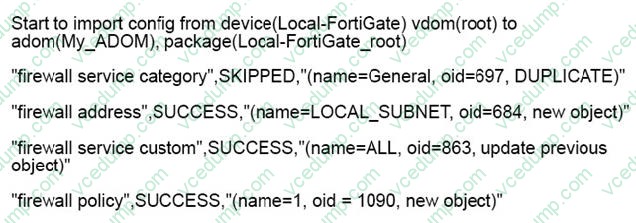
Which statement about the object named ALL is true?
A. FortiManager updated the object ALL using the FortiGate value in its database.
B. FortiManager installed the object ALL with the updated value.
C. FortiManager created the object ALL as a unique entity in its database, which can be only used by this managed FortiGate.
D. FortiManager updated the object ALL using the FortiManager value in its database. -
Question 59:
An administrator would like to review, approve, or reject all the firewall policy changes made by the junior administrators. How should the Workspace mode be configured on FortiManager?
A. Set to workflow and use the ADOM locking feature
B. Set to read/write and use the policy locking feature
C. Set to normal and use the policy locking feature
D. Set to disable and use the policy locking feature -
Question 60:
Refer to the exhibit.
According to the error message why is FortiManager failing to add the FortiAnalyzer device?
A. The administrator must turn off the Use Legacy Device login and add the FortiAnaJyzer device to the same network as Forti-Manager
B. The administrator must select the Forti-Manager administrative access checkbox on the FortiAnalyzer management interface
C. The administrator must use the Add Model Device section and discover the FortiAnaJyzer device
D. The administrator must use the correct user name and password of the FortiAnalyzer device
Related Exams:
-
EMEA-ADVANCED-SUPPORT
Fortinet EMEA Advanced Support -
FCP_FAC_AD-6.5
FCP - FortiAuthenticator 6.5 Administrator -
FCP_FAZ_AD-7.4
FCP - FortiAnalyzer 7.4 Administrator -
FCP_FAZ_AN-7.4
FCP - FortiAnalyzer 7.4 Analyst -
FCP_FAZ_AN-7.6
Fortinet NSE 5 - FortiAnalyzer 7.6 Analyst -
FCP_FCT_AD-7.2
FCP - Forti Client EMS 7.2 Administrator -
FCP_FCT_AD-7.4
Fortinet NSE 6 - FortiClient EMS 7.4 Administrator -
FCP_FGT_AD-7.4
FCP - FortiGate 7.4 Administrator -
FCP_FGT_AD-7.6
FortiGate 7.6 Administrator FCP_FGT_AD-7.6 -
FCP_FMG_AD-7.4
FCP - FortiManager 7.4 Administrator
Tips on How to Prepare for the Exams
Nowadays, the certification exams become more and more important and required by more and more enterprises when applying for a job. But how to prepare for the exam effectively? How to prepare for the exam in a short time with less efforts? How to get a ideal result and how to find the most reliable resources? Here on Vcedump.com, you will find all the answers. Vcedump.com provide not only Fortinet exam questions, answers and explanations but also complete assistance on your exam preparation and certification application. If you are confused on your NSE5_FMG-7.0 exam preparations and Fortinet certification application, do not hesitate to visit our Vcedump.com to find your solutions here.