NSE5_FMG-6.4 Exam Details
-
Exam Code
:NSE5_FMG-6.4 -
Exam Name
:Fortinet NSE 5 - FortiManager 6.4 -
Certification
:Fortinet Certifications -
Vendor
:Fortinet -
Total Questions
:59 Q&As -
Last Updated
:May 26, 2026
Fortinet NSE5_FMG-6.4 Online Questions & Answers
-
Question 21:
View the following exhibit.
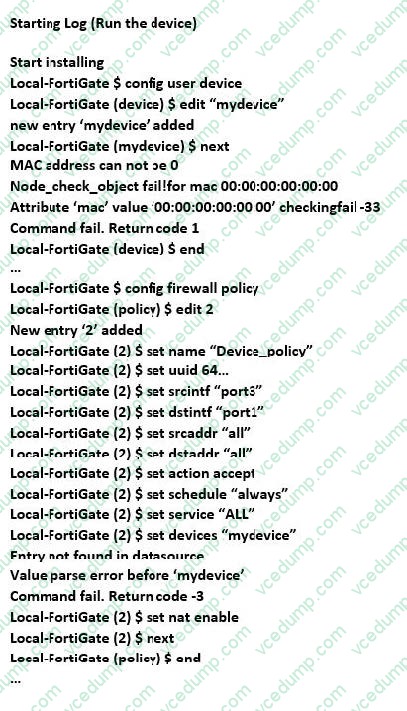
Which statement is true regarding this failed installation log?
A. Policy ID 2 is installed without a source address
B. Policy ID 2 will not be installed
C. Policy ID 2 is installed in disabled state
D. Policy ID 2 is installed without a source device -
Question 22:
In the event that the primary FortiManager fails, which of the following actions must be performed to return the FortiManager HA to a working state?
A. Secondary device with highest priority will automatically be promoted to the primary role, and manually reconfigure all other secondary devices to point to the new primary device
B. Reboot one of the secondary devices to promote it automatically to the primary role, and reconfigure all other secondary devices to point to the new primary device.
C. Manually promote one of the secondary devices to the primary role, and reconfigure all other secondary devices to point to the new primary device.
D. FortiManager HA state transition is transparent to administrators and does not require any reconfiguration. -
Question 23:
Which configuration setting for FortiGate is part of a device-level database on FortiManager?
A. VIP and IP Pools
B. Firewall policies
C. Security profiles
D. Routing -
Question 24:
An administrator with the Super_User profile is unable to log in to FortiManager because of an authentication failure message. Which troubleshooting step should you take to resolve the issue?
A. Make sure FortiManager Access is enabled in the administrator profile
B. Make sure Offline Mode is disabled
C. Make sure the administrator IP address is part of the trusted hosts.
D. Make sure ADOMs are enabled and the administrator has access to the Global ADOM -
Question 25:
Refer to the exhibit.
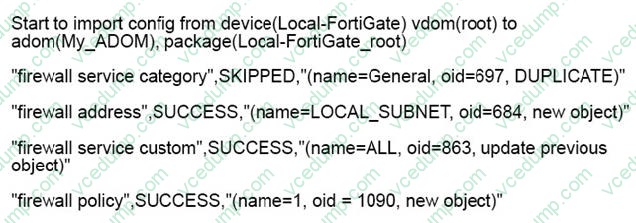
Which statement about the object named ALL is true?
A. FortiManager updated the object ALL using the FortiGate value in its database.
B. FortiManager installed the object ALL with the updated value.
C. FortiManager created the object ALL as a unique entity in its database, which can be only used by this managed FortiGate.
D. FortiManager updated the object ALL using the FortiManager value in its database. -
Question 26:
View the following exhibit.
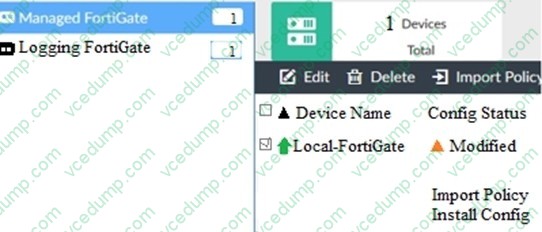
When using Install Config option to install configuration changes to managed FortiGate, which of the following statements are true? (Choose two.)
A. Once initiated, the install process cannot be canceled and changes will be installed on the managed device
B. Will not create new revision in the revision history
C. Installs device-level changes to FortiGate without launching the Install Wizard
D. Provides the option to preview configuration changes prior to installing them -
Question 27:
What does a policy package status of Conflict indicate?
A. The policy package reports inconsistencies and conflicts during a Policy Consistency Check.
B. The policy package does not have a FortiGate as the installation target.
C. The policy package configuration has been changed on both FortiManager and the managed device independently.
D. The policy configuration has never been imported after a device was registered on FortiManager. -
Question 28:
View the following exhibit.
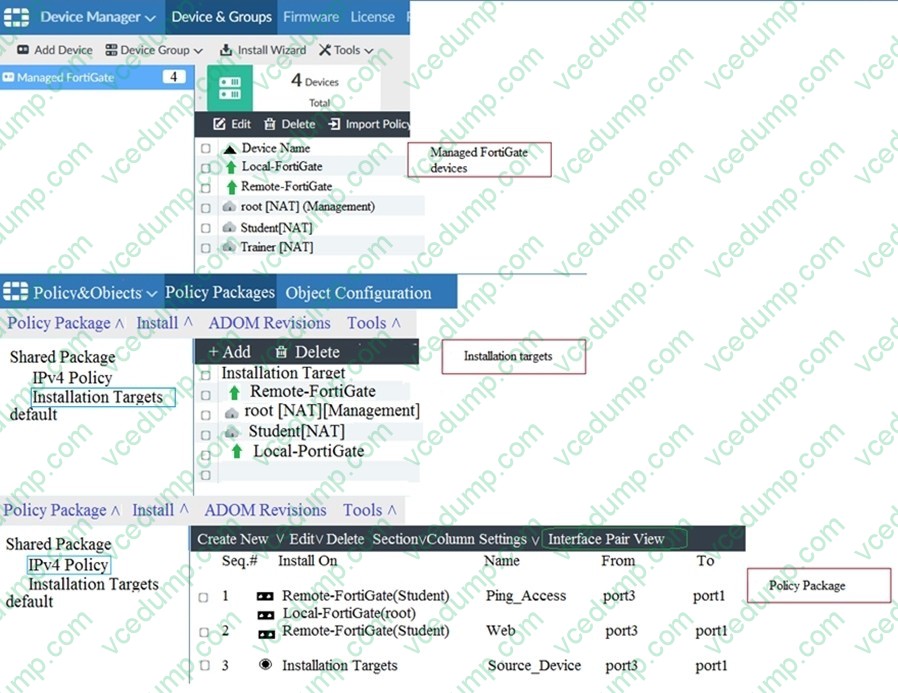
Given the configurations shown in the exhibit, what can you conclude from the installation targets in the Install On column?
A. The Install On column value represents successful installation on the managed devices
B. Policy seq#3 will be installed on all managed devices and VDOMs that are listed under Installation Targets
C. Policy seq#3 will be installed on the Trainer[NAT] VDOM only
D. Policy seq#3 will be not installed on any managed device -
Question 29:
View the following exhibit.
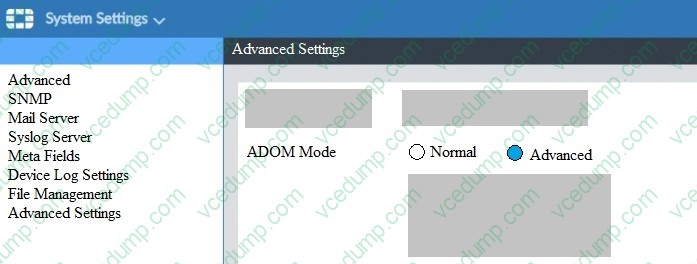
What is the purpose of setting ADOM Mode to Advanced?
A. The setting allows automatic updates to the policy package configuration for a managed device
B. The setting enables the ADOMs feature on FortiManager
C. This setting allows you to assign different VDOMs from the same FortiGate to different ADOMs.
D. The setting disables concurrent ADOM access and adds ADOM locking -
Question 30:
View the following exhibit.
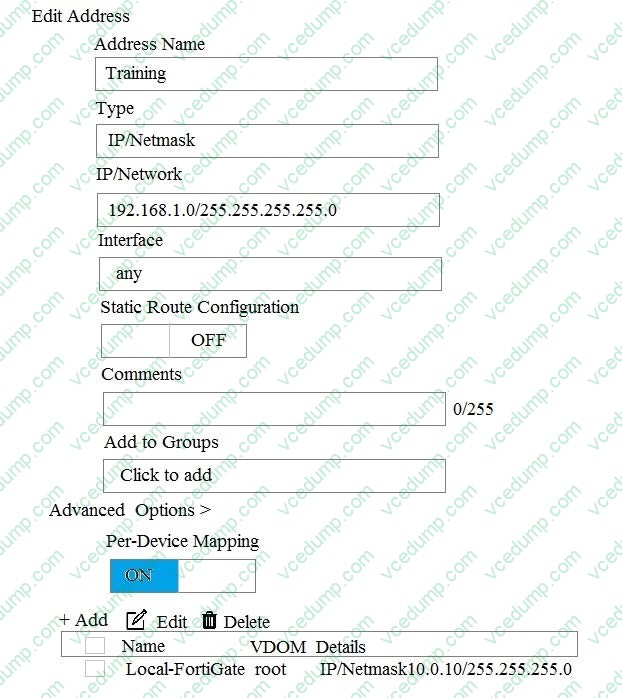
An administrator has created a firewall address object, Training, which is used in the Local- FortiGate policy package. When the install operation is performed, which IP Netmask will be installed on the Local-FortiGate, for the Training firewall address object?
A. 10.0.1.0/24
B. It will create firewall address group on Local-FortiGate with 192.168.0.1/24 and 10.0.1.0/24 object values
C. 192.168.0.1/24
D. Local-FortiGate will automatically choose an IP Network based on its network interface settings.
Related Exams:
-
EMEA-ADVANCED-SUPPORT
Fortinet EMEA Advanced Support -
FCP_FAC_AD-6.5
FCP - FortiAuthenticator 6.5 Administrator -
FCP_FAZ_AD-7.4
FCP - FortiAnalyzer 7.4 Administrator -
FCP_FAZ_AN-7.4
FCP - FortiAnalyzer 7.4 Analyst -
FCP_FAZ_AN-7.6
Fortinet NSE 5 - FortiAnalyzer 7.6 Analyst -
FCP_FCT_AD-7.2
FCP - Forti Client EMS 7.2 Administrator -
FCP_FCT_AD-7.4
Fortinet NSE 6 - FortiClient EMS 7.4 Administrator -
FCP_FGT_AD-7.4
FCP - FortiGate 7.4 Administrator -
FCP_FGT_AD-7.6
FortiGate 7.6 Administrator FCP_FGT_AD-7.6 -
FCP_FMG_AD-7.4
FCP - FortiManager 7.4 Administrator
Tips on How to Prepare for the Exams
Nowadays, the certification exams become more and more important and required by more and more enterprises when applying for a job. But how to prepare for the exam effectively? How to prepare for the exam in a short time with less efforts? How to get a ideal result and how to find the most reliable resources? Here on Vcedump.com, you will find all the answers. Vcedump.com provide not only Fortinet exam questions, answers and explanations but also complete assistance on your exam preparation and certification application. If you are confused on your NSE5_FMG-6.4 exam preparations and Fortinet certification application, do not hesitate to visit our Vcedump.com to find your solutions here.