MS-700 Exam Details
-
Exam Code
:MS-700 -
Exam Name
:Managing Microsoft Teams -
Certification
:Microsoft Certifications -
Vendor
:Microsoft -
Total Questions
:553 Q&As -
Last Updated
:Jul 12, 2026
Microsoft MS-700 Online Questions & Answers
-
Question 411:
HOTSPOT
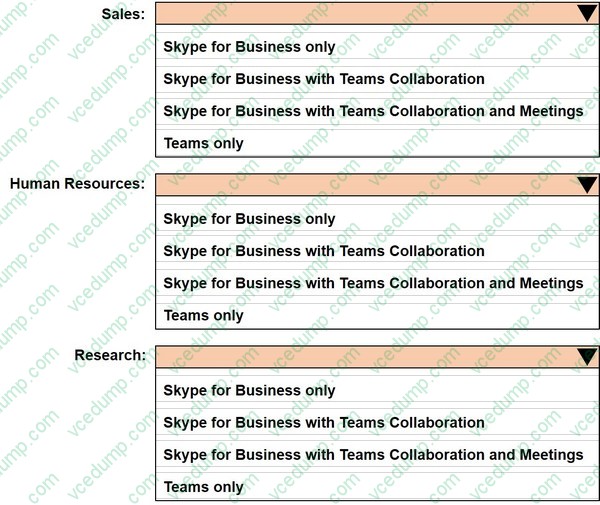
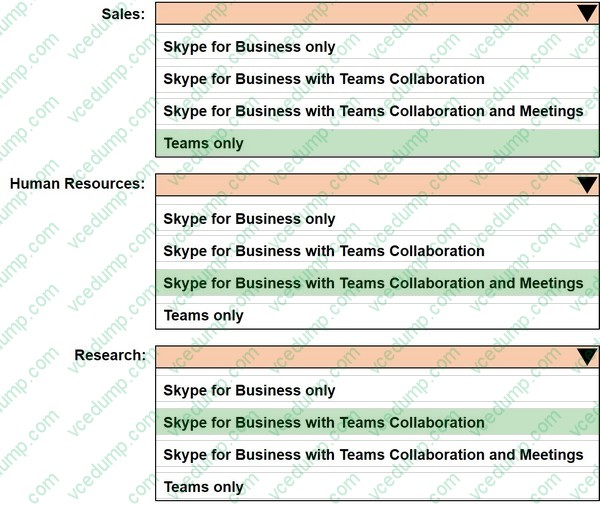
You have a Microsoft 365 tenant that uses Microsoft Skype for Business on-premises. You plan to upgrade to Microsoft Teams in stages based on groups. The features required by each group are shown in the following table.

How should you configure the upgrade policy for the groups? To answer, select the appropriate options in the answer area.
-
Question 412:
You have a Microsoft 365 subscription that uses Microsoft Teams.
You plan to implement Microsoft Teams Rooms. The solution must meet the following requirements:
1. Support Microsoft Teams Rooms, Microsoft Surface Hub, and collaboration bars for Microsoft Teams.
2. Ensure that Microsoft manages firmware and application updates for room systems and peripherals.
3. Ensure that Microsoft monitors and troubleshoots room system and peripherals.
Which license should you purchase?
A. Advanced Communications
B. Microsoft Teams Rooms Premium
C. Microsoft Teams Rooms Standard
D. Microsoft 365 Business Voice -
Question 413:
Which governance requirement is met by using a team template?
A. The team name must contain a GRP prefix.
B. The team name must be validated against a blocklist of team names.
C. Team channels must include a pinned tab that displays the Wingtip Toys website.
D. Team members must be prevented from deleting messages from team channels. -
Question 414:
DRAG DROP
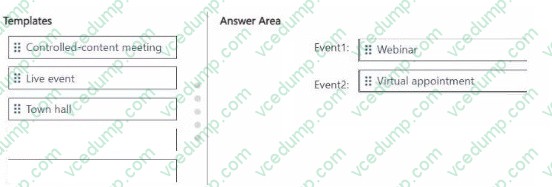
You have a Microsoft 365 E5 subscription and use Microsoft Teams. You plan to schedule the events shown in the following table.
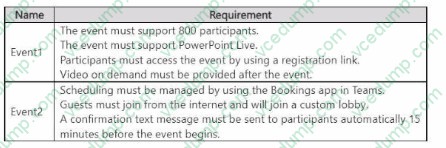
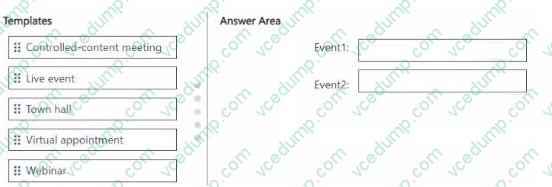
Which meeting template should you use for each event? To answer, drag the appropriate templates to the correct events. Each template may be used once, more than once, or not at all. You may need to drag the split bar between panes or scroll to view content.
NOTE: Each correct selection is worth one point.
Select and Place:
-
Question 415:
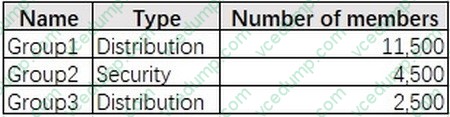
You have a Microsoft 365 subscription that uses Microsoft Teams and contains the groups shown in the following table.
You create a new team named Project1.
Which groups can be added to Project1?
A. Group1 only
B. Group2 only
C. Group3 only
D. Group1 and Group3 only
E. Group1, Group2, and Group3 -
Question 416:
HOTSPOT
Your company uses Microsoft Skype for Business Online and Microsoft Teams.
All Skype for Business Online users can make and receive PSTN calls. Microsoft Teams is configured for PSTN calls.
You plan to upgrade the Skype for Business Online users to Microsoft Teams.
The Teams upgrade settings are configured as shown in the Teams upgrade exhibit. (Click the Teams upgrade tab.)
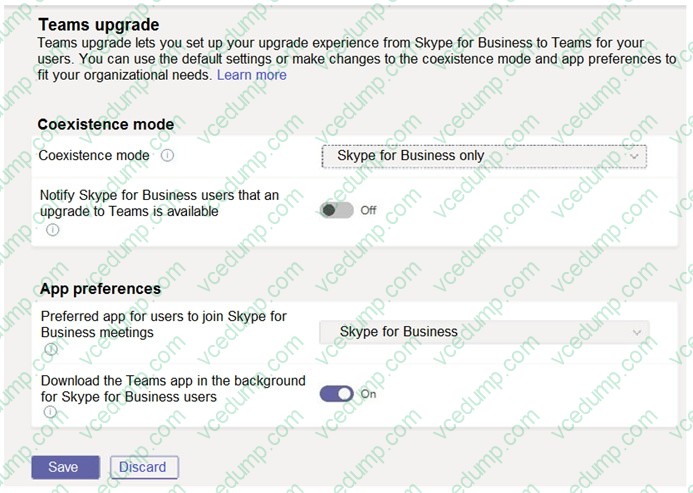
You apply TeamsUpgradePolicy to the user accounts of the company's R&D and human resources (HR) departments by using the coexistence modes shown in the following table.

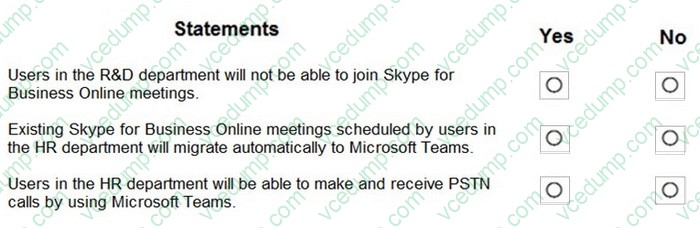
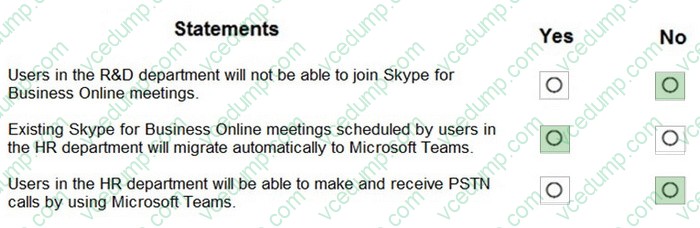
For each of the following statements, select Yes if the statement is true. Otherwise, select No.
NOTE: Each correct selection is worth one point.
-
Question 417:
Your company has a Microsoft 365 tenant that uses Microsoft Skype for Business Online.
All users connect to Skype for Business Online by using computers that run Windows 10.
You plan to upgrade all the users from Skype for Business Online to Microsoft Teams.
You need to ensure that the Microsoft Teams client is installed automatically on all the computers.
What should you do from the Teams admin center?
A. From the Messaging policies settings, modify the Global (Org-wide default) messaging policy.
B. From Org-wide settings, configure the Teams upgrade settings.
C. From Teams apps, add an App setup policy. -
Question 418:
Your company has a Microsoft 365 subscription.
You need to prevent users from sending priority (urgent) messages.
What should you configure?
A. meeting policy
B. messaging policy
C. app setup policy
D. Teams upgrade policy -
Question 419:
Note: This section contains one or more sets of questions with the same scenario and problem.
Each question presents a unique solution to the problem.
You must determine whether the solution meets the stated goals.
More than one solution in the set might solve the problem.
It is also possible that none of the solutions in the set solve the problem.
After you answer a question in this section, you will NOT be able to return.
As a result, these questions do not appear on the Review Screen.
You have a Teams deployment.
A user cannot sign in to Teams.
You need to run self-help diagnostics to troubleshoot the issue.
Solution: From Connectivity Tests in Microsoft Remote Connectivity Analyzer, you select Microsoft Teams.
Does this meet the goal?
A. Yes
B. No -
Question 420:
SIMULATION
Please wait while the virtual machine loads. Once loaded, you may proceed to the lab section. This may take a few minutes, and the wait time will not be deducted from your overall test time.
When the Next button is available, click it to access the lab section. In this section, you will perform a set of tasks in a live environment. While most functionality will be available to you as it would be in a live environment, some functionality (e.g. copy and paste, ability to navigate to external websites) will not be possible by design.
Scoring is based on the outcome of performing the tasks stated in the lab. In other words, it doesn't matter how you accomplish the task, if you successfully perform it, you will earn credit for that task.
Labs are not timed separately, and this exam may have more than one lab that you must complete. You can use as much time as you would like to complete each lab. But you should manage your time appropriately to ensure that you are able to complete the lab(s) and all other sections of the exam in the time provided.
Please not that once you submit your work by clicking the Next button within a lab, you will NOT be able to return to the lab.
You may now click next to proceed to the lab.
Username and password.
Use the following login credentials as needed:
To enter your username, place your cursor in the Sign in box and click on the username below.
To enter your password, place your cursor in the Enter password box and click on the password below.
Microsoft 365 Username:
[email protected] Microsoft 365 Password: XXXXXXXXXXXX
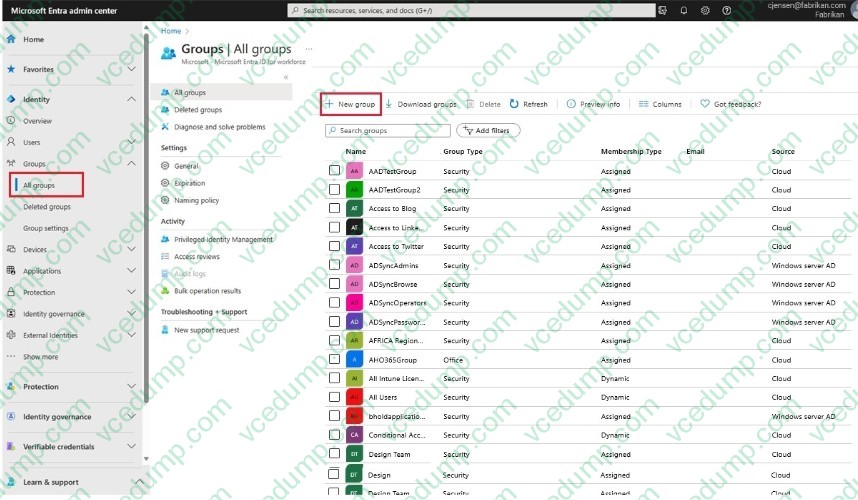
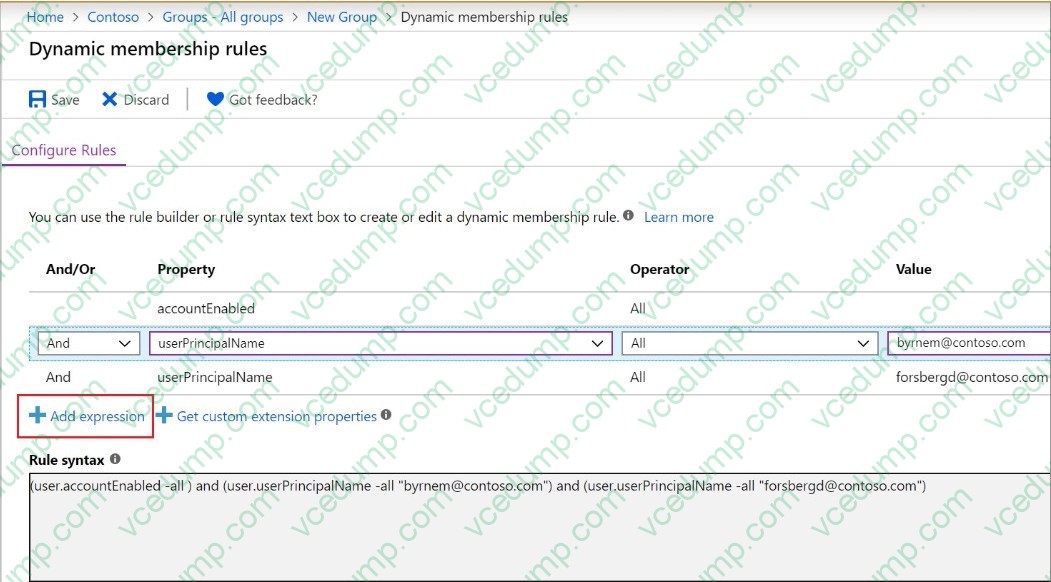
You need to ensure that a team named US Sales automatically contains all the users that have the department attribute set to Sales. No other users must be members of the team.
To complete this task, sign in to the Microsoft 365 portal.
A. Check the answer in explanation.
B. PlaceHolder
C. PlaceHolder
D. PlaceHolder
Related Exams:
-
62-193
Technology Literacy for Educators -
70-243
Administering and Deploying System Center 2012 Configuration Manager -
70-355
Universal Windows Platform – App Data, Services, and Coding Patterns -
77-420
Excel 2013 -
77-427
Excel 2013 Expert Part One -
77-725
Word 2016 Core Document Creation, Collaboration and Communication -
77-726
Word 2016 Expert Creating Documents for Effective Communication -
77-727
Excel 2016 Core Data Analysis, Manipulation, and Presentation -
77-728
Excel 2016 Expert: Interpreting Data for Insights -
77-731
Outlook 2016 Core Communication, Collaboration and Email Skills
Tips on How to Prepare for the Exams
Nowadays, the certification exams become more and more important and required by more and more enterprises when applying for a job. But how to prepare for the exam effectively? How to prepare for the exam in a short time with less efforts? How to get a ideal result and how to find the most reliable resources? Here on Vcedump.com, you will find all the answers. Vcedump.com provide not only Microsoft exam questions, answers and explanations but also complete assistance on your exam preparation and certification application. If you are confused on your MS-700 exam preparations and Microsoft certification application, do not hesitate to visit our Vcedump.com to find your solutions here.