MS-700 Exam Details
-
Exam Code
:MS-700 -
Exam Name
:Managing Microsoft Teams -
Certification
:Microsoft Certifications -
Vendor
:Microsoft -
Total Questions
:553 Q&As -
Last Updated
:Jul 12, 2026
Microsoft MS-700 Online Questions & Answers
-
Question 361:
HOTSPOT
You have a Microsoft 365 subscription that contains a user named User1.
You have a custom policy named AppPolicy that has the following configurations:
1. Allow all apps published by Microsoft.
2. Allow only specified third-party apps.
3. Block all custom apps.
You need to assign AppPolicy to User1.
How should you complete the PowerShell command? To answer, select the appropriate options in the answer area.
NOTE: Each correct selection is worth one point.

-
Question 362:
You have a Microsoft 365 ES subscription.
You plan to have Teams administrators use sell-help diagnostics.
Which two scenarios are covered by self-help diagnostics? Each correct answer presents a complete solution. NOTE: Each correct selection is worth one point.
A. Validate that a specified user can disable Teams live events.
B. Validate that a specified user is configured to record meetings.
C. Review Teams guest access.
D. Attempt to locate a missing Teams meeting recording.
E. Validate end-to-end encryption for strictly confidential Teams meetings -
Question 363:
You have a Microsoft E5 subscription that uses Teams.
You need to configure a policy to block specific words from being used as part of the name of new teams.
Which type of policy should you configure?
A. group naming policy
B. team templates policy
C. communication compliance policy
D. terms of use (ToU) policy -
Question 364:
Your company has a Microsoft 365 subscription.
All users have a computer that runs Windows 10 and has Microsoft Teams installed.
A user reports the following issues:
1. Users lose their connection during screen sharing.
2. The user selection process takes too long to complete.
3. The Microsoft Teams client crashes and restarts automatically.
You need to view the Microsoft Teams debug logs to troubleshoot the issues.
What should you do?
A. From the Microsoft Teams client, select F1. Open the ETL files in the %Appdata%\Microsoft\Teams\folder.
B. From the Microsoft Teams client, select Ctrl+Alt+Shift+1. Open the log files in the %Userprofile%\Downloads\ folder.
C. From Event Viewer, open the Application log and filter the log for a keyword of MSTeams.
D. Right-click the Microsoft Teams icon in the application tray, and then select Get logs. Open Logs.txt in the %Appdata%\Microsoft\Teams\ folder. -
Question 365:
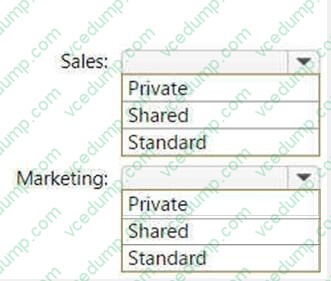
HOTSPOT
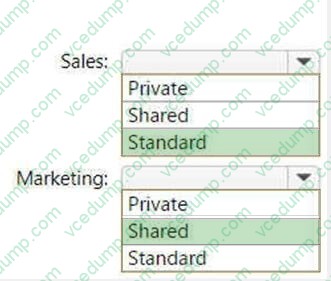
You have a Teams deployment that contains the following teams:
1. Marketing
2. Sales
You plan to create new channels to meet the following requirements:
1. The Sales team must collaborate on customer reviews.
2. The Marketing team must collaborate with the Sales team on a product rollout.
You need to recommend which types of channels to use for the teams.
What should you recommend for each team? To answer, select the appropriate options in the answer area.
NOTE: Each correct selection is worth one point.
-
Question 366:
You work as a Systems Administrator for your company. The company has a subscription to Microsoft 365.
All users in your company have a Microsoft 365 E5 license.
A user named User1 has the Microsoft Teams desktop client on his Windows 10 client computer.
User1 reports several problems when using Microsoft Teams.
You need to view the debug logs on User1's computer.
Which of the following actions should you perform to generate the debug logs?
A. Press the following key combination: Ctrl+Alt+Shift+1.
B. Right click on the Teams icon and select Get Logs.
C. Use Windows Event Viewer and browse to the Application Log.
D. Run a Usage report in the Teams admin center. -
Question 367:
You work as a Systems Administrator for your company. The company has a subscription to Microsoft 365. All users in your company have a Microsoft 365 E3 license.
All users use Microsoft Teams for collaboration.
Users in the Marketing department often host live events in Microsoft Teams for large audiences.
Users report that Internet performance is poor during the live events. You discover that the live events consume a large amount of Internet bandwidth.
You need to reduce the Internet bandwidth consumed during the live events.
Which of the following should you configure?
A. Microsoft Phone System.
B. An Enterprise Content Delivery Network (eCDN) provider.
C. Cloud Video Interop
D. A SIP provider. -
Question 368:
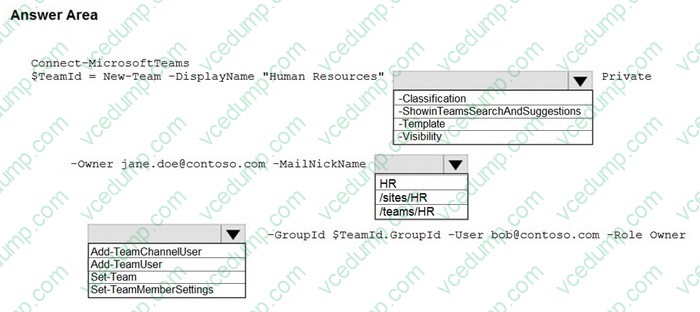
HOTSPOT
You have a Microsoft 365 subscription.
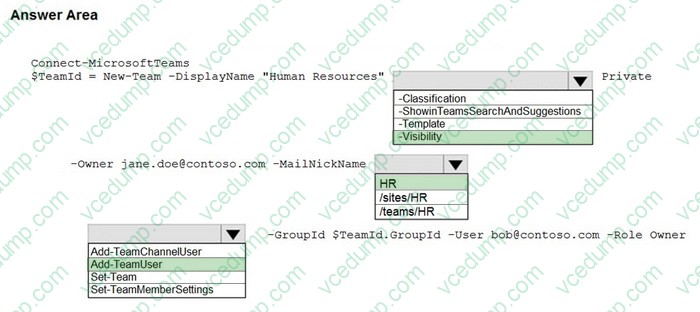
You need to create a new Microsoft Teams team named Human Resources that meets the following requirements:
1. All join requests must be approved by an owner of the team.
2. The URL for the Microsoft SharePoint Online site of the team must be /teams/HR.
3. Two users named [email protected] and [email protected] must be assigned as team owners.
How should you complete the PowerShell command? To answer, select the appropriate options in the answer area.
NOTE: Each correct selection is worth one point.
-
Question 369:
You work as a Systems Administrator for your company. The company has a subscription to Microsoft 365 and all users have a Microsoft 365 E3 license.
The company network includes Windows Server 2019 servers that host a Virtual Desktop Infrastructure (VDI).
All company users use the Microsoft Teams desktop client in non-persistent virtual desktops.
Microsoft has released an update to the Microsoft Teams client that includes several new features.
You need to ensure that all virtual desktop users are able to use the updated Microsoft Teams clients.
Which of the following actions should you perform?
A. Configure the Teams Upgrade Policy with the Upgrade to Teams setting.
B. Uninstall the Microsoft Teams MSI package from the VM image and install the latest version.
C. Configure a Group Policy Object to deploy the latest version of the Microsoft Teams client.
D. Configure Windows Updates on the servers hosting the VDI. -
Question 370:
Your company uses Teams Calling Plans.
When a user places a Teams call to an ambulance service, you need to ensure that a notification is also sent to the main receptionist of the company.
What should you configure?
A. a caller ID policy
B. a calling policy
C. a voice routing policy
D. an emergency calling policy

Related Exams:
-
62-193
Technology Literacy for Educators -
70-243
Administering and Deploying System Center 2012 Configuration Manager -
70-355
Universal Windows Platform – App Data, Services, and Coding Patterns -
77-420
Excel 2013 -
77-427
Excel 2013 Expert Part One -
77-725
Word 2016 Core Document Creation, Collaboration and Communication -
77-726
Word 2016 Expert Creating Documents for Effective Communication -
77-727
Excel 2016 Core Data Analysis, Manipulation, and Presentation -
77-728
Excel 2016 Expert: Interpreting Data for Insights -
77-731
Outlook 2016 Core Communication, Collaboration and Email Skills
Tips on How to Prepare for the Exams
Nowadays, the certification exams become more and more important and required by more and more enterprises when applying for a job. But how to prepare for the exam effectively? How to prepare for the exam in a short time with less efforts? How to get a ideal result and how to find the most reliable resources? Here on Vcedump.com, you will find all the answers. Vcedump.com provide not only Microsoft exam questions, answers and explanations but also complete assistance on your exam preparation and certification application. If you are confused on your MS-700 exam preparations and Microsoft certification application, do not hesitate to visit our Vcedump.com to find your solutions here.