MB7-842 Exam Details
-
Exam Code
:MB7-842 -
Exam Name
:NAV 2009 Trade & Inventory -
Certification
:MCITP -
Vendor
:Microsoft -
Total Questions
:50 Q&As -
Last Updated
:Dec 08, 2021
Microsoft MB7-842 Online Questions & Answers
-
Question 21:
You are the consultant on a Microsoft Dynamics?NAV 2009 implementation. Your client is conducting their first physical inventory count. To begin the process, they populated the Physical Inventory Journal and printed and distributed the Physical Inventory List report. Your client contacts you because they are unsure of the next steps.
What advice do you give your client for completing the physical inventory count?Choose the 3 that apply.
A. Enter the counted quantities in the Physical Inventory Journal.
B. Post the Physical Inventory Journal.
C. Use the Physical Inventory List report to manually document the inventory count.
D. Enter the variance between the counted and Microsoft Dynamics NAV calculated quantities in the Physical Inventory Journal. -
Question 22:
An Item Card is set up with a Purchase Unit of Measure of Each and a Last Direct Cost of 30.00. for the same item, a vendor has the Purchase Prices page set up as follows:
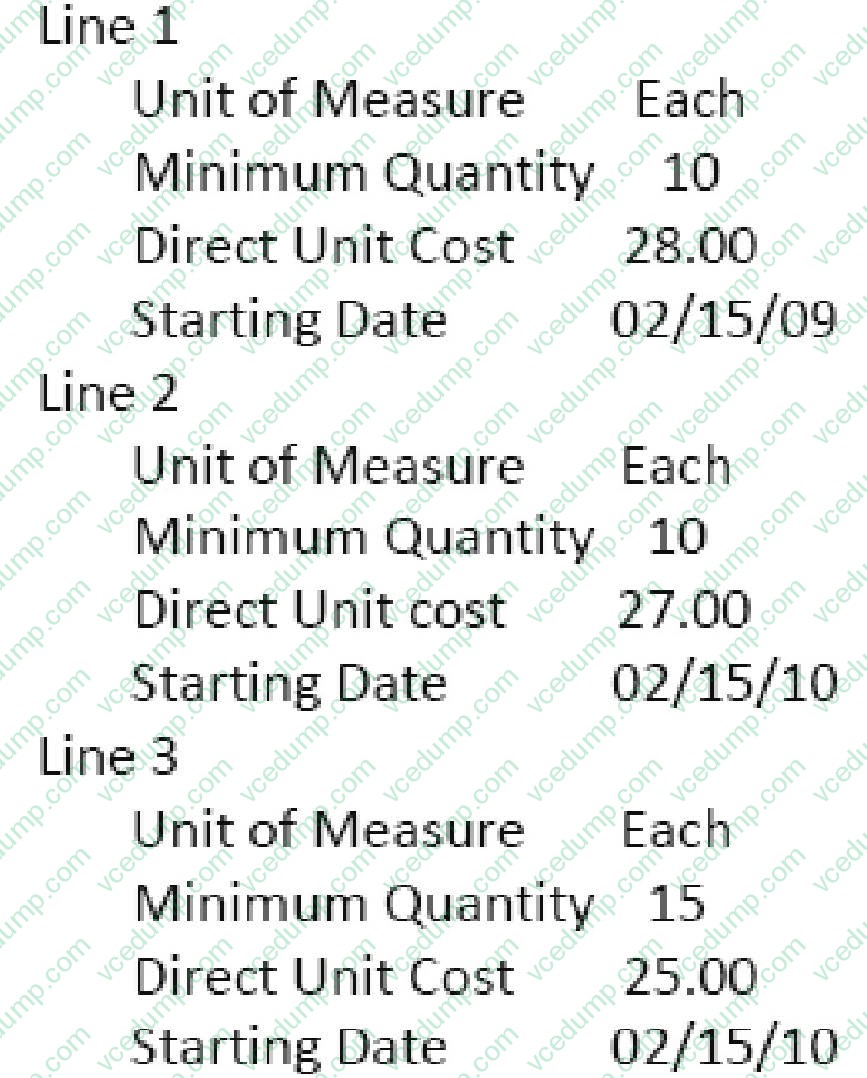
A Purchase Order is entered with an Order Date of 02/18/10; a line is added for the item with a Quantity of 10 and a Unit of Measure of Each. On the Purchase Order line, what price is suggested by Microsoft Dynamics? NAV 2009 for the item?
A. 25.00
B. 27.00
C. 28.00
D. 30.00 -
Question 23:
What methods can be used to create Stockkeeping Units (SKUs)? Choose the 2 that apply.
A. Enter Stockkeeping Units manually.
B. Use the Create Stockkeeping Units batch job from an Item Card.
C. Use the Create Stockkeeping Units batch job from the Inventory Setup page.
D. Use the Create Stockkeeping Units batch job from Periodic Activities on the Purchase menu. -
Question 24:
Sales Orders, Purchase Orders, and Transfer Orders are among the source documents that are available for retrieval in Warehouse Receipts and Warehouse Shipments. To use the Get Source Documents function, what status must be assigned to the source documents?
A. Warehouse Ready
B. Open
C. Released
D. Processing -
Question 25:
What types of information can be changed using the Item Reclassification Journal? Choose the 3 that apply.
A. Location
B. Serial/Lot Number
C. Unit Cost
D. Dimension Code -
Question 26:
You are a technical support specialist working with Microsoft Dynamics?NAV 2009. You receive a request from a client for assistance with Item Charges. Your client previously posted a Purchase Receipt for 10 AMSTERDAM Lamps and 3 ST. MORITZ Storage Units. They want your help with the process for entering a Purchase Order for the 300 LCY freight charge; this is the only Item Charge to be linked to the Purchase Receipt.
What are the steps you provide to your client?Choose the 3 that apply.
A. On the Lines FastTab for the freight, select a Type of Charge(Item), a No. for the Item Charge, a Quantity of 1, and a Unit Cost of 300.
B. To allocate the cost, use the Suggest Item Charge Assignment function from the Item Charge Assignment page.
C. To prevent additional Item Charges from being posted to the Purchase Receipt, use the Finalize Item Charges function from the Item Charge Assignment page.
D. To select the Purchase Receipt lines, use the Get Receipt Lines function from the Item Charge Assignment page. -
Question 27:
A company using Exact Cost Reversing records Sales Returns at exactly the same cost as the original sale. What methods can be used to assign exact cost reversing to a Sales Return line? Choose the 3 that apply.
A. In the Appl.-from Item Entry field on the Return Order, select the relevant line from the Item Ledger Entries page.
B. Select the Exact Cost Reversing Mandatory check box on Sales and Receivables Setup; then, use the Copy Document function to fill in the Return Order automatically from a posted shipment or invoice document.
C. From the Return Order, use the Exact Cost Reversing function to select a posted shipment or invoice for reversal.
D. Use the Get Posted Document Lines to Reverse function to select one or more posted document lines for exact cost reversal. -
Question 28:
What field on a Purchase Order line determines whether the Receipt Date and Quantity fields can be updated automatically by the planning system?
A. Freeze Line
B. Released
C. Planning Flexibility
D. Blocked -
Question 29:
You are the consultant on a Microsoft Dynamics?NAV 2009 implementation. Through discussions, you determine that your client plans to automatically assign sequential serial numbers to a specific purchased item. for this item, what setup and processing recommendations are appropriate for your client?Choose the 2 that apply.
A. Set up an Item Tracking Code, and in the Auto. No. Series field, select the No. Series to use when assigning serial numbers.
B. On the Item Card, select the Item Tracking Code and the No. Series to use when assigning serial numbers.
C. In the Item Tracking Lines page, use the Auto Assign Serial No. function.
D. On the Lines FastTab of the Purchase line, use the Auto Assign Serial No. function. -
Question 30:
You are the consultant on a Microsoft Dynamics? NAV 2009 implementation. As part of a review of business requirements, you are discussing purchase discounts with your client. You determine that your client offers line discounts. In addition, your client posts the discount amounts to separate general ledger accounts.
What setup is required to use line discounts and post them separately from purchases? Choose the 2 that apply.
A. In the Payment Disc. fields on the Vendor Posting Groups page, select an account from the Chart of Accounts.
B. In the Purchase Line Disc. Account field of the General Posting Setup page, select an account from the Chart of Accounts.
C. On the General FastTab of the Purchases and Payables Setup page, select Line Discounts in the Discount Posting field.
D. On the General FastTab of the Purchases and Payables Setup page, select the Post Line Discounts check box.
Related Exams:
Tips on How to Prepare for the Exams
Nowadays, the certification exams become more and more important and required by more and more enterprises when applying for a job. But how to prepare for the exam effectively? How to prepare for the exam in a short time with less efforts? How to get a ideal result and how to find the most reliable resources? Here on Vcedump.com, you will find all the answers. Vcedump.com provide not only Microsoft exam questions, answers and explanations but also complete assistance on your exam preparation and certification application. If you are confused on your MB7-842 exam preparations and Microsoft certification application, do not hesitate to visit our Vcedump.com to find your solutions here.