Kinaxis KX3-003 Online Practice
Questions and Exam Preparation
KX3-003 Exam Details
Exam Code
:KX3-003
Exam Name
:Certified RapidResponse Author Level 3
Certification
:Kinaxis Certifications
Vendor
:Kinaxis
Total Questions
:60 Q&As
Last Updated
:Jul 12, 2026
Kinaxis KX3-003 Online Questions &
Answers
Question 1:
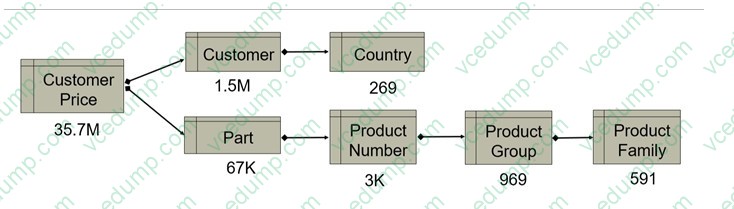
The graphic shows a path to generate a list of customer prices with record counts for each table in the path. Given the following filter expression:
Part.ProductNumber.ProductGroup.ProductFamily In ('bikes','trikes')
AND Customer.Country IN ("US", "CA")
In this situation, what is the chosen line of descent from the query engine?
A. Country > Country_Customers > CustomerPrices B. ProductFamily > ProductFamily_ProductGroups > ProductGroup_ProductNumbers > ProductNumber_Parts > CustomerPartPrices C. CustomerPartPrices > ProductNumber_Parts > ProductGroup_ProductNumbers > ProductFamily_ProductGroups > ProductFamily D. CustomerPrices > Country_Customers > Country
B. ProductFamily > ProductFamily_ProductGroups > ProductGroup_ProductNumbers > ProductNumber_Parts > CustomerPartPrices
Explanation
The filter expression contains a path that starts from ProductFamily, going down to ProductGroup, then ProductNumber, and Part, and finally linking to Customer prices. This path represents a 'line of descent' where the query engine filters down from the highest level of hierarchy (ProductFamily) to the desired records (CustomerPartPrices), respecting the AND logic to include only those records where the ProductFamily is either 'bikes' or 'trikes' and the Customer's Country is "US" or "CA". This is the logical path of filters applied in sequence according to the hierarchy laid out in the filter expression. ReferencesIn Kinaxis RapidResponse, filter expressions are used to specify the subset of data that you want to retrieve. The reference to 'line of descent' reflects how the RapidResponse query engine processes the filters along the hierarchy of related tables. This is consistent with the Kinaxis RapidResponse Author Level 3 documentation on advanced filtering and data retrieval strategies.
References: The filter expression indicates a top-down approach, starting from the product hierarchy and moving towards customer-related data1. Kinaxis RapidResponse documentation suggests that the query engine follows the path from the broadest category down to the specific records that match the criteria2.
Question 2:
You are asked to improve the performance of a worksheet based on the WhereConsumedForDemand table. You notice there is no filter control selected. Which type of filter will improve performance?
A. a filter based on the Part table B. a filter based on the IndependentDemand table C. a filter based on the SupplyDemand table D. a filter based on the Demand table
B. a filter based on the IndependentDemand table
Explanation
A filter based on the IndependentDemand table would improve the performance of a worksheet based on the WhereConsumedForDemand table, assuming that the demand is what drives the consumption. By filtering on IndependentDemand, you reduce the number of records the worksheet needs to process, thus improving load times and responsiveness, especially if there are a large number of records in the WhereConsumedForDemand table. ReferencesThe Kinaxis RapidResponse documentation suggests that filtering based on driving factors such as demand can significantly enhance performance by narrowing down the data set to the most relevant records.
Question 3:
You want to track the date of the most recent order placed by each Customer. You also want to make the most efficient use of memory, and query and algorithm performance.
Considering Kinaxis best practices, which data model design would you use?
A. Add an input field, DateOrdered, to IndependentDemand and use a set operation from Customer to Order to IndependentDemand to find the maximum DateOrdered. B. Add an input field, MostRecentOrderDate, to the Customer table. C. Add an input field, MostRecentOrderDate, to the PartCustomer table. D. Add an input table with a single key reference to Customer, containing a MostRecentOrderDate.
D. Add an input table with a single key reference to Customer, containing a MostRecentOrderDate.
Explanation
Adding a dedicated input table with a single key reference to the Customer table and a field for the MostRecentOrderDate is the most memory-efficient approach. This design avoids adding additional fields to tables that may contain a large
numberof records, which would increase memory usage. Instead, the MostRecentOrderDate is stored once per customer in a separate table, minimizing the memory footprint and optimizing query performance since only the relevant data is
accessed.
References:
Kinaxis RapidResponse documentation on data modeling and performance optimization.
Best practices in database normalization and data model efficiency provided by Kinaxis.
Question 4:
You want to create a composite worksheet using two component worksheets. The group by columns in both worksheets are Part.Name, Part.Site, Order.ID, Order.Site, Order.Type, Order.Type.ControlSet, and Line.
How would you improve performance of the composite worksheet?
A. Group the component worksheets by Part.Name, Part.Site and Order.ID. In the composite worksheet group by Order.Type, Order.Type.ControlSet and Line. B. Ensure that the sort order and sort direction used in both worksheets are the same. C. Instead of using Part.Name and Part.Site, use Part as a reference in both worksheets. D. Instead of using Order.ID, Order.Site, Order.Type, and Line replace them with a column that concatenates those values and use it as a group by column.
B. Ensure that the sort order and sort direction used in both worksheets are the same.
Explanation
Matching the sort order and direction in both component worksheets before creating a composite worksheet can improve performance. This alignment ensures that the composite worksheet does not have to re-sort the data from each component worksheet, which can be computationally expensive, especially for large datasets. ReferencesThe recommendation to match sort orders and directions for performance optimization in composite worksheets is in line with best practices for data management in Kinaxis RapidResponse, which can be found in the training and documentation materials.
Question 5:
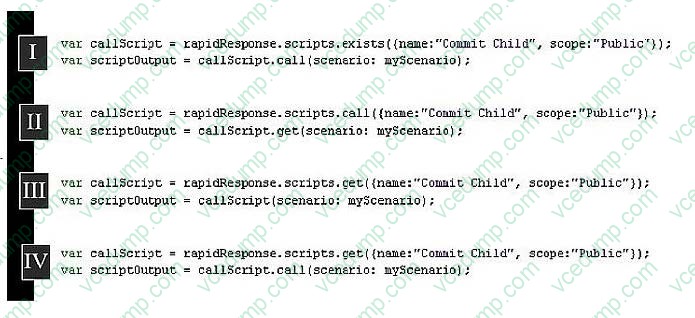
You are creating a new script that must insert a new customer record, archive that record weekly in a new scenario, and then commit the child scenario to a parent scenario. You already have a script that commits child scenarios. Referring to the graphic, which code will call the script that commits child scenarios in your new script?
A. I B. II C. III D. IV
D. IV
Explanation
The code block IV is correctly using the script execution pattern in RapidResponse. It first gets the script usingrapidResponse.scripts.get()method with the correct parameters for the name and scope, and then calls the script with.call()method,
passing the necessary scenario argument. This is how you would invoke another script from within a script.
ReferencesThe use ofrapidResponse.scripts.get()andcall()methods is standard practice in Kinaxis RapidResponse for executing one script from within another, as detailed in the Kinaxis RapidResponse scripting documentation.
Question 6:
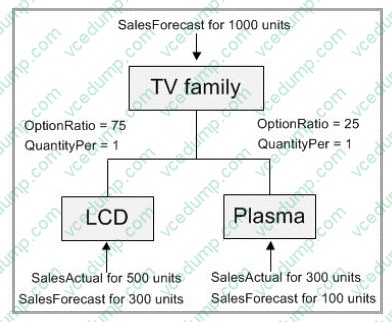
Referring to the graphic, the TV Family represents an MPSConfig planning BOM. No supply is available. What will be the quantity of the planned order created for the TV family?
A. 200 B. 600 C. 800 D. 1000
D. 1000
Explanation
The SalesForecast for the TV family is for 1000 units, as shown in the graphic. The MPSConfig planning BOM will generate a planned order equal to the SalesForecast quantity because there is no available supply. OptionRatio and QuantityPer indicatethe proportion of the forecast to be planned for each product type (LCD and Plasma), not the total quantity to be planned. Therefore, the planned order quantity will match the total forecasted demand, which is 1000 units. ReferencesThis conclusion is drawn from the Master Production Schedule (MPS) and Bill of Materials (BOM) configuration rules within Kinaxis RapidResponse. When there is no supply to meet demand and forecasts are being translated into planned production, the full amount of the forecast typically becomes the planned order quantity.
Question 7:
You are building a worksheet for supplier collaboration and you want to assign a profile variable, Suppliers, so each user can see data for their own list of suppliers.
You include an expression in your sheet reporting the ScheduledReceipt table:
Order.Supplier IN ListAsSet($Suppliers)
Which string would you enter for the Suppliers profile variable for a user that should see data for suppliers A, B and C?
A. 'A', 'B', 'C' B. 'A, B, C' C. A\, B\, C D. A, B, C
A. 'A', 'B', 'C'
Explanation
The ListAsSet function in Kinaxis RapidResponse expects a set of elements as input, typically in the format of a string with elements enclosed in single quotes and separated by commas. For a user that should see data for suppliers A, B, and
C, you need to format the string to match this expected input format.
References:
Kinaxis RapidResponse documentation on the ListAsSet function and profile variables.
Kinaxis community discussions or support articles on configuring profile variables for user-specific views.
References: The information is based on the Kinaxis RapidResponse documentation and learning resources, which provide guidelines on how to properly format expressions and variables for worksheets.
Question 8:
You are asked to create a worksheet that shows which process orchestration activity performers are late and how much they are late for each activity. There could be more than one performer per activity.
How would you accomplish this task?
A. Create a worksheet based on the Assignment table in the ProcOrch namespace. B. Create a worksheet based on the Activity table in the ProcOrch namespace. C. Create a worksheet based on the ProcessInstance table in the Mfg namespace. D. Create a worksheet on the Activity table in the Mfg namespace.
A. Create a worksheet based on the Assignment table in the ProcOrch namespace.
Explanation
To track which performers are late and by how much for each activity in a process orchestration scenario, you need to access data that includes information on activity assignments, due dates, and completion status. The Assignment table
within the ProcOrch (Process Orchestration) namespace contains this data. You can use this table to identify the performers assigned to each activity, check the planned completion dates against actual completion dates, and calculate the
delays. By creating a worksheet based on the Assignment table, you can include columns for activity IDs, performer IDs, due dates, completion dates, and a calculated field for the delay. The delay can be calculated by comparing the due
date with the completion date or the current date if the activity is not yet completed. If there is more than one performer per activity, each performer's assignment will be a separate record in the Assignment table, allowing the worksheet to
show delays for each performer.
References:
Kinaxis RapidResponse documentation on creating worksheets based on specific tables.
Training and knowledge resources provided by Kinaxis on how to use and configure worksheets in RapidResponse for process orchestration scenarios.
Question 9:
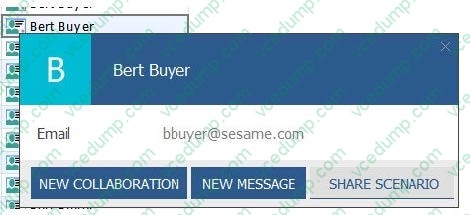
You want to identify the buyer responsible for the component part in a worksheet based on the BillofMaterial table. Additionally, you want to have the option of inviting that buyer to a collaboration, messaging that buyer, and sharing a scenario with them.
Which set of column expressions and configuration changes will enable this capability?
A. Create a column with an expression of Responsibility($Role_Buyers, Component). On the Column Formatting tab, Check the "Display as user name" checkbox. B. Create a column with an expression of Responsibility($Role_Buyers, Component). On the Column Formatting tab, Check the "Display as image" checkbox and select an appropriate image. C. Create a column with an expression of Responsibility($Role_Buyers, Component.Name). On the Column Formatting tab, Check the "Display as user name" checkbox. D. Create a column with an expression of Responsibility($Role_Buyers, Component.Name). On the Column Formatting tab, Check the "Display as image" checkbox and select an appropriate image.
A. Create a column with an expression of Responsibility($Role_Buyers, Component). On the Column Formatting tab, Check the "Display as user name" checkbox.
Explanation
To identify the buyer responsible for the component part, you would use the Responsibility function with the appropriate role and the component part as arguments. The resulting column should display the user name, which allows you to interact with that user directly from the worksheet, including inviting to a collaboration, messaging, and sharing scenarios. Enabling the "Display as user name" checkbox on the Column Formatting tab would provide this functionality directly in the worksheet. ReferencesThe Kinaxis RapidResponse function library contains the Responsibility function and outlines how to display responsible parties for certain records. Additional user interface functionalities such as messaging and collaboration options are detailed in the system's user management and worksheet configuration sections.
Question 10:
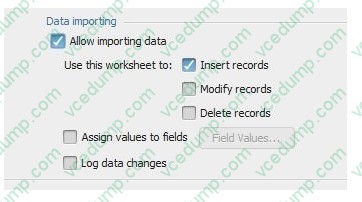
Given the worksheet properties shown in the exhibit, which console output would exist for the following script?
var dataForInsert = [['1','BBy-LCD37','DC-Europe','DCRequest','LCD-3735','DC- Europe','06-01-20',147]];
var wsOrderChng = wbOrderChng.worksheets.get('ChangeOrders');
var importResult = wsOrderChng.importData(dataForInsert); rapidResponse.console.writeLine(JSON.stringify(importResult));
A. {"deleted":0,"modified":0,"inserted":1} B. 1 record(s) inserted C. error 455: "importData failed. Delete modify not permitted" D. {"deleted":-1,"modified":-1,"inserted":1}
A. {"deleted":0,"modified":0,"inserted":1}
Explanation
The script is performing a data import operation into a worksheet that is configured to allow importing data for the purpose of inserting records, as shown in the worksheet properties exhibit. The JSON object in the console output would reflect
the result of this import operation. The object details the number of records deleted, modified, and inserted. Since the worksheet is set up only to allow insertion, and the script is importing data for insertion, the "inserted" key would have a
value of 1, and"deleted" and "modified" would have a value of 0, indicating a successful insert without any deletions or modifications.
ReferencesKinaxis RapidResponse documentation for data importing and console operations would support this behavior, outlining how the importData method interacts with worksheet configurations.
Nowadays, the certification exams become more and more important and required by more and more
enterprises when applying for a job. But how to prepare for the exam effectively? How to prepare
for the exam in a short time with less efforts? How to get a ideal result and how to find the
most reliable resources? Here on Vcedump.com, you will find all the answers.
Vcedump.com provide not only Kinaxis exam questions,
answers and explanations but also complete assistance on your exam preparation and certification
application. If you are confused on your KX3-003 exam preparations
and Kinaxis certification application, do not hesitate to visit our
Vcedump.com to find your solutions here.