FCSS_NST_SE-7.6 Exam Details
-
Exam Code
:FCSS_NST_SE-7.6 -
Exam Name
:Fortinet NSE 6 - Network Security 7.6 Support Engineer -
Certification
:Fortinet Certifications -
Vendor
:Fortinet -
Total Questions
:116 Q&As -
Last Updated
:May 24, 2026
Fortinet FCSS_NST_SE-7.6 Online Questions & Answers
-
Question 71:
Refer to the exhibits.
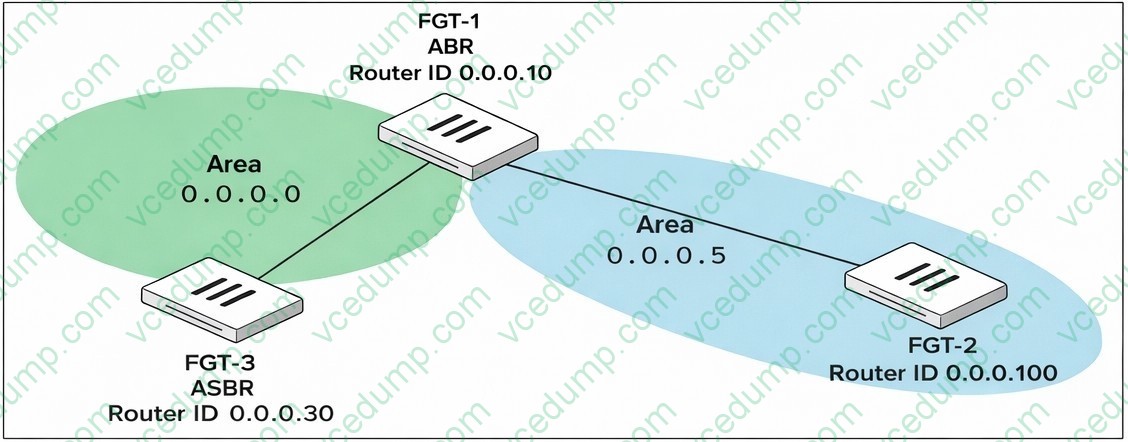
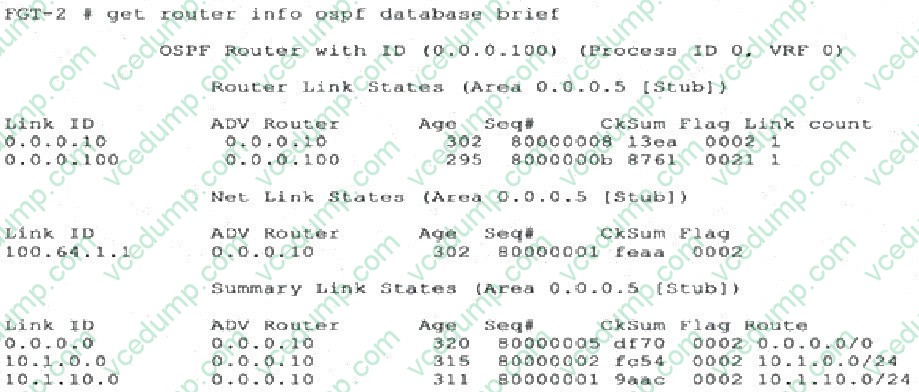
FGT-1 is an area border router (ABR) that has interfaces in OSPF areas 0.0.0.0 and 0.0.0.5. FGT-3 acts as an autonomous system border router (ASBR), importing static routes into OSPF. FGT-2 is an internal router with all its interfaces belonging to area 0.0.0.5. FGT-1 is receiving all advertised routes from FGT-2, however, FGT-3 is not receiving any
of the advertised routes from FGT-1. What is the most likely reason for this? (Choose one answer)
A. Area 0.0.0.5 is configured not to propagate type 5 LSAs.
B. FGT-2 is configured with a distribution list to block all advertised routes from FGT-3.
C. FGT-3 and FGT-2 have not formed an OSPF adjacency yet.
D. IP protocol 89 is blocked between FGT-1 and FGT-3. -
Question 72:
Refer to the exhibit, which shows the output of diagnose sys session list.
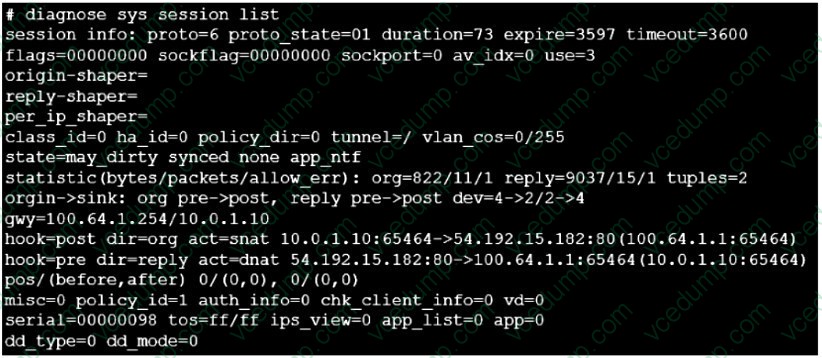
If the HA ID for the primary device is 0, what happens if the primary fails and the secondary becomes the primary?
A. The secondary device has this session synchronized; however, because application control is applied, the session is marked dirty and has to be re-evaluated after failover.
B. Traffic for this session continues to be permitted on the new primary device after failover, without requiring the client to restart the session with the server.
C. The session will be removed from the session table of the secondary device because of the presence of allowed error packets, which will force the client to restart the session with the server.
D. The session state is preserved but the kernel will need to re-evaluate the session because NAT was applied. -
Question 73:
Refer to the exhibit, which shows partial outputs from two routing debug commands.
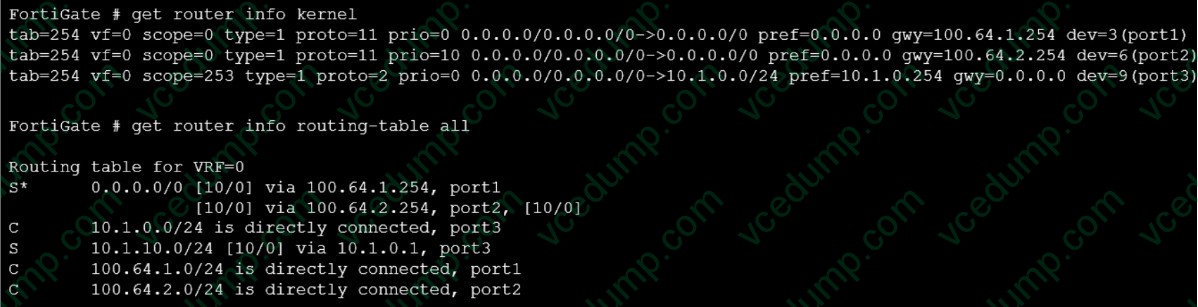
Which change must an administrator make on FortiGate to route web traffic from internal users to the internet, using ECMP?
A. Set snat-route-change to enable.
B. Set the priority of the static default route using port2 to 1.
C. Set preserve-session-route to enable.
D. Set the priority of the static default route using port1 to 10. -
Question 74:
Refer to the exhibit, which shows a partial output from the get router info routing-table database command.
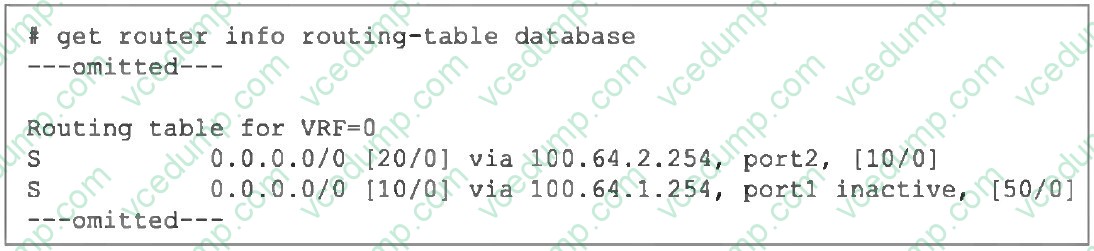
The administrator wants to configure a default static route for port3 and assign a distance of 50 and a priority of 0.
What will happen to the port1 and port2 default static routes after the port3 default static route is created?
A. The port2 default static route will be injected into the forwarding information base (FIB).
B. The port1 default static route will be injected into the FIB.
C. Neither of the routes shown in the output will be injected into the FIB.
D. Both default static routes shown in the output will be injected into the FIB. -
Question 75:
Refer to the exhibits,
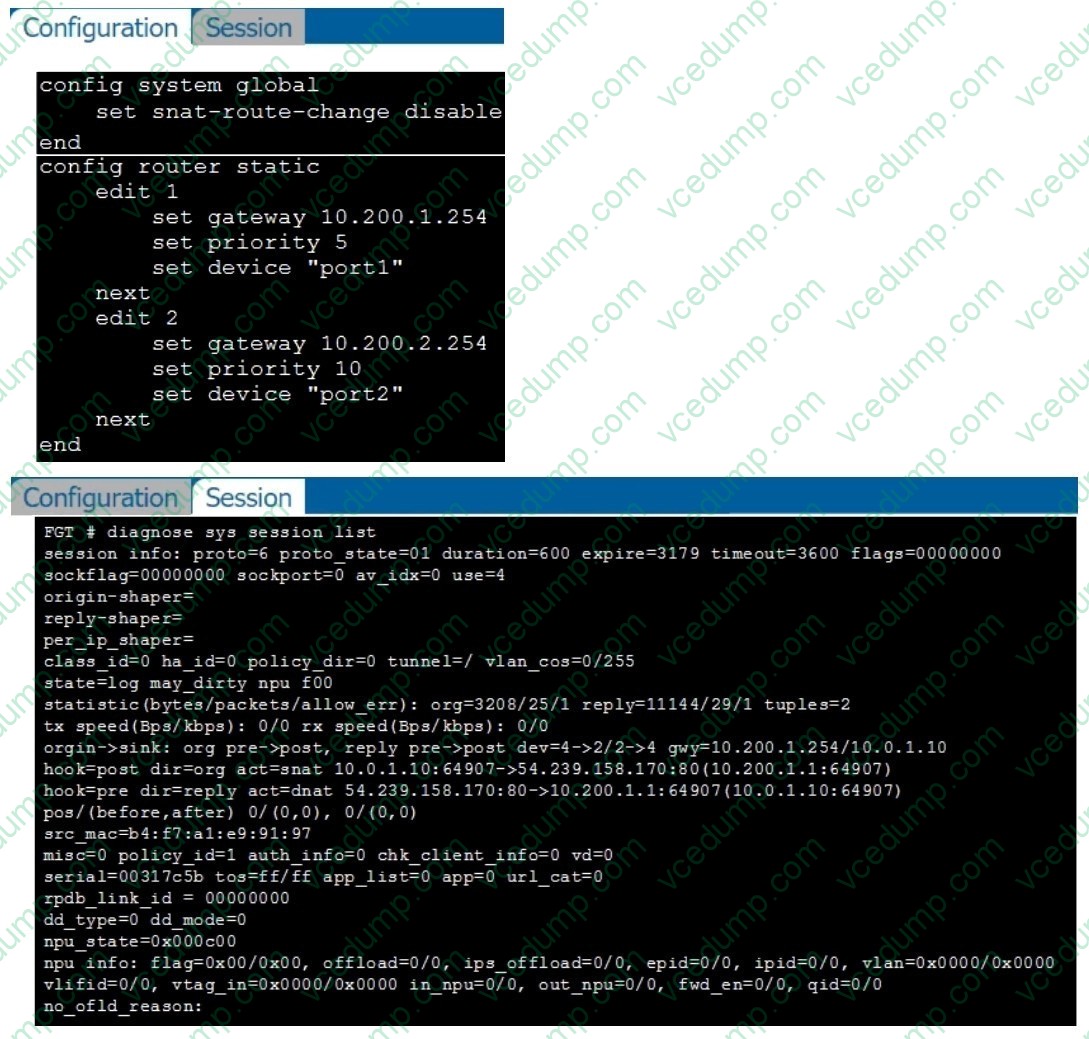
Which show the configuration on FortiGate and partial session information for internet traffic from a user on the internal network.
If the priority on route ID 2 were changed from 10 to 0, what would happen to traffic matching that user session? (Choose one answer)
A. The session would be deleted, and the client would need to start a new session.
B. The session would remain in the session table, but its traffic would now egress from both port1 and
C. The session would remain in the session table, and its traffic would egress from port2.
D. The session would remain in the session table, and its traffic would egress from port1. -
Question 76:
Which FortiGate feature allows administrators to capture live traffic for troubleshooting without using external packet capture tools?
A. diagnose sys top
B. diagnose sniffer packet
C. diagnose debug crashlog read
D. diagnose vpn ike log-filter -
Question 77:
Refer to the exhibits.
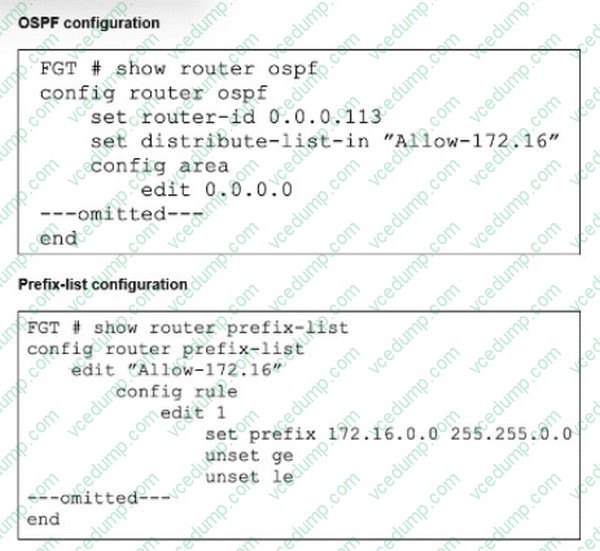
An OSPF peer is advertising route 172.16.52.0/24.
The local FortiGate is configured with an inbound distribution list that allows the 172.16.0.0/16 network to be injected into its routing table.
However, the 1'2.16.52.0/24 subnet cannot be seen in the FIB.
Which two stops can the administrator of the local FortiGate take to ensure that the advertised 172.16.
52.0/24 subnet will be injected into the routing table? (Choose two.)
A. Add another entry to the prefix list to specifically allow the 172.16.52.0/24 network.
B. Change the ge value to 17.
C. Change the R- value lo 16.
D. Modify the default prefix-list behavior from implicit deny to implicit allow. -
Question 78:
Consider the scenario where the server name indication (SNI) does not match either the common name (CN) or any of the subject alternative names (SAN) in the server certificate.
Which action will FortiGate take when using the default settings for SSL certificate inspection?
A. FortiGate uses the SNI from the user's web browser.
B. FortiGate closes the connection because this represents an invalid SSL/TLS configuration.
C. FortiGate uses the first entry listed in the SAN field in the server certificate.
D. FortiGate uses the CN information from the Subject field in the server certificate. -
Question 79:
Refer to the exhibit, which shows a partial output of the real-time LDAP debug.
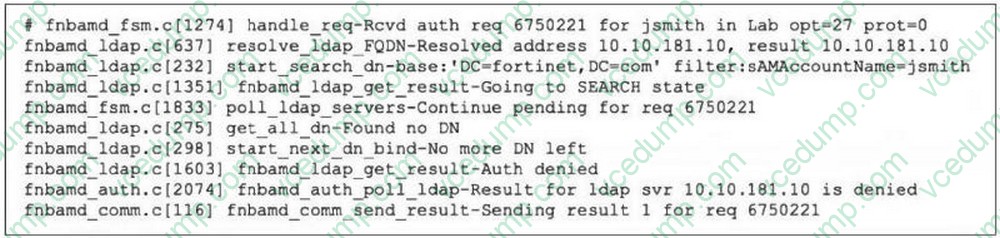
What two actions can the administrator take to resolve this issue? (Choose two.)
A. Ensure the user logs in using 'John Smith' not 'jsmith'.
B. Ensure the user is providing the correct user credentials.
C. Ensure the user is a member of at least one AD group to ensure step 4 of the LDAP authentication process is successful.
D. Ensure the account is active. -
Question 80:
Refer to the exhibit,
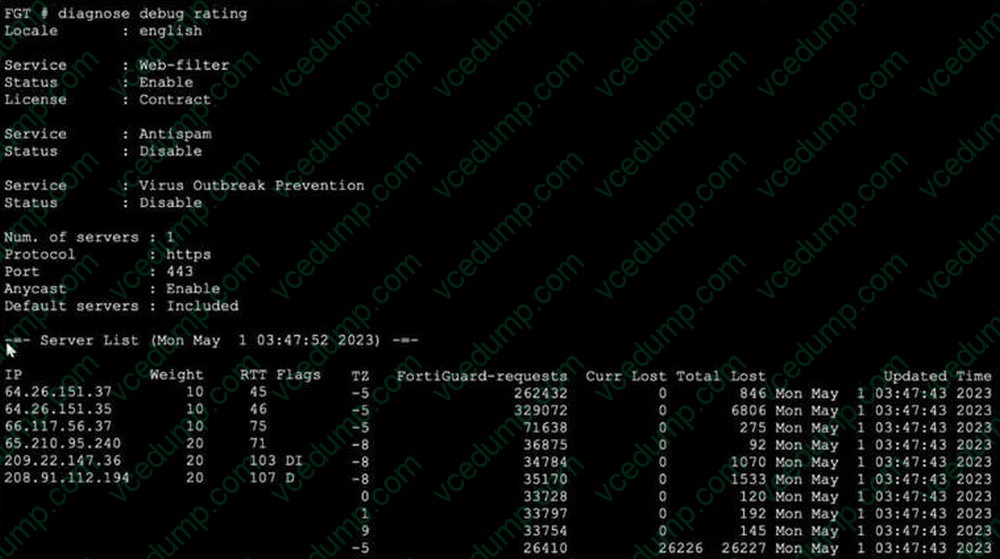
Which shows the output of a diagnose command.
What can you conclude about the debug output in this scenario?
A. The first server provided to FortiGate when it performed a DNS query looking for a list of rating servers, was 121.111.236.179.
B. There is a natural correlation between the value in the FortiGuard-requests field and the value in the Weight field.
C. FortiGate used 64.26.151.37 as the initial server to validate its contract.
D. Servers with a negative TZ value are less preferred for rating requests.
Related Exams:
-
EMEA-ADVANCED-SUPPORT
Fortinet EMEA Advanced Support -
FCP_FAC_AD-6.5
FCP - FortiAuthenticator 6.5 Administrator -
FCP_FAZ_AD-7.4
FCP - FortiAnalyzer 7.4 Administrator -
FCP_FAZ_AN-7.4
FCP - FortiAnalyzer 7.4 Analyst -
FCP_FAZ_AN-7.6
Fortinet NSE 5 - FortiAnalyzer 7.6 Analyst -
FCP_FCT_AD-7.2
FCP - Forti Client EMS 7.2 Administrator -
FCP_FCT_AD-7.4
Fortinet NSE 6 - FortiClient EMS 7.4 Administrator -
FCP_FGT_AD-7.4
FCP - FortiGate 7.4 Administrator -
FCP_FGT_AD-7.6
FortiGate 7.6 Administrator FCP_FGT_AD-7.6 -
FCP_FMG_AD-7.4
FCP - FortiManager 7.4 Administrator
Tips on How to Prepare for the Exams
Nowadays, the certification exams become more and more important and required by more and more enterprises when applying for a job. But how to prepare for the exam effectively? How to prepare for the exam in a short time with less efforts? How to get a ideal result and how to find the most reliable resources? Here on Vcedump.com, you will find all the answers. Vcedump.com provide not only Fortinet exam questions, answers and explanations but also complete assistance on your exam preparation and certification application. If you are confused on your FCSS_NST_SE-7.6 exam preparations and Fortinet certification application, do not hesitate to visit our Vcedump.com to find your solutions here.