F5CAB1 Exam Details
-
Exam Code
:F5CAB1 -
Exam Name
:BIG-IP Administration Install, Initial Configuration, and Upgrade -
Certification
:F5 Certifications -
Vendor
:F5 -
Total Questions
:54 Q&As -
Last Updated
:Jul 08, 2026
F5 F5CAB1 Online Questions & Answers
-
Question 1:
Which configuration file can a BIG-IP administrator use to verify the provisioned modules ?
A. /config/bigip.license
B. /config/bigip_base.conf
C. /config/bigip.conf
D. /var/local/ucs/config.ucs -
Question 2:
A BIG-IP Administrator has just completed the initial setup of a new BIG-IP system using the Configuration Utility. The administrator wants to verify which boot volume is currently active without rebooting the device. Which tmsh command should be used?
A. tmsh list sys software update
B. tmsh show sys software status
C. tmsh list sys software volume
D. tmsh show sys version -
Question 3:
Which one of the following is a port and protocol combination allowed by the Allow Default setting for Port Lockdown?
A. TCP 80
B. UDP 8443
C. TCP 443 -
Question 4:
For security reasons, a BIG-IP Administrator needs to specify allowable IP ranges for access to the Configuration Utility (WebUI). The exhibit shows the User Administration section of the Configuration Utility.
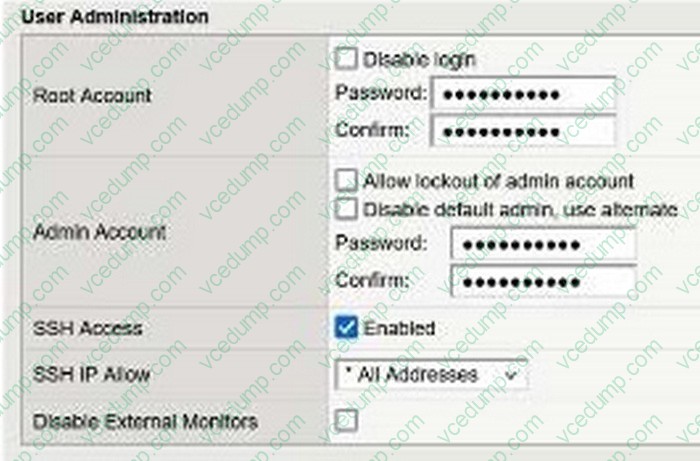
The administrator could not find any setting that explicitly restricts access to the Configuration Utility. Which one of the following is a reason for that?
A. Restricting access to the Configuration Utility can only be done from the Command Line Interface
B. The administrator must restrict access by IP address for SSH, which will implicitly restrict access to the Configuration Utility
C. To avoid locking out the administrator, recent versions of BIG-IP no longer allow restricting administrator access to the Configuration Utility by source IP address
D. The administrator needs to switch to the "Advanced" view mode in order to display the relevant setting -
Question 5:
A secondary administrator has been granted access to a BIG-IP device through its Management Interface , but is unable to access the Configuration Utility (WebUI) . What command can be run from the CLI to capture the network traffic on the management interface and troubleshoot the issue? (Choose two.)
A. tcpdump -i eth0 -n port 443
B. tcpdump -i mgmt -n port 443
C. tcpdump -i 0.0 -n port 443
D. tcpdump -i tun0 -n port 443
E. tcpdump -i management -n port 443 -
Question 6:
A BIG-IP device will be dedicated to functioning as a WAF, requiring only the ASM module to be provisioned.
What provisioning level will ensure that the system allocates all CPU, memory, and disk resources to this module exclusively?
A. Dedicated
B. Comprehensive
C. Maximal
D. Nominal -
Question 7:
The Configuration Utility of a BIG-IP device is currently accessible via its management IP 10.53.1.245 from all VLANs.
The BIG-IP Administrator needs to restrict access so only hosts from the 10.0.0.0/24 subnet can access the Configuration Utility.
Which TMSH command accomplishes this?
A. (tmos)# create /net acl MGMT.HTTP rule add { (permit tcp 10.0.0.0 0.0.0.255 host 10.53.1.245 http) }
B. (tmos)# modify /ltm httpd allow replace-all-with {10.0.0.0/24}
C. (tmos)# create /net acl MGMT.HTTP rule add { (permit tcp 10.0.0.0/24 10.53.1.245 http) (deny ip any any http) }
D. (tmos)# modify /sys httpd allow replace-all-with {10.0.0.0/24} -
Question 8:
A BIG-IP Administrator is responsible for deploying a new software image on an F5 BIG-IP HA pair and has scheduled a one-hour maintenance window. With a focus on minimizing service disruption, which of the following strategies is the most appropriate?
A. Update the active node first, reboot to the newly updated boot location and verify functionality, then push the update from the active to the standby node and reboot the standby node.
B. Reset the Device Trust, apply the update to each node separately, reboot both nodes, then re-establish the Device Trust.
C. Update the standby node first and reboot it to the newly updated boot location, failover to the newly updated node and verify functionality. Repeat the upgrade procedures on the next node, which is now in standby mode.
D. Update both nodes in the HA pair, then reboot both nodes simultaneously to ensure they run the same software version. -
Question 9:
The device is currently on v15.1.2.1 .
The BIG-IP Administrator needs to boot the device back to v13.1.0.6 to gather data for troubleshooting.
The system shows:
Sys::Software Status
Volume Product Version Build Active Status Allowed
HD1.1 BIG-IP 15.1.2.1 0.0.10 yes complete yes
HD1.2 BIG-IP 13.1.0.6 0.0.3 no complete yes
Which is the correct command-line sequence to boot the device to version 13.1.0.6 ?
A. Use tmsh to select a new boot volume, tmsh reboot HD1.2
B. switchboot -b HD1.2, then reboot
C. switchboot -I HD1.2, then reboot
D. Use tmsh to select a new boot volume, tmsh switchboot HD1.2 -
Question 10:
A BIG-IP Administrator needs to install a HotFix on a standalone BIG-IP device, which has HD1.1 as the Active Boot Location.
The administrator has already re-activated the license and created a UCS archive.
In which sequence should the administrator perform the remaining steps?
A. Install HotFix in HD1.2, Install base Image in HD1.2, Activate HD1.2
B. Install HotFix in HD1.1, Reboot the BIG-IP device, Install UCS Archive
C. Install base Image in HD1.2, Install HotFix in HD1.2, Activate HD1.2
D. Activate HD1.2, Install base Image in HD1.2, Install HotFix in HD1.2
Related Exams:
-
101
Application Delivery Fundamentals -
201
TMOS Administration -
301A
BIG-IP LTM Specialist: Architect, Set up and Deploy -
301B
BIG-IP Local Traffic Manager (LTM) Specialist: Maintain & Troubleshoot -
302
BIG-IP DNS Specialist -
303
BIG-IP ASM Specialist -
402
F5 Cloud Solutions -
771-101
Application Delivery Fundamentals -
F50-506
F5 FirePass 600 V5 -
F50-531
BIG-IP v10.x LTM Essentials V10.x
Tips on How to Prepare for the Exams
Nowadays, the certification exams become more and more important and required by more and more enterprises when applying for a job. But how to prepare for the exam effectively? How to prepare for the exam in a short time with less efforts? How to get a ideal result and how to find the most reliable resources? Here on Vcedump.com, you will find all the answers. Vcedump.com provide not only F5 exam questions, answers and explanations but also complete assistance on your exam preparation and certification application. If you are confused on your F5CAB1 exam preparations and F5 certification application, do not hesitate to visit our Vcedump.com to find your solutions here.