AZ-800 Exam Details
-
Exam Code
:AZ-800 -
Exam Name
:Administering Windows Server Hybrid Core Infrastructure -
Certification
:Microsoft Certifications -
Vendor
:Microsoft -
Total Questions
:289 Q&As -
Last Updated
:Jul 08, 2026
Microsoft AZ-800 Online Questions & Answers
-
Question 51:
SIMULATION
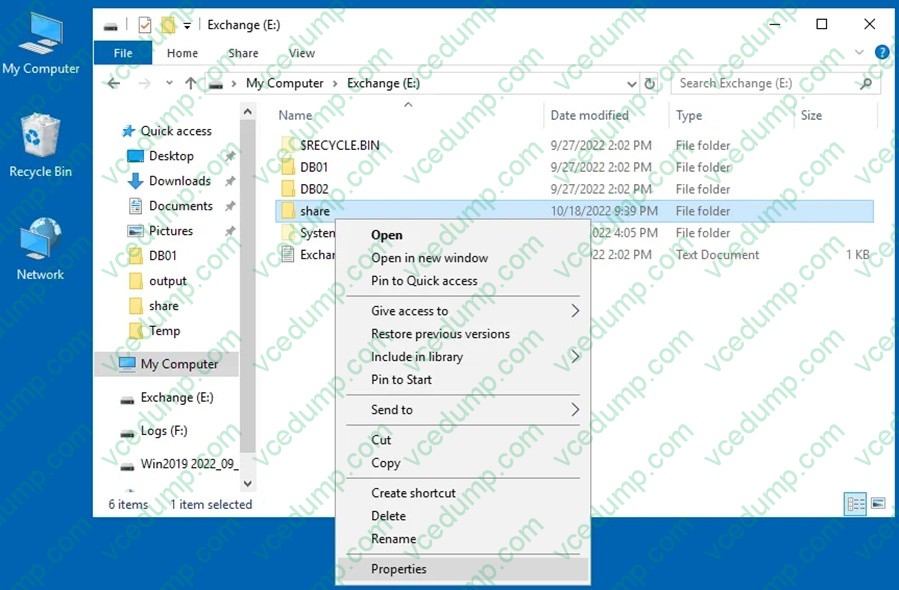
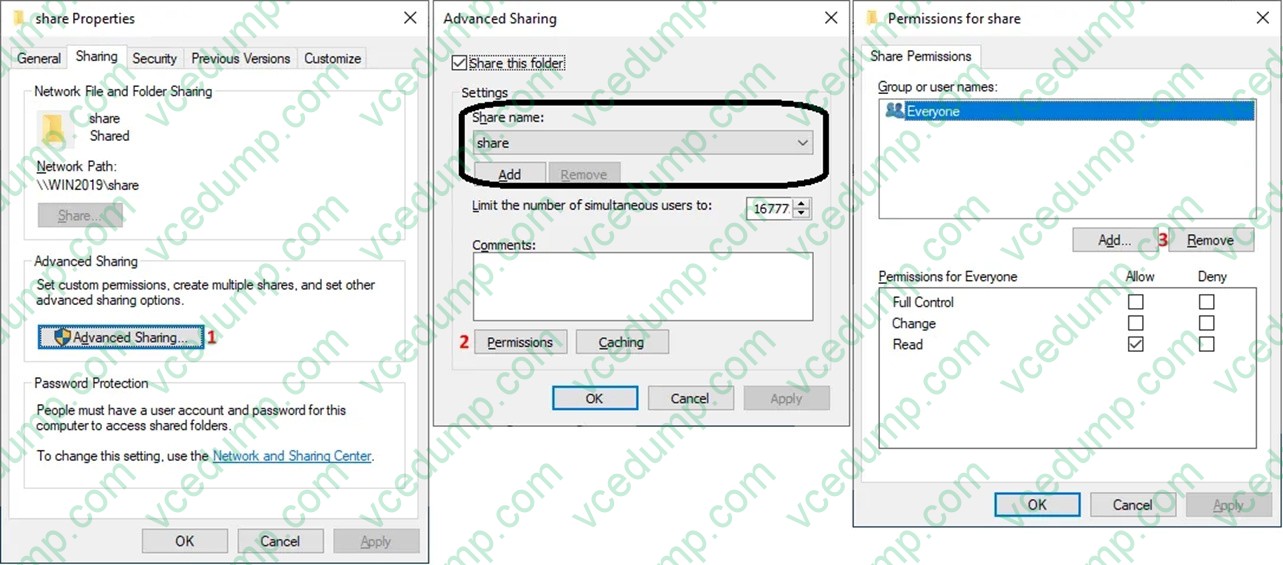
You need to make the shares named Marketing and Sales from SRV1 available on the network by using the following UNC paths:
1. \\contoso.com\documents\marketing
2. \\contoso.com\documents\sales
To complete this task, sign in to the required computer or computers.
A. See explanation below.
B. PlaceHolder
C. PlaceHolder
D. PlaceHolder -
Question 52:
You need to meet the technical requirements for User1. The solution must use the principle of least privilege.
What should you do?
A. Add Users1 to the Server Operators group in contoso.com.
B. Create a delegation on contoso.com.
C. Add Users1 to the Account Operators group in contoso.com.
D. Create a delegation on OU3. -
Question 53:
HOTSPOT
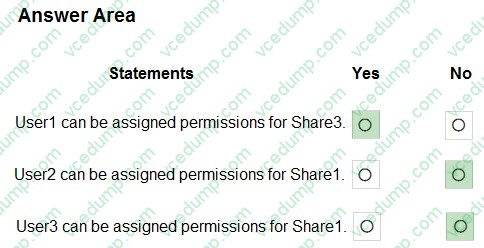
Your network contains two Active Directory forests and a domain trust as shown in the following exhibit.
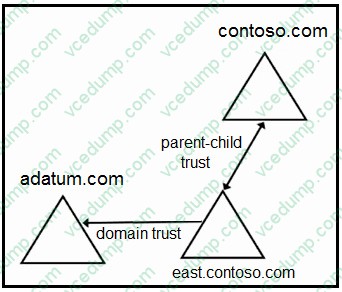
The domain trust has the following configurations:
1. Name: adatum.com
2. Type: External
3. Direction: One-way. outgoing
4. Outgoing trust authentication level: Domain-wide authentication
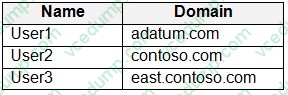
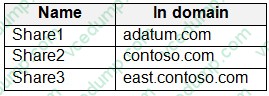
The forests contain the network shares shown in the following table.
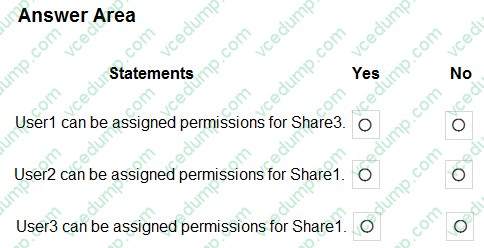
For each of the following statements, select Yes if the statement is true. Otherwise, select No. NOTE: Each correct selection is worth one point.
-
Question 54:
Your network contains an Active Directory Domain Services (AD DS) forest. The forest contains the servers shown in the following table.
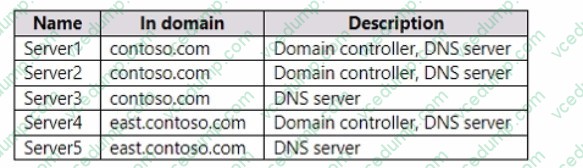
On Server1, you create a DNS zone named Zone1.com as shown in the following exhibit.
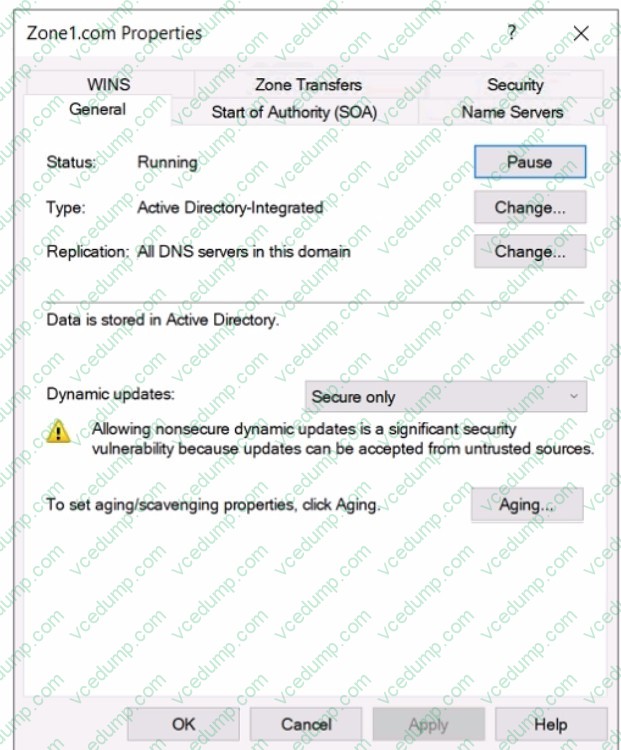
To which DNS servers is Zone1.
com replicated?
A. Server2 only
B. Server2 and Server3 only
C. Setver2 and Sen/er4 only
D. Server2. Server3, and Server4 only
E. Server2, Server3, Server4, and Server5 -
Question 55:
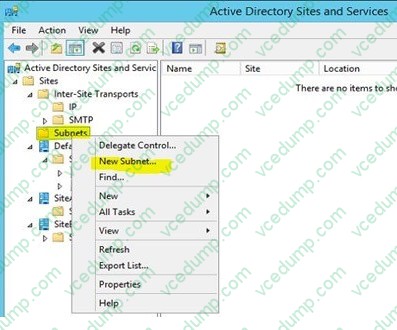
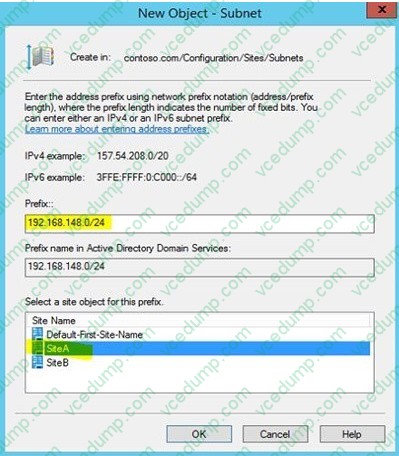
SIMULATION
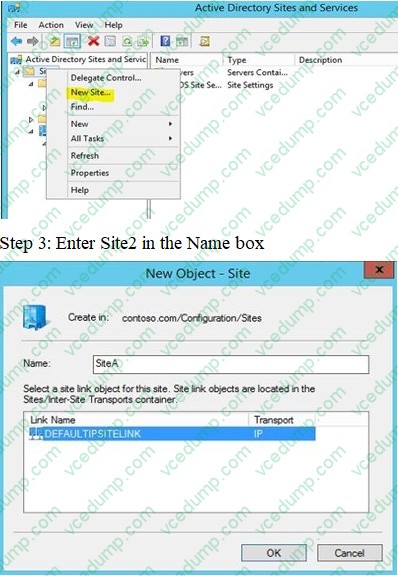
You need to create an Active Directory Domain Services (AD DS) site named Site2 that is associated to an IP address range of 192.168.2.0 to 192.168.2.255.
To complete this task, sign in the required computer or computers.
A. See the explanation below.
B. Placeholder
C. Placeholder
D. Placeholder -
Question 56:
Note: This question is part of a series of questions that present the same scenario. Each question in the series contains a unique solution that might meet the stated goals. Some question sets might have more than one correct solution, while others might not have a correct solution.
After you answer a question in this section, you will NOT be able to return to it. As a result, these questions will not appear in the review screen.
Your network contains an Active Directory Domain Services (AD DS) forest. The forest contains three Active Directory sites named Site1, Site2, and Site3. Each site contains two domain controllers. The sites are connected by using DEFAULTIPSITELINK.
You open a new branch office that contains only client computers.
You need to ensure that the client computers in the new office are primarily authenticated by the domain controllers in Site1.
Solution: You create a new site named Site4 and associate Site4 to DEFAULTIPSITELINK Does this meet the goal?
A. Yes
B. No -
Question 57:
HOTSPOT
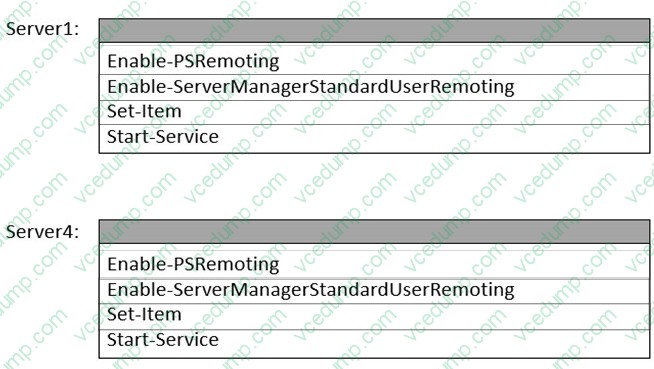
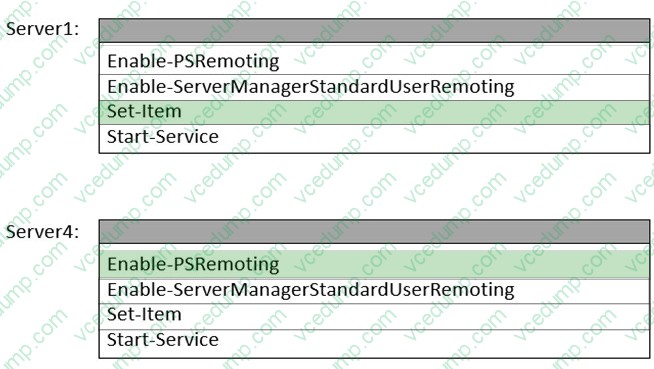
You need to meet the technical requirements for Server4.
Which cmdlets should you run on Server1 and Server4? To answer, select the appropriate options in the answer area.
NOTE: Each correct selection is worth one point.
-
Question 58:
Your network contains an Active Directory Domain Services (AD DS) forest. The forest contains three domains. Each domain contains 10 domain controllers.
You plan to store a DNS zone in a custom Active Directory partition.
You need to create the Active Directory partition for the zone. The partition must replicate to only four of the domain controllers.
What should you use?
A. Active Directory Administrative Center
B. Set-DnsServer
C. New-ADObject
D. ntdsutil.exe -
Question 59:
Your network contains an Active Directory domain named contoso.com. The domain contains the computers shown in the following table.
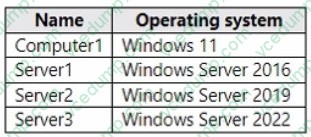
On Server3, you create a Group Policy Object (GPO) named GPO1 and link GPO1 to contoso.com. GPO1 includes a shortcut preference named Shortcut1 that has item-level targeting configured as shown in the following exhibit.
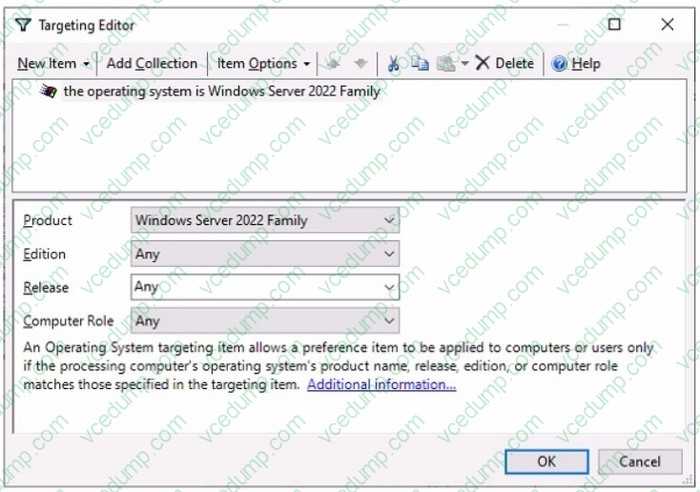
To which computer will Shortcut1 be applied?
A. Server3 only
B. Computer1 and Server3 only
C. Server2 and Server3 only
D. Server1, Server2, and Server3 only -
Question 60:
HOTSPOT
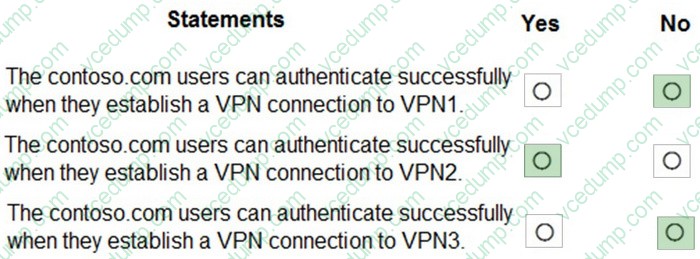
Your network contains an Active Directory Domain Services (AD DS) domain named contoso.com. The domain contains the VPN servers shown in the following table.
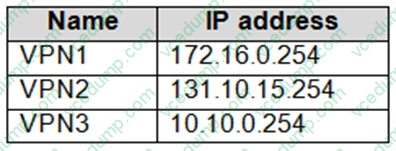
You have a server named NPS1 that has Network Policy Server (NPS) installed. NPS1 has the following RADIUS clients:
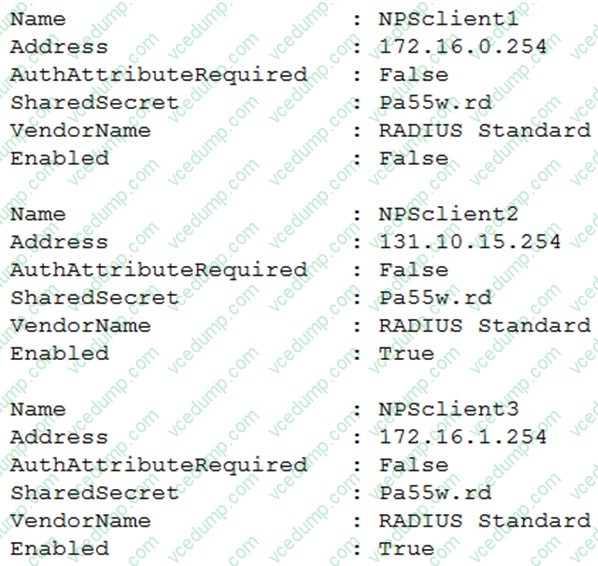
VPN1, VPN2, and VPN3 use NPS1 for RADIUS authentication. All the users in contoso.com are allowed to establish VPN connections.
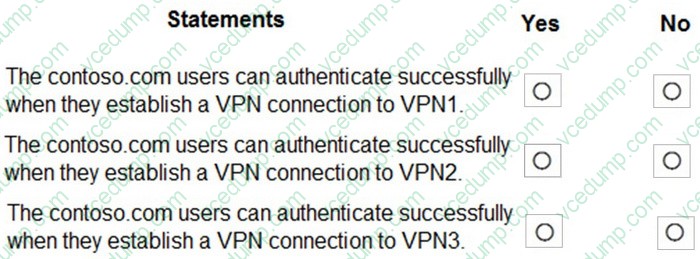
For each of the following statements, select Yes if the statement is true. Otherwise, select No.
NOTE: Each correct selection is worth one point.
Related Exams:
-
62-193
Technology Literacy for Educators -
70-243
Administering and Deploying System Center 2012 Configuration Manager -
70-355
Universal Windows Platform – App Data, Services, and Coding Patterns -
77-420
Excel 2013 -
77-427
Excel 2013 Expert Part One -
77-725
Word 2016 Core Document Creation, Collaboration and Communication -
77-726
Word 2016 Expert Creating Documents for Effective Communication -
77-727
Excel 2016 Core Data Analysis, Manipulation, and Presentation -
77-728
Excel 2016 Expert: Interpreting Data for Insights -
77-731
Outlook 2016 Core Communication, Collaboration and Email Skills
Tips on How to Prepare for the Exams
Nowadays, the certification exams become more and more important and required by more and more enterprises when applying for a job. But how to prepare for the exam effectively? How to prepare for the exam in a short time with less efforts? How to get a ideal result and how to find the most reliable resources? Here on Vcedump.com, you will find all the answers. Vcedump.com provide not only Microsoft exam questions, answers and explanations but also complete assistance on your exam preparation and certification application. If you are confused on your AZ-800 exam preparations and Microsoft certification application, do not hesitate to visit our Vcedump.com to find your solutions here.