AZ-800 Exam Details
-
Exam Code
:AZ-800 -
Exam Name
:Administering Windows Server Hybrid Core Infrastructure -
Certification
:Microsoft Certifications -
Vendor
:Microsoft -
Total Questions
:289 Q&As -
Last Updated
:Jul 08, 2026
Microsoft AZ-800 Online Questions & Answers
-
Question 31:
SIMULATION
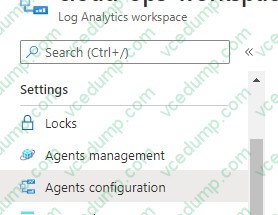
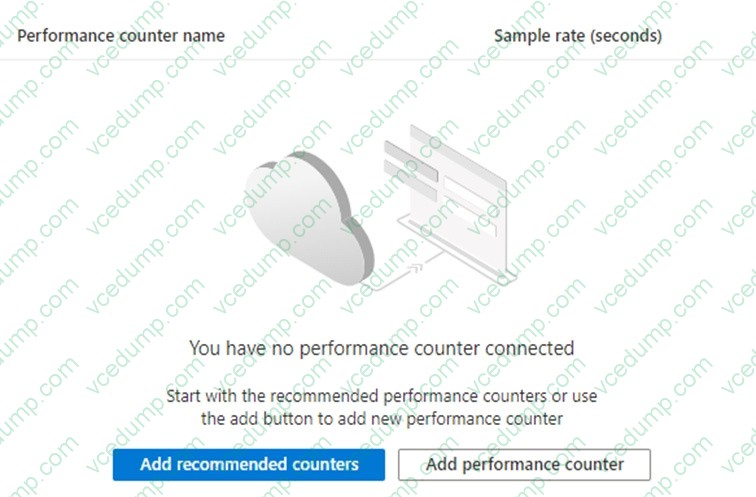
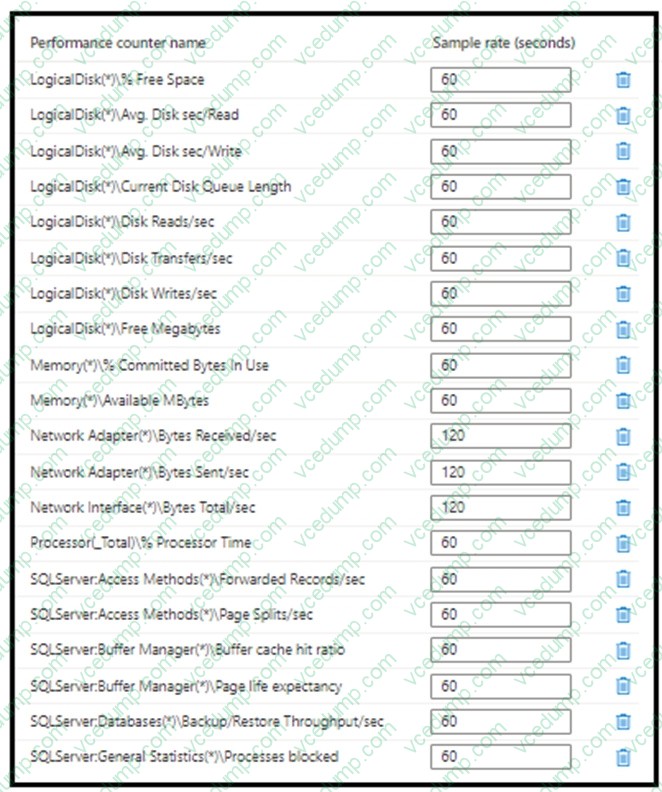
You need to collect the recommended Windows Performance Counters from SRV1 in a Log Analytics workspace.
The required files are stored in a shared folder named \\dc1\install.
To complete this task, sign in to the required computer or computers.
A. See explanation below.
B. PlaceHolder
C. PlaceHolder
D. PlaceHolder -
Question 32:
Your network contains an Active Directory forest. The forest contains two domains named contoso.com and east.contoso.com and the servers shown in the following table.
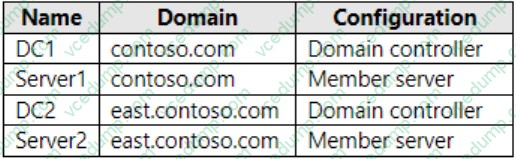
Contoso.com contains a user named User1.
You add User1 to the built-in Backup Operators group in contoso.com.
Which servers can User1 back up?
A. DC1 only
B. Server1 only
C. DC1 and DC2 only
D. DC1 and Server1 only
E. DC1, DC2, Server1, and Server2 -
Question 33:
HOTSPOT
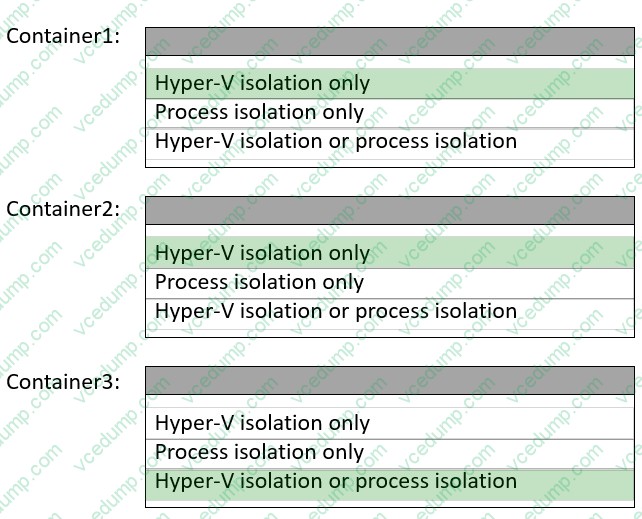
You have a Windows Server container host named Server1 that has a single disk.
On Server1, you plan to start the containers shown in the following table.
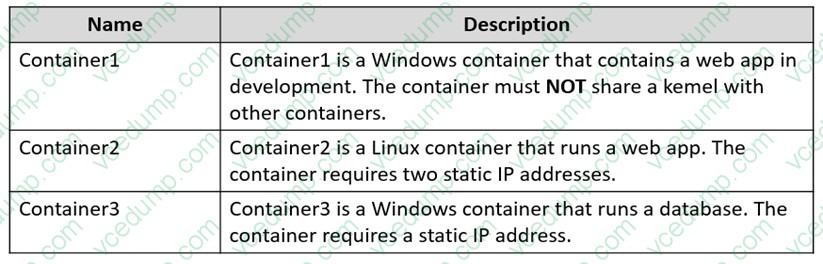
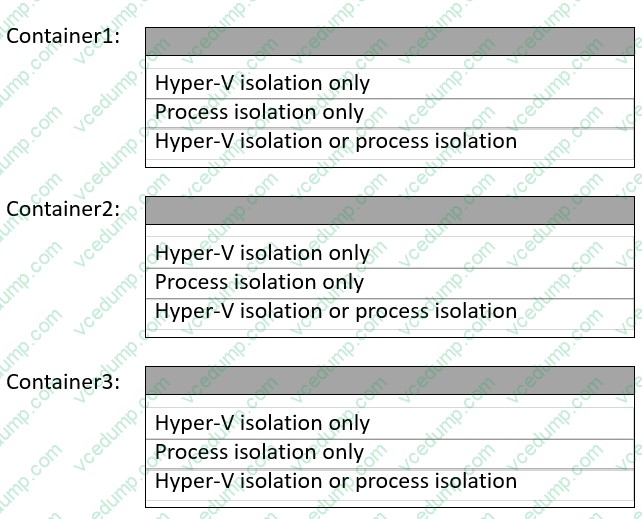
Which isolation mode can you use for each container? To answer, select the appropriate options in the answer area.
NOTE: Each correct selection is worth one point.
-
Question 34:
You have three on-premises servers named SVR1, SVR2, and SVR3 that run Windows Server. SRV1 has a direct-attached storage (DAS) array.
You plan to deploy a failover cluster named Cluster1 by using SVR2 and SVR3.
You need to ensure that the DAS array on SRV1 can be used as shared storage for Cluster1.
The solution must ensure that Cluster1 has block-level access to the storage.
What should you do first on SRV1?
A. Run the start-service -name msiscsi cmdlet.
B. Install the iSCSI Target Server role service.
C. Install the File Server role service.
D. Run the Enable-ClusterStorageSpacesDirect cmdlet. -
Question 35:
You have a server named Host1 that has the Hyper-V server role installed. Host1 hosts a virtual machine named VM1.
You have a management server named Server1 that runs Windows Server. You remotely manage Host1 from Server1 by using Hyper-V Manager.
You need to ensure that you can access a USB hard drive connected to Server1 when you connect to VM1 by using Virtual Machine Connection.
Which two actions should you perform? Each correct answer presents part of the solution.
NOTE: Each correct selection is worth one point.
A. From the Hyper-V Settings of Host1, select Allow enhanced session mode.
B. From Virtual Machine Connection, select Show Options, and then select the USB hard drive.
C. From Virtual Machine Connection, switch to a basic session.
D. From Disk Management on Host1, select Rescan Disks.
E. From Disk Management on Host1, attach a virtual hard disk. -
Question 36:
HOTSPOT
You have a server named Server1 that runs Windows Server and has the Hyper-V server role installed.
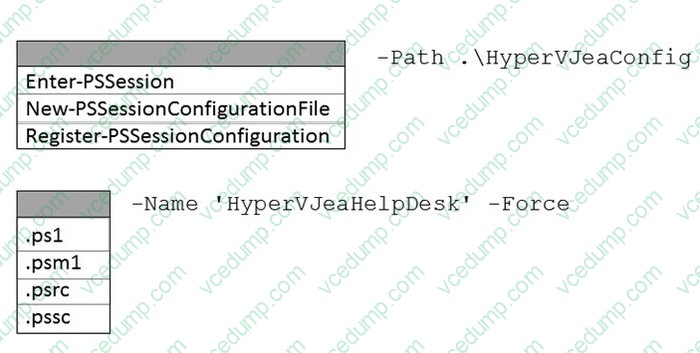
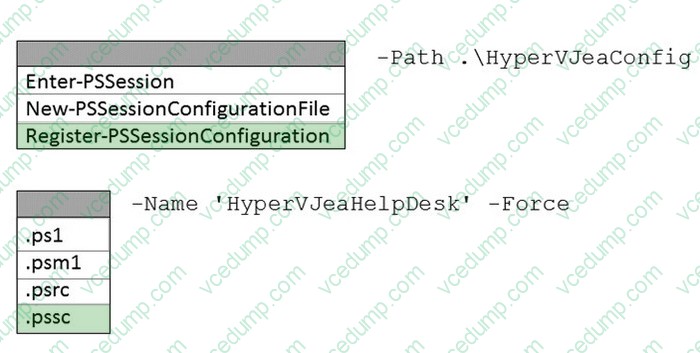
You need to limit which Hyper-V module cmdlets helpdesk users can use when administering Server1 remotely.
You configure Just Enough Administration (JEA) and successfully build the role capabilities and session configuration files.
How should you complete the PowerShell command? To answer, select the appropriate options in the answer area.
NOTE: Each correct selection is worth one point.
-
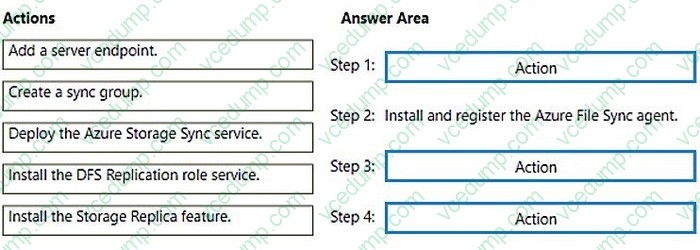
Question 37:
DRAG DROP
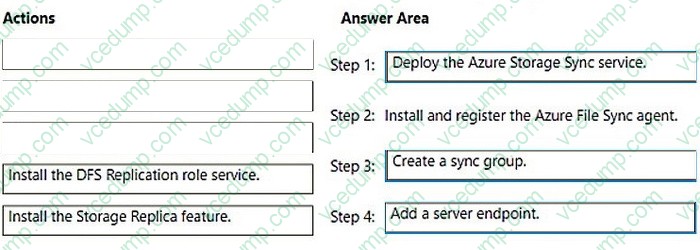
You need to implement the planned change for Data1.
Which actions should you perform in sequence? To answer, drag the appropriate actions to the correct order. Each action may be used once, more than once, or not at all. You may need to drag the split bar between panes or scroll to view content.
NOTE: Each correct selection is worth one point.
Select and Place:
-
Question 38:
You have servers that have the DNS Server role installed. The servers are configured as shown in the following table.

All the client computers in the New York office use Server2 as the DNS server.
You need to configure name resolution in the New York office to meet the following requirements:
1. Ensure that the client computers in New York can resolve names from contoso.com.
2. Ensure that Server2 forwards all DNS queries for internet hosts to
131. 107.100.200.
The solution must NOT require modifications to Server1.
Each correct answer presents part of the solution.
NOTE: Each correct selection is worth one point.
A. a forwarder
B. a conditional forwarder
C. a delegation
D. a secondary zone
E. a reverse lookup zone -
Question 39:
Note: This question is part of a series of questions that present the same scenario. Each question in the series contains a unique solution that might meet the stated goals. Some question sets might have more than one correct solution, while others might not have a correct solution.
After you answer a question in this section, you will NOT be able to return to it. As a result, these questions will not appear in the review screen.
Your network contains an Active Directory Domain Services (AD DS) forest. The forest contains three Active Directory sites named Site1, Site2, and Site3. Each site contains two domain controllers. The sites are connected by using DEFAULTIPSITELINK.
You open a new branch office that contains only client computers.
You need to ensure that the client computers in the new office are primarily authenticated by the domain controllers in Site1.
Solution: You create a new subnet object that is associated to Site1.
Does this meet the goal?
A. Yes
B. No -
Question 40:
HOTSPOT
Your on-premises network contains an Active Directory Domain Services (AD DS) domain.
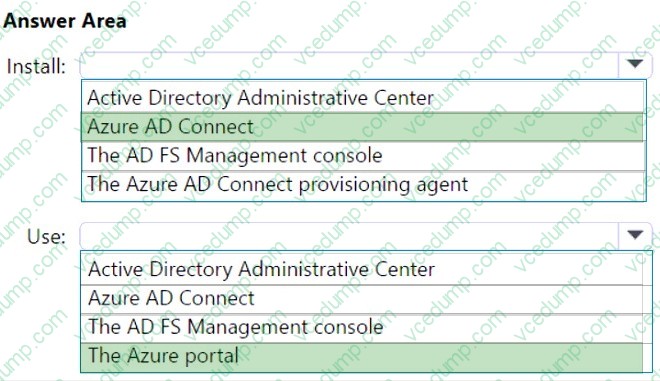
You plan to sync the domain with an Microsoft Entra tenant by using Microsoft Entra Connect cloud sync.
You need to meet the following requirements:
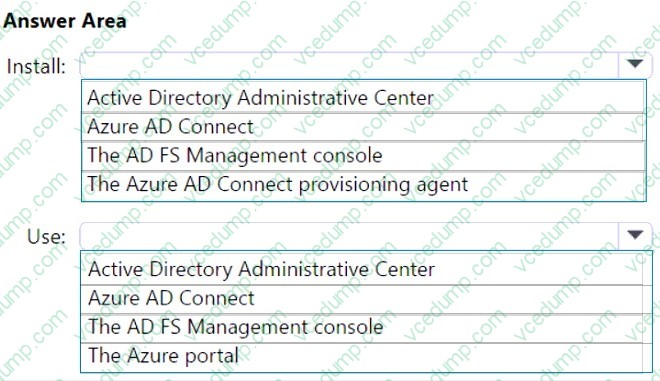
1. Install the software required to sync the domain and Azure AD.
2. Enable password hash synchronization.
What should you install, and what should you use to enable password hash synchronization? To answer, select the appropriate options in the answer area.
NOTE: Each correct selection is worth one point.
Related Exams:
-
62-193
Technology Literacy for Educators -
70-243
Administering and Deploying System Center 2012 Configuration Manager -
70-355
Universal Windows Platform – App Data, Services, and Coding Patterns -
77-420
Excel 2013 -
77-427
Excel 2013 Expert Part One -
77-725
Word 2016 Core Document Creation, Collaboration and Communication -
77-726
Word 2016 Expert Creating Documents for Effective Communication -
77-727
Excel 2016 Core Data Analysis, Manipulation, and Presentation -
77-728
Excel 2016 Expert: Interpreting Data for Insights -
77-731
Outlook 2016 Core Communication, Collaboration and Email Skills
Tips on How to Prepare for the Exams
Nowadays, the certification exams become more and more important and required by more and more enterprises when applying for a job. But how to prepare for the exam effectively? How to prepare for the exam in a short time with less efforts? How to get a ideal result and how to find the most reliable resources? Here on Vcedump.com, you will find all the answers. Vcedump.com provide not only Microsoft exam questions, answers and explanations but also complete assistance on your exam preparation and certification application. If you are confused on your AZ-800 exam preparations and Microsoft certification application, do not hesitate to visit our Vcedump.com to find your solutions here.