AZ-800 Exam Details
-
Exam Code
:AZ-800 -
Exam Name
:Administering Windows Server Hybrid Core Infrastructure -
Certification
:Microsoft Certifications -
Vendor
:Microsoft -
Total Questions
:289 Q&As -
Last Updated
:Jul 16, 2026
Microsoft AZ-800 Online Questions & Answers
-
Question 151:
HOTSPOT
Your network contains a two-domain on-premises Active Directory Domain Services (AD DS) forest named contoso.com. The forest contains the domain controllers shown in the following table.
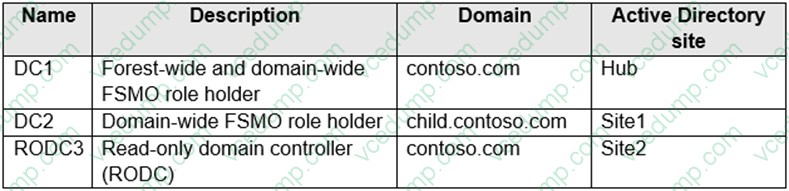
All domain controllers are backed up by using Azure Backup.
You create an Active Directory site named Site3. Site1, Site2, and Site3 each has a dedicated site link to the Hub site.
In Site3, you install a new server named Server1.
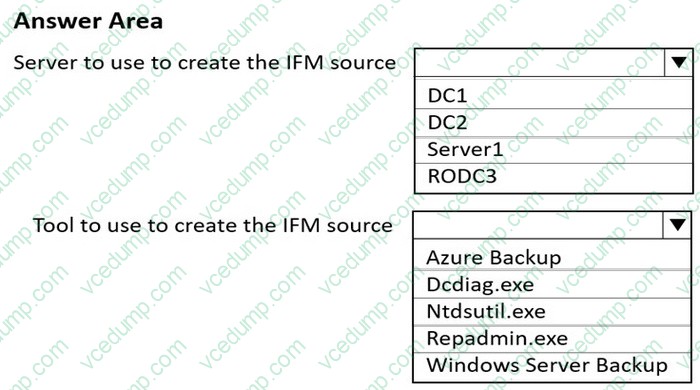
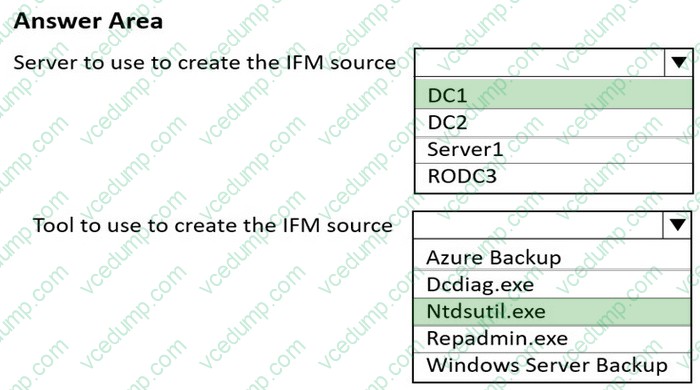
You need to promote Server1 to an RODC in child.contoso.com by using the Install from Media (IFM) option. The solution must minimize network traffic.
What should you do? To answer, select the appropriate options in the answer area.
NOTE: Each correct selection is worth one point.
-
Question 152:
DRAG DROP
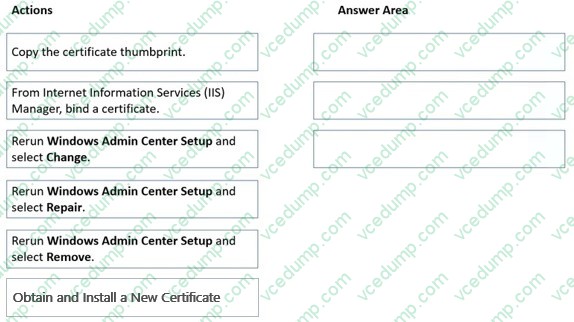
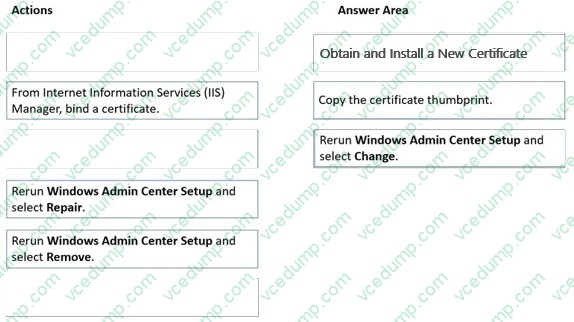
You have a server named Server1 that has Windows Admin Center installed. The certificate used by Windows Admin Center was obtained from a certification authority (CA).
The certificate expires.
You need to replace the certificate.
Which three actions should you perform in sequence? To answer, move the appropriate actions from the list of actions to the answer area and arrange them in the correct order.
Select and Place:
-
Question 153:
Your network contains an on-premises Active Directory Domain Services (AD DS) domain named contoso.com. The domain contains three servers that run Windows Server and have the Hyper-V server role installed. Each server has a Switch Embedded Teaming (SET) team.
You need to verify that Remote Direct Memory Access (RDMA) and all the required Windows Server settings are configured properly on each server to support an Azure Stack HCI cluster.
What should you use?
A. Server Manager.
B. The validate-DCB cmdtet.
C. The Get-NetAdaptor cmdlet.
D. Failover Cluster Manager. -
Question 154:
HOTSPOT
Your network contains an on-premises Active Directory Domain Services (AD DS) domain named
contoso.c6om. Contoso.com contains an organizational unit (OU) named OU1.
You have an Azure subscription that is linked to a Microsoft Entra tenant named fabrikam.com.
You need to sync contoso.com with fabrikam.com.
The solution must meet the following requirements:
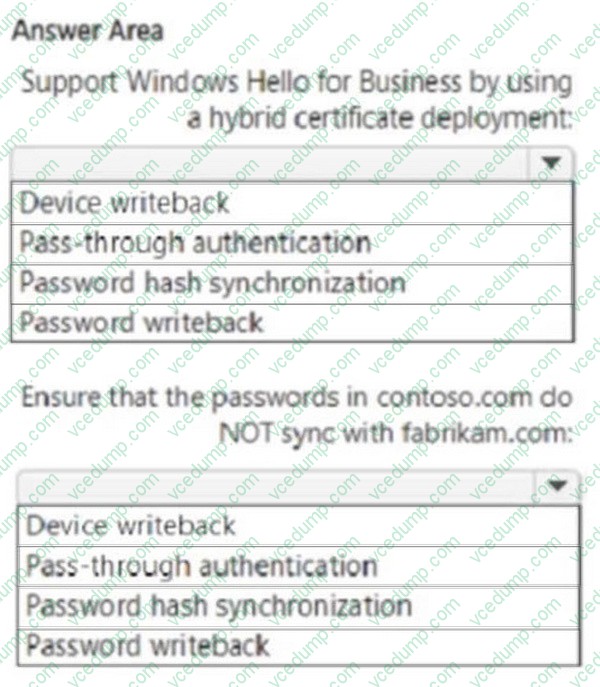
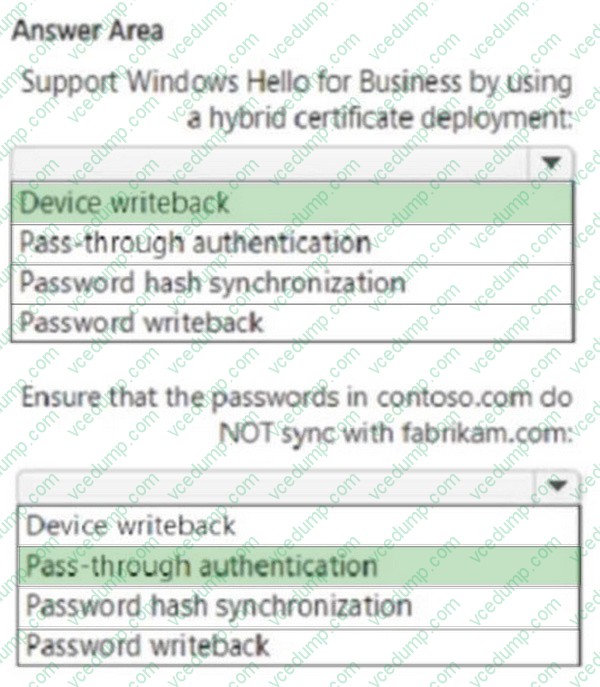
1. Support Windows Hello for Business by using a hybrid certificate deployment.
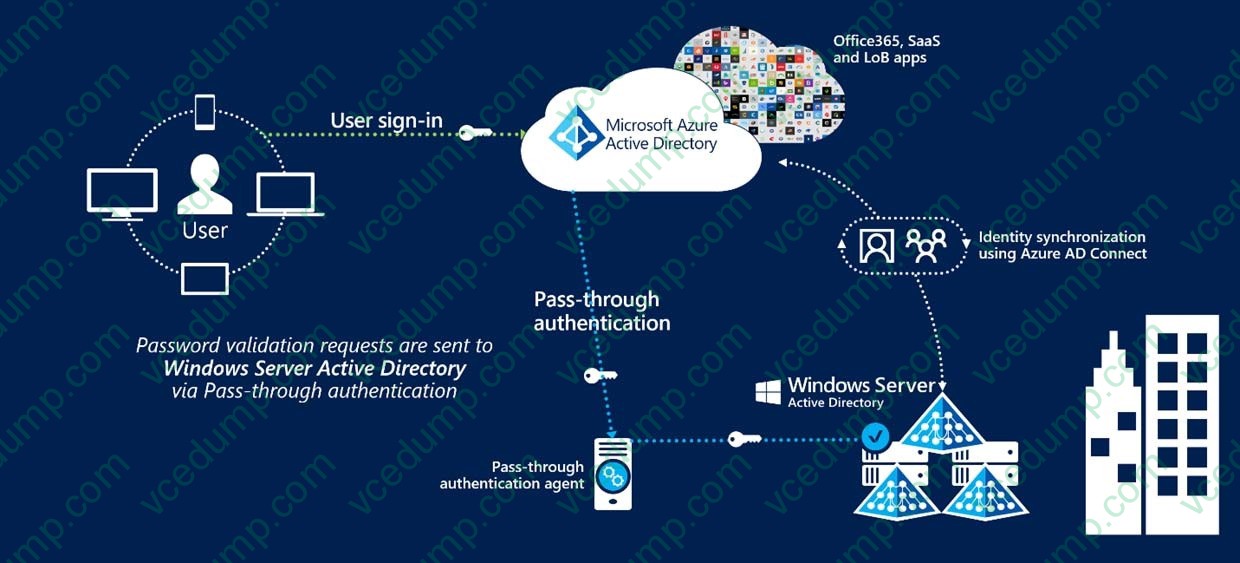
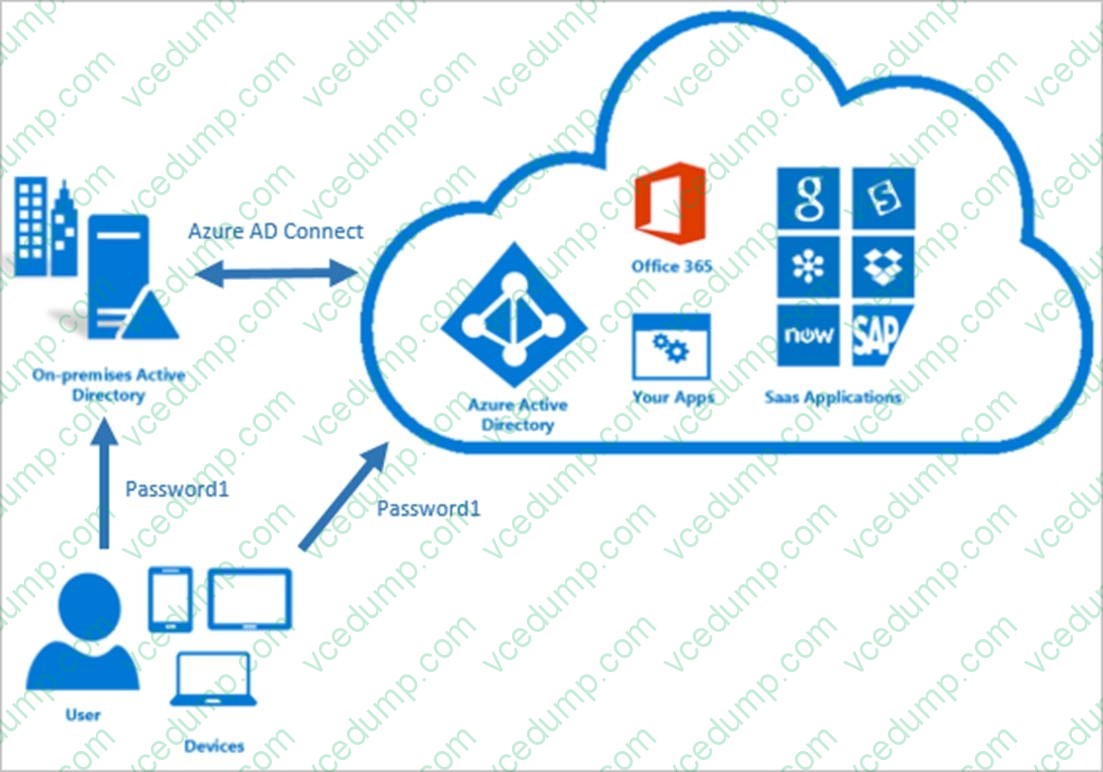
2. Ensure that the passwords in contoso.com do NOT sync to fabnkam.com.
Which Microsoft Entra Connect feature should you use for each requirement? To answer, select the appropriate options in the answer area.
NOTE: Each correct selection is worth one point.
-
Question 155:
You have an Active Directory Domain Services (AD DS) domain that contains the domain controllers shown in the following table.
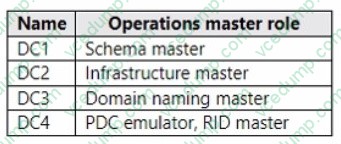
The domain contains an app named App1 that uses a custom application partition to store configuration data.
You decommission App1.
When you attempt to remove the custom application partition, the process fails.
Which domain controller is unavailable?
A. DC1
B. DC2
C. DC3
D. DC4 -
Question 156:
Your network contains an Active Directory Domain Services (AD DS) domain. The domain contains the offices shown in the following table.

You need to deploy a Network Policy Server (NPS) named NPS1 to enforce network access policies for all remote connections.
What is the minimum number of RADIUS clients that you should add to NPS1?
A. 1
B. 3
C. 8
D. 180
E. 188 -
Question 157:
HOTSPOT
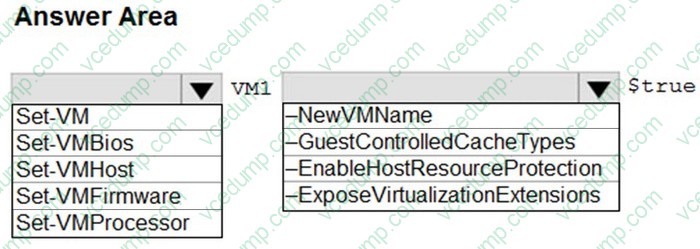
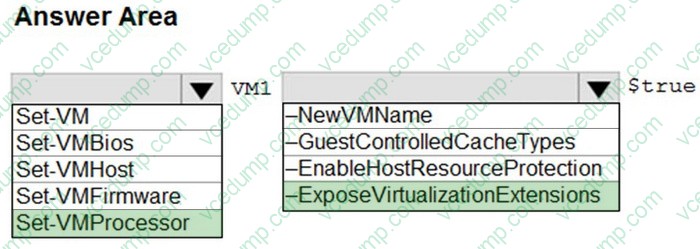
You need to meet the technical requirements for VM1.
Which cmdlet should you run first? To answer, select the appropriate options in the answer area.
NOTE: Each correct selection is worth one point.
-
Question 158:
SIMULATION
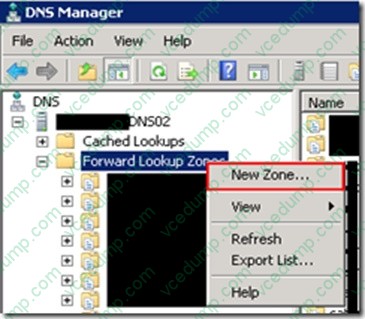
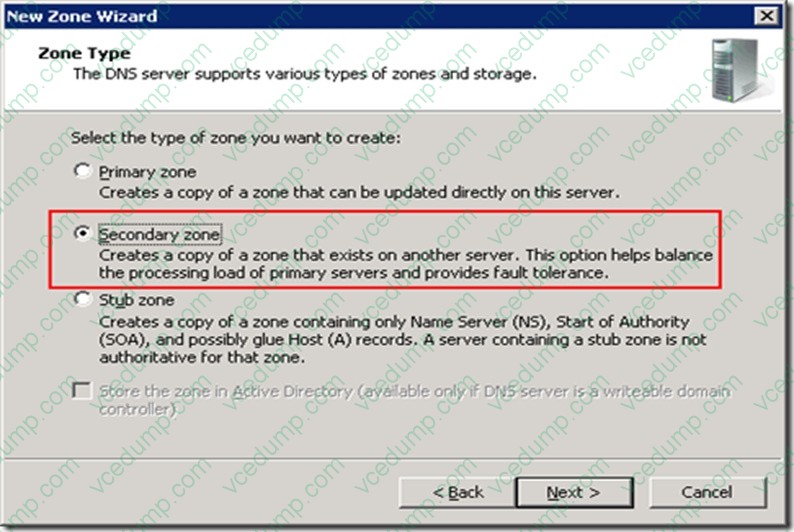
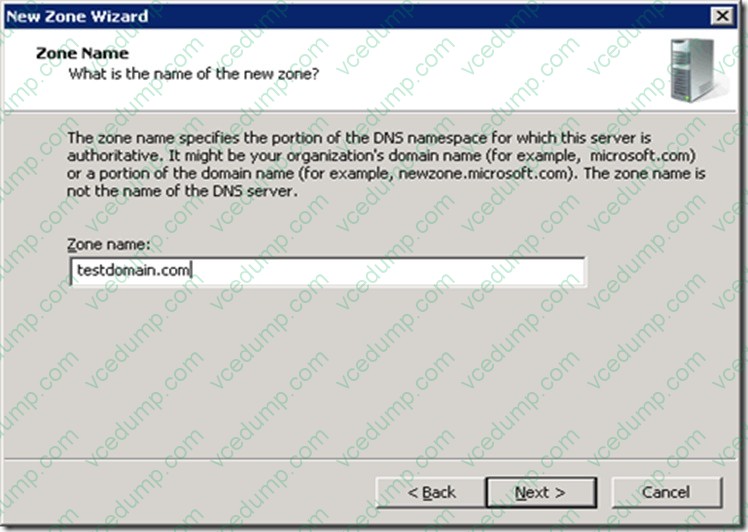
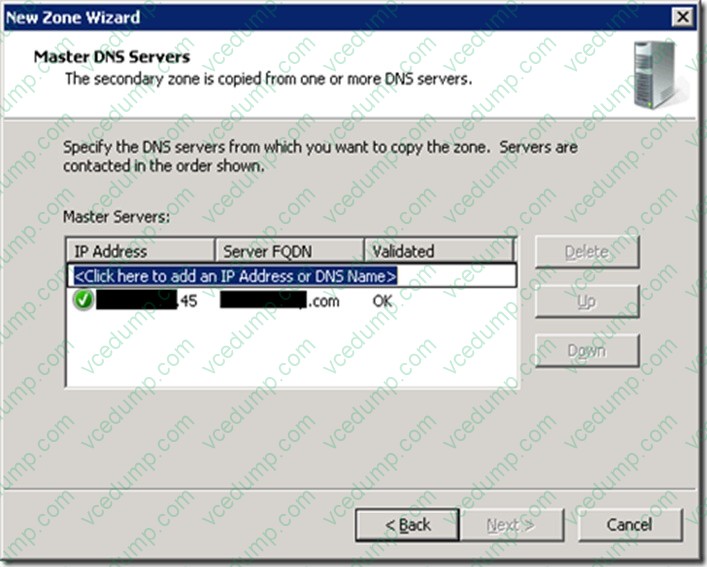
You need to replicate a read-only copy of a DNS zone named contoso.com D to SRV2.
To complete this task, sign in the required computer or computers.
A. See explanation below.
B. PlaceHolder
C. PlaceHolder
D. PlaceHolder -
Question 159:
Your network contains an Active Directory Domain Services (AD DS) forest named contoso.com. The forest root domain contains a server named server1.contoso.com.
A two-way forest trust exists between the contoso.com forest and an AD DS forest named fabrikam.com. The fabrikam.com forest contains 10 child domains.
You need to ensure that only the members of a group named fabrikam\Group1 can authenticate to server1.contoso.com.
What should you do first?
A. Add fabrikam\Group1 to the local Users group on server1.contoso.com.
B. Enable SID filtering for the trust.
C. Enable Selective authentication for the trust.
D. Change the trust to a one-way external trust. -
Question 160:
You have 50 on-premises servers that run Windows Server.
You have an Azure subscription.
You plan to monitor the on-premises servers by using Azure Monitor.
You need to collect event logs from the on-premises servers.
What should you do first?
A. From the Azure portal, create a storage account.
B. From the Azure portal, create a Log Analytics workspace.
C. From the on-premises servers, run azuremonitoragentclientsetup.msi.
D. From the Azure portal, create a data collection rule (DCR) in Azure Monitor.
Related Exams:
-
62-193
Technology Literacy for Educators -
70-243
Administering and Deploying System Center 2012 Configuration Manager -
70-355
Universal Windows Platform – App Data, Services, and Coding Patterns -
77-420
Excel 2013 -
77-427
Excel 2013 Expert Part One -
77-725
Word 2016 Core Document Creation, Collaboration and Communication -
77-726
Word 2016 Expert Creating Documents for Effective Communication -
77-727
Excel 2016 Core Data Analysis, Manipulation, and Presentation -
77-728
Excel 2016 Expert: Interpreting Data for Insights -
77-731
Outlook 2016 Core Communication, Collaboration and Email Skills
Tips on How to Prepare for the Exams
Nowadays, the certification exams become more and more important and required by more and more enterprises when applying for a job. But how to prepare for the exam effectively? How to prepare for the exam in a short time with less efforts? How to get a ideal result and how to find the most reliable resources? Here on Vcedump.com, you will find all the answers. Vcedump.com provide not only Microsoft exam questions, answers and explanations but also complete assistance on your exam preparation and certification application. If you are confused on your AZ-800 exam preparations and Microsoft certification application, do not hesitate to visit our Vcedump.com to find your solutions here.