Microsoft AZ-800 Online Practice
Questions and Exam Preparation
AZ-800 Exam Details
Exam Code
:AZ-800
Exam Name
:Administering Windows Server Hybrid Core Infrastructure
Certification
:Microsoft Certifications
Vendor
:Microsoft
Total Questions
:289 Q&As
Last Updated
:Jul 16, 2026
Microsoft AZ-800 Online Questions &
Answers
Question 101:
You have a server named Server1 that runs Windows Server 2019 and hosts a container named Container1.
Container1 uses a Windows Server 2019 base image that was built by using a Docker file.
You upgrade Server1 to Windows Server 2022.
You need to ensure that Container1 will run on Server1.
The solution must minimize administrative effort.
What should you do?
A. Start Container1 in Hyper-V isolation mode. B. Modify the Docker file. C. Start Container1 in process isolation mode. D. Rebuild the base image for Container1.
A. Start Container1 in Hyper-V isolation mode.
Explanation
When you upgrade Server1 to Windows Server 2022, you are running a newer version of the operating system than the one that the container (which is based on a Windows Server 2019 image) was built for.
Containers running in process isolation mode must use a base image that matches the host OS version or be very close. Since the base image for Container1 is built on Windows Server 2019 and the host is now Windows Server 2022, process isolation would not work without rebuilding the image.
To minimize administrative effort, you can run the container in Hyper-V isolation mode, which provides compatibility by allowing containers to run with a different kernel version than the host. Hyper-V isolation creates a lightweight virtual machine for each container, allowing it to run in its own isolated environment.
Question 102:
DRAG DROP
You have an on-premises server named Server1 that runs Windows Server. Server1 contains a file share named Share1.
You have an Azure subscription.
You perform the following actions:
1. Deploy Azure File Sync.
2. Install the Azure File Sync agent on Server1.
3. Register Server1 with Azure File Sync.
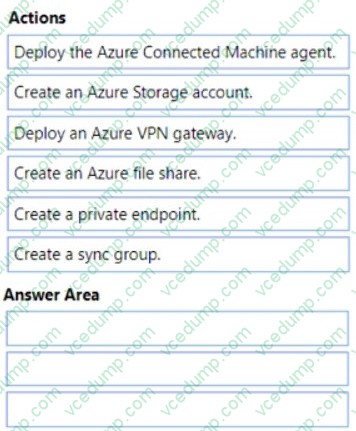
You need to ensure that you can add Share1 as an Azure File Sync server endpoint.
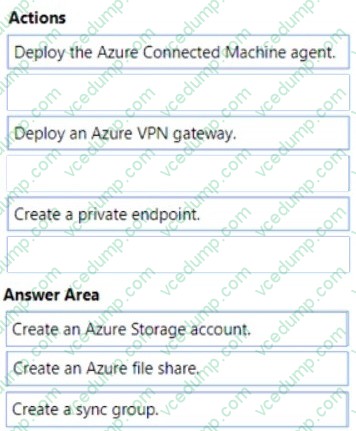
Which three actions should you perform in sequence? To answer, move the appropriate actions from the list of actions to the answer area and arrange them in the correct order.
Select and Place:
Create an Azure File Sync server endpoint Prerequisites
To create a server endpoint, you must first ensure that the following criteria are met:
The server has the Azure File Sync agent installed and has been registered.
Ensure that a Storage Sync Service has been deployed.
Ensure that a sync group has been deployed. (Step 3)
Ensure that the server is connected to the internet and that Azure is accessible. Azure File Sync uses port 443 for all communication between the server and cloud service.
Step 1: Create an Azure Storage account We need a storage account for the file share.
Step 2: Create an Azure File Share Before you can create a server endpoint in Azure File Sync, you need to create an Azure Files share.
In the left pane, click Storage accounts, and then click the name of the storage account that you want to use for Azure Files.
Step 3: Create a sync group
Note: A server endpoint consists of the following components:
Namespace: The namespace is the name of the Azure Files share that the server endpoint is associated with. The Azure Files share is the destination for the synchronized files.
Path: The path is the local file system path of the folder on the file server that is being synchronized.
Sync group: A sync group is a group of server endpoints that synchronize files with the same Azure Files share.
You have an on premises Active Directory Domain Services (AD DS) domain that syncs with a Microsoft Entra tenant.
You plan to implement self-service password reset (SSPR) in Azure AD.
You need to ensure that users that reset their passwords by using SSPR can use the new password resources in the AD DS domain.
What should you do?
A. Deploy the Microsoft Entra Password Protection proxy service to the on premises network. B. Run the Microsoft Entra Connect wizard and select Password writeback. C. Grant the Change password permission for the domain to the Microsoft Entra Connect service account. D. Grant the impersonate a client after authentication user right to the Microsoft Entra Connect service account.
B. Run the Microsoft Entra Connect wizard and select Password writeback.
Your network contains an Active Directory Domain Services (AD DS) domain. The domain contains a server named Server1.
You implement Just Enough Administration (JEA) on Server1.
You need to perform remote administration tasks on Server by using only JEA.
What should you use?
A. PowerShell only B. Remote Server Administration Tools (RSAT) only C. PowerShell or Remote Desktop only D. PowerShell or Remote Server Administration Tools (RSAT) only E. Remote Server Administration Tools (RSAT) or Remote Desktop only F. PowerShell, Remote Server Administration Tools (RSAT), or Remote Desktop
A. PowerShell only
Explanation
Just Enough Administration is a feature included in PowerShell 5.0 and higher.
Just Enough Administration (JEA) is a security technology that enables delegated administration for anything managed by PowerShell. With JEA, you can:
Reduce the number of administrators on your machines using virtual accounts or group-managed service accounts to perform privileged actions on behalf of regular users.
Limit what users can do by specifying which cmdlets, functions, and external commands they can run.
Better understand what your users are doing with transcripts and logs that show you exactly which commands a user executed during their session.
Note: This section contains one or more sets of questions with the same scenario and problem. Each question presents a unique solution to the problem. You must determine whether the solution meets the stated goals. More than one solution in the set might solve the problem. It is also possible that none of the solutions in the set solve the problem.
After you answer a question in this section, you will NOT be able to return. As a result, these questions do not appear on the Review Screen.
Your network contains an Active Directory Domains Services (AD DS) domain named contoso.com.
You implement a central store.
You create a new Group Policy Object (GPO) named GPO1.
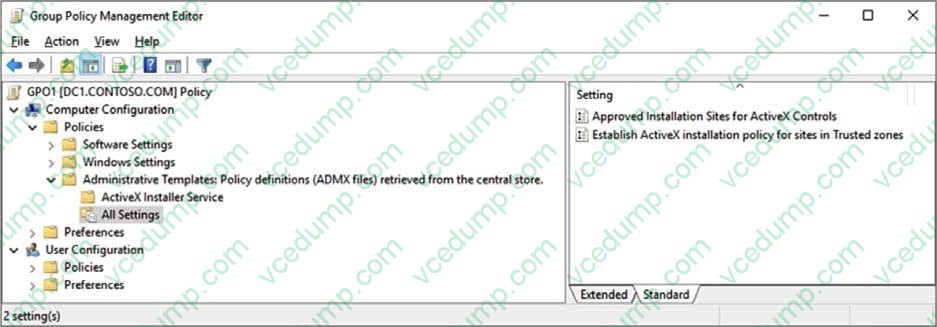
When you attempt to edit GPO1, you see the settings shown in the exhibit. (Click the Exhibit tab.)
You need to ensure that all settings are available.
Solution: You copy the contents of the C:\Windows\PolicyDefinitions folder to the central store.
Does this meet the goal?
A. Yes B. No
A. Yes
Explanation
In an Active Directory Domains Services (AD DS) domain with a central store, how to ensure that a GPO have all settings available?
Correct:
* You copy the contents of the C:\Windows\PolicyDefinitions folder to the central store.
To ensure a Group Policy Object (GPO) in an Active Directory domain with a central store has all settings available, you need to ensure the .admx and .adml files for those settings are present in the central store (the PolicyDefinitions folder within the SYSVOL share). These files contain the administrative templates that define the available settings within a GPO.
Incorrect:
* You delete the \\contoso.com\SYSVOL\contoso.com\Policies\PolicyDefinitions folder.
* You modify the properties of GPO1.
Note:
1. Understanding the Central Store:
The central store is a designated location on a domain controller (typically \\<domain>\SYSVOL\<domain>\Policies\PolicyDefinitions) where administrative template files (.admx and .adml) are stored. It ensures that all domain controllers have the same set of administrative templates for managing Group Policy, preventing inconsistencies.
It replaces the older method of storing templates within individual GPOs.
2. Ensuring Template Availability:
Locate and Download Templates: Download the necessary .admx and .adml files for the specific features or applications you want to manage. These can often be found on Microsoft's website, from the application vendor, or in the operating system's installation media.
3. Managing GPOs:
Edit GPOs: Open Group Policy Management (GPMC) and edit the desired GPO.
*-> Access Settings: When you browse the Computer or User Configuration settings in the Group Policy Management Editor, the available settings will be populated based on the templates in the central store.
Configure Settings: Configure the desired settings within the GPO as needed.
You plan to create group managed service accounts (gMSAs).
You need to configure the domain to support the creation of gMSAs.
To complete this task, sign in the required computer or computers.
A. See explanation below. B. PlaceHolder C. PlaceHolder D. PlaceHolder
A. See explanation below.
Explanation
To configure the domain to support the creation of gMSAs, you need to perform the following steps:
On a domain controller or a computer that has the Remote Server Administration Tools (RSAT) installed, open PowerShell as an administrator and run the following command to install the Active Directory module:
Install-WindowsFeature -Name RSAT-AD-PowerShell
Run the following command to create a Key Distribution Service (KDS) root key, which is required for generating passwords for gMSAs. You only need to do this once per domain:
Add-KdsRootKey -EffectiveImmediately
Wait for at least 10 hours for the KDS root key to replicate to all domain controllers in the domain. Alternatively, you can use the -EffectiveTime parameter to specify a past date and time for the KDS root key, but this is not recommended for security reasons. For more information, see Add-KdsRootKey.
After the KDS root key is replicated, you can create and configure gMSAs using the New-ADServiceAccount and Set-ADServiceAccount cmdlets. For more information, see Create a gMSA and Configure a gMSA.
Question 109:
Your network contains an Active Directory Domain Services (AD DS) domain.
The domain contains a user named User1 and the servers shown in the following table.
You need to ensure that User1 can manage only Scope1 and Scope3.
What should you do?
A. Add User1 to the DHCP Administrators group on Server1 and Server2. B. Implement IP Address Management (IPAM). C. Add User1 to the DHCP Administrators domain local group. D. Implement Windows Admin Center and add connections to Server1 and Server2.
B. Implement IP Address Management (IPAM).
Explanation
IPAM provides highly customizable administrative and monitoring capabilities for the IP address and DNS infrastructure on an Enterprise or Cloud Service Provider (CSP) network. You can monitor, audit, and manage servers running Dynamic Host Configuration Protocol (DHCP) and Domain Name System (DNS) by using IPAM.
Windows PowerShell support for Role Based Access Control
You can now use Windows PowerShell to configure Role Based Access Control. You can use Windows PowerShell commands to retrieve DNS and DHCP objects in IPAM and change their access scopes. Because of this, you can write Windows PowerShell scripts to assign access scopes to the following objects.
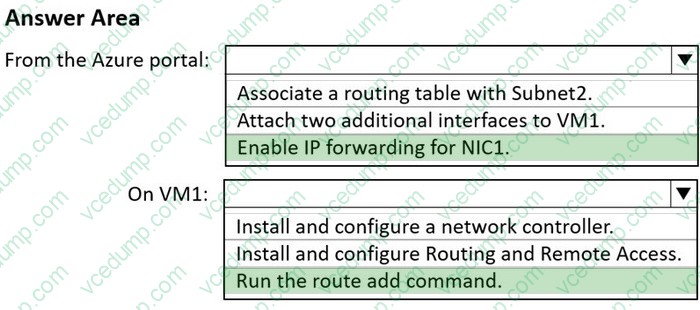
You have an Azure subscription that contains a virtual network named VNet1. Vnet1 contains three subnets named Subnet1, Subnet2, and Subnet3.
You deploy a virtual machine that has the following settings:
1. Name:VM1
2. Subnet: Subnet2
3. Network interface name: NIC1
4. Operating system: Windows Server 2022
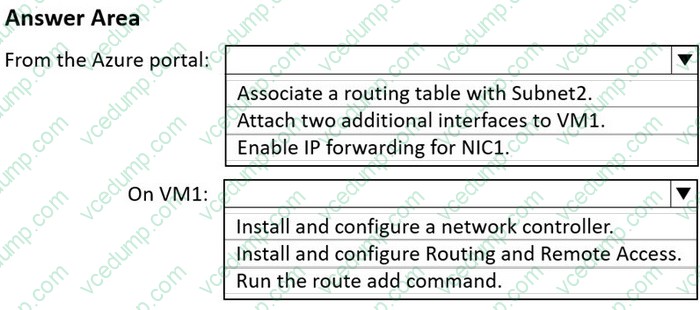
You need to ensure that VM1 can route traffic between Subnet1 and Subnet3. The solution must minimize administrative effort.
What should you do? To answer, select the appropriate options in the answer area.
NOTE: Each correct selection is worth one point.
Box 1: Enable IP forwarding for NIC1 IP forwarding enables a NIC attached to a VM to:
Receive network traffic not destined for any of the IP addresses assigned in any of the NIC's IP configurations.
Send network traffic with a different source IP address than is assigned in any of the NIC's IP configurations.
You must enable IP forwarding for every NIC attached to the VM that needs to forward traffic. A VM can forward traffic whether it has multiple NICs or a single NIC attached to it.
IP forwarding is typically used with user-defined routes.
Box 2: Run the route add command User-defined
You can create custom, or user-defined(static), routes in Azure to override Azure's default system routes, or to add more routes to a subnet's route table. In Azure, you create a route table, then associate the route table to zero or more virtual network subnets. Each subnet can have zero or one route table associated to it.
Example:
To add a route to the destination 10.41.0.0 with the subnet mask of 255.255.0.0 and the next hop address of 10.27.0.1, type:
Nowadays, the certification exams become more and more important and required by more and more
enterprises when applying for a job. But how to prepare for the exam effectively? How to prepare
for the exam in a short time with less efforts? How to get a ideal result and how to find the
most reliable resources? Here on Vcedump.com, you will find all the answers.
Vcedump.com provide not only Microsoft exam questions,
answers and explanations but also complete assistance on your exam preparation and certification
application. If you are confused on your AZ-800 exam preparations
and Microsoft certification application, do not hesitate to visit our
Vcedump.com to find your solutions here.