AZ-204 Exam Details
-
Exam Code
:AZ-204 -
Exam Name
:Developing Solutions for Microsoft Azure -
Certification
:Microsoft Certifications -
Vendor
:Microsoft -
Total Questions
:588 Q&As -
Last Updated
:Jul 12, 2026
Microsoft AZ-204 Online Questions & Answers
-
Question 411:
HOTSPOT
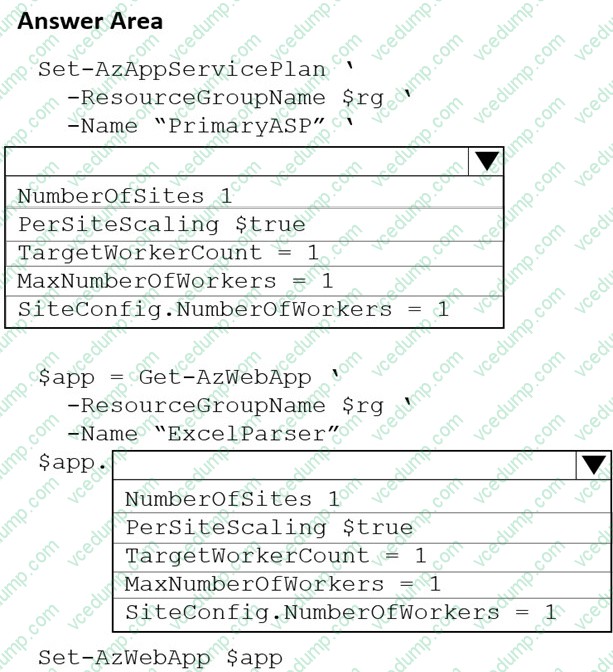
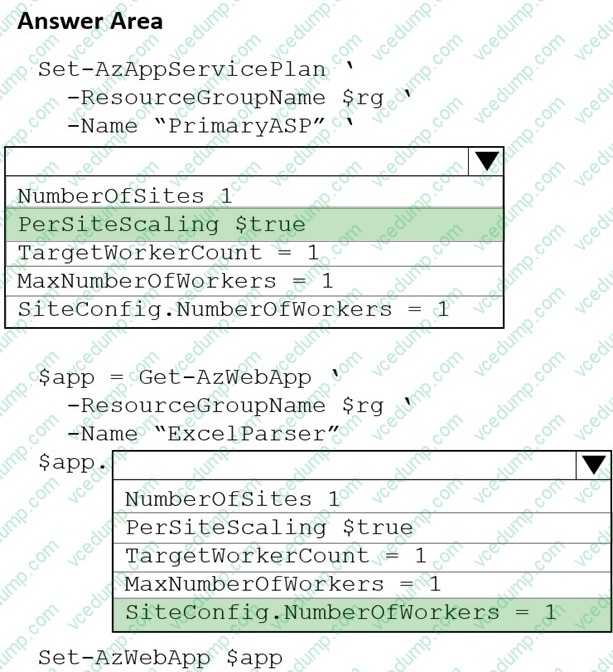
A software as a service (SaaS) company provides document management services. The company has a service that consists of several Azure web apps. All Azure web apps run in an Azure App Service Plan named PrimaryASP.
You are developing a new web service by using a web app named ExcelParser. The web app contains a third-party library for processing Microsoft Excel files. The license for the third-party library stipulates that you can only run a single instance of the library.
You need to configure the service.
How should you complete the script? To answer, select the appropriate options in the answer area.
NOTE: Each correct selection is worth one point.
-
Question 412:
You develop and deploy an Azure Logic app that calls an Azure Function app. The Azure Function app includes an OpenAPI (Swagger) definition and uses an Azure Blob storage account. All resources are secured by using Azure Active Directory (Azure AD).
The Azure Logic app must securely access the Azure Blob storage account. Azure AD resources must remain if the Azure Logic app is deleted.
You need to secure the Azure Logic app.
What should you do?
A. Create a user-assigned managed identity and assign role-based access controls.
B. Create an Azure AD custom role and assign the role to the Azure Blob storage account.
C. Create an Azure Key Vault and issue a client certificate.
D. Create a system-assigned managed identity and issue a client certificate.
E. Create an Azure AD custom role and assign role-based access controls. -
Question 413:
You develop and deploy a web application to Azure App Service. The application accesses data stored in an Azure Storage account. The account contains several containers with several blobs with large amounts of data. You deploy all Azure resources to a single region.
You need to move the Azure Storage account to the new region. You must copy all data to the new region.
What should you do first?
A. Export the Azure Storage account Azure Resource Manager template
B. Initiate a storage account failover
C. Configure object replication for all blobs
D. Use the AzCopy command line tool
E. Create a new Azure Storage account in the current region
F. Create a new subscription in the current region -
Question 414:
HOTSPOT
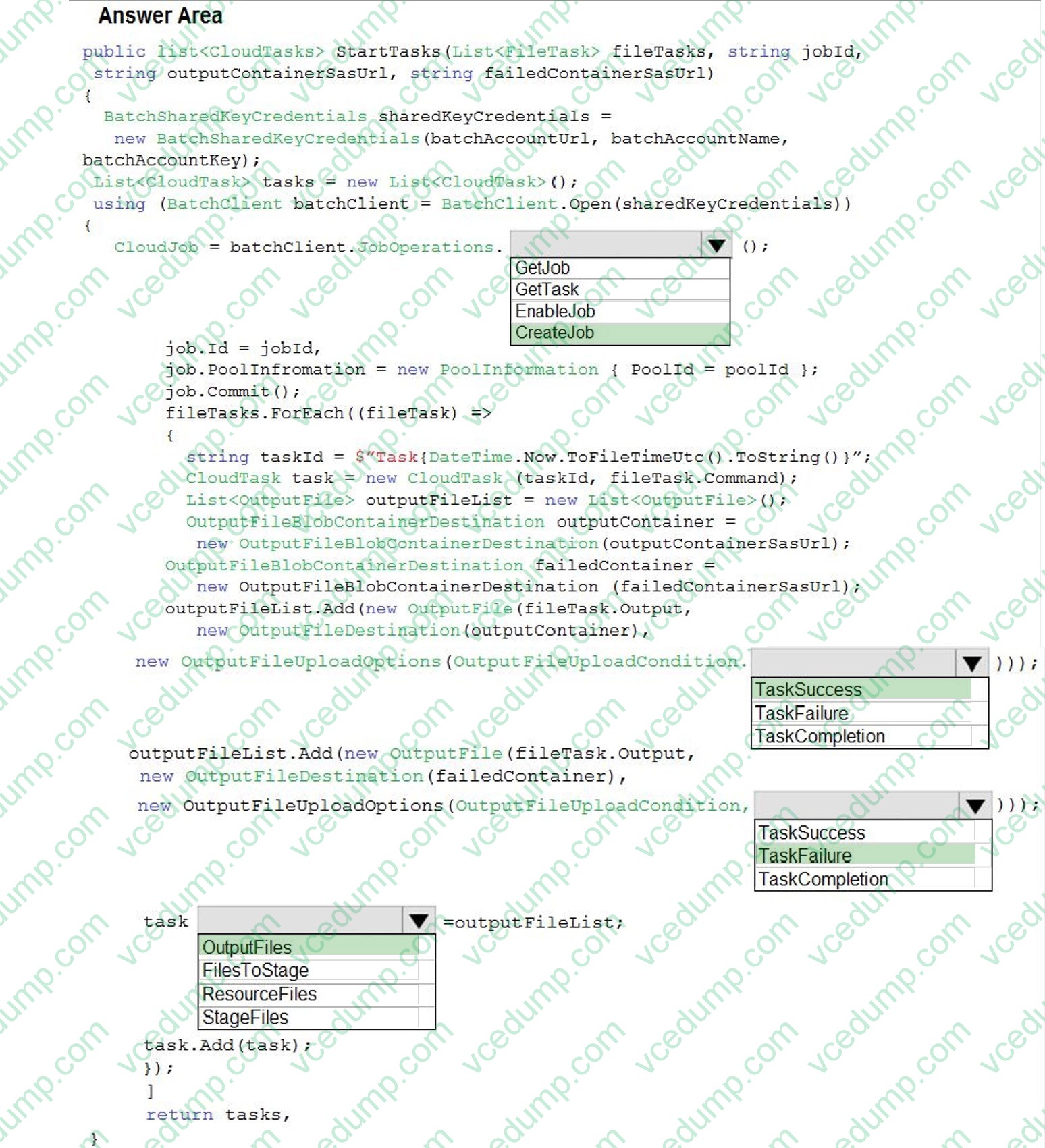
You have an Azure Batch project that processes and converts files and stores the files in Azure storage. You are developing a function to start the batch job.
You add the following parameters to the function.

You must ensure that converted files are placed in the container referenced by the outputContainerSasUrl parameter. Files which fail to convert are placed in the container referenced by the failedContainerSasUrl parameter.
You need to ensure the files are correctly processed.
How should you complete the code segment? To answer, select the appropriate options in the answer area.
NOTE: Each correct selection is worth one point.

-
Question 415:
You deploy an Azure Container Apps app and disable ingress on the container app.
Users report that they are unable to access the container app. You investigate and observe that the app has scaled to 0 instances.
You need to resolve the issue with the container app.
Solution: Enable ingress and configure the minimum replicas to 1 for the container app.
Does the solution meet the goal?
A. Yes
B. No -
Question 416:
DRAG DROP
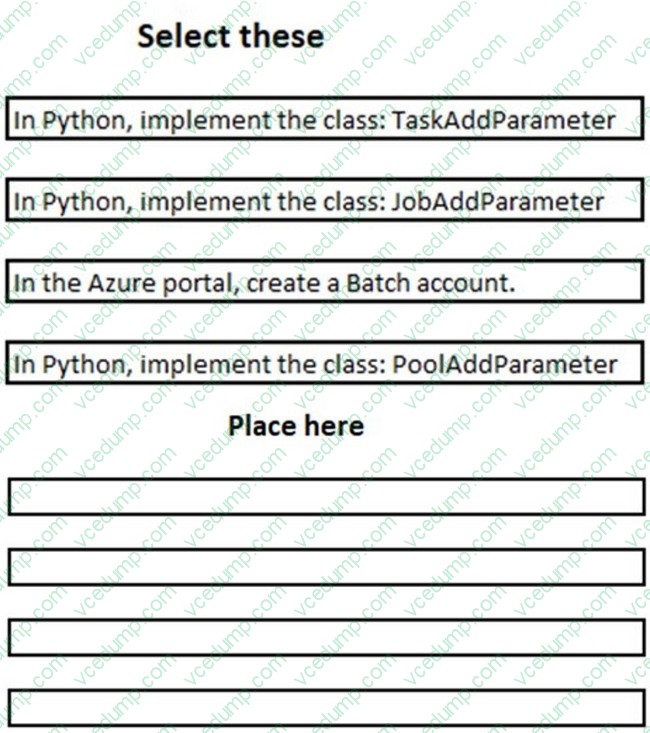
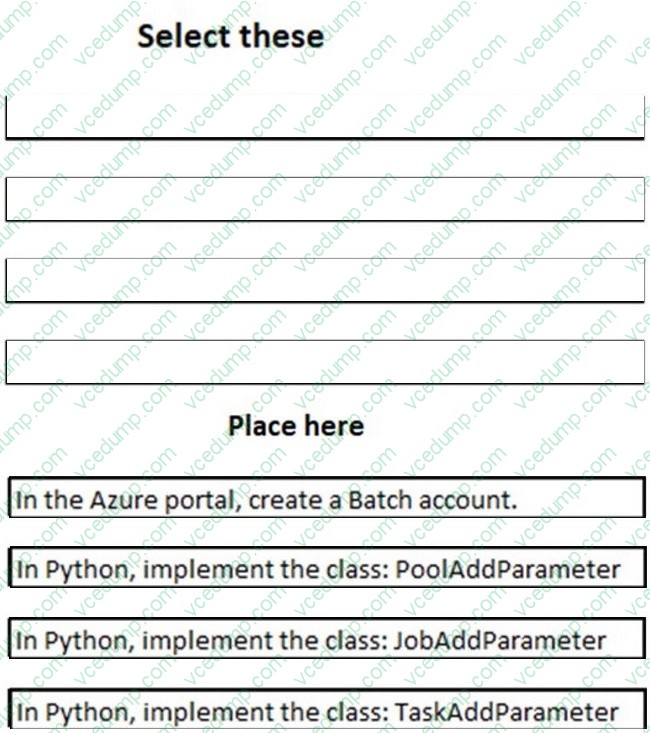
You are developing a software solution for an autonomous transportation system. The solution uses large data sets and Azure Batch processing to simulate navigation sets for entire fleets of vehicles.
You need to create compute nodes for the solution on Azure Batch.
What should you do?
Put the actions in the correct order.
Select and Place:
-
Question 417:
You are developing an internal website for employees to view sensitive data. The website uses Azure Active Directory (AAD) for authentication.
You need to implement multifactor authentication for the website.
What should you do? Each correct answer presents part of the solution.
NOTE: Each correct selection is worth one point.
A. Upgrade to Azure AD Premium.
B. In Azure AD conditional access, enable the baseline policy.
C. In Azure AD, create a new conditional access policy.
D. In Azure AD, enable application proxy.
E. Configure the website to use Azure AD B2C. -
Question 418:
HOTSPOT
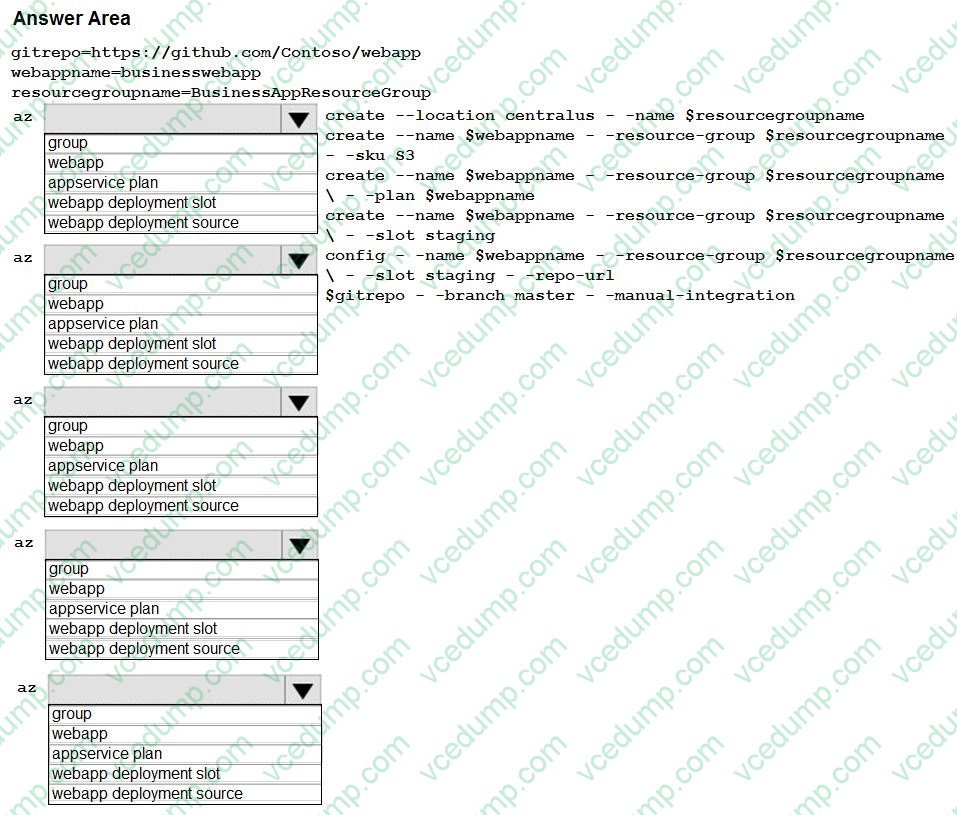
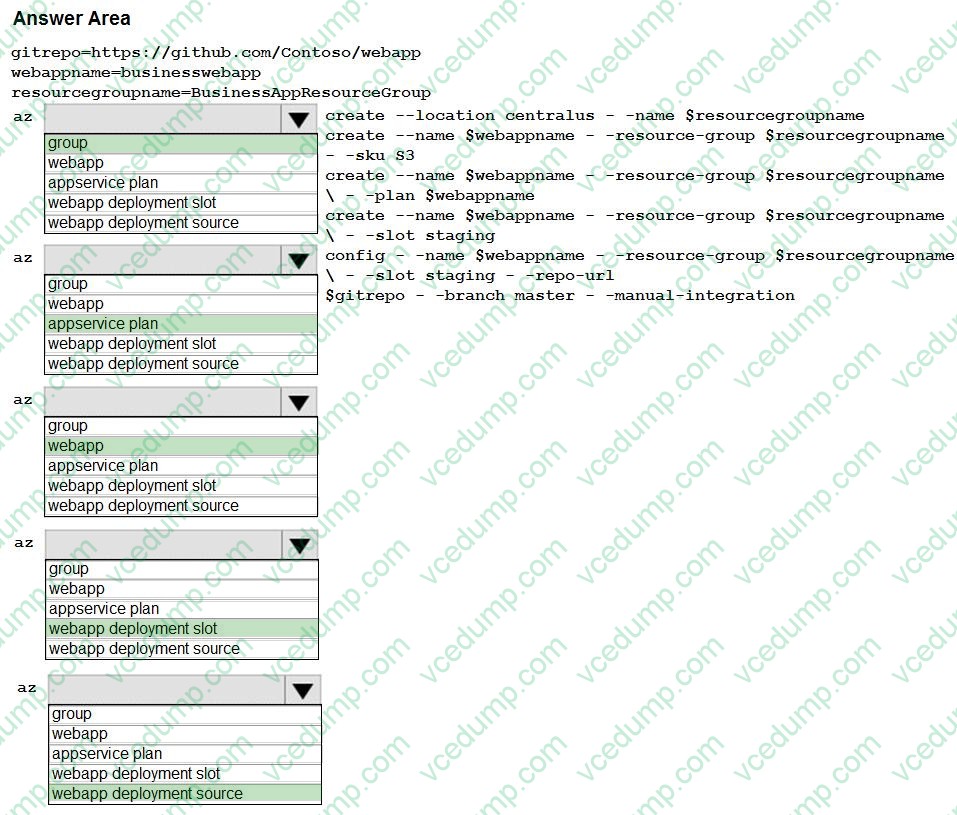
A company is developing a Java web app. The web app code is hosted in a GitHub repository located at https://github.com/Contoso/webapp.
The web app must be evaluated before it is moved to production. You must deploy the initial code release to a deployment slot named staging.
You need to create the web app and deploy the code.
How should you complete the commands? To answer, select the appropriate options in the answer area.
NOTE: Each correct selection is worth one point.
-
Question 419:
You are a developer at your company.
You need to update the definitions for an existing Logic App.
What should you use?
A. the Enterprise Integration Pack (EIP)
B. the Logic App Code View
C. the API Connections
D. the Logic Apps Designer -
Question 420:
DRAG DROP
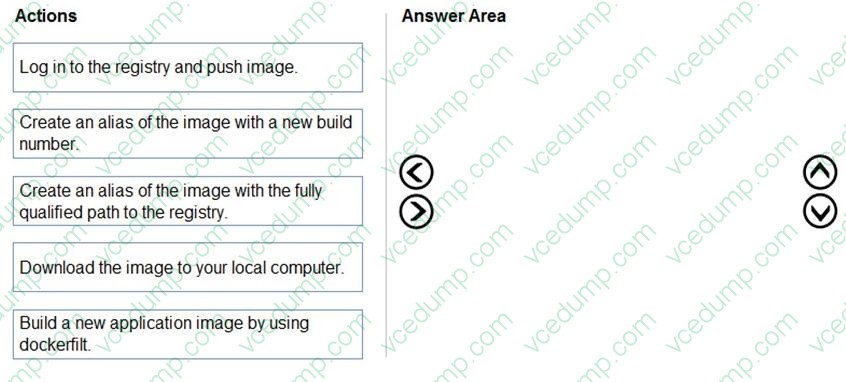
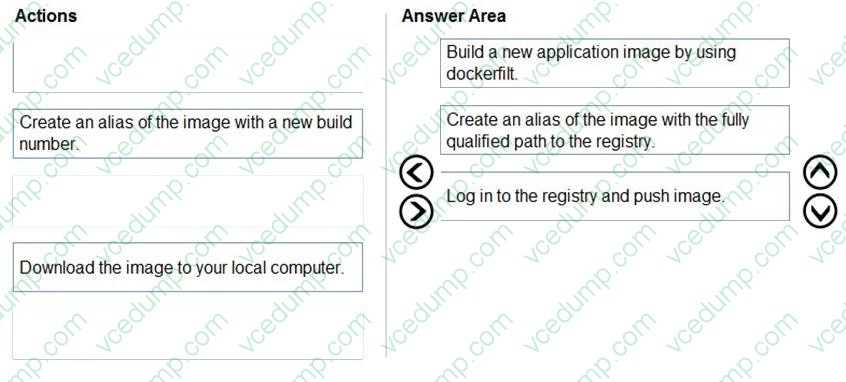
You need to deploy a new version of the LabelMaker application to ACR.
Which three actions should you perform in sequence? To answer, move the appropriate actions from the list of actions to the answer area and arrange them in the correct order.
Select and Place:
Related Exams:
-
62-193
Technology Literacy for Educators -
70-243
Administering and Deploying System Center 2012 Configuration Manager -
70-355
Universal Windows Platform – App Data, Services, and Coding Patterns -
77-420
Excel 2013 -
77-427
Excel 2013 Expert Part One -
77-725
Word 2016 Core Document Creation, Collaboration and Communication -
77-726
Word 2016 Expert Creating Documents for Effective Communication -
77-727
Excel 2016 Core Data Analysis, Manipulation, and Presentation -
77-728
Excel 2016 Expert: Interpreting Data for Insights -
77-731
Outlook 2016 Core Communication, Collaboration and Email Skills
Tips on How to Prepare for the Exams
Nowadays, the certification exams become more and more important and required by more and more enterprises when applying for a job. But how to prepare for the exam effectively? How to prepare for the exam in a short time with less efforts? How to get a ideal result and how to find the most reliable resources? Here on Vcedump.com, you will find all the answers. Vcedump.com provide not only Microsoft exam questions, answers and explanations but also complete assistance on your exam preparation and certification application. If you are confused on your AZ-204 exam preparations and Microsoft certification application, do not hesitate to visit our Vcedump.com to find your solutions here.