AZ-204 Exam Details
-
Exam Code
:AZ-204 -
Exam Name
:Developing Solutions for Microsoft Azure -
Certification
:Microsoft Certifications -
Vendor
:Microsoft -
Total Questions
:588 Q&As -
Last Updated
:Jul 12, 2026
Microsoft AZ-204 Online Questions & Answers
-
Question 301:
You develop and deploy a web app to Azure App Service. The Azure App Service uses a Basic plan in a single region.
You need to capture the telemetry.
Which three actions should you perform? Each correct answer presents part of the solution
NOTE; Each correct selection is worth one pewit
A. Upgrade the Azure App Service plan to Premium.
B. Enable remote debugging.
C. Enable Profiler
D. Restart an apps in the App Service plan
E. Enable Snapshot debugger
F. Enable Application Insights site extensions.
G. Enable the Always On setting for the app service. -
Question 302:
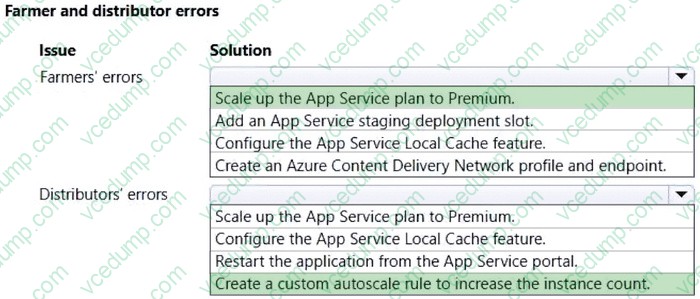
HOTSPOT
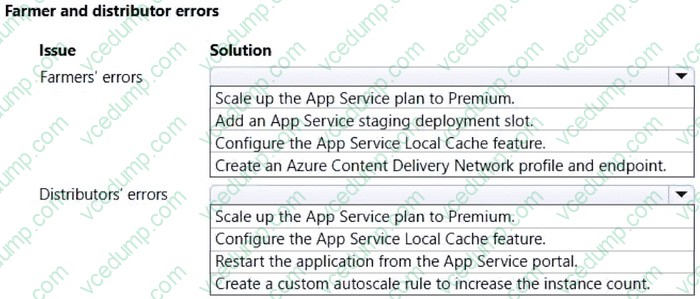
You need to correct the errors for farmers and distributors.
Which solution should you use? To answer, select the appropriate options in the answer area.
NOTE: Each correct selection is worth one point.
-
Question 303:
You need to investigate the http server log output to resolve the issue with the ContentUploadService.
Which command should you use first?
A. az webapp log
B. az ams live-output
C. az monitor activity-log
D. az container attach -
Question 304:
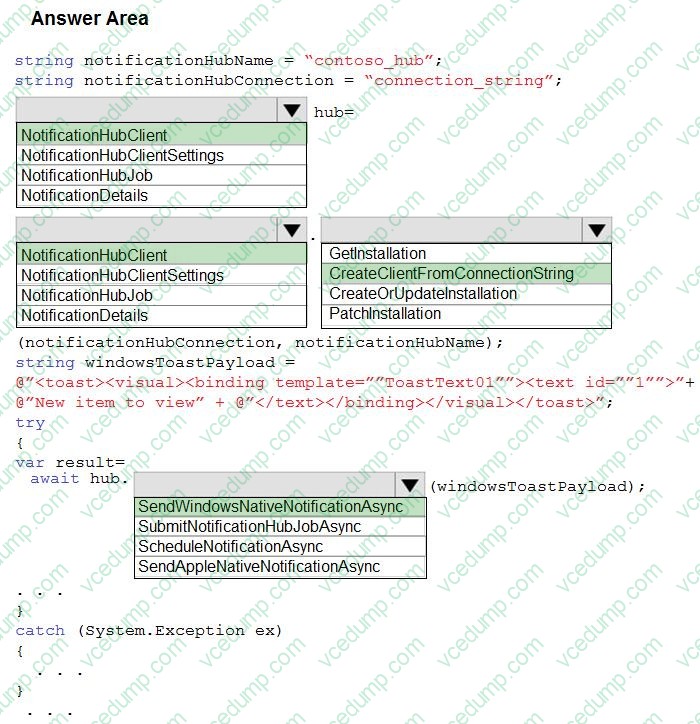
HOTSPOT
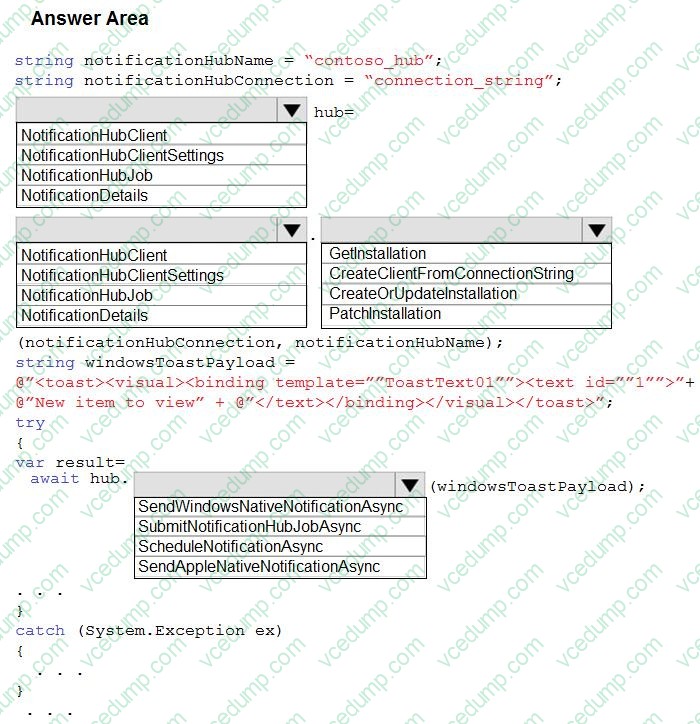
You develop a news and blog content delivery app for Windows devices.
A notification must arrive on a user's device when there is a new article available for them to view.
You need to implement push notifications.
How should you complete the code segment? To answer, select the appropriate options in the answer area;
NOTE: Each correct selection is worth one point.
-
Question 305:
A company is implementing a publish-subscribe (Pub/Sub) messaging component by using Azure Service Bus. You are developing the first subscription application.
In the Azure portal you see that messages are being sent to the subscription for each topic. You create and initialize a subscription client object by supplying the correct details, but the subscription application is still not consuming the messages.
You need to ensure that the subscription client processes all messages.
Which code segment should you use?
A. await subscriptionClient.AddRuleAsync(new RuleDescription(RuleDescription.DefaultRuleName, new TrueFilter()));
B. subscriptionClient = new SubscriptionClient(ServiceBusConnectionString, TopicName, SubscriptionName);
C. await subscriptionClient.CloseAsync();
D. subscriptionClient.RegisterMessageHandler(ProcessMessageAsync, messageHandlerOptions); -
Question 306:
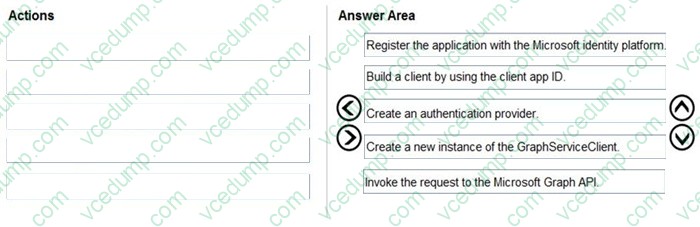
DRAG DROP
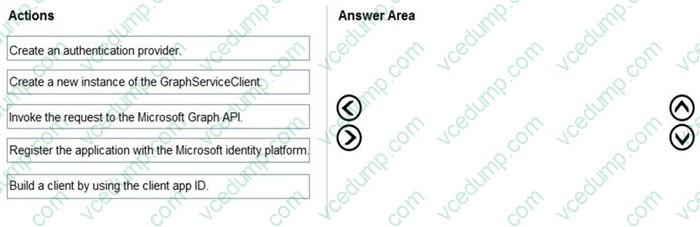
You are developing an application to retrieve user profile information. The application will use the Microsoft Graph SDK.
The app must retrieve user profile information by using a Microsoft Graph API call.
You need to call the Microsoft Graph API from the application.
In which order should you perform the actions? To answer, move all actions from the list of actions to the answer area and arrange them in the correct order.
Select and Place:
-
Question 307:
You develop and deploy an ASP.NET web app to Azure App Service. You use Application Insights telemetry to monitor the app.
You must test the app to ensure that the app is available and responsive from various points around the world and at regular intervals. If the app is not responding, you must send an alert to support staff.
You need to configure a test for the web app.
Which two test types can you use? Each correct answer presents a complete solution.
NOTE: Each correct selection is worth one point.
A. integration
B. multi-step web
C. URL ping
D. unit
E. load -
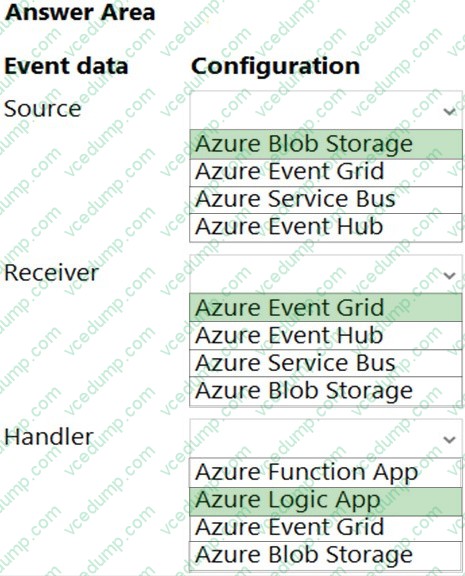
Question 308:
HOTSPOT
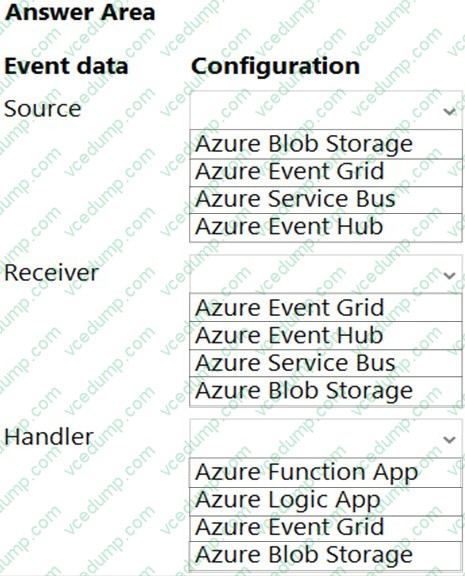
You need to implement event routing for retail store location data.
Which configurations should you use? To answer, select the appropriate options in the answer area.
NOTE: Each correct selection is worth one point.
-
Question 309:
You are developing several microservices to run on Azure Container Apps. External HTTP ingress traffic has been enabled for the microservices.
The microservices must be deployed to the same virtual network and write logs to the same Log Analytics workspace.
You need to deploy the microservices.
What should you do?
A. Enable single revision mode.
B. Use a separate environment for each container.
C. Use a private container registry image and single image for all containers.
D. Use a single environment for all containers.
E. Enable multiple revision mode. -
Question 310:
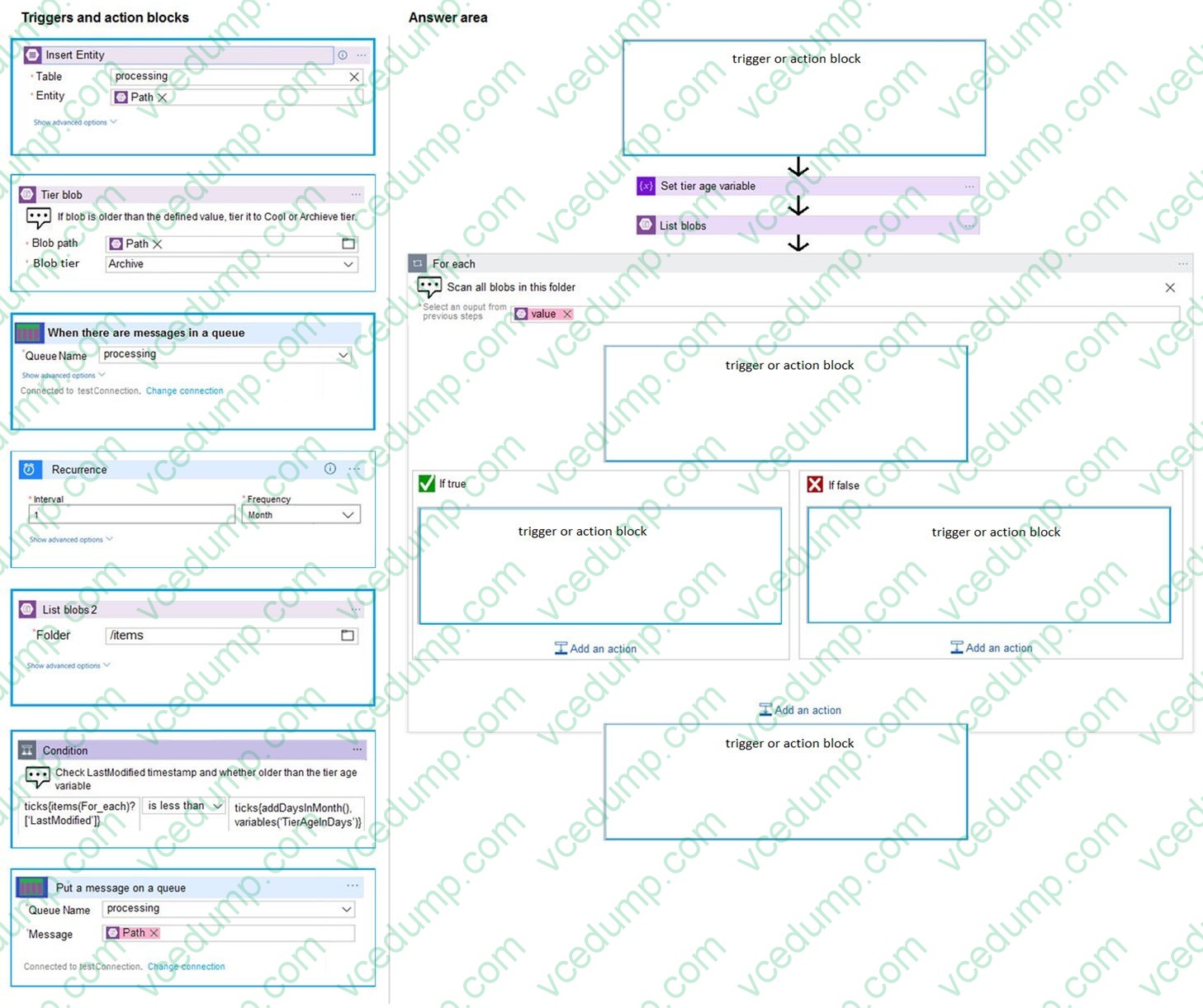
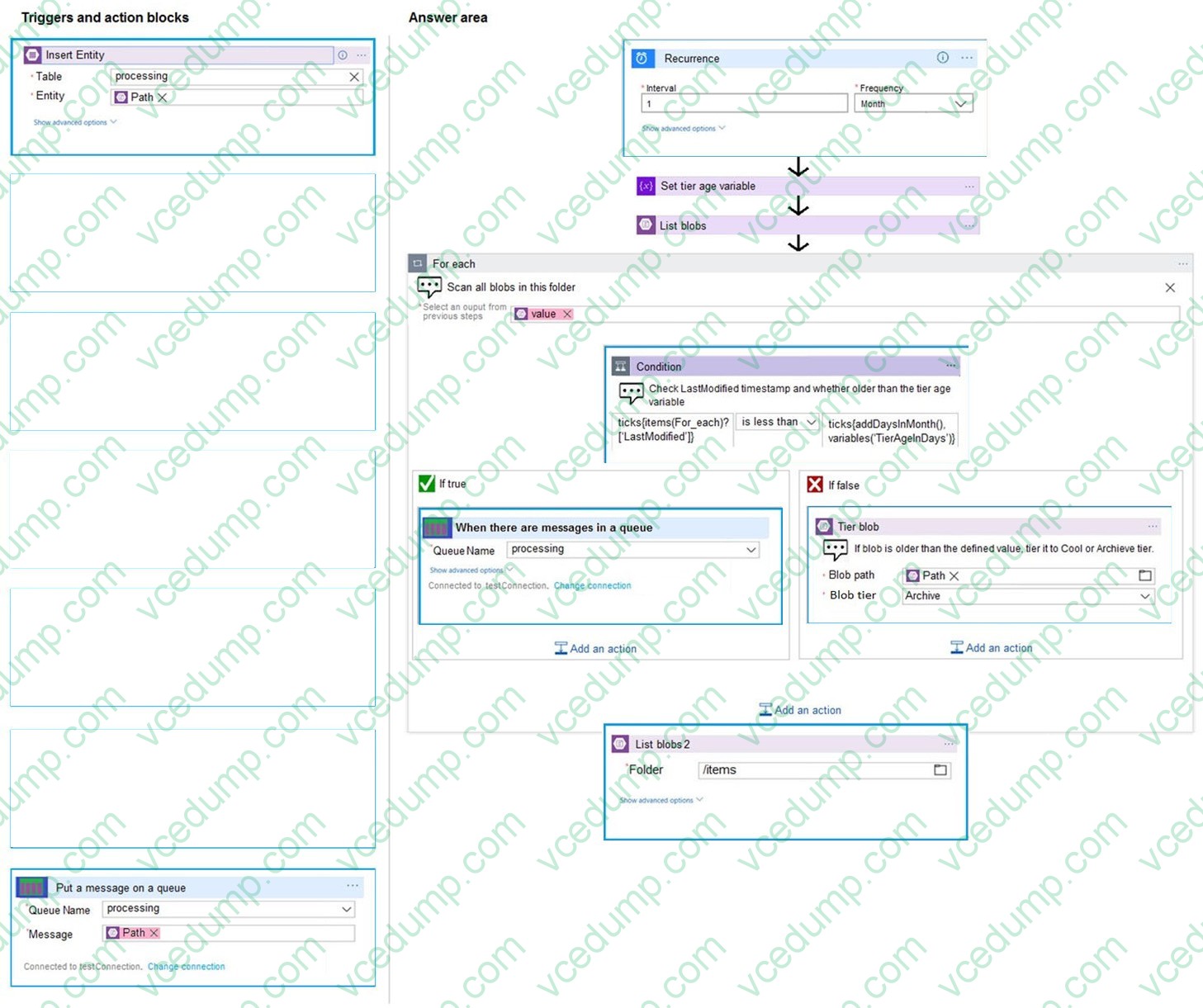
DRAG DROP
A company backs up all manufacturing data to Azure Blob Storage. Admins move blobs from hot storage to archive tier storage every month.
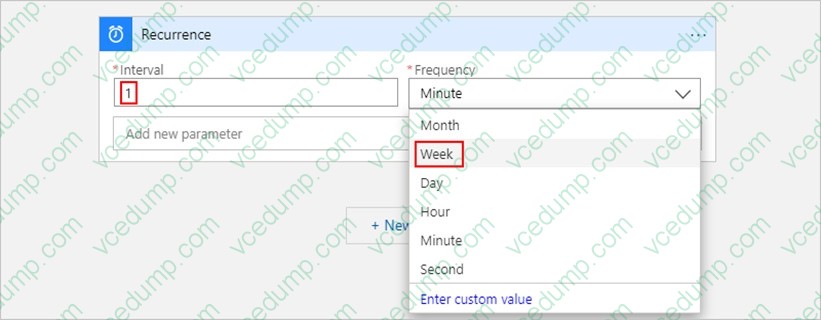
You must automatically move blobs to Archive tier after they have not been modified within 180 days. The path for any item that is not archived must be placed in an existing queue. This operation must be performed automatically once a month. You set the value of TierAgeInDays to 180.
How should you configure the Logic App? To answer, drag the appropriate triggers or action blocks to the correct trigger or action slots. Each trigger or action block may be used once, more than once, or not at all. You may need to drag the split bar between panes or scroll to view content.
NOTE: Each correct selection is worth one point.
Select and Place:
Related Exams:
-
62-193
Technology Literacy for Educators -
70-243
Administering and Deploying System Center 2012 Configuration Manager -
70-355
Universal Windows Platform – App Data, Services, and Coding Patterns -
77-420
Excel 2013 -
77-427
Excel 2013 Expert Part One -
77-725
Word 2016 Core Document Creation, Collaboration and Communication -
77-726
Word 2016 Expert Creating Documents for Effective Communication -
77-727
Excel 2016 Core Data Analysis, Manipulation, and Presentation -
77-728
Excel 2016 Expert: Interpreting Data for Insights -
77-731
Outlook 2016 Core Communication, Collaboration and Email Skills
Tips on How to Prepare for the Exams
Nowadays, the certification exams become more and more important and required by more and more enterprises when applying for a job. But how to prepare for the exam effectively? How to prepare for the exam in a short time with less efforts? How to get a ideal result and how to find the most reliable resources? Here on Vcedump.com, you will find all the answers. Vcedump.com provide not only Microsoft exam questions, answers and explanations but also complete assistance on your exam preparation and certification application. If you are confused on your AZ-204 exam preparations and Microsoft certification application, do not hesitate to visit our Vcedump.com to find your solutions here.