SCS-C01 Exam Details
-
Exam Code
:SCS-C01 -
Exam Name
:AWS Certified Security - Specialty (SCS-C01) -
Certification
:Amazon Certifications -
Vendor
:Amazon -
Total Questions
:733 Q&As -
Last Updated
:May 27, 2026
Amazon SCS-C01 Online Questions & Answers
-
Question 411:
A company has five AWS accounts and wants to use AWS CloudTrail to log API calls. The log files must be stored in an Amazon S3 bucket that resides in a new account specifically built for centralized services with a unique top-level prefix for each trail. The configuration must also enable detection of any modification to the logs.
Which of the following steps will implement these requirements? (Choose three.)
A. Create a new S3 bucket in a separate AWS account for centralized storage of CloudTrail logs, and enable "Log File Validation" on all trails.
B. Use an existing S3 bucket in one of the accounts, apply a bucket policy to the new centralized S3 bucket that permits the CloudTrail service to use the "s3: PutObject" action and the "s3 GetBucketACL" action, and specify the appropriate resource ARNs for the CloudTrail trails.
C. Apply a bucket policy to the new centralized S3 bucket that permits the CloudTrail service to use the "s3 PutObject" action and the "s3 GelBucketACL" action, and specify the appropriate resource ARNs for the CloudTrail trails.
D. Use unique log file prefixes for trails in each AWS account.
E. Configure CloudTrail in the centralized account to log all accounts to the new centralized S3 bucket.
F. Enable encryption of the log files by using AWS Key Management Service -
Question 412:
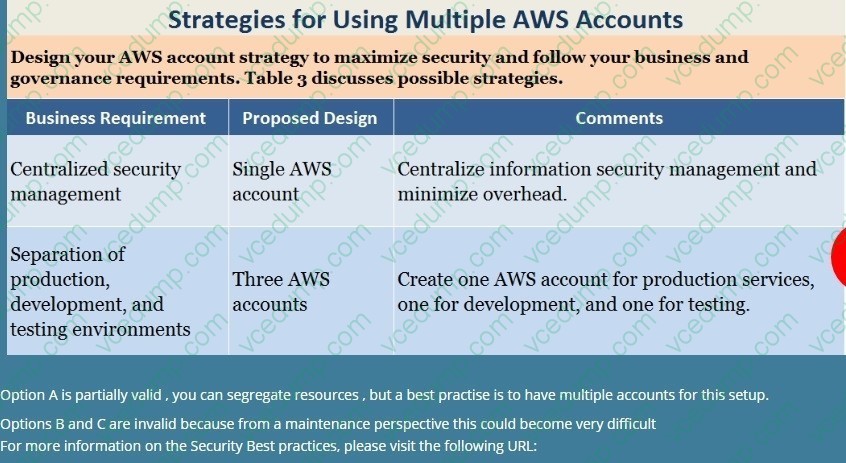
A company is planning on using AWS for hosting their applications. They want complete separation and isolation of their production , testing and development environments. Which of the following is an ideal way to design such a setup? Please select:
A. Use separate VPCs for each of the environments
B. Use separate IAM Roles for each of the environments
C. Use separate IAM Policies for each of the environments
D. Use separate AWS accounts for each of the environments -
Question 413:
A company has several production AWS accounts and a central security AWS account. The security account is used for centralized monitoring and has IAM privileges to all resources in every corporate account. All of the company's Amazon S3 buckets are tagged with a value denoting the data classification of their contents.
A Security Engineer is deploying a monitoring solution in the security account that will enforce bucket policy compliance. The system must monitor S3 buckets in all production accounts and confirm that any policy change is in accordance with the bucket's data classification. If any change is out of compliance; the Security team must be notified quickly.
Which combination of actions would build the required solution? (Choose three.)
A. Configure Amazon CloudWatch Events in the production accounts to send all S3 events to the security account event bus.
B. Enable Amazon GuardDuty in the security account. and join the production accounts as members.
C. Configure an Amazon CloudWatch Events rule in the security account to detect S3 bucket creation or modification events.
D. Enable AWS Trusted Advisor and activate email notifications for an email address assigned to the security contact.
E. Invoke an AWS Lambda function in the security account to analyze S3 bucket settings in response to S3 events, and send non-compliance notifications to the Security team.
F. Configure event notifications on S3 buckets for PUT; POST, and DELETE events. -
Question 414:
Your application currently uses customer keys which are generated via AWS KMS in the US east region. You now want to use the same set of keys from the EU-Central region. How can this be accomplished?
Please select:
A. Export the key from the US east region and import them into the EU-Central region
B. Use key rotation and rotate the existing keys to the EU-Central region
C. Use the backing key from the US east region and use it in the EU-Central region
D. This is not possible since keys from KMS are region specific -
Question 415:
A company is migrating its Amazon EC2 based applications to use Instance Metadata Service Version 2 (IMDSv2). A security engineer needs to determine whether any of the EC2 instances are still using Instance Metadata Service Version 1 (IMDSv1).
What should the security engineer do to confirm that the IMDSv1 endpoint is no longer being used?
A. Configure logging on the Amazon CloudWatch agent for IMDSv1 as part of EC2 instance startup. Create a metric filter and a CloudWatch dashboard. Track the metric in the dashboard.
B. Create an Amazon CloudWatch dashboard. Verify that the EC2:MetadataNoToken metric is zero across all EC2 instances. Monitor the dashboard.
C. Create a security group that blocks access to HTTP for the IMDSv1 endpoint. Attach the security group to all EC2 instances.
D. Configure user data scripts for all EC2 instances to send logging information to AWS CloudTrail when IMDSv1 is used. Create a metric filter and an Amazon CloudWatch dashboard. Track the metric in the dashboard. -
Question 416:
A company is deploying an Amazon EC2-based application. The application will include a custom health-checking component that produces health status data in JSON format. A Security Engineer must implement a secure solution to monitor application availability in near-real time by analyzing the hearth status data.
Which approach should the Security Engineer use?
A. Use Amazon CloudWatch monitoring to capture Amazon EC2 and networking metrics Visualize metrics using Amazon CloudWatch dashboards.
B. Run the Amazon Kinesis Agent to write the status data to Amazon Kinesis Data Firehose Store the streaming data from Kinesis Data Firehose in Amazon Redshift. (hen run a script on the pool data and analyze the data in Amazon Redshift
C. Write the status data directly to a public Amazon S3 bucket from the health-checking component Configure S3 events to invoke an AWS Lambda function that analyzes the data
D. Generate events from the health-checking component and send them to Amazon CloudWatch Events. Include the status data as event payloads. Use CloudWatch Events rules to invoke an AWS Lambda function that analyzes the data. -
Question 417:
You need to ensure that the cloudtrail logs which are being delivered in your AWS account is encrypted. How can this be achieved in the easiest way possible?
Please select:
A. Don't do anything since CloudTrail logs are automatically encrypted.
B. Enable S3-SSE for the underlying bucket which receives the log files
C. Enable S3-KMS for the underlying bucket which receives the log files
D. Enable KMS encryption for the logs which are sent to Cloudwatch -
Question 418:
A company wants to prevent SSH access through the use of SSH key pairs for any Amazon Linux 2 Amazon EC2 instances in its AWS account. However, a system administrator occasionally will need to access these EC2 instances through SSH in an emergency. For auditing purposes, the company needs to record any commands that a user runs in an EC2 instance.
What should a security engineer do to configure access to these EC2 instances to meet these requirements?
A. Use the EC2 serial console. Configure the EC2 serial console to save all commands that are entered to an Amazon S3 bucket. Provide the EC2 instances with an IAM role that allows the EC2 serial console to access Amazon S3. Configure an IAM account for the system administrator. Provide an IAM policy that allows the IAM account to use the EC2 serial console,
B. Use EC2 Instance Connect. Configure EC2 Instance Connect to save all commands that are entered to Amazon CloudWatch Logs. Provide the EC2 instances with an IAM role that allows the EC2 Instances to access CloudWatch Logs. Configure an IAM account for the system administrator. Provide an IAM policy that allows the IAM account to use EC2 Instance Connect.
C. Use an EC2 key pair with an EC2 instance that needs SSH access. Access the EC2 instance with this key pair by using SSH. Configure the EC2 instance to save all commands that are entered to Amazon CloudWatch Logs. Provide the EC2 instance with an IAM role that allows the EC2 instance to access Amazon S3 and CloudWatch Logs.
D. Use AWS Systems Manager Session Manager. Configure Session Manager to save all commands that are entered in a session to an Amazon S3 bucket. Provide the EC2 instances with an IAM role that allows Systems Manager to manage the EC2 instances. Configure an IAM account for the system administrator. Provide an IAM policy that allows the IAM account to use Session Manager. -
Question 419:
A VPC endpoint for Amazon CloudWatch Logs was recently added to a company's VPC. The company's system administrator has verified that private DNS is enabled and that the appropriate route tables and security groups have been updated. The role attached to the Amazon EC2 instance is:
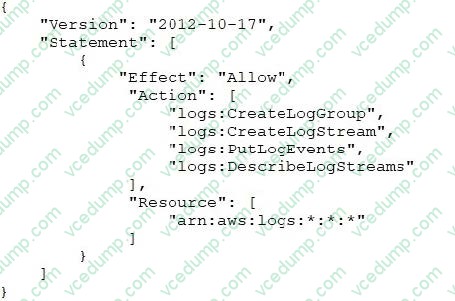
The CloudWatch Logs agent is running and attempting to write to a CloudWatch Logs stream in the same AWS account. However, no logs are being updated in CloudWatch Logs. What is the likely cause of this issue?
A. Option A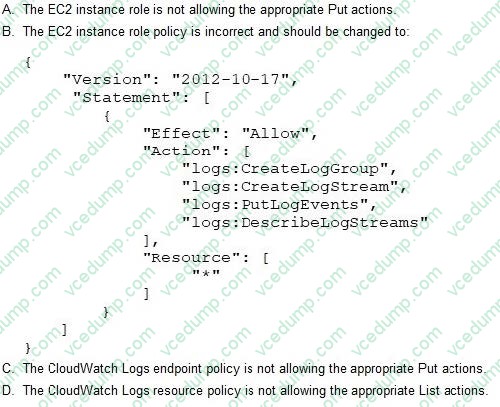
B. Option B
C. Option C
D. Option D -
Question 420:
An EC2 Instance hosts a Java based application that access a DynamoDB table. This EC2 Instance is currently serving production based users. Which of the following is a secure way of ensuring that the EC2 Instance access the Dynamo table
Please select:
A. Use IAM Roles with permissions to interact with DynamoDB and assign it to the EC2 Instance
B. Use KMS keys with the right permissions to interact with DynamoDB and assign it to the EC2 Instance
C. Use IAM Access Keys with the right permissions to interact with DynamoDB and assign it to the EC2 Instance
D. Use IAM Access Groups with the right permissions to interact with DynamoDB and assign it to the EC2 Instance
Related Exams:
-
AIF-C01
Amazon AWS Certified AI Practitioner (AIF-C01) -
AIP-C01
AWS Certified Generative AI Developer - Professional -
ANS-C00
AWS Certified Advanced Networking - Specialty (ANS-C00) -
ANS-C01
AWS Certified Advanced Networking - Specialty (ANS-C01) -
AXS-C01
AWS Certified Alexa Skill Builder - Specialty (AXS-C01) -
BDS-C00
AWS Certified Big Data - Speciality (BDS-C00) -
CLF-C02
AWS Certified Cloud Practitioner (CLF-C02) -
DAS-C01
AWS Certified Data Analytics - Specialty (DAS-C01) -
DATA-ENGINEER-ASSOCIATE
AWS Certified Data Engineer - Associate (DEA-C01) -
DBS-C01
AWS Certified Database - Specialty (DBS-C01)
Tips on How to Prepare for the Exams
Nowadays, the certification exams become more and more important and required by more and more enterprises when applying for a job. But how to prepare for the exam effectively? How to prepare for the exam in a short time with less efforts? How to get a ideal result and how to find the most reliable resources? Here on Vcedump.com, you will find all the answers. Vcedump.com provide not only Amazon exam questions, answers and explanations but also complete assistance on your exam preparation and certification application. If you are confused on your SCS-C01 exam preparations and Amazon certification application, do not hesitate to visit our Vcedump.com to find your solutions here.