ASSOCIATE-ANDROID-DEVELOPER Exam Details
-
Exam Code
:ASSOCIATE-ANDROID-DEVELOPER -
Exam Name
:Associate Android Developer (Kotlin and Java) -
Certification
:Google Certifications -
Vendor
:Google -
Total Questions
:128 Q&As -
Last Updated
:Jul 14, 2026
Google ASSOCIATE-ANDROID-DEVELOPER Online Questions & Answers
-
Question 21:
In a class PreferenceFragmentCompat. What method is called during onCreate(Bundle) to supply the preferences for this fragment. And where subclasses are expected to call setPreferenceScreen (PreferenceScreen) either directly or via helper methods such as addPreferencesFromResource (int)?
A. onCreateLayoutManager
B. onCreatePreferences
C. onCreateRecyclerView
D. onCreateView -
Question 22:
Select correct statements about Hardware Abstraction Layer (HAL). (Choose two.)
A. The HAL provides standard interfaces that expose device hardware capabilities to the higher-level Java API framework.
B. The HAL function both as apps for users and to provide key capabilities that developers can access from their own app. For example, if your app would like to deliver an SMS message, you don't need to build that functionality yourself ? you can instead invoke whichever SMS app is already installed to deliver a message to the recipient you specify
C. The HAL consists of multiple library modules, each of which implements an interface for a specific type of hardware component, such as the camera or bluetooth module. When a framework API makes a call to access device hardware, the Android system loads the library module for that hardware component.
D. Using a HAL, not using a Linux kernel, allows Android to take advantage of key security features and allows device manufacturers to develop hardware drivers for a well-known kernel. -
Question 23:
Custom views and directional controller clicks. On most devices, clicking a view using a directional controller sends (to the view currently in focus) a KeyEvent with:
A. KEYCODE_DPAD_CENTER
B. KEYCODE_BUTTON_START
C. KEYCODE_CALL
D. KEYCODE_BUTTON_SELECT -
Question 24:
To create a basic JUnit 4 test class, create a class that contains one or more test methods. A test method begins with the specific annotation and contains the code to exercise and verify a single functionality in the component that you want to test. What is the annotation?
A. @RunWith
B. @LargeTest
C. @Rule
D. @Test -
Question 25:
For example, our preferences.xmlfile was added by addPreferencesFromResource(R.xml.preferences). Our preferences.xmlfile contains such item:
In our Fragment, we can dynamically get current notification preference value in this way:
A. boolean isNotificationOn = PreferenceManager.getDefaultSharedPreferences(getContext()).getBoolean(getContext().getString(R.string.pref_notification_key),getContext().getResources().getBoolean(R.bool.pref_notification_default_value));
B. boolean isNotificationOn = PreferenceManager.getSharedPreferences(getContext()).getBoolean(getContext().getString(R.string.pref_notification_default_value),getContext().getString(R.string.pref_notification_key));
C. boolean isNotificationOn = PreferenceManager.getSharedPreferences(getContext()).getBoolean(getContext().getResources().getBoolean(R.bool.pref_notification_default_value),getContext().getString(R.string.pref_notification_key)); -
Question 26:
A content label sometimes depends on information only available at runtime, or the meaning of a View might change over time. For example, a Play button might change to a Pause button during music playback. In these cases, to update the content label at the appropriate time, we can use:
A. View#setContentDescription(int contentDescriptionResId)
B. View#setContentLabel(int contentDescriptionResId)
C. View#setContentDescription(CharSequence contentDescription)
D. View#setContentLabel(CharSequence contentDescription) -
Question 27:
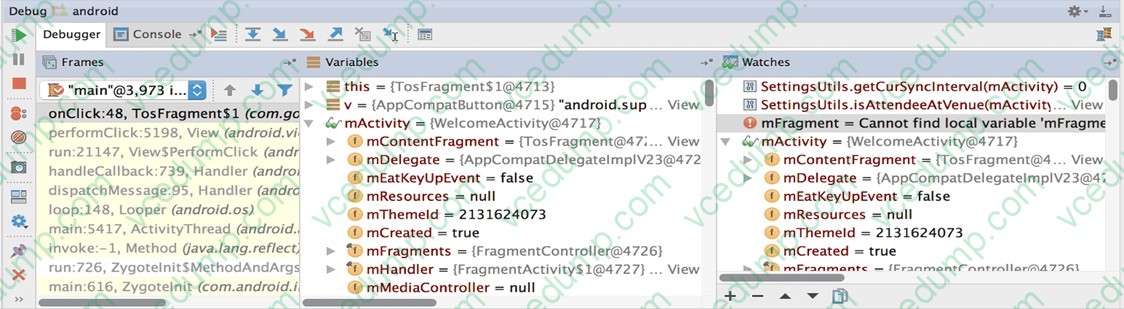
What is illustrated in the picture?
A. Logcat window with filter settings
B. Debugging native code using LLDB
C. The Variables and Watches panes in the Debugger window
D. The Breakpoints window lists all the current breakpoints and includes behavior settings for each
E. Adding a watchpoint to a variable in memory -
Question 28:
Filter logcat messages. If in the filter menu, a filter option "Show only selected application"? means:
A. Display the messages produced by the app code only (the default). Logcat filters the log messages using the PID of the active app.
B. Apply no filters. Logcat displays all log messages from the device, regardless of which process you selected.
C. Create or modify a custom filter. For example, you could create a filter to view log messages from two apps at the same time. -
Question 29:
In application theme style, flag windowNoTitle (
A. whether this window should have an Action Bar in place of the usual title bar.- ) indicates:
B. whether there should be no title on this window.
C. that this window should not be displayed at all.
D. whether this is a floating window.
E. whether this Window is responsible for drawing the background for the system bars. -
Question 30:
The Layout Inspector in Android Studio allows you to compare your app layout with design mockups, display a magnified or 3D view of your app, and examine details of its layout at runtime. When this is especially useful?
A. when your layout is built entirely in XML rather than runtime and the layout is behaving expectedly.
B. when your layout is built at runtime rather than entirely in XML and the layout is behaving unexpectedly.
Related Exams:
-
ADWORDS-DISPLAY
Google AdWords: Display Advertising -
ADWORDS-FUNDAMENTALS
Google AdWords: Fundamentals -
ADWORDS-MOBILE
Google AdWords: Mobile Advertising -
ADWORDS-REPORTING
Google AdWords: Reporting -
ADWORDS-SEARCH
Google AdWords: Search Advertising -
ADWORDS-SHOPPING
Google AdWords: Shopping Advertising -
ADWORDS-VIDEO
Google AdWords: Video Advertising -
APIGEE-API-ENGINEER
Apigee Certified API Engineer -
ASSOCIATE-ANDROID-DEVELOPER
Associate Android Developer (Kotlin and Java) -
ASSOCIATE-CLOUD-ENGINEER
Associate Cloud Engineer
Tips on How to Prepare for the Exams
Nowadays, the certification exams become more and more important and required by more and more enterprises when applying for a job. But how to prepare for the exam effectively? How to prepare for the exam in a short time with less efforts? How to get a ideal result and how to find the most reliable resources? Here on Vcedump.com, you will find all the answers. Vcedump.com provide not only Google exam questions, answers and explanations but also complete assistance on your exam preparation and certification application. If you are confused on your ASSOCIATE-ANDROID-DEVELOPER exam preparations and Google certification application, do not hesitate to visit our Vcedump.com to find your solutions here.