ASSOCIATE-ANDROID-DEVELOPER Exam Details
-
Exam Code
:ASSOCIATE-ANDROID-DEVELOPER -
Exam Name
:Associate Android Developer (Kotlin and Java) -
Certification
:Google Certifications -
Vendor
:Google -
Total Questions
:128 Q&As -
Last Updated
:Jul 14, 2026
Google ASSOCIATE-ANDROID-DEVELOPER Online Questions & Answers
-
Question 41:
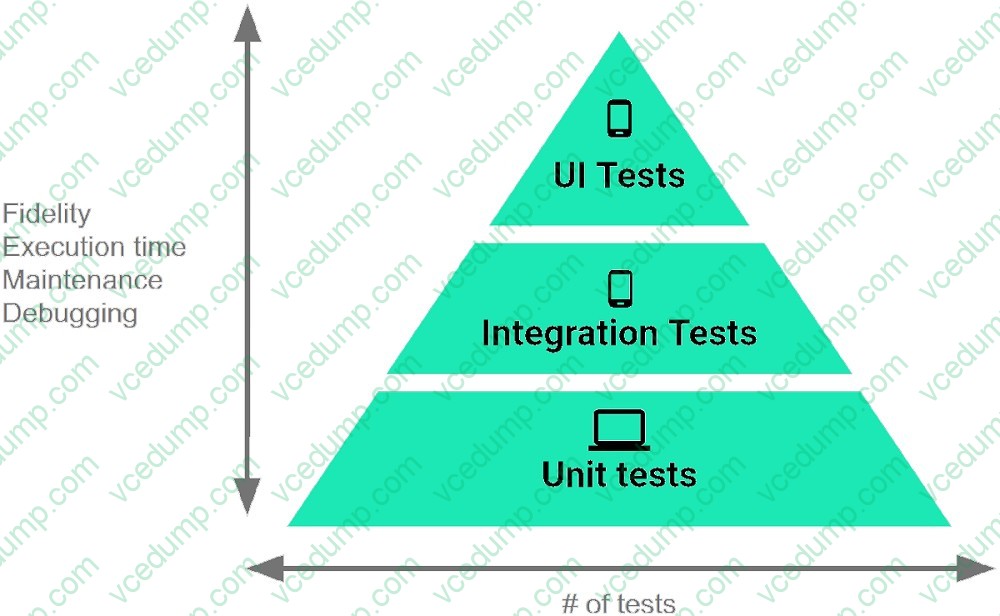
The Testing Pyramid, shown in the Figure, illustrates how your app should include the three categories of tests: small, medium, and large. Medium tests are integration tests that:
A. validate your app's behavior one class at a time.
B. validate either interactions between levels of the stack within a module, or interactions between related modules.
C. validate user journeys spanning multiple modules of your app. -
Question 42:
Custom views and directional controller clicks. In general, you should send an AccessibilityEvent whenever the content of your custom view changes. For example, if a text value was changed in your custom view, you should emit an event of this type:
A. TYPE_WINDOWS_CHANGED
B. TYPE_VIEW_CONTEXT_CLICKED
C. TYPE_WINDOWS_CHANGED
D. TYPE_VIEW_TEXT_CHANGED -
Question 43:
Once your test has obtained a UiObject object, you can call the methods in the UiObject class to perform user interactions on the UI component represented by that object. You can specify such actions as: (Choose four.)
A. click() : Clicks the center of the visible bounds of the UI element.
B. touch() : Touch the center of the visible bounds of the UI element.
C. dragTo() : Drags this object to arbitrary coordinates.
D. moveTo() : Move this object to arbitrary coordinates.
E. setText() : Sets the text in an editable field, after clearing the field's content. Conversely, the clearTextField() method clears the existing text in an editable field.
F. swipeUp() : Performs the swipe up action on the UiObject. Similarly, the swipeDown(), swipeLeft (), and swipeRight() methods perform corresponding actions. -
Question 44:
The following code snippet shows an example of an Espresso test:
A. @Rulepublic void greeterSaysHello() {onView(withId(R.id.name_field)).do(typeText("Steve"));onView(withId(R.id.greet_button)).do(click());onView(withText("Hello Steve!")).check(matches(isDisplayed()));}
B. @Testpublic void greeterSaysHello() {onView(withId(R.id.name_field)).perform(typeText("Steve"));onView(withId(R.id.greet_button)).perform(click());onView(withText("Hello Steve!")).check(matches(isDisplayed()));}
C. @Testpublic void greeterSaysHello() {onView(withId(R.id.name_field)).do(typeText("Steve"));onView(withId(R.id.greet_button)).do(click());onView(withText("Hello Steve!")).compare(matches(isDisplayed()));} -
Question 45:
We have a custom view that extends android.widget.ProgressBar. Our progress bar is not touchable, focusable, etc.: it just shows progress. Style for our custom progress bar extends "Widget.AppCompat.ProgressBar.Horizontal". An item, named "progressDrawable", in our style, is a xml file . What we usually can see as a main single element in this xml file:
A. A State List ( element )
B. A Layer List ( element) with items android:id="@+id/progress" and android:id="@+id/ background" inside it.
C. An element with android:id="@+id/progress" identifier -
Question 46:
If content in a PagedList updates, the PagedListAdapter object receives:
A. only one item from PagedList that contains the updated information.
B. one or more items from PagedList that contains the updated information.
C. a completely new PagedList that contains the updated information. -
Question 47:
With a room database. When performing queries, you'll often want your app's UI to update automatically when the data changes. Can you use a return value of type LiveData in your query method description to achieve this?
A. Yes
B. No -
Question 48:
As an example. In an Activity we have our TimerViewModel object (extended ViewModel), named mTimerViewModel. mTimerViewModel.timer method returns a LiveData
A. mTimerViewModel!!.timer.value.toString().observe (Observer { aLong -> callAnyChangeUIMethodHere(aLong!!) })value. What can be a correct way to set an observer to change UI in case if data was changed?
B. mTimerViewModel!!.timer.observe (this, Observer { aLong -> callAnyChangeUIMethodHere(aLong!!) })
C. mTimerViewModel.observe (Observer { aLong -> callAnyChangeUIMethodHere(aLong!!) }) -
Question 49:
"Set the activity content to an explicit view. This view is placed directly into the activity's view hierarchy. It can itself be a complex view hierarchy." This can be done by calling method:
A. findViewById
B. setContentView
C. setActionBar
D. setContentTransitionManager
E. setTheme -
Question 50:
As an example. Our MutableLiveData
A. mLapseTime.postValue("new String")object, named mLapseTime, is not connected to a Room database, etc. How can we change the value in mLapseTime?
B. mLapseTime.setValue(1000l)
C. mLapseTime.changeValue(1000l)
Related Exams:
-
ADWORDS-DISPLAY
Google AdWords: Display Advertising -
ADWORDS-FUNDAMENTALS
Google AdWords: Fundamentals -
ADWORDS-MOBILE
Google AdWords: Mobile Advertising -
ADWORDS-REPORTING
Google AdWords: Reporting -
ADWORDS-SEARCH
Google AdWords: Search Advertising -
ADWORDS-SHOPPING
Google AdWords: Shopping Advertising -
ADWORDS-VIDEO
Google AdWords: Video Advertising -
APIGEE-API-ENGINEER
Apigee Certified API Engineer -
ASSOCIATE-ANDROID-DEVELOPER
Associate Android Developer (Kotlin and Java) -
ASSOCIATE-CLOUD-ENGINEER
Associate Cloud Engineer
Tips on How to Prepare for the Exams
Nowadays, the certification exams become more and more important and required by more and more enterprises when applying for a job. But how to prepare for the exam effectively? How to prepare for the exam in a short time with less efforts? How to get a ideal result and how to find the most reliable resources? Here on Vcedump.com, you will find all the answers. Vcedump.com provide not only Google exam questions, answers and explanations but also complete assistance on your exam preparation and certification application. If you are confused on your ASSOCIATE-ANDROID-DEVELOPER exam preparations and Google certification application, do not hesitate to visit our Vcedump.com to find your solutions here.