9A0-096 Exam Details
-
Exam Code
:9A0-096 -
Exam Name
:Adobe AfterEffects CS4 Exam -
Certification
:Adobe Certifications -
Vendor
:Adobe -
Total Questions
:143 Q&As -
Last Updated
:Jul 10, 2026
Adobe 9A0-096 Online Questions & Answers
-
Question 101:
When you uncheck "Show Animation Presets" from the Options menu in the Effects and Presets panel, which result do you get?
A. You will see all the available effects in the panel.
B. You will see only the effects that have associated animation presets.
C. The folder that contains the effects will be revealed in Windows Explorer (Windows) or in Finder (Mac OS).
D. You will see only the available effects that work with the current color depth (bits per channel) of your project. -
Question 102:
Which string do you need to type in the project's Quick Search field, to show footage items that are left outside of the current project?
A. unused
B. missing
C. notshown
D. notpresent -
Question 103:
Click the Exhibit button.
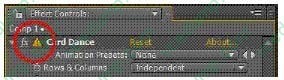
The Effect Controls panel displays a warning icon next to an effect name, an exclamation mark inside a yellow triangle. What does it mean?
A. Your After Effects project is set to 16 or 32bpc, but the applied effect supports only 8bpc.
B. You applied effects which need to reference other layers, but you did not define which other layers to use.
C. You applied the effect to a 3D layer, and its Effect controls conflict with similar Transform controls for the layer itself in the timeline.
D. You opened a project that has effects applied to layers, but they are flagged as missing because they are not installed on your system. -
Question 104:
When working with After Effects on a multi-processor enabled computer, After Effects can take advantage of the multiple cores of the processors during RAM previews and rendering. Which feature can let After Effects access the individual processor cores of a multi -processor computer?
A. Enable OpenGL
B. Enable Disk Cache
C. Conformed Media Cache
D. Render Multiple Frames Simultaneously
E. Hardware Accelerate Composition, Layer and Footage Panels -
Question 105:
You created guide layers from existing layers to use for reference in the Composition panel, to help position and edit the dimensions of elements. What do you need to do if you wish to visibly include the guide layers in your final output?
A. choose Composition > Make Movie, click Output Module in the Render Queue panel, and choose Include Project Link
B. choose Composition > Make Movie, and choose Best Settings from the Render Settings pulldown menu in the Render Queue panel
C. choose Composition > Make Movie, then choose Project Name And Dimensions from the Output To pulldown menu in the Render Queue panel
D. choose Composition > Make Movie, click Render Settings in the Render Queue panel, and choose Current Settings from the Guide Layers menu in the Render Settings dialog box -
Question 106:
You have placed a 2D layer in an After Effects 3D composition and have applied the Shatter effect to the 2D layer. Which feature in the Shatter effect will let the 2D layer interact with the lights in the 3D composition?
A. View
B. Render
C. Physics
D. Lighting > Light Type
E. Camera System > Comp Camera
F. Camera System > Camera Position -
Question 107:
In order to work faster, you have set a region of i nterest in the Composition viewer. What will happen when you render the composition?
A. The output file will be automatically cropped to the region of interest.
B. The output file will not be affected, unless you set it to Crop in the output module setting s.
C. The output file will render at its original comp size, while pixels outside the crop area will render as black.
D. The output file will render at its original comp size, while pixels outside the crop area will be set as a premultiplied alpha channel. -
Question 108:
You use another application to modify a footage item that is used in a project. After you have saved that file, the changes are not reflect ed in After Effects. What is the best way to update the footage inside After Effects?
A. select the footage item in the Project panel and choose File > Reload Footage
B. save the project, then Select File > Open Recent Projects > Choose the first project i n the list
C. select the footage item in the Project panel and choose File > Replace Footage > File, locate the file and choose Open
D. save the project, Quit After Effects and relaunch it, then Select File > Open Recent Projects > Choose the first project on the list -
Question 109:
What happens when you insert a dynamically-linked composition into a Premiere Pro timeline, and play it back within Premiere Pro?
A. You see a black frame until you render it or create a RAM preview inside After Effects.
B. Premiere Pro must render the linked composition before gener ating real-time playback.
C. Premiere Pro can play back the comp in real -time, without the need to render it inside After Effects.
D. After Effects renders the linked composition on a frame-by-frame basis during playback in Premiere Pro. -
Question 110:
To determine if the original field order of a footage item was interprete d correctly, you open the clip in the footage viewer from within the timeline, and step forward five frames. What should you check for?
A. that frames are not duplicating
B. that you see vertical lines on the video
C. that you see horizontal lines on the v ideo
D. that the movement of the content is consistent frame -by-frame
Related Exams:
-
9A0-019
Adobe Photoshop 6.0 Product Proficiency -
9A0-042
Acrobat 7.0 Prowith Adobe LiveCycle Designer ACE Exam -
9A0-043
Adobe Illustrator CS 2 ACE -
9A0-044
Adobe Photoshop CS 2 ACE Exam -
9A0-045
Adobe InDesign CS 2 ACE Exam -
9A0-046
Adobe GoLive CS2 ACE Exam -
9A0-055
Adobe InDesign CS3 ACE Exam -
9A0-056
Adobe Dreamweaver CS3 ACE Exam -
9A0-057
Adobe Illustrator CS3 ACE Exam -
9A0-058
Adobe Flash CS3 ACE Exam
Tips on How to Prepare for the Exams
Nowadays, the certification exams become more and more important and required by more and more enterprises when applying for a job. But how to prepare for the exam effectively? How to prepare for the exam in a short time with less efforts? How to get a ideal result and how to find the most reliable resources? Here on Vcedump.com, you will find all the answers. Vcedump.com provide not only Adobe exam questions, answers and explanations but also complete assistance on your exam preparation and certification application. If you are confused on your 9A0-096 exam preparations and Adobe certification application, do not hesitate to visit our Vcedump.com to find your solutions here.