9L0-422 Exam Details
-
Exam Code
:9L0-422 -
Exam Name
:OS X Support Essentials 10.10 -
Certification
:Apple Certifications -
Vendor
:Apple -
Total Questions
:82 Q&As -
Last Updated
:Jan 19, 2026
Apple 9L0-422 Online Questions & Answers
-
Question 1:
Which OS X tool can you use to create a strong password?
A. Security Audit in Directory Utility
B. Password Audit in Security preferences
C. Password Assistant in Users and Groups preferences
D. Password Checking in Parental Controls preferences -
Question 2:
Review the screenshot, then answer the question below.

While attempting to start up, an Intel-based Mac displays the icon shown above. What does it indicate?
A. The computer's firmware can't locate a valid booter file.
B. The Mac can't load a kernel.
C. The user is pressing invalid startup shortcut keys.
D. The folder that holds all the user home folders can't be located or accessed. -
Question 3:
Which utility is on the OS X Recovery partition?
A. Activity Monitor
B. Firmware Password Utility
C. Boot Camp Assistant
D. Console -
Question 4:
Which folder contains instructions for the launchd process to start certain items when a user logs in to an OS X computer?
A. /etc/launchd/
B. /var/run/launchd/
C. /Library/Extensions/
D. /Library/LaunchAgents/ -
Question 5:
How can you find out which application the Finder will use to open a specific document?
A. Select the document icon in the Finder, and choose Show Default Application from the File menu.
B. Control-click the document icon in the Finder, and choose Show Application from the shortcut menu.
C. Select the document icon in the Finder, choose Get Info from the File menu, and click the disclosure triangle next to "Open with."
D. Select the document icon in the Finder, choose Show Inspector from the File menu, click Application Bindings in the Inspector window, and scroll to locate the selected application in the pop-up menu. -
Question 6:
Review the screenshot of a system configuration, then answer the question below.
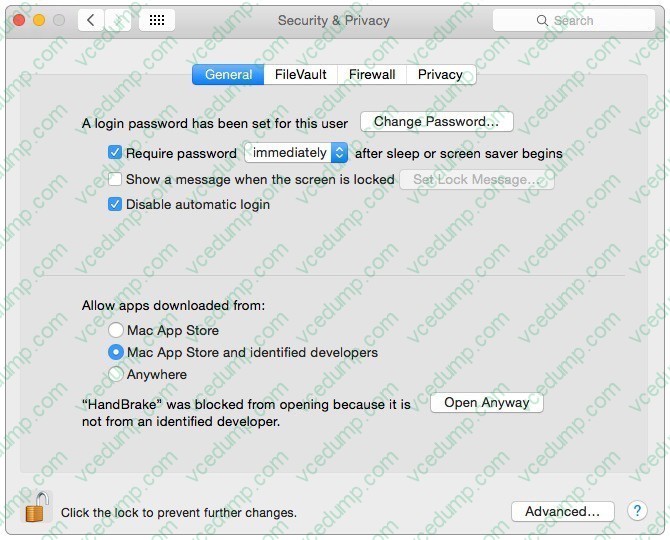
Your Mac is configured as shown in the screenshot. Using Safari, you download an app from an unidentified developer and double-click the app icon. What happens?
A. The app opens without an alert message.
B. The app opens after an alert message that the app is from an unidentified developer.
C. An alert message asks whether you want to open this app from an unidentified developer.
D. The app doesn't open, and an alert message tells you that the app is from an unidentified developer. -
Question 7:
Review the screenshot of a portion of the Disk Utility application window, then answer the question below.
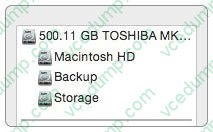
Which statement best describes the item that's selected?
A. It's one of three stripes in a RAID set.
B. It's one of three file systems on a partition.
C. It's one of three partitions on a disk.
D. It's one of three disks in a RAID set. -
Question 8:
What is the result when you enable Stealth Mode in the OS X Firewall settings?
A. The Mac won't respond to network connection requests such as Bonjour requests.
B. The Mac won't respond to diagnostic probes such as ping.
C. The Mac won't register any services that are offered via Bonjour.
D. The Mac won't allow outgoing connections for nonapproved applications. -
Question 9:
When Marie logs in to her computer, she sees an error message that the system was unable to unlock her login keychain. What's a likely explanation for this?
A. Before the current login session, Marie removed Keychain Access from her login items.
B. In a previous login session, Marie's account password was reset in Users and Groups preferences.
C. In a previous login session, Marie enabled FileVault on her account, then reset her account password in Users and Groups preferences.
D. Before the current login session, Marie's account password was reset using the Reset Password utility on the OS X Recovery system partition. -
Question 10:
How can you display the serial number for a Mac you're logged in to?
A. Choose About This Mac from the Apple menu.
B. Open System Preferences, then in the General pane, click the Info disclosure triangle to reveal the serial number.
C. Type "serial number" in Spotlight, then scroll through the resulting information until the serial number is displayed.
D. Choose About This Mac from the Apple menu, then click the line of text under OS X until the serial number is displayed.
Related Exams:
-
9L0-004
Apple Desktop Service Exam -
9L0-005
Apple Desktop Service Certification Exam -
9L0-006
Apple Macintosh Service Exam -
9L0-007
Macintosh Service Certification Exam -
9L0-009
Macintosh Service Certification Exam -
9L0-011
Mac Service Certification Exam -
9L0-012
Mac Service Certification -
9L0-060
Mac OS X 10.4 Service and Support Exam -
9L0-061
MAC OS X 10.5 Troubleshooting Exam -
9L0-062
Mac OS X v10.6 Troubleshooting Exam
Tips on How to Prepare for the Exams
Nowadays, the certification exams become more and more important and required by more and more enterprises when applying for a job. But how to prepare for the exam effectively? How to prepare for the exam in a short time with less efforts? How to get a ideal result and how to find the most reliable resources? Here on Vcedump.com, you will find all the answers. Vcedump.com provide not only Apple exam questions, answers and explanations but also complete assistance on your exam preparation and certification application. If you are confused on your 9L0-422 exam preparations and Apple certification application, do not hesitate to visit our Vcedump.com to find your solutions here.