70-689 Exam Details
-
Exam Code
:70-689 -
Exam Name
:Upgrading Your Skills to MCSA Windows 8 -
Certification
:Microsoft Certifications -
Vendor
:Microsoft -
Total Questions
:126 Q&As -
Last Updated
:Apr 07, 2020
Microsoft 70-689 Online Questions & Answers
-
Question 1:
You install Windows 8 on a desktop computer. You create a system image and then install third-party desktop apps and create personal data. You disable the creation of restore points. The computer is not running optimally. You need to remove the third-party applications and preserve files that are stored in your Documents folder. You start the computer from a system repair disk.
Which troubleshooting option should you use?
A. Refresh your PC without affecting your files
B. System Restore
C. Remove everything and install Windows
D. System Image Recovery -
Question 2:
You administer Windows 7 client computers in your company network.
You plan to upgrade the computers to Windows 8.1.
You need to ensure that the computers are able to support Full Windows Touch and the Windows 8.1 Snap feature.
Which three minimum specifications should you ensure the hardware meets? (Each correct answer presents part of the solution. Choose three,)
A. Screen resolution of at least 1366 x 768
B. Microsoft DirectX 9 graphics device
C. Screen resolution of at least 1024 x 768
D. Firmware that supports Unified Extensible Firmware Interface (UEFI)
E. Touch screen that supports five simultaneous touch points
F. Touch screen that supports two simultaneous touch points -
Question 3:
A company has client computers that run Windows 8. Finance department employees store files in the
C:\Finance directory. File History is on.
A Finance department employee attempts to restore a file to a previous version by using File History.
The file is not available to restore.
You need to establish why the file history is not available and ensure that it is available in the future. Which two actions should you perform? (Each correct answer presents part of the solution. Choose two.)
A. Set the Protection Settings for drive C to On.
B. Restore the data files from the Previous
C. Versions tab located in the folder properties.
D. Review the File History backup log.
E. Move the file into a library. -
Question 4:
A company has 100 client computers that run Windows XP 64-bit Edition.
You are deploying new computers that run a 32-bit version of Windows 8.
You need to transfer the contents of each user's Documents folder to the new computer by using the least amount of administrative effort.
What should you do?
A. Manually copy the folder content to a USB flash drive. Then paste the files to the new computer.
B. Use the User State Migration Tool.
C. Use Windows Easy Transfer.
D. Back up the folders by running the NTBackup command. Then restore the backup to the new computer. -
Question 5:
You administer a computer that runs Windows 8 Enterprise and is a member of an Active Directory domain.
You create a folder named C:\Reports and assign NTFS permissions as shown in Exhibit 1. (Click the Exhibit button.)
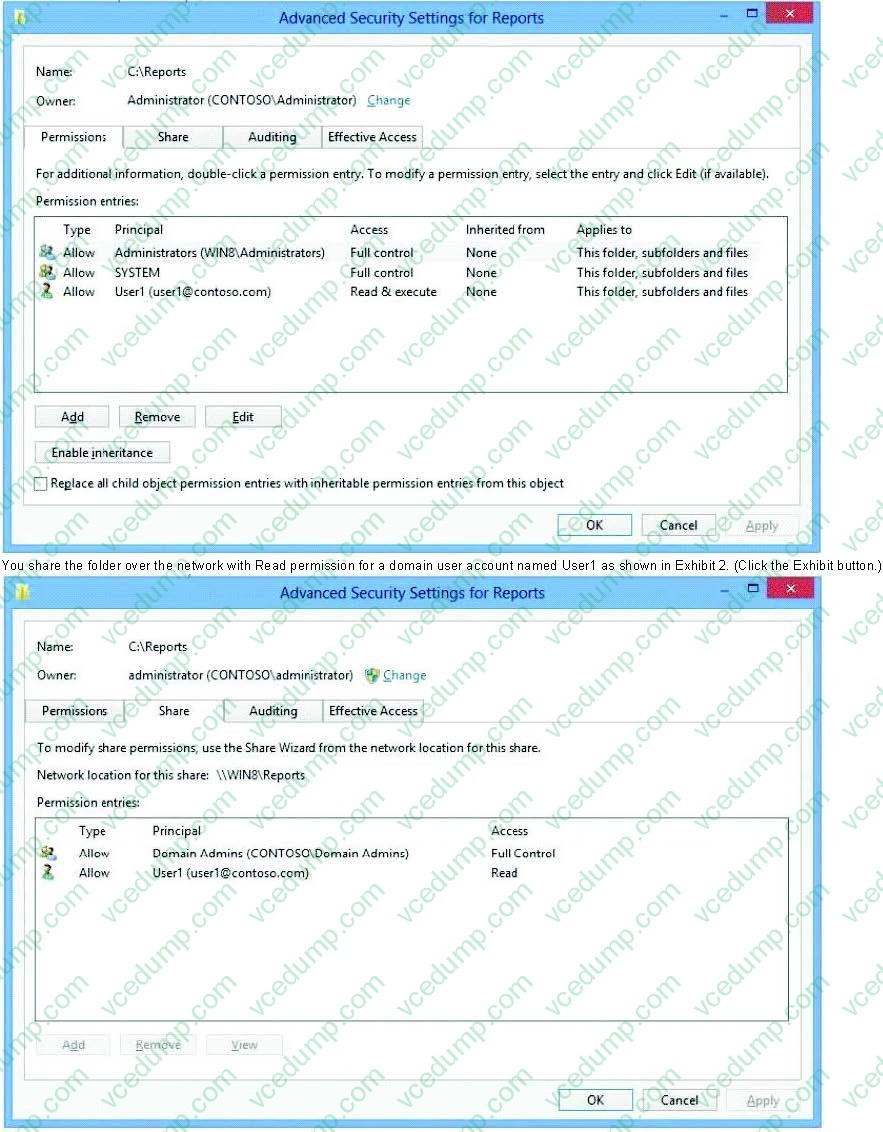
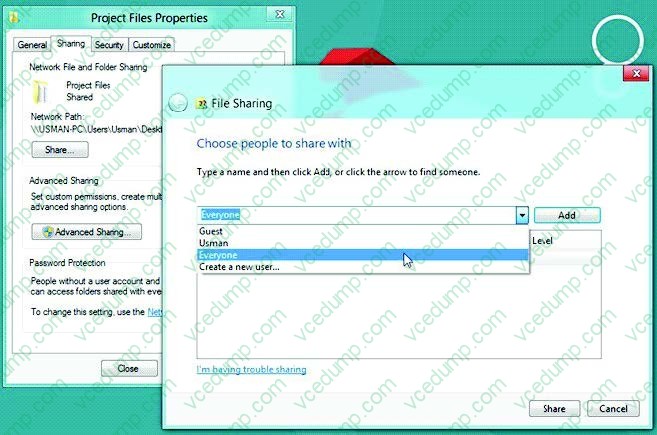
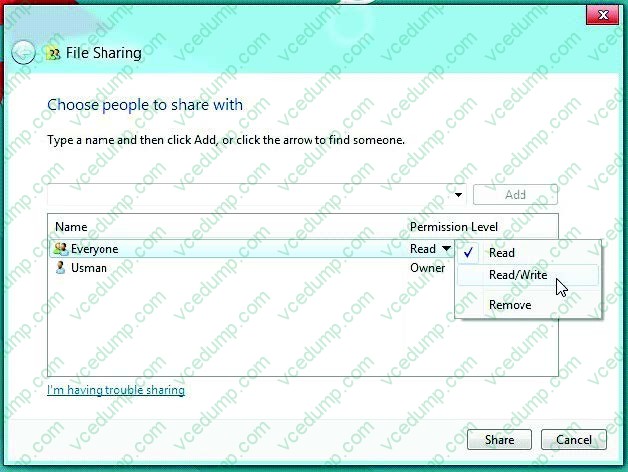
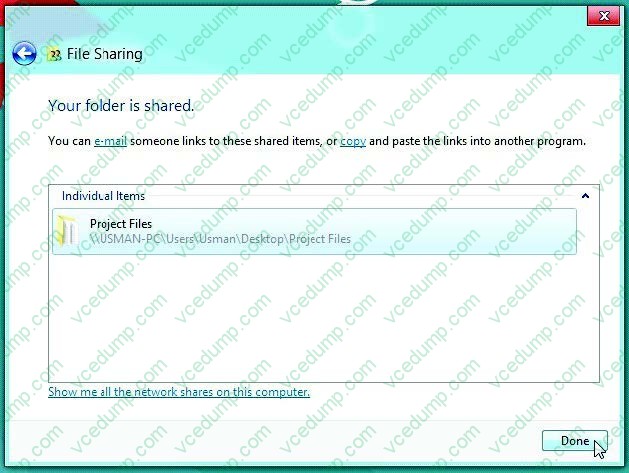
You share the folder over the network with Read permission for a domain user account named User1 as shown in Exhibit 2. (Click the Exhibit button.)
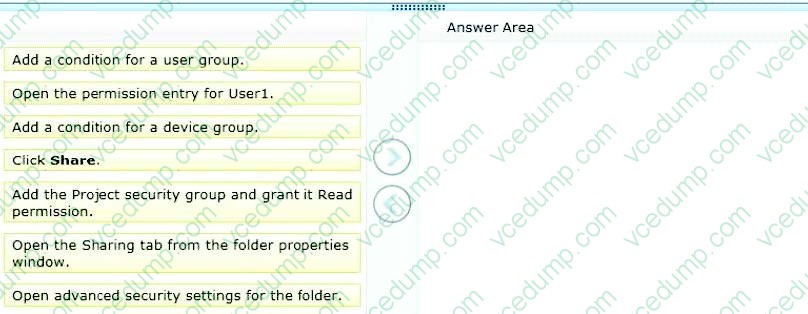
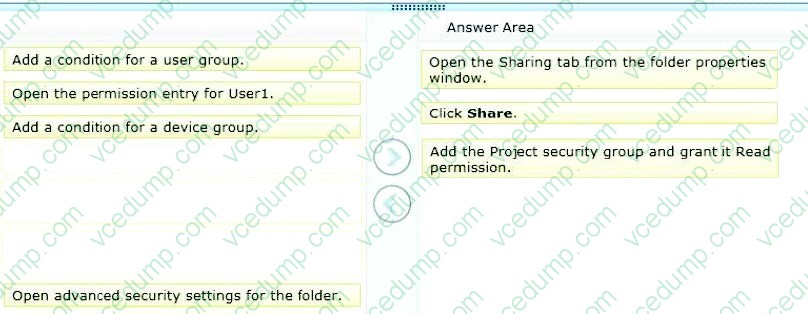
You want to provide access to the shared folder only for the time that User1 is a member of the domain security group named Project.
You need to assign the required permissions.
Which three actions should you perform in sequence? (To answer, move the appropriate actions from the list of actions to the answer area and arrange them in the correct order.)
Select and Place:
-
Question 6:
You support desktop computers and tablets that run Windows 8. Domain joined computers are able to connect to your company network from the Internet by using DirectAccess.
Your company wants to deploy a new application to the tablets. The deployment solution must meet the following requirements:
The application is installed locally on the tablets.
The application installation is hosted in a public cloud.
The installation must support Windows RT.
You need to deploy the new application to the tablets.
What should you do?
A. Deploy the application as an Application Virtualization (App-V) package. Install the App-V 4.6 client on the tablets.
B. Deploy the application as a published application on the Remote Desktop server. Create a Remote Desktop connection on the tablets.
C. Install the application on a local drive on the tablets.
D. Install the application in a Windows To Go workspace.
E. Install Hyper-V on tablets. Install the application on a virtual machine.
F. Publish the application to Windows Store.
G. Install the application within a separate Windows 8 installation in a virtual hard disk (VHD) file. Configure the tablets with dual boot.
H. Install the application within a separate Windows 8 installation in a VHDX file. Configure tablets with dual boot. -
Question 7:
A company has client computers that run Windows 8. You install a new printer on a client computer. The printer software installation includes an application that runs when the computer starts.
You experience problems with the application.
You need to prevent the application from running when the computer starts, without affecting any other application.
What should you do?
A. Configure the printer by using Device Manager.
B. Configure the printer application by using Task Manager.
C. Run the msconfig -p command.
D. Run the bcdedit -p command. -
Question 8:
You administer client computers that run Windows 8 Enterprise deployed by using Windows Deployment Services (WDS). Your company recently purchased 25 new tablets that run Windows 8 Pro.
For all 25 new tablets, you want to replace the existing Windows 8 Pro installation with Windows 8 Enterprise.
You need to deploy the Windows 8 Enterprise image to all 25 tablets simultaneously by using the existing WDS infrastructure.
What should you do?
A. Start the tablets from a USB flash drive with a customized Windows Preinstallation Environment (WinPE).
B. Start the tablets normally. Map the Windows Image (WIM) file from a WDS network share.
C. Start the tablets in Windows Recovery mode.
D. Start the tablets from the Windows To Go workspace. -
Question 9:
You support a desktop computer that runs Windows 8 Pro. The computer is joined to an Active Directory domain.
The computer has a folder named C:\Reports. The folder NTFS permissions are shown in Exhibit 1.
(Click the Exhibit button.)
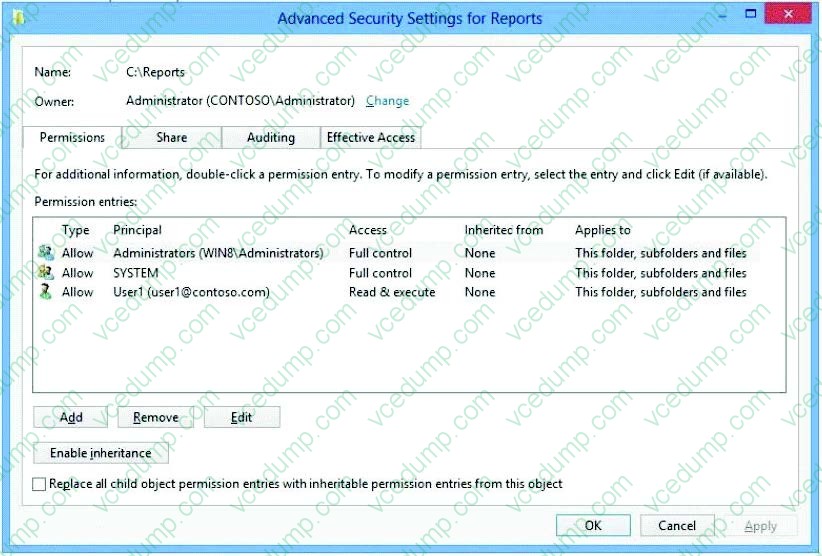
The folder is shared over the network with Read permission for a domain user account named User1 as shown in Exhibit 2. (Click the Exhibit button.)
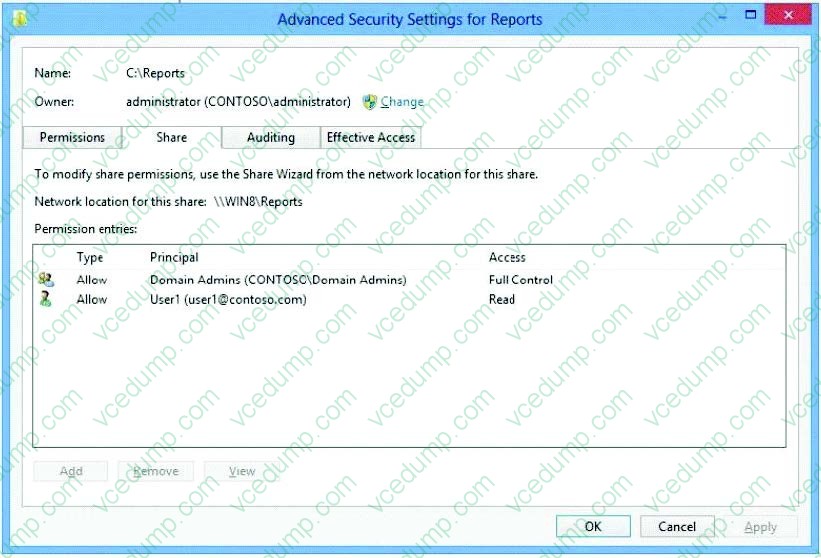
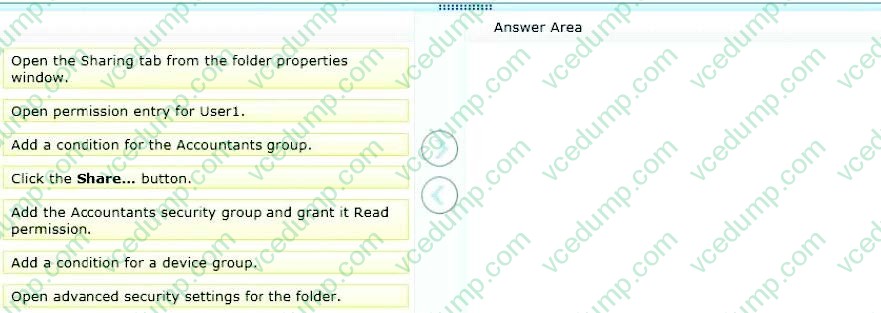
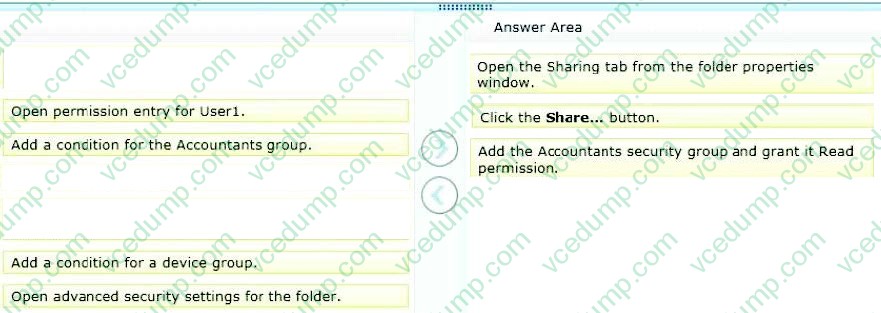
Members of the domain security group named Accountants must have access to the shared folder.
You need to assign the required permissions.
Which three actions should you perform in sequence? (To answer, move the appropriate actions from the list of actions to the answer area and arrange them in the correct order.)
Select and Place:
-
Question 10:
A computer currently runs a 64-bit version of Windows 7 Enterprise.
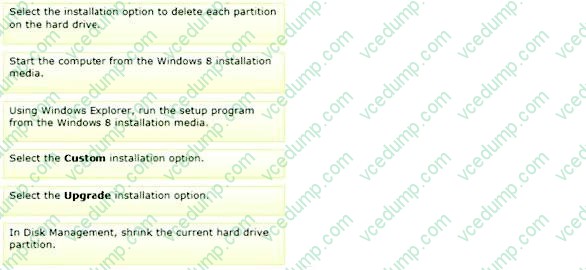
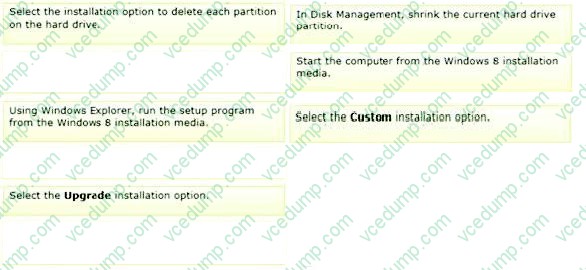
You need to deploy a 64-bit version of Windows 8 Pro to the computer. The new deployment must not affect the Windows 7 installation on the computer.
Which three actions should you perform in sequence? (To answer, move the appropriate actions from the list of actions to the answer area and arrange them in the correct order.)
Select and Place:
Related Exams:
-
62-193
Technology Literacy for Educators -
70-243
Administering and Deploying System Center 2012 Configuration Manager -
70-355
Universal Windows Platform – App Data, Services, and Coding Patterns -
77-420
Excel 2013 -
77-427
Excel 2013 Expert Part One -
77-725
Word 2016 Core Document Creation, Collaboration and Communication -
77-726
Word 2016 Expert Creating Documents for Effective Communication -
77-727
Excel 2016 Core Data Analysis, Manipulation, and Presentation -
77-728
Excel 2016 Expert: Interpreting Data for Insights -
77-731
Outlook 2016 Core Communication, Collaboration and Email Skills
Tips on How to Prepare for the Exams
Nowadays, the certification exams become more and more important and required by more and more enterprises when applying for a job. But how to prepare for the exam effectively? How to prepare for the exam in a short time with less efforts? How to get a ideal result and how to find the most reliable resources? Here on Vcedump.com, you will find all the answers. Vcedump.com provide not only Microsoft exam questions, answers and explanations but also complete assistance on your exam preparation and certification application. If you are confused on your 70-689 exam preparations and Microsoft certification application, do not hesitate to visit our Vcedump.com to find your solutions here.