70-682 Exam Details
-
Exam Code
:70-682 -
Exam Name
:Pro. Upgrading to Windows 7 MCITP Enterprise Desktop Support Technician -
Certification
:Microsoft Certifications -
Vendor
:Microsoft -
Total Questions
:240 Q&As -
Last Updated
:Feb 07, 2022
Microsoft 70-682 Online Questions & Answers
-
Question 211:
Your company has client computers that run Windows 7 and client computers that run Windows XP Professional. You enable the Network Discovery feature on the Windows 7 computers. You discover that the Windows XP computers do not appear on the network map. You need to ensure that all client computers appear on the network map. What should you do?
A. Configure the IPv6 protocol on the Windows 7 computers.
B. Configure the network shares on the Windows 7 computers to include the user names of all employees.
C. Configure the network shares on the Windows XP computers to include the user names of all employees.
D. Install the Link Layer Topology Discovery (LLTD) Responder on the Windows XP computers. -
Question 212:
You deploy a Windows 7 Enterprise image to a computer on the network. You need to display the detailed activation and license status of the computer. What should you run?
A. Msconfig.exe
B. Slui.exe
C. Slmgr.vbs and specify the dli parameter
D. Winrm.vbs and specify the id parameter -
Question 213:
Your network contains an Active Directory domain. All client computers run Windows 7 Enterprise. A custom application named App1 is installed on the computers. All settings for App1 are stored in the user portion of the registry. The help desk reports a high volume of calls from users who have incorrectly configured the App1 settings. You need to recommend a solution to minimize the number of help desk calls about the incorrect App1 configurations. Users must be able to use App1. What should you do?
A. Instruct the help desk to modify the Windows Defender settings.
B. Instruct the help desk to remove all users from the Administrators group on all local computers.
C. Request that a domain administrator create a Group Policy object (GPO) that uses a custom administrative template.
D. Request that an administrator create a Group Policy object (GPO) that configures a software restriction policy. -
Question 214:
You work as a desktop technician at ABC.com. The ABC.com network consists of a single Active Directory domain named ABC.com. All servers on the network run Windows Server 2008. All client computers run Windows 7 Professional.
ABC.com contains a Development department. The Development department users create custom software applications for use by ABC.com staff and customers.
The developers create a custom application named ABC-App1. All ABC.com domain users require ABC- App1 to be installed on their computers. The settings for ABC-App1 are stored under the Local User portion of the registry. ABC.com
users install the application by copying the application from a network share, running the application installer then manually configuring the registry.
You receive reports from a number of users that ABC-App1 is not functioning correctly. You discover that the registry settings are not configured correctly.
How can you ensure the ABC-App1 functions correctly on user computers and that future installations function correctly?
A. Log in to each computer as Administrator and configure the correct registry settings.
B. Configure the correct registry settings under the user logins.
C. Configure the local security policy on the computers with a custom administrative template that contains the correct registry settings.
D. Deploy a Group Policy Object to the computers with a custom administrative template that contains the correct registry settings. -
Question 215:
Your network consists of an Active Directory domain and a DirectAccess infrastructure. You install Windows 7 on a new portable computer and join the computer to the domain. You need to ensure that the computer can establish DirectAccess connections. What should you do?
A. Install a computer certificate.
B. Create a new network connection.
C. Enable the Network Discovery firewall exception.
D. Add the computer account to the Network Configuration Operators group. -
Question 216:
This question is the first in a series of questions that all present the same scenario. For your convenience, the scenario is repeated in each question. Each question presents a different goal and answer choices, but the text of the scenario is exactly the same in each question in this series. Start of repeated scenarioYou are an enterprise desktop support technician for A. Datum Corporation. Active Directory ConfigurationThe company has three offices. The offices are configured as shown in the following table. The network contains a single Active Directory domain named adatum.com. Two Group Policy objects (GPOs) are configured as shown in the following table. Servers The relevant servers in the main office are configured as shown in the following table. Wireless NetworkA wireless network is implemented in the main office. The wireless network is configured to use WPA2- Enterprise security. Client ConfigurationAll client computers run Windows 7 Enterprise and are configured to use DHCP. Windows Firewall is disabled on all client computers. All computers in the research department have Windows XP Mode and Windows Virtual PC installed. You deploy a custom Windows XP Mode image to the research department computers. An application named App1 is installed in the image. Each research department computer has the following hardware. 4 GB of RAMIntel Core i7 processor500- GB hard disk drive Corporate Security PolicyThe corporate security policy includes the following requirements. Users without domain accounts must be denied access to internal servers.All connections to the companys wireless access points must be encrypted.Only employees can be configured to have user accounts in the Active Directory domain.The hard disk drives on all portable computers must be encrypted by using Windows BitLocker Drive Encryption (BitLocker). End of repeated scenario Users in the research department report that they cannot run App1 or Windows XP Mode. You need to ensure that all research department users can run App1. You need to achieve this goal by using the minimum amount of administrative effort. What should you do?
The safer , easier way to help you pass any IT exams.

A. Approve all Windows 7 updates on WSUS1.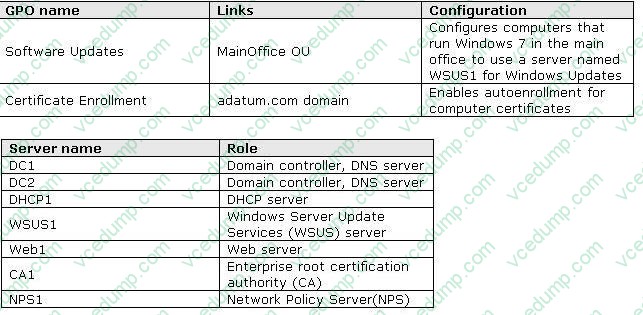
B. Enable hardware virtualization on the research department computers.
C. Give each member of the research department a computer that has an Intel Core i5 processor. Changed with the DEMO VERSION of CAD-KAS PDF-Editor (http://www.cadkas.com).
D. Request that a domain administrator create a GPO that configures the Windows Remote Management (WinRM) settings. -
Question 217:
This question is the first in a series of questions that all present the same scenario. For your convenience, the scenario is repeated in each question. Each question presents a different goal and answer choices, but the text of the scenario is exactly the same in each question in this series. Start of repeated scenarioYou are an enterprise desktop support technician for City Power and Light. City Power and Light is a utility company. The company has a main office and a branch office. The main office is located in Toronto. The branch office is located in Boston. The main office has 1,000 employees. The branch office has 10 employees. Active Directory ConfigurationThe network contains a single Active Directory domain named cpandl.com. The functional level of the forest is Windows Server 2008 R2. Server ConfigurationAll servers run Windows Server 2008 R2. The relevant servers in the main office are configured as shown in the following table. All computers in the main office are configured to use DHCP. All computers in the branch office are configured to use static IP addresses. User InformationAll user accounts are standard user accounts.All client computers run Windows 7 Enterprise.Each portable computer has a PPTP-based VPN connection to the internal network. Corporate Security GuidelinesAll users must be granted the least privileges possible.All locally stored documents must be encrypted by using Encrypting File System (EFS).The hard disk drives on all portable computers must be encrypted by using Windows BitLocker Drive Encryption (BitLocker).All encryption certificates must be stored on smart cards. End of repeated scenario The company is deploying a new application. When users attempt to install the application, they receive an error message indicating that they need administrative privileges to install it. You need to recommend a solution to ensure that users can install the application. The solution must adhere to the corporate security guidelines. What should you recommend?
A. Publish the application by using a Group Policy.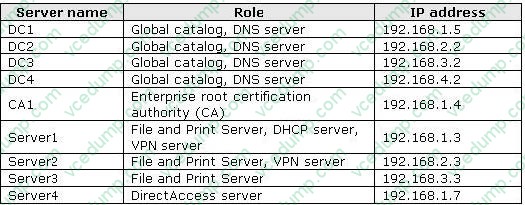
B. Disable User Account Control (UAC) by using a Group Policy.
C. Add all domain users to the local Power Users group by using Restricted Groups.
D. Add the current users to the local Administrators group by using Group Policy preferences. -
Question 218:
All client computers on your company network run Windows 7. A computer is unable to connect to network resources. The configuration of the computer is as shown in the following table. You need to ensure that the computer is able to connect to network resources. What should you do?
A. Change the IP address to 131.107.3.254.
B. Change the subnet mask to 255.255.248.0.
C. Change the default gateway to 131.107.0.1.
D. Change the preferred DNS server to 131.107.3.1. -
Question 219:
You have a computer that runs Windows 7. You create an Encrypting File System (EFS) recovery key and certificate. You need to ensure that your user account can decrypt all EFS files on the computer. What should you do?
A. From Credential Manager, add a Windows credential.
B. From Credential Manager, add a certificate-based credential.
C. From the local computer policy, add a data recovery agent.
D. From the local computer policy, modify the Restore files and directories setting. -
Question 220:
You have a computer that runs Windows 7. A user installs a third-party media player on the computer. You discover that all media files automatically open by using the third-party media player. You need to ensure that all media files open automatically by using Windows Media Player. You must achieve this goal by using the minimum amount of administrative effort. What should you do?
A. Select a media file. Right-click the file and select Open with.
B. Select a media file. Right-click the file and select Restore previous versions.
C. From Control Panel, modify the Set your default programs settings.
D. From Control Panel, modify the Set program access and computer defaults settings.
Related Exams:
-
62-193
Technology Literacy for Educators -
70-243
Administering and Deploying System Center 2012 Configuration Manager -
70-355
Universal Windows Platform – App Data, Services, and Coding Patterns -
77-420
Excel 2013 -
77-427
Excel 2013 Expert Part One -
77-725
Word 2016 Core Document Creation, Collaboration and Communication -
77-726
Word 2016 Expert Creating Documents for Effective Communication -
77-727
Excel 2016 Core Data Analysis, Manipulation, and Presentation -
77-728
Excel 2016 Expert: Interpreting Data for Insights -
77-731
Outlook 2016 Core Communication, Collaboration and Email Skills
Tips on How to Prepare for the Exams
Nowadays, the certification exams become more and more important and required by more and more enterprises when applying for a job. But how to prepare for the exam effectively? How to prepare for the exam in a short time with less efforts? How to get a ideal result and how to find the most reliable resources? Here on Vcedump.com, you will find all the answers. Vcedump.com provide not only Microsoft exam questions, answers and explanations but also complete assistance on your exam preparation and certification application. If you are confused on your 70-682 exam preparations and Microsoft certification application, do not hesitate to visit our Vcedump.com to find your solutions here.