70-682 Exam Details
-
Exam Code
:70-682 -
Exam Name
:Pro. Upgrading to Windows 7 MCITP Enterprise Desktop Support Technician -
Certification
:Microsoft Certifications -
Vendor
:Microsoft -
Total Questions
:240 Q&As -
Last Updated
:Feb 07, 2022
Microsoft 70-682 Online Questions & Answers
-
Question 161:
You have a computer that runs Windows 7. You create an Encrypting File System (EFS) recovery key and certificate. You need to ensure that your user account can decrypt all EFS files on the computer. What should you do?
A. From Credential Manager, add a Windows credential.
B. From Credential Manager, add a certificate-based credential.
C. From the local computer policy, add a data recovery agent.
D. From the local computer policy, modify the Restore files and directories setting. -
Question 162:
You work as a desktop technician at ABC.com. The ABC.com network consists of a single Active Directory domain named ABC.com. All servers on the network run Windows Server 2008. All client computers run Windows 7 Enterprise.
You use a desktop computer named ABC-Tech01 and a portable laptop computer named ABC-Tech02.
Both computers run Windows 7 Enterprise.
You want to test Windows 7 Ultimate. You have a Virtual Hard Disk (VHD) on a portable external hard drive. The VHD has Windows 7 Ultimate installed.
You want to boot ABC-Tech02 from the VHD. You plug the external hard drive into ABC- Tech02 and restart the computer. However, the computer starts from the internal hard drive.
How can you start the computer from the VHD?
A. Open Disk Management and format the external hard drive.
B. Use Bcdedit.exe to modify the boot sequence.
C. Modify the boot.ini file.
D. Run msconfig.exe. -
Question 163:
You work as a desktop technician at ABC.com. The ABC.com network consists of a single Active Directory domain named ABC.com. All servers on the network run Windows Server 2008. All client computers run Windows 7 Enterprise.
ABC.com contains a Research and Development department. All Research and Development computer and user accounts are located in an organizational unit (OU) named RandD.
The computers in the Research and Development department contain sensitive information. ABC company security policy states that users must not be able to use removable devices on the computers in the Research and Development
department.
How would you apply the company security policy?
A. Configure a group policy object to apply the Prevent installation of removable devices setting.
B. Ensure no users have local administrative rights on the Research and Development department computers.
C. Disable User Account Control on the computers in the Research and Development department.
D. Configure a group policy object to apply the Prevent redirection of USB devices setting. -
Question 164:
You have a computer that runs Windows XP and a USB drive that is protected by using BitLocker To Go. You need to ensure that you can copy files from the computer to the USB drive. The solution must retain the existing files on the USB drive. What should you do?
A. From a computer that runs Windows 7, change the file system of the USB drive.
B. From a computer that runs Windows 7, disable BitLocker To Go for the USB drive.
C. Log on to Windows XP as member of the Administrators group.
D. Log on to Windows XP by using a user account that has an Encrypting File System (EFS) certificate. -
Question 165:
All client computers on your company network run Windows 7 and are members of an Active Directory Domain Services domain. Your company policy requires that all unnecessary services be disabled on the computers. The Sales department staff has been provided with new mobile broadband adapters that use the Global System for Mobile Communications (GSM) technology. You need to ensure that portable computers can connect to the broadband GSM network. Which service should be enabled on the portable computers?
A. WLAN AutoConfig
B. WWAN AutoConfig
C. Computer Browser
D. Portable Device Enumerator Service -
Question 166:
You work as a desktop technician at ABC.com. The network consists of a single Active Directory domain named ABC.com. All servers on the network run Windows Server 2008. Most client computers have been migrated to Windows 7 Professional. However, some client computers still run Windows XP Professional.
The Network Discovery Feature has been enabled on the servers and the Windows 7 Professional client computers. All servers and Windows 7 client computers are now displayed on the network map. You notice that that the Windows XP client computers do not appear on the map.
How can you ensure that all the client computers are displayed on the network map?
A. You should install the Link Layer Topology Discovery (LLTD) Responder on the Windows XP Professional client computers.
B. You should enable File and Printer Sharing on the Windows XP Professional computers.
C. You should enable the Computer Browser service on the Windows XP Professional computers.
D. You should enable the Workstation service on the Windows XP Professional computers. -
Question 167:
Start of repeated scenarioYou are an enterprise desktop support technician for Contoso, Ltd. IP AddressingContoso has one office. The IP addressing for Contoso is configured as shown in the following table. Active Directory ConfigurationYou have an Active Directory forest that contains one domain named contoso.com. All domain controllers run Windows Server 2008 R2. An OU exists for each department in the company. The MainOffice Users and Computers OU contains the OUs for each department in the company. The Users OUs contains the user accounts for each department. The Computers OUs contain the computer accounts for each department. The Domain Controllers OU contains the computer accounts for all domain controllers. The Servers OU contains the computer accounts for all other servers. Custom Group Policy objects (GPOs) are linked to each departmental OU, the Domain Controllers OU, and the Servers OU. Server ConfigurationThe relevant servers are configured as shown in the following table. A year ago, a Windows Server 2008 R2 VPN server was deployed. Ten sales users participated in a pilot project to test the new VPN. The pilot project lasted two months. After the pilot project, the VPN server was put into production. The VPN server allows L2TP/IPSec-based VPN connections only. The VPN server requires certificate authentication. Printer ConfigurationNetwork printers are located in a single room on each floor. Users can search Active Directory to find printers that are nearby. Print1 is the print server for all printers. Client Computer ConfigurationMost users have desktop computers. Several users in the sales and management departments have portable computers because they travel frequently. All client computers run Windows 7 Enterprise. The Windows Internet Explorer proxy settings are configured on all client computers by using a GPO named GPO-IE. GPO-IE is linked to the domain. All users in the company use a custom application named App1. App1 is manually installed on all client computers. A new version of App1 is available. Some features in the new version of App1 are incompatible with the previous version of App1. End of repeated scenario Portable computer users report that they can use Internet Explorer to browse Internet Web sites only when they are connected to the company network. You need to ensure that portable computer users can access Internet Web sites from wherever they connect. What should you do?
A. Instruct the users to configure static IPv4 settings.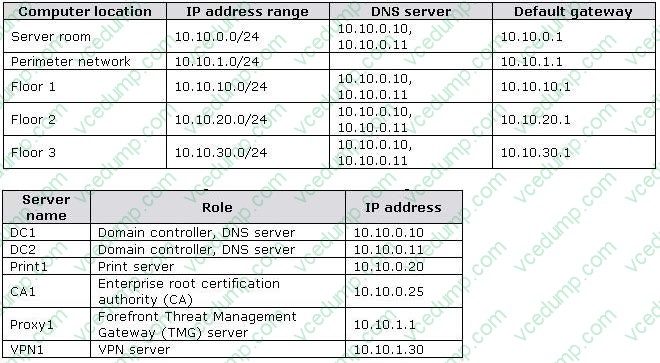
B. Instruct the users to configure automatic IPv4 settings.
C. Request that a domain administrator link GPO-IE to Active Directory site objects.
D. Request that a domain administrator create a new GPO that modifies the Internet Explorer Maintenance settings, and then link the new GPO to the Users OUs. -
Question 168:
All client computers on your company network were recently upgraded from Windows Vista to Windows7. Several employees use a scanner to import document images into a database. They install a new scanning application on their computers. The application updates the device driver for the scanners as part of the installation process. Employees report that the application can no longer connect to the scanner. You need to ensure that the employees can use the scanner. What should you do?
A. Roll back the device driver to the previous version.
B. Reinstall the application in Windows Vista compatibility mode.
C. Set the application compatibility properties to run the application as an administrator.
D. Restart the computer by using the System Configuration tool to load only basic devices and services. -
Question 169:
You work as the network administrator at ABC.com. Mia Hamm is part of the ABC.com IT team and works as a desktop technician.
The network consists of a single Active Directory domain named ABC.com. All servers on the network run Windows Server 2008. All client computers run Windows 7 Enterprise.
All servers and client computers on the ABC.com network have static IP configurations. The company has hired a new user named Clive Allen to work in the Sales department. Mia is configuring a new desktop computer for Clive. She
configures the IPv4 settings as shown below:
Mia successfully joins Clive's computer to the domain. However she reports that Clive is unable to access Internet web sites.
Which IP setting should you change?
A. The default gateway should be changed to 192.168.15.254.
B. The subnet mask should be changed to 255.255.255.0.
C. The IP address should be changed to 192.168.15.254.
D. The preferred DNS server should be changed to 192.168.1.3. -
Question 170:
All client computers on your company network run Windows 7. The Finance department staff run an application that collects data from 09.30 hours to 15.00 hours everyday. After data collection, the application generates reports that contain data aggregation for the day and the previous week. During report generation, the Finance department staff experience slow performance on their computers. You discover that the usage of the processor on these computers is between 90 and 100 percent. You need to reduce the impact of report generation on the Finance computers. What should you do?
A. Set the priority of the application to Low.
B. Set the priority of the application to Real-time.
C. Configure the processor affinity mask to ensure that the application uses all the available processors.
D. Modify the memory settings of the computers to optimize the performance of the background applications.
Related Exams:
-
62-193
Technology Literacy for Educators -
70-243
Administering and Deploying System Center 2012 Configuration Manager -
70-355
Universal Windows Platform – App Data, Services, and Coding Patterns -
77-420
Excel 2013 -
77-427
Excel 2013 Expert Part One -
77-725
Word 2016 Core Document Creation, Collaboration and Communication -
77-726
Word 2016 Expert Creating Documents for Effective Communication -
77-727
Excel 2016 Core Data Analysis, Manipulation, and Presentation -
77-728
Excel 2016 Expert: Interpreting Data for Insights -
77-731
Outlook 2016 Core Communication, Collaboration and Email Skills
Tips on How to Prepare for the Exams
Nowadays, the certification exams become more and more important and required by more and more enterprises when applying for a job. But how to prepare for the exam effectively? How to prepare for the exam in a short time with less efforts? How to get a ideal result and how to find the most reliable resources? Here on Vcedump.com, you will find all the answers. Vcedump.com provide not only Microsoft exam questions, answers and explanations but also complete assistance on your exam preparation and certification application. If you are confused on your 70-682 exam preparations and Microsoft certification application, do not hesitate to visit our Vcedump.com to find your solutions here.