70-682 Exam Details
-
Exam Code
:70-682 -
Exam Name
:Pro. Upgrading to Windows 7 MCITP Enterprise Desktop Support Technician -
Certification
:Microsoft Certifications -
Vendor
:Microsoft -
Total Questions
:240 Q&As -
Last Updated
:Feb 07, 2022
Microsoft 70-682 Online Questions & Answers
-
Question 131:
You plan to deploy Windows 7 by using a virtual hard disk (VHD). You need to ensure that when a computer starts from the VHD, the Windows 7 installation programs will run the out-of-box-experience (OOBE) portion of the setup. What should you do?
A. Copy install.wim from the Windows 7 installation media to the VHD.
B. Use ImageX to apply install.wim from the Windows 7 installation media to the VHD.
C. Start the computer by using the Windows 7 installation media and then select Install now.
D. Start the computer by using the Windows Preinstallation Environment (Windows PE) and then run Diskprep.exe. -
Question 132:
Your network has a main office and a branch office. The branch office has computers that run Windows 7. A network administrator enables BranchCache in the main office. You run Netsh on your computer as shown in the exhibit. (Click the Exhibit button.) You need to ensure that other computers in the branch office can access the cached content on your computer. What should you do?
A. Turn on Internet Information Services (IIS).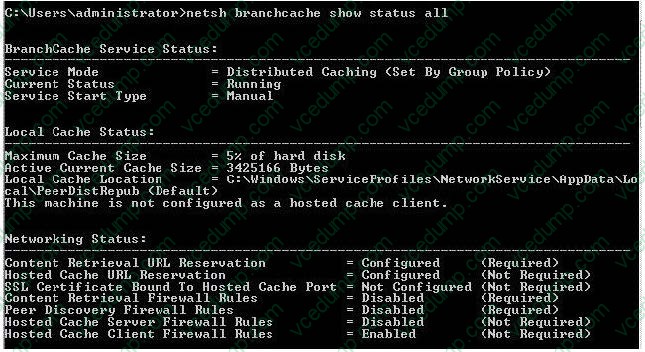
B. Configure the computer as a hosted cache client.
C. Configure the BranchCache service to start automatically.
D. Modify the Windows Firewall with Advanced Security rules. -
Question 133:
You work as the network administrator at ABC.com. Mia Hamm is part of the ABC.com IT team and works as a desktop technician.
The network consists of a single Active Directory domain named ABC.com. All servers on the network run Windows Server 2008. All client computers run Windows 7 Enterprise.
All servers and client computers on the ABC.com network have static IP configurations.
The company has hired a new user named Clive Allen to work in the Sales department. Clive Allen will use his own portable laptop computer until a new computer arrives for him.
Mia is configuring Clive's laptop to join the domain. She configures a static IP address. Mia attempts to join Clive's laptop to the domain but is unsuccessful. Mia calls you for assistance. She reports that Clive's laptop is able to ping the domain
controller's IP address.
What is the most likely cause of the problem?
A. The DNS server setting is incorrect in the IPv4 properties.
B. The WINS server setting is incorrect in the IPv4 properties.
C. The IP address is not in the same range as the ABC.com network.
D. The Time Zone is incorrect.
E. The Default Gateway setting is incorrect in the IPv4 properties. -
Question 134:
You work as a desktop technician at ABC.com. The ABC.com network consists of a single Active Directory domain named ABC.com. All servers on the network run Windows Server 2008. All client computers run Windows 7 Enterprise.
ABC.com contains a Sales department. Some of the Sales staff are based full time in the office and use desktop computers. ABC also employs Sales staff who work mainly out of the office and use portable laptop computers.
The roaming Sales staff use DirectAccess connections to connect to a server in the office named ABC- SRV10.
ABC.com hires a new Sales person named Mia Hamm. Mia will be a roaming Sales person and so will work mainly out of the office. She will need to be able to use DirectAccess to connect to ABC-SRV10.
You are configuring a new Windows 7 Enterprise laptop computer for Mia. What do you need to do to enable the computer to connect to ABC-SRV10 using a DirectAccess connection?
A. Install a computer certificate on ABC-SRV10.
B. Configure a new VPN connection on the laptop.
C. Join the domain and install a computer certificate on the laptop.
D. Configure a static IP address on the laptop. -
Question 135:
All client computers on your company network run Windows 7 and are members of an Active Directory Domain Services domain. Employees using portable computers report that they get connected to a coffee shop wireless network from the company conference room. You need to ensure that the employees connect to the company wireless network by default from anywhere within the company premises. What should you do?
A. Configure the Network authentication (Shared mode) setting.
B. Apply a Wireless Network Policy to set the network type to WPA-PSK.
C. Apply a Wireless Network Policy to automatically connect to the company wireless network.
D. Apply a Wireless Network Policy to set the company wireless network as the preferred network. -
Question 136:
Start of repeated scenarioYou are an enterprise desktop support technician for Fourth Coffee. The network contains a single domain named fourthcoffee.com. Physical EnvironmentThe company has three offices. The offices are configured as shown in the following table. The relevant servers are configured as shown in the following table. The Web1 server is accessible only through the URL http.//web1.fourthcoffee.local. Application ConfigurationsFourth Coffee deploys an application named App1 to users in the main office by using a Group Policy object (GPO) named APP1Deploy. App1 requires that a drive named M be mapped to \\AppServer1\AppData$. App1 saves information on a local computer if drive M is unavailable. All client computers have drive M. Security PolicyThe corporate security policy states that domain controllers can only be deployed in secure data centers. Branch office 2 does not have a secure data center. Client ConfigurationAll users connect remotely through VPN1. VPN1 is configured to accept only SSTP-based VPN connections. All client computers receive IP configurations from DHCP. You recently purchased 100 desktop computers from a new hardware vendor. End of repeated scenario Users in branch office 2 map drives to shared folders on SRV1. The users report that they cannot access files in the shared folders when the WAN link between branch office 2 and the main office is unavailable. When they attempt to access the files, they are prompted to enter their credentials but are denied access. You need to ensure that the users can access the shared folders if the WAN link fails. What should you do?

10 / 65
The safer , easier way to help you pass any IT exams.
A. Instruct a desktop support technician to configure Offline Files on the Windows 7 computers.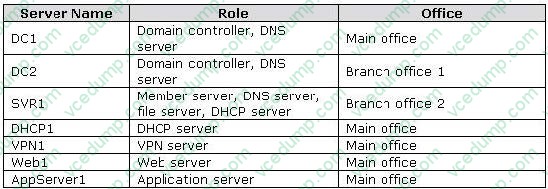
B. Instruct a desktop support technician to configure BranchCache on the Windows 7 computers.
C. Request that a domain administrator deploy a domain controller in branch office 2.
D. Request that a domain administrator enable Universal Group Membership Caching for branch office 2. -
Question 137:
This question is the first in a series of questions that all present the same scenario. For your convenience, the scenario is repeated in each question. Each question presents a different goal and answer choices, but the text of the scenario is exactly the same in each question in this series. Start of repeated scenarioYou are an enterprise desktop support technician for Humongous Insurance. Active Directory ConfigurationThe company has two offices named Office1 and Office2. The network contains an Active Directory forest named humongousinsurance.com. An Active Directory site exists for each office. The sites are named Site1 and Site2. Server ConfigurationAll servers run Windows Server 2008 R2 and are joined to the domain. The relevant servers are configured as shown in the following table. The corporate security policy states that all domain controllers must have only the following roles. AD DSDNS serverDHCP server Network ConfigurationSite1 and Site2 connect to each other by using a WAN link. Client Computer ConfigurationAll client computers run Windows 7 Enterprise and are members of the domain. Some client computers are portable computers and some are desktop computers. The computers do not support hardware virtualization. All computers are configured to receive Windows Updates from WSUS1. Remote Access ConfigurationUsers can connect to NPAS1 from the Internet by using all of the VPN protocols that are supported by Windows Server 2008 R2. Fabrikam, Inc. is a customer of Humongous Insurance. Several Humongous Insurance users work at the Fabrikam office and access resources on the Humongous Insurance network by using direct VPN connections to NPAS1. Fabrikam contains several wireless access points. Application ConfigurationAll computers in the finance department run a custom application suite named App1. Several users in the sales department install an application named App2. App2 runs as a service and logs on by using the credentials of the user who installed the application. End of repeated scenario Several users in the sales department report that their user accounts are locked out shortly after they change their user passwords. You need to minimize the number of account lockouts that occur after the users change their passwords. What should you instruct the users to do?
A. Delete all entries from the Credential Manager vault.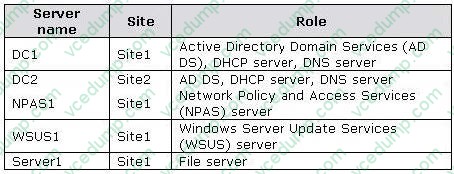
B. Change their passwords and then create a password reset disk.
C. Change their passwords and then configure App2 to log on by using a service account.
D. Change their passwords and then log off and log back on to their computers. -
Question 138:
You have two computers named Computer1 and Computer2 that run Windows 7. You need to ensure that you can remotely execute commands on Computer2 from Computer1. What should you do?
A. Run Winrm quickconfig on Computer1.
B. Run Winrm quickconfig on Computer2.
C. Enable Windows Remote Management (WinRM) through Windows Firewall on Computer1.
D. Enable Windows Remote Management (WinRM) through Windows Firewall on Computer2. -
Question 139:
Your network has a main office and a branch office. The branch office has computers that run Windows 7. A network administrator enables BranchCache in the main office. You run Netsh on your computer as shown in the exhibit. (Click the Exhibit button.) You need to ensure that other computers in the branch office can access the cached content on your computer. What should you do?
The safer , easier way to help you pass any IT exams.
A. Turn on Internet Information Services (IIS).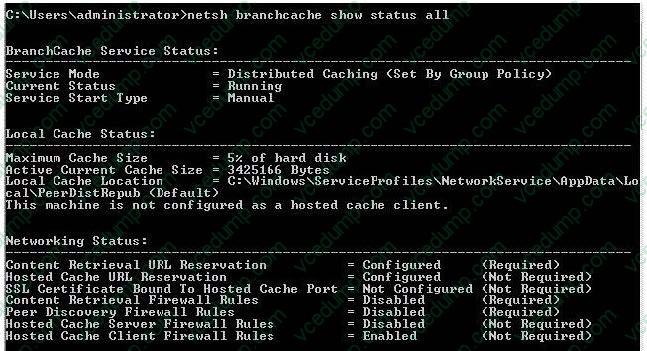
B. Configure the computer as a hosted cache client.
C. Configure the BranchCache service to start automatically.
D. Modify the Windows Firewall with Advanced Security rules. -
Question 140:
Multiple users report that their Windows 7 computers take longer to start than when their computers were first installed. A help desk technician reports that the problem is related to installed applications. You need to recommend a solution that identifies the applications that run during the startup process. What should you recommend?
A. Event Forwarding
B. MSConfig.exe
C. Problem Steps Recorder
D. Reliability Monitor
Related Exams:
-
62-193
Technology Literacy for Educators -
70-243
Administering and Deploying System Center 2012 Configuration Manager -
70-355
Universal Windows Platform – App Data, Services, and Coding Patterns -
77-420
Excel 2013 -
77-427
Excel 2013 Expert Part One -
77-725
Word 2016 Core Document Creation, Collaboration and Communication -
77-726
Word 2016 Expert Creating Documents for Effective Communication -
77-727
Excel 2016 Core Data Analysis, Manipulation, and Presentation -
77-728
Excel 2016 Expert: Interpreting Data for Insights -
77-731
Outlook 2016 Core Communication, Collaboration and Email Skills
Tips on How to Prepare for the Exams
Nowadays, the certification exams become more and more important and required by more and more enterprises when applying for a job. But how to prepare for the exam effectively? How to prepare for the exam in a short time with less efforts? How to get a ideal result and how to find the most reliable resources? Here on Vcedump.com, you will find all the answers. Vcedump.com provide not only Microsoft exam questions, answers and explanations but also complete assistance on your exam preparation and certification application. If you are confused on your 70-682 exam preparations and Microsoft certification application, do not hesitate to visit our Vcedump.com to find your solutions here.