70-480 Exam Details
-
Exam Code
:70-480 -
Exam Name
:Programming in HTML5 with JavaScript and CSS3 -
Certification
:Microsoft Certifications -
Vendor
:Microsoft -
Total Questions
:332 Q&As -
Last Updated
:Dec 07, 2021
Microsoft 70-480 Online Questions & Answers
-
Question 181:
You are developing an HTML5 web page.
The appearance of the text box must change when a user moves the focus to another element on the page.
You need to develop the page to respond to user action.
Which line of code should you use?
-
Question 182:
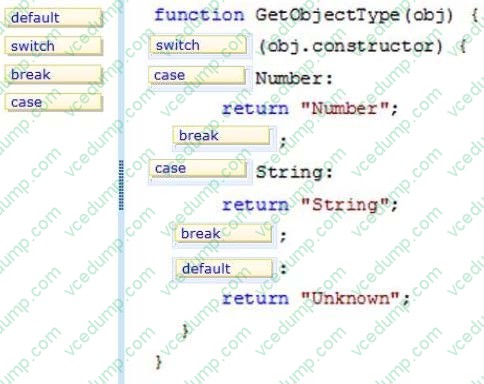
DRAG DROP
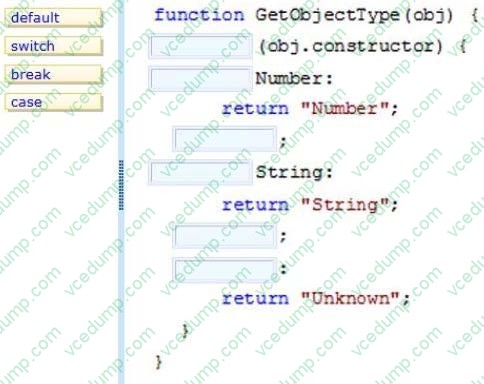
You are creating a function by using JavaScript. The function accepts an object as the parameter and returns a string that identifies the data type of the object. You have the following requirements: The function must return "Number" if the object is a number The function must return "String" if the object is a string
The function must return "Unknown" if the object is neither a number nor a string You need to implement the function to meet the requirements. How should you build the code segment? (To answer, drag the appropriate word to the correct location in the code segment. Each word may be used once, more than once, or not at all. You may need to drag the split bar between panes or
scroll to view content.)
Select and Place:
-
Question 183:
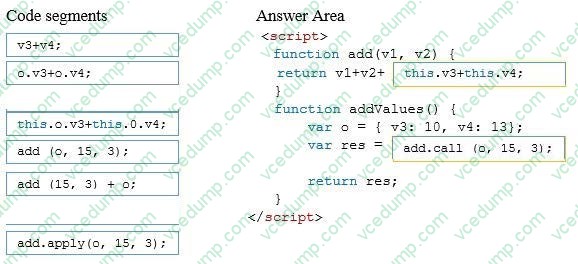
DRAG DROP
You are developing an application by using JavaScript.
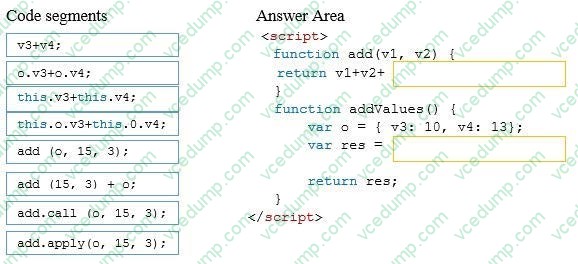
You must write a function named Add that returns the sum of the variables named v1, v2, v3, v4. The addValues function must call the Add function and use the appropriate owner object.
You need to complete the sum function.
How should you complete the relevant code? (To answer, drag the appropriate code segment or segments to the correct location or locations in the answer area. Use only code segments that apply.)
Select and Place:
-
Question 184:
You are developing an HTML5 page that has an element with an ID of logo. The page includes the following HTML.
Logo:
You need to move the logo element lower on the page by five pixels.
Which lines of code should you use? (Each correct answer presents part of the solution. Choose two.)
A. document.getElementById("logo") .style.position = "relative";
B. document.getElementByld("logo").Style.top = "5px";
C. document.getElementById("logo").style.top = "-5px";
D. document.getElementById("logo").style.position = "absolute"; -
Question 185:
You are developing an HTML5 web application for an architectural company that displays architectural blueprints.
The application must: Display the blueprints at different zoom levels without loss of detail Print the blueprints without loss of detail Work from only one source file per blueprint You need to ensure that blueprints display according to the requirements.
Which HTML5 element should you use?
A. CANVAS
B. SAMP
C. SVG
D. AREA -
Question 186:
You develop an HTML5 application for a company. Employees must enter a personal identification number (PIN) in an INPUT element named SecurityCode to access their employee records.
The SecurityCode element must meet the following requirements:
Allow up to 6 digits.
Do not display numbers as they are entered.
Display the text Enter PIN Code before the user enters any data.
You need to implement the SecurityCode element.
Which HTML markup should you add to the application?
A. Option A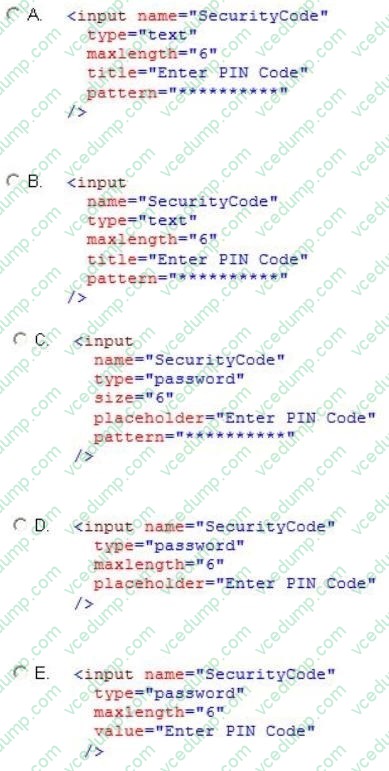
B. Option B
C. Option C
D. Option D
E. Option E -
Question 187:
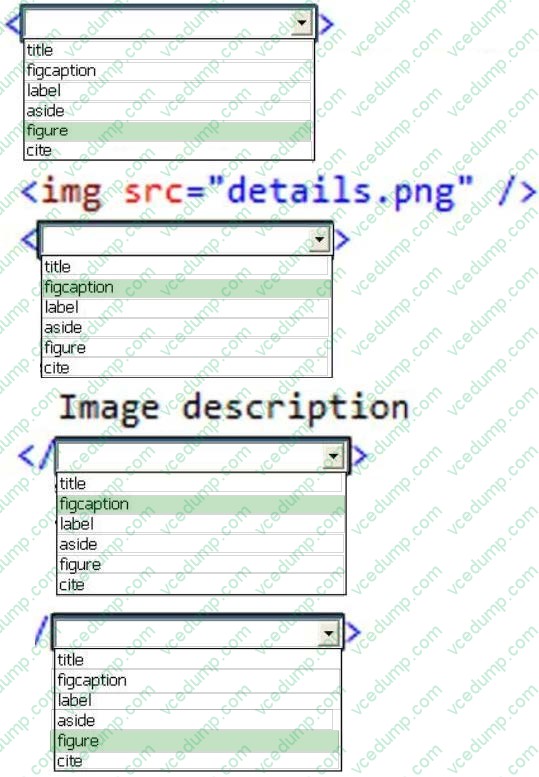
HOTSPOT
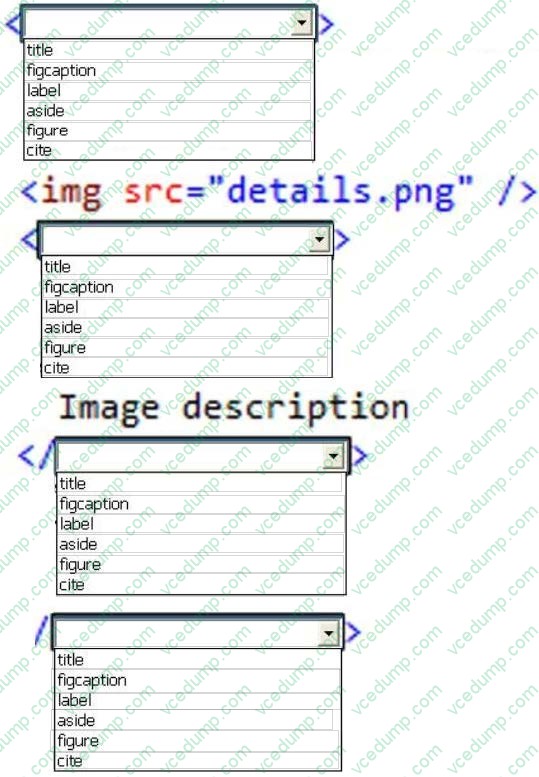
You are developing an HTML5 web application for displaying encyclopedia entries.
Each encyclopedia entry has an associated image that is referred to in the entry.
You need to display the image by using the correct semantic markup.
What should you do? (To answer, select the appropriate options from the drop-down list in the answer area.)
Hot Area:
-
Question 188:
You are developing a website that helps users locate theaters in their area from a browser. You created a function named findTheaters ().
The function must:
Get the current latitude and longitude of the user's device
Pass the user's location to findTheaters()
The user needs to access the geolocation information from the browser before searching for theaters.
Which code segment should you use?
A. Option A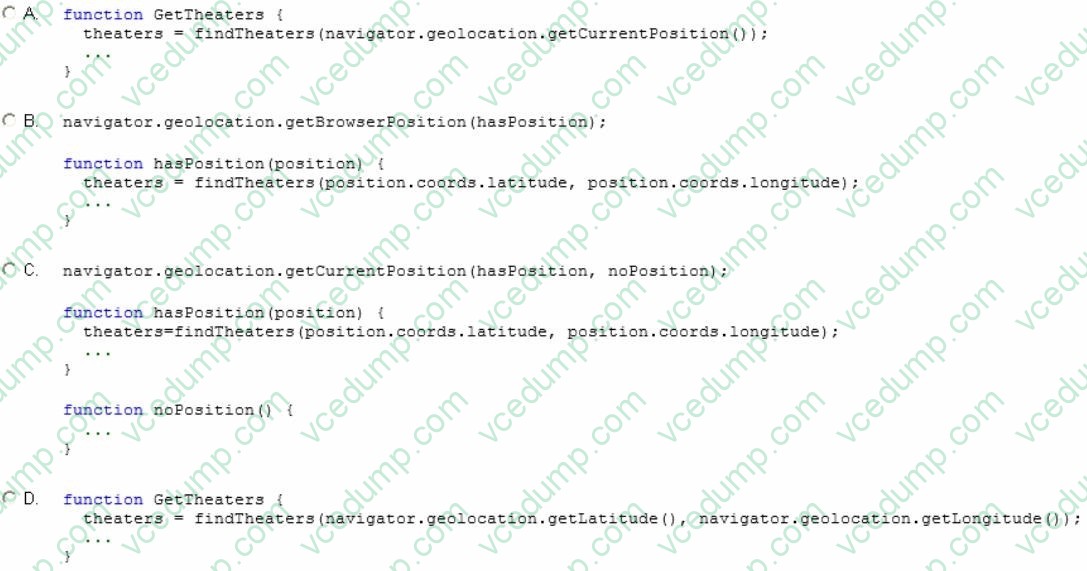
B. Option B
C. Option C
D. Option D -
Question 189:
You develop a webpage by using HTML5.
The user interface of the webpage must show a gray-lined box that contains the label Enter your information:. Inside the box are two labels and two input boxes. The first input box must be labeled Name:. The second input box must be
labeled Email:. Below the box is a Submit button.
The user interface must look like the following;
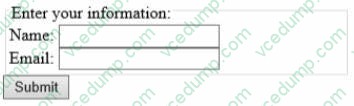
You need to create the user interface. Which markup should you use?
A. Option A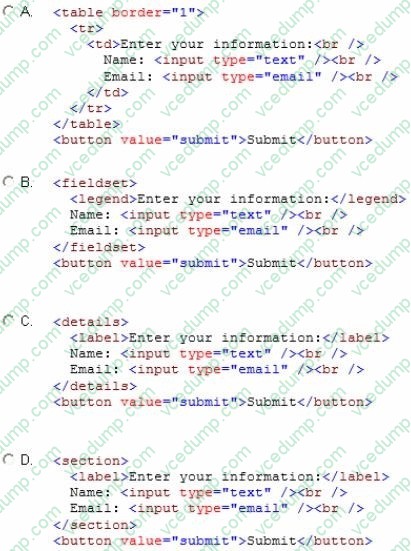
B. Option B
C. Option C
D. Option D -
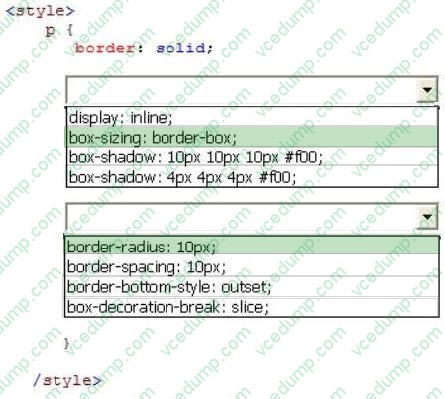
Question 190:
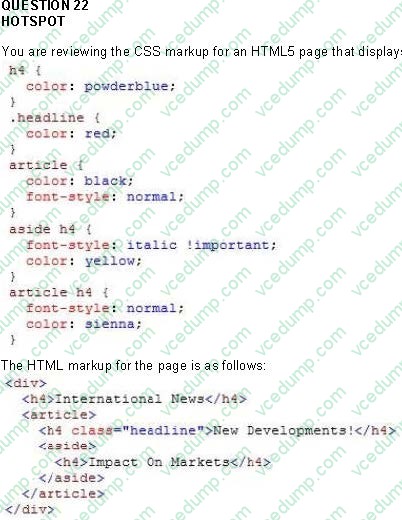
HOTSPOT
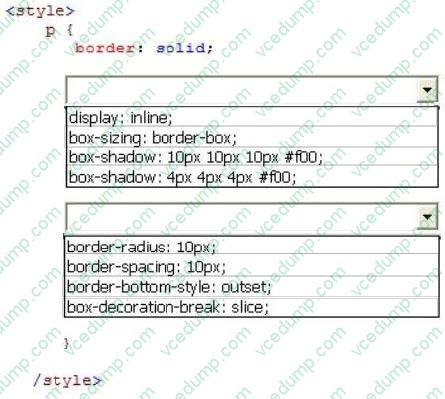
You create a custom style by using CSS3.
A box with rounded corners must appear around text. The box must match the following illustration:
You need to add the CSS3 markup to your style.
How should you complete the relevant CSS styles? (To answer, select the appropriate option from each drop-down list in the answer area.)
Hot Area:
Related Exams:
-
62-193
Technology Literacy for Educators -
70-243
Administering and Deploying System Center 2012 Configuration Manager -
70-355
Universal Windows Platform – App Data, Services, and Coding Patterns -
77-420
Excel 2013 -
77-427
Excel 2013 Expert Part One -
77-725
Word 2016 Core Document Creation, Collaboration and Communication -
77-726
Word 2016 Expert Creating Documents for Effective Communication -
77-727
Excel 2016 Core Data Analysis, Manipulation, and Presentation -
77-728
Excel 2016 Expert: Interpreting Data for Insights -
77-731
Outlook 2016 Core Communication, Collaboration and Email Skills
Tips on How to Prepare for the Exams
Nowadays, the certification exams become more and more important and required by more and more enterprises when applying for a job. But how to prepare for the exam effectively? How to prepare for the exam in a short time with less efforts? How to get a ideal result and how to find the most reliable resources? Here on Vcedump.com, you will find all the answers. Vcedump.com provide not only Microsoft exam questions, answers and explanations but also complete assistance on your exam preparation and certification application. If you are confused on your 70-480 exam preparations and Microsoft certification application, do not hesitate to visit our Vcedump.com to find your solutions here.