70-448 Exam Details
-
Exam Code
:70-448 -
Exam Name
:TS:MS SQL Server 2008.Business Intelligence Dev and Maintenan -
Certification
:Microsoft Certifications -
Vendor
:Microsoft -
Total Questions
:331 Q&As -
Last Updated
:Feb 05, 2022
Microsoft 70-448 Online Questions & Answers
-
Question 241:
You are developing a SQL Server 2008 Integration Services (SSIS) project in Business Intelligence Development Studio. You configure the project properties as shown in the following image.
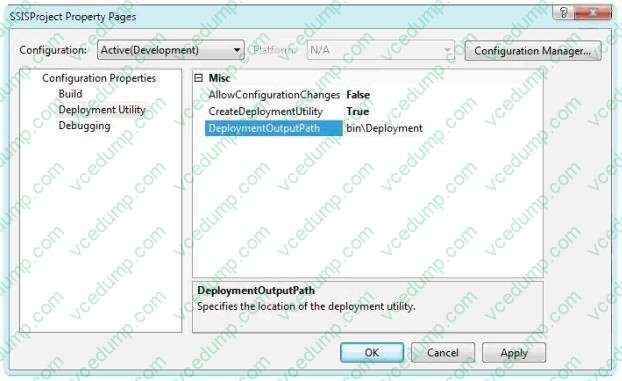
You need to create a deployment manifest for all packages in the project. What should you do?
A. Build the Integration Services project.
B. Modify the AllowConfigurationChanges property of the project.
C. Copy each package. Rename each copy with a .SSISDeploymentManifest file extension.
D. View the code of each Data Transformation Services (DTS) package. Copy the first xml node to a file with a .SSISDeploymentManifest file extension. -
Question 242:
You maintain a SQL Server 2008 Analysis Services (SSAS) database on a default instance.
You plan to document the Analysis Services performance information.
You need to collect information related to the temporary file usage when the database is processed.
Which object should you use?
A. MSAS 2008: Memory
B. MSAS 2008: Cache
C. MSAS 2008: Proc Aggregations
D. MSAS 2008: Storage Engine Query -
Question 243:
You work for an organization with global operations. You are responsible for the SQL Server 2008 Integration Services (SSIS) instance. You develop SSIS packages to load daily and weekly feeds. These packages are deployed via the SQL
Server method.
The servers reside in geographies with a high risk of natural disaster.
You need to implement a disaster recovery plan to back up the SSIS packages for availability.
What should you back up?
A. The model database
B. The package folder
C. The master database
D. The MSDB database -
Question 244:
You maintain a SQL Server 2008 Reporting Services (SSRS) instance.
Your instance supports several different rendering extensions.
You need to configure the server so that all reports render only to Microsoft Excel.
What should you do?
A. Modify the RSMgrPolicy.config file.
B. Modify the Web.config file.
C. Modify the Global.asax file.
D. Modify the RSReportServer.config file. -
Question 245:
You maintain a SQL Server 2008 Analysis Services (SSAS) instance.
You plan to process a cube by using an XML for Analysis (XMLA) script.
You need to ensure that aggregations are populated.
What should you do?
A. Execute a processIndex command.
B. Execute a processUpdate command.
C. Execute a processStructure command.
D. Execute a processData command. -
Question 246:
You are working as reporting administrator for a product development company. The company uses SQL Server 2008 Reporting Services (SSRS) deployed in native mode.
You need to deploy multiple reports via InstallShield.
Which three components are you required to use? (Each correct answer presents part of the solution.
Choose three.)
A. Report Builder
B. rs.exe
C. rsconfig utility
D. ReportService2010.asmx
E. .rss file -
Question 247:
You develop a report by using SQL Server 2008 Reporting Services (SSRS).
The report has a dataset that contains 25 columns of data. You plan to render the dataset to a Microsoft Office Excel worksheet.
You need to ensure that the report columns are properly aligned when rendering to Excel.
Which type of data region should you use?
A. List
B. Table
C. Rectangle
D. Matrix -
Question 248:
You are developing a sales report by using SQL Server 2008 Reporting Services (SSRS).
The report contains a table.
You need to implement a technology that allows users to open a new report when they click on a field in a table.
Which SSRS technology should you use?
A. Subreport
B. Tablix Data Region
C. Drillthrough action
D. Interactive Sorting -
Question 249:
You are a database developer and you have about two years experience in creating business intelligence (BI) solutions by using SQL Server2008.
Now you are employed in a company which is named NaproStar and work as the technical support for the company which uses SQL Server2008. You are in charge of a SQL Server 2008 Reporting Services (SSRS) instance and you use it to create a report, which is so complex that it needs a few minutes to generate.
Now you are assigned a task to find a solution to configure the report server so that it can be cached for half an hour after the original request.
Which solution should be chosen to accomplish this task?
A. The solution of using snapshot isolation to configure the data source would be chosen to accomplish this task
B. The solution of using a database snapshot to configure the data source would be chosen to accomplish this task
C. The solution of implementing report snapshots would be chosen to accomplish this task
D. The solution of implementing report execution caching would be chosen to accomplish this task. -
Question 250:
You maintain a SQL Server 2008 Reporting Services (SSRS) database server.
The instance contains a large number of reports that take a long time to execute. The reports contain multiple execution snapshots.
You have a new production server along with SSRS installed.
You need to migrate the reports and their snapshots to the production server in the minimum amount of time.
What should you do?
A. Use the rs.exe utility.
B. Use the rskeymgmt.exe utility.
C. Deploy the solutions by using Business Intelligence Development Studio (BIDS).
D. Copy the Report Server databases to the production server. Configure the server by using the Reporting Services Configuration tool.
Related Exams:
-
62-193
Technology Literacy for Educators -
70-243
Administering and Deploying System Center 2012 Configuration Manager -
70-355
Universal Windows Platform – App Data, Services, and Coding Patterns -
77-420
Excel 2013 -
77-427
Excel 2013 Expert Part One -
77-725
Word 2016 Core Document Creation, Collaboration and Communication -
77-726
Word 2016 Expert Creating Documents for Effective Communication -
77-727
Excel 2016 Core Data Analysis, Manipulation, and Presentation -
77-728
Excel 2016 Expert: Interpreting Data for Insights -
77-731
Outlook 2016 Core Communication, Collaboration and Email Skills
Tips on How to Prepare for the Exams
Nowadays, the certification exams become more and more important and required by more and more enterprises when applying for a job. But how to prepare for the exam effectively? How to prepare for the exam in a short time with less efforts? How to get a ideal result and how to find the most reliable resources? Here on Vcedump.com, you will find all the answers. Vcedump.com provide not only Microsoft exam questions, answers and explanations but also complete assistance on your exam preparation and certification application. If you are confused on your 70-448 exam preparations and Microsoft certification application, do not hesitate to visit our Vcedump.com to find your solutions here.