70-412 Exam Details
-
Exam Code
:70-412 -
Exam Name
:Configuring Advanced Windows Server 2012 Services -
Certification
:Microsoft Certifications -
Vendor
:Microsoft -
Total Questions
:450 Q&As -
Last Updated
:Feb 03, 2022
Microsoft 70-412 Online Questions & Answers
-
Question 311:
You have a server named DC2 that runs Windows Server 2012 R2. DC2 contains a DNS zone named adatum.com. The adatum.com zone is shown in the exhibit. (Click the Exhibit button.)
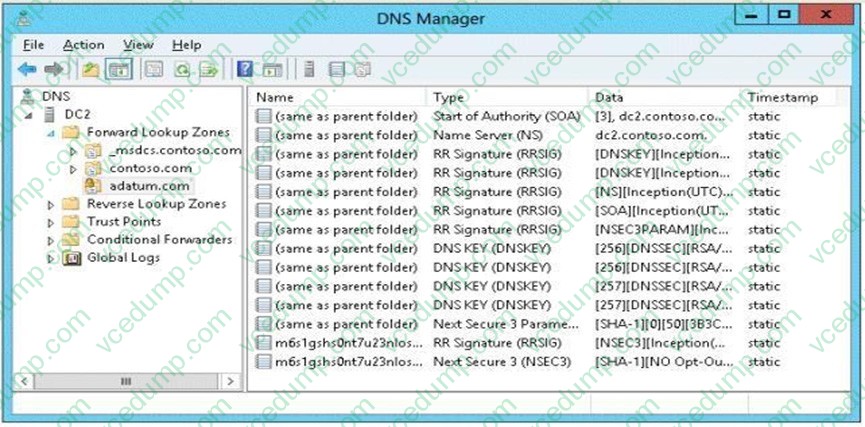
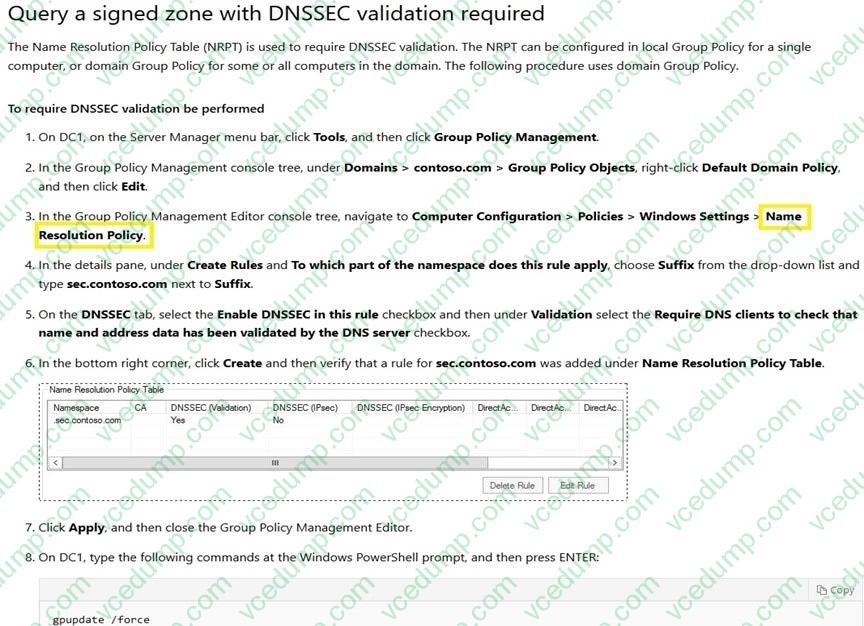
You need to configure DNS clients to perform DNSSEC validation for the adatum.com DNS domain. What should you configure?
A. The Network Location settings
B. A Name Resolution Policy
C. The DNS Client settings
D. The Network Connection settings -
Question 312:
Your network contains two servers named Server1 and Server2 that run Windows Server 2008 R2 Service Pack 1 (SP1). Server1 and Server2 are nodes in a failover cluster named Cluster1. The network contains two servers named Server3 and Server4 that run Windows Server 2012 R2. Server3 and Server4 are nodes in a failover cluster named Cluster2.
You need to move all of the applications and the services from Cluster1 to Cluster2.
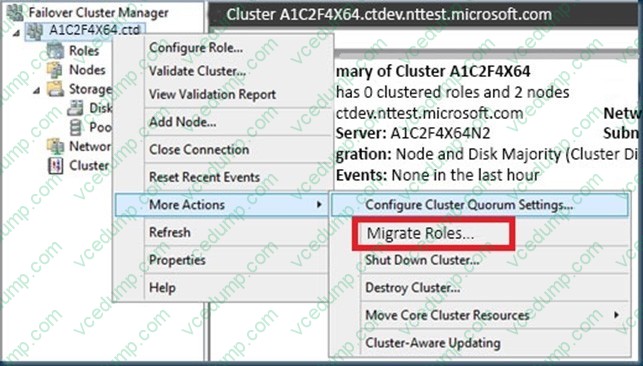
What should you do first from Failover Cluster Manager?
A. On a server in Cluster2, configure Cluster-Aware Updating.
B. On a server in Cluster2, click Move Core Cluster Resources, and then click Best Possible Node.
C. On a server in Cluster1, click Move Core Cluster Resources, and then click Best Possible Node.
D. On a server in Cluster2, click Migrate Roles.
E. On a server in Cluster1, click Move Core Cluster Resources, and then click Select Node. -
Question 313:
Which security groups must a user account be a member of to modify the AD RMS SCP? (Choose two answers. Each answer forms part of a complete solution.)
A. Domain Admins
B. AD RMS Enterprise Administrators
C. Enterprise Admins
D. Cryptographic Operators. -
Question 314:
Your network contains an Active Directory domain named contoso.com. The domain contains a domain controller named DC1 and a member server named Server1. Server1 has the IP Address Management (IPAM) Server feature installed.
On Dc1, you configure Windows Firewall to allow all of the necessary inbound ports for IPAM.
On Server1, you open Server Manager as shown in the exhibit. (Click the Exhibit button.)
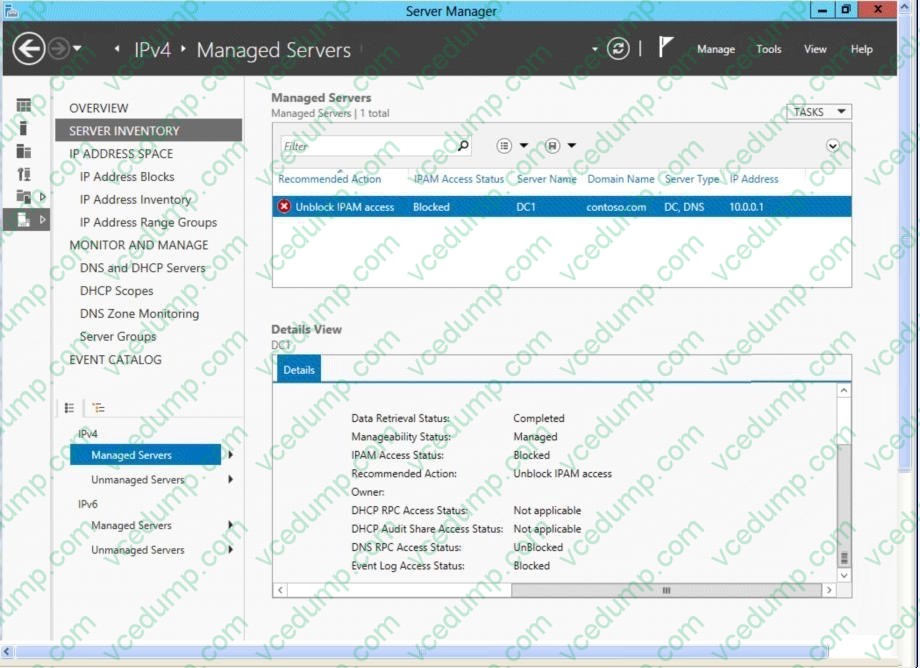
You need to ensure that you can use IPAM on Server1 to manage DNS on DC1. What should you do?
A. Modify the outbound firewall rules on Server1.
B. Modify the inbound firewall rules on Server1.
C. Add Server1 to the Remote Management Users group.
D. Add Server1 to the Event Log Readers group. -
Question 315:
HOTSPOT
Your company has a main office and a branch office. An Active Directory site exists for each office.
The network contains an Active Directory forest named contoso.com. The contoso.com domain contains three member servers named Server1, Server2, and Server3. All servers run Windows Server 2012 R2.
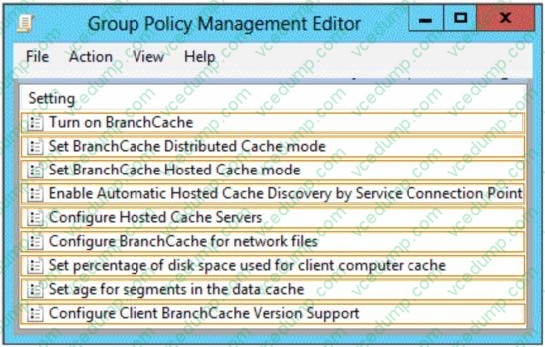
In the main office, you configure Server1 as a file server that uses BranchCache.
In the branch office, you configure Server2 and Server3 as BranchCache hosted cache servers.
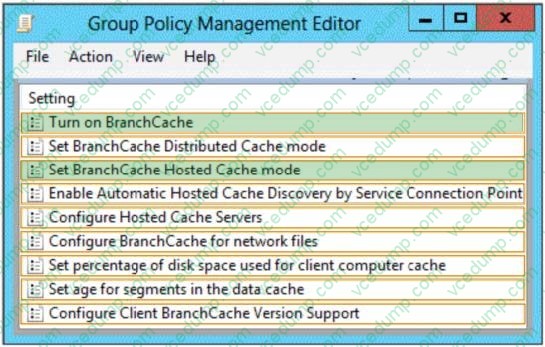
You are creating a Group Policy for the branch office site.
Which two Group Policy settings should you configure?
To answer, select the appropriate two settings in the answer area.
Hot Area:
-
Question 316:
You have a DHCP server named Server1.
Server1 has one network adapter. Server1 is located on a subnet named Subnet1.
Server1 has scope named Scope1. Scope1 contains IP addresses for the 192.168.1.0/24 network.
Your company is migrating the IP addresses on Subnet1 to use a network ID of 10.10.0.0/16.
On Server1 you create a scope named Scope2.
Scope2 contains IP addresses for the 10.10.0.0/16 network.
You need to ensure that clients on Subnet1 can receive IP addresses from either scope.
What should you create on Server1?
A. A multicast scope
B. A scope
C. A superscope
D. A split-scope -
Question 317:
Your network contains an Active Directory domain named contoso.com.
The domain contains a member server named Server1. Server1 runs Windows Server 2012 R2 and has the Hyper-V server role installed. Server1 hosts 10 virtual machines.
A virtual machine named VM1 runs Windows Server 2012 R2 and hosts a processor-intensive Application named App1. Users report that App1 responds more slowly than expected.
You need to monitor the processor usage on VM1 to identify whether changes must be made to the hardware settings of VM1.
Which performance object should you monitor on Server1?
A. Hyper-V Hypervisor Logical Processor
B. Processor
C. Hyper-V Hypervisor Root Virtual Processor
D. Process
E. Hyper-V Hypervisor Virtual Processor -
Question 318:
DRAG DROP
Your network contains an Active Directory domain named contoso.com. The domain contains four member servers named Server1, Server2, Server3, and Server4. All servers run Windows Server 2012 R2.
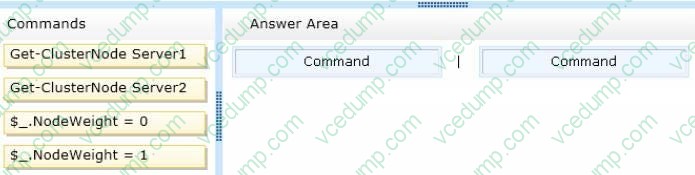
Server1 and Server3 are located in a site named Site1. Server2 and Server4 are located in a site named Site2. The servers are configured as nodes in a failover cluster named Cluster1.
Dynamic quorum management is disabled.
Cluster1 is configured to use the Node Majority quorum configuration.
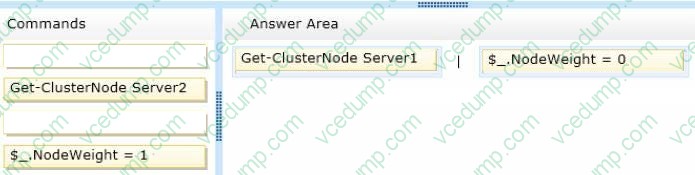
You need to ensure that users in Site2 can access Cluster1 if the network connection between the two sites becomes unavailable.
What should you run from Windows PowerShell?
To answer, drag the appropriate commands to the correct location. Each command may be used once, more than once, or not at all. You may need to drag the split bar between panes or scroll to view content.
Select and Place:
-
Question 319:
You have an Active Directory Rights Management Services (AD RMS) cluster.
You need to prevent users from encrypting new content. The solution must ensure that the users can continue to decrypt content that was encrypted already.
Which two actions should you perform? (Each correct answer presents part of the solution. Choose two.)
A. From the Active Directory Rights Management Services console, enable decommissioning.
B. From the Active Directory Rights Management Services console, create a user exclusion policy.
C. Modify the NTFS permissions of %systemdrive%\inetpub\wwwroot\_wmcs\licensing.
D. Modify the NTFS permissions of %systemdrive%\inetpub\wwwroot\_wmcs\decommission.
E. From the Active Directory Rights Management Services console, modify the rights policy templates. -
Question 320:
HOTSPOT
Your network contains three Active Directory forests. The forests are configured as shown in the following table.
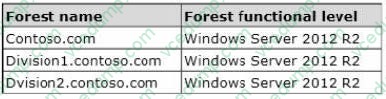
A two-way forest trust exists between contoso.com and divisionl.contoso.com. A two-way forest trust also exists between contoso.com and division2.contoso.com.
You plan to create a one-way forest trust from divisionl.contoso.com to division2.contoso.com.
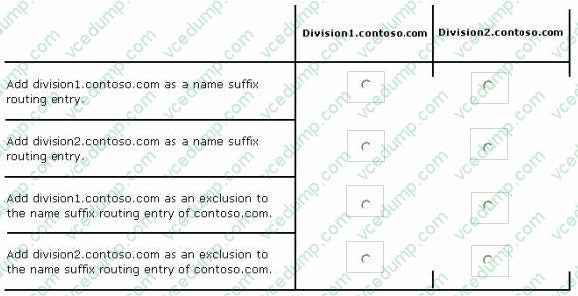
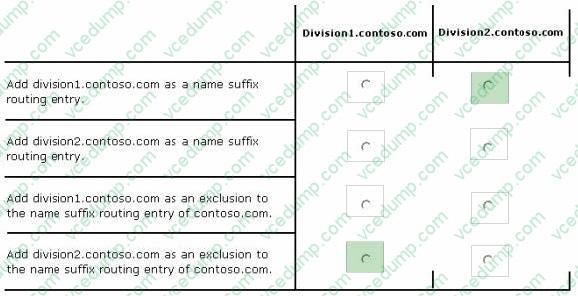
You need to ensure that any cross-forest authentication requests are sent to the domain controllers in the appropriate forest after the trust is created.
How should you configure the existing forest trust settings?
In the table below, identify which configuration must be performed in each forest. Make only one selection in each column. Each correct selection is worth one point.
Hot Area:
Related Exams:
-
62-193
Technology Literacy for Educators -
70-243
Administering and Deploying System Center 2012 Configuration Manager -
70-355
Universal Windows Platform – App Data, Services, and Coding Patterns -
77-420
Excel 2013 -
77-427
Excel 2013 Expert Part One -
77-725
Word 2016 Core Document Creation, Collaboration and Communication -
77-726
Word 2016 Expert Creating Documents for Effective Communication -
77-727
Excel 2016 Core Data Analysis, Manipulation, and Presentation -
77-728
Excel 2016 Expert: Interpreting Data for Insights -
77-731
Outlook 2016 Core Communication, Collaboration and Email Skills
Tips on How to Prepare for the Exams
Nowadays, the certification exams become more and more important and required by more and more enterprises when applying for a job. But how to prepare for the exam effectively? How to prepare for the exam in a short time with less efforts? How to get a ideal result and how to find the most reliable resources? Here on Vcedump.com, you will find all the answers. Vcedump.com provide not only Microsoft exam questions, answers and explanations but also complete assistance on your exam preparation and certification application. If you are confused on your 70-412 exam preparations and Microsoft certification application, do not hesitate to visit our Vcedump.com to find your solutions here.