220-1101 Exam Details
-
Exam Code
:220-1101 -
Exam Name
:CompTIA A+ Certification: Core 1 -
Certification
:CompTIA Certifications -
Vendor
:CompTIA -
Total Questions
:1057 Q&As -
Last Updated
:Jul 18, 2026
CompTIA 220-1101 Online Questions & Answers
-
Question 741:
A salesperson is unable to use a personal device to access emails and calendar features at a client site but was able to use the device while at the office.
Which of the following policies has been enforced on the salesperson's mobile device?
A. MOW
B. MAN
C. MFA
D. MAM -
Question 742:
A technician is investigating the output shown on a monitor. The output is clear, but it has a pink hue. The technician has replaced the video card and updated the graphics drivers. Which of the following would be the MOST likely cause?
A. Physical cabling issues
B. Burned-out bulb
C. Display burn-in
D. Incorrect data source -
Question 743:
A technician needs to select PC components with a minimal number of visible internal cables. Which of the following should the technician use?
A. SATA drive connections
B. Liquid cooling
C. Modular power supply
D. Wireless NIC -
Question 744:
A customer reports that a text-only document prints with unrecognizable characters. The print preview correctly displays the document. Which of the following is the most likely cause of the issue?
A. Outdated firmware
B. Incorrect driver
C. Bad toner cartridge
D. Corrupted document file -
Question 745:
A technician verifies the slow boot time and slow OS performance of a tower server with a RAID 5 on a PCIe RAID card that does not support hot swapping. Which of the following steps should the technician take NEXT to verify RAID health?
A. Verify S.M.A.R.T. operation on the RAID card.
B. Replace the failed drive while users are connected
C. Physically clean the HDDs and connectors.
D. Shut down the server and check the RAID controller's status. -
Question 746:
A user calls the help desk about a 4K monitor that will not output an image from a desktop. The monitor was working previously but now shows a black screen with a message stating a signal is not detected. The desktop is connected via HDMI, and the monitor has an empty DVI port. Which of the following steps should the technician perform first? (Select two).
A. Check the version of the HDMI cable.
B. Check the input source.
C. Set up the desktop for DVI.
D. Replace the HDMI cable.
E. Install OS updates.
F. Initiate a system restore. -
Question 747:
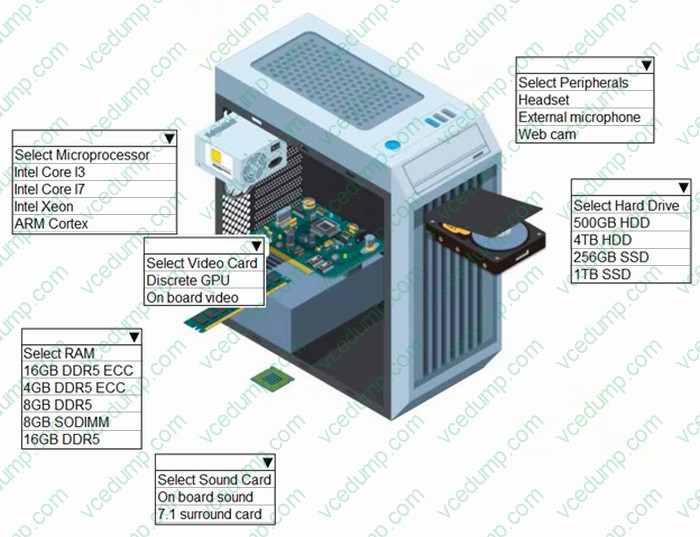
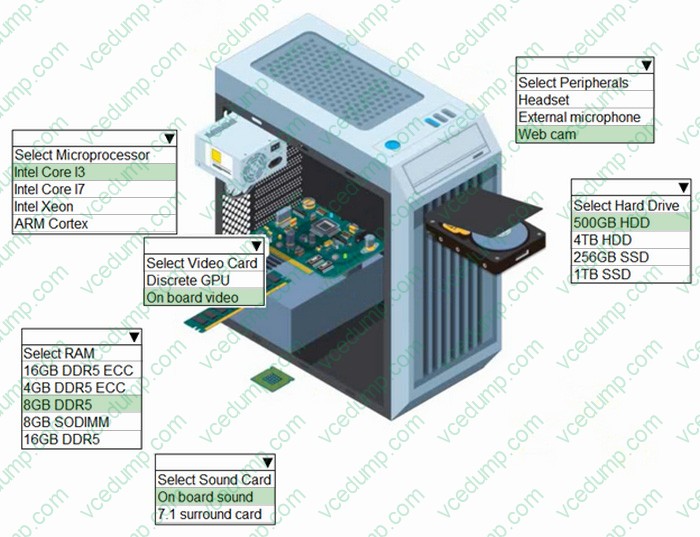
HOTSPOT - For Family(SOHO)
A customer has contacted you about building two new desktops.
The first desktop will be a gaming workstation. The customer requirements include:
1. Playing the newest games at a high frame rate
2. Fast game load times
3. Enough storage to have several games installed at once
4. High-end audio
5. No concern about cost
6. Running the current Windows OS
The second workstation will be a family workstation. The requirements include:
1. Capability for word processing, videoconferencing, and basic web surfing
2. Minimal cost, as long as it meets the requirements
3. Running the current Windows OS
INSTRUCTIONS
Use the drop-down menus to select the appropriate component for each category, based on the above requirements.
If at any time you would like to bring back the initial state of the simulation, please click the Reset All button.
For FAMILY(SOHO) Hot Area:
-
Question 748:
A workstation was just moved to a new work location without a surge protector. It was working the day before, but now the PC will not power on, the fans will not spin, and there are no signs of activity. Which of the following should the technician do FIRST?
A. Check the power cable connection
B. Check the voltage of the PSU with a tester
C. Test for distended capacitors
D. Check the voltage switch -
Question 749:
Which of the following resolutions is commonly known as Ultra HD?
A. 1920x1080
B. 2048x1080
C. 3840x2160
D. 7680x4320 -
Question 750:
A laptop is experiencing slow performance writing data. Which of the following is the best component for a technician to upgrade to fix the issue?
A. RAM
B. HDD
C. TPM
D. CPU
Related Exams:
-
220-1001
CompTIA A+ Certification: Core 1 -
220-1002
CompTIA A+ Certification: Core 2 -
220-1101
CompTIA A+ Certification: Core 1 -
220-1102
CompTIA A+ Certification: Core 2 -
220-1201
CompTIA A+ Certification: Core 1 -
220-1202
CompTIA A+ Core 2 (2026) -
220-902
CompTIA A+ Certification -
CAS-004
CompTIA Advanced Security Practitioner (CASP+) -
CAS-005
CompTIA SecurityX -
CLO-001
CompTIA Cloud Essentials+
Tips on How to Prepare for the Exams
Nowadays, the certification exams become more and more important and required by more and more enterprises when applying for a job. But how to prepare for the exam effectively? How to prepare for the exam in a short time with less efforts? How to get a ideal result and how to find the most reliable resources? Here on Vcedump.com, you will find all the answers. Vcedump.com provide not only CompTIA exam questions, answers and explanations but also complete assistance on your exam preparation and certification application. If you are confused on your 220-1101 exam preparations and CompTIA certification application, do not hesitate to visit our Vcedump.com to find your solutions here.