156-215.77 Exam Details
-
Exam Code
:156-215.77 -
Exam Name
:Check Point Certified Security Administrator -
Certification
:Checkpoint Certifications -
Vendor
:CheckPoint -
Total Questions
:358 Q&As -
Last Updated
:Dec 13, 2024
CheckPoint 156-215.77 Online Questions & Answers
-
Question 141:
How can you activate the SNMP daemon on a Check Point Security Management Server?
A. B. From cpconfig, select SNMP extension.
B. C. Any of these options will work.
C. D. In SmartDashboard, right-click a Check Point object and select Activate SNMP. -
Question 142:
What are you required to do before running the command upgrade_export?
A. Run a cpstop on the Security Gateway.
B. Run a cpstop on the Security Management Server.
C. Close all GUI clients.
D. Run cpconfig and set yourself up as a GUI client. -
Question 143:
You find a suspicious FTP site trying to connect to one of your internal hosts. How do you block it in real time and verify it is successfully blocked? Highlight the suspicious connection in SmartView Tracker:
A. Log mode. Block it using Tools > Block Intruder menu. Observe in the Log mode that the suspicious connection does not appear again in this SmartView Tracker view.
B. Log mode. Block it using Tools > Block Intruder menu. Observe in the Log mode that the suspicious connection is listed in this SmartView Tracker view as "dropped?.
C. Active mode. Block it using Tools > Block Intruder menu. Observe in the Active mode that the suspicious connection does not appear again in this SmartView Tracker view.
D. Active mode. Block it using Tools > Block Intruder menu. Observe in the Active mode that the suspicious connection is listed in this SmartView Tracker view as "dropped?. -
Question 144:
Study the Rule base and Client Authentication Action properties screen
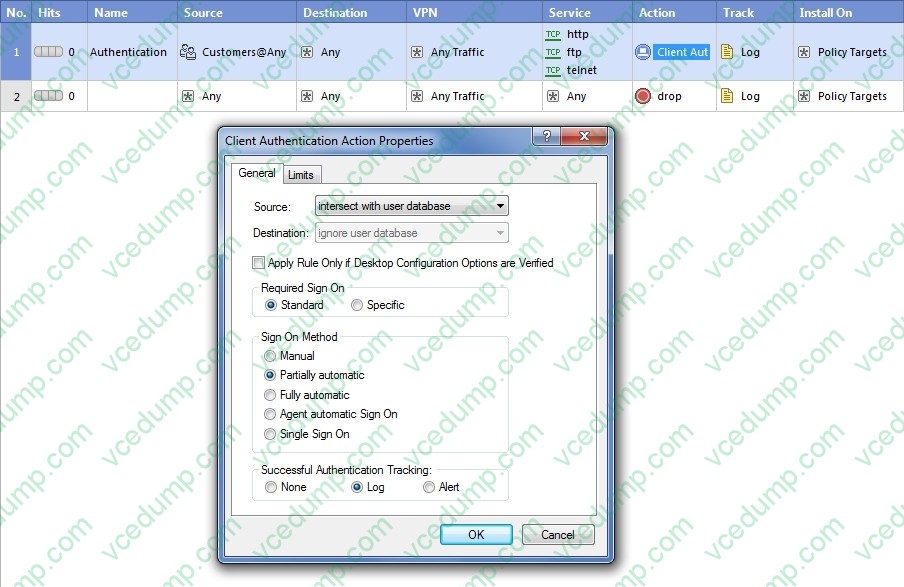
After being authenticated by the Security Gateway, when a user starts an HTTP connection to a Web site, the user tries to FTP to another site using the command line. What happens to the user?
A. user is prompted for authentication by the Security Gateway again.
B. FTP data connection is dropped after the user is authenticated successfully.
C. user is prompted to authenticate from that FTP site only, and does not need to enter his username and password for Client Authentication.
D. FTP connection is dropped by Rule 2. -
Question 145:
Which NAT option applicable for Automatic NAT applies to Manual NAT as well?
A. Allow bi-directional NAT
B. Automatic ARP configuration
C. Translate destination on client-side
D. Enable IP Pool NAT -
Question 146:
You have detected a possible intruder listed in SmartView Tracker's active pane. What is the fastest method to block this intruder from accessing your network indefinitely?
A. Modify the Rule Base to drop these connections from the network.
B. In SmartView Tracker, select Tools > Block Intruder.
C. In SmartView Monitor, select Tools > Suspicious Activity Rules.
D. In SmartDashboard, select IPS > Network Security > Denial of Service. -
Question 147:
You have three servers located in a DMZ, using private IP addresses. You want internal users from 10.10.10.x to access the DMZ servers by public IP addresses. Internal_net 10.10.10.x is configured for Hide NAT behind the Security Gateway's external interface.
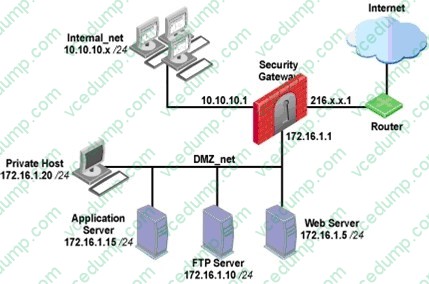
What is the best configuration for 10.10.10.x users to access the DMZ servers, using the DMZ servers' public IP addresses?
A. When connecting to internal network 10.10.10.x, configure Hide NAT for the DMZ network behind the Security Gateway DMZ interface.
B. When the source is the internal network 10.10.10.x, configure manual static NAT rules to translate the DMZ servers.
C. When connecting to the Internet, configure manual Static NAT rules to translate the DMZ servers.
D. When trying to access DMZ servers, configure Hide NAT for 10.10.10.x behind the DMZ's interface. -
Question 148:
Which tool CANNOT be launched from SmartUpdate R77?
A. IP Appliance Voyager
B. snapshot
C. GAiA WebUI
D. cpinfo -
Question 149:
When using vpn tu, which option must you choose if you only want to clear phase 2 for a specific IP (gateway)? Exhibit:
A. (5) Delete all IPsec SAs for a given peer (GW)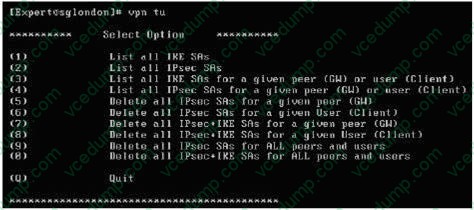
B. (7) Delete all IPsec+IKE SAs for a given peer (GW)
C. (6) Delete all IPsec SAs for a given User (Client)
D. (8) Delete all IPsec+IKE SAs for a given User (Client) -
Question 150:
Your primary Security Gateway runs on GAiA. What is the easiest way to back up your Security Gateway R77 configuration, including routing and network configuration files?
A. Copying the directories $FWDIR/conf and $FWDIR/lib to another location.
B. Using the native GAiA backup utility from command line or in the Web based user interface.
C. Using the command upgrade_export.
D. Run the pre_upgrade_verifier and save the .tgz file to the directory /temp.
Related Exams:
-
156-110
Check Point Certified Security Principles Associate (CCSPA) -
156-115.80
Check Point Certified Security Master - R80 -
156-215
Check Point Security Administration NGX -
156-215.1
Check Point Certified Security Administrator NGX -
156-215.70
Check Point Certified Security Administrator R70 -
156-215.71
Check Point Certified Security Administrator R71 -
156-215.75
Check Point Certified Security Administrator -
156-215.80
Check Point Certified Security Administrator (CCSA) -
156-215.81
Check Point Certified Security Administrator - R81 (CCSA) -
156-215.81.20
Check Point Certified Security Administrator - R81.20 (CCSA)
Tips on How to Prepare for the Exams
Nowadays, the certification exams become more and more important and required by more and more enterprises when applying for a job. But how to prepare for the exam effectively? How to prepare for the exam in a short time with less efforts? How to get a ideal result and how to find the most reliable resources? Here on Vcedump.com, you will find all the answers. Vcedump.com provide not only CheckPoint exam questions, answers and explanations but also complete assistance on your exam preparation and certification application. If you are confused on your 156-215.77 exam preparations and CheckPoint certification application, do not hesitate to visit our Vcedump.com to find your solutions here.