156-215.75 Exam Details
-
Exam Code
:156-215.75 -
Exam Name
:Check Point Certified Security Administrator -
Certification
:Checkpoint Certifications -
Vendor
:CheckPoint -
Total Questions
:629 Q&As -
Last Updated
:May 27, 2026
CheckPoint 156-215.75 Online Questions & Answers
-
Question 501:
In New Mode HA, the internal cluster IP VIP address is 10.4.8.3. An internal host 10.4.8.108 successfully pings its Cluster and receives replies. Review the ARP table from the internal Windows host 10.4.8.108. Based on this information, what is the active cluster member's IP address?
A. The active cluster member's IP address cannot be determined by this ARP cache.
B. 10.4.8.3
C. 10.4.8.1
D. 10.4.8.2 -
Question 502:
In Load Sharing Unicast mode, the internal cluster IP address is 10.4.8.3. The internal interfaces on two members are 10.4.8.1 and 10.4.8.2. Internal host 10.4.8.108 Pings 10.4.8.3, and receives replies. The following is the ARP table from the internal Windows host 10.4.8.108.
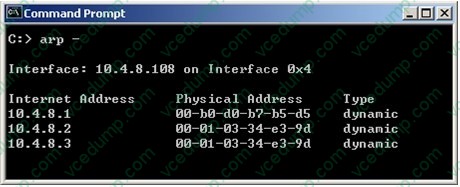
Review the exhibit and identify the member serving as the pivot machine.
A. 10.4.8.3
B. 10.4.8.2
C. The pivot machine cannot be determined by this test.
D. 10.4.8.1 -
Question 503:
Which of the following statements is FALSE about the DLP Software Blade and Active Directory (AD) or LDAP?
A. When a user authenticates in the DLP Portal to view all his unhandled incidents, the portal authenticates the user using only AD/LDAP.
B. Check Point UserCheck client authentication is based on AD.
C. For SMTP traffic, each recipient e-mail address is translated using AD/LDAP to a user name and group that is checked vs. the destination column of the DLP rule base.
D. For SMTP traffic, the sender e-mail address is translated using AD/LDAP to a user name and group that is checked vs. the source column of the DLP rule base. -
Question 504:
Which of the following statements about the Port Scanning feature of IPS is TRUE?
A. The default scan detection is when more than 500 open inactive ports are open for a period of 120 seconds.
B. The Port Scanning feature actively blocks the scanning, and sends an alert to SmartView Monitor.
C. Port Scanning does not block scanning; it detects port scans with one of three levels of detection sensitivity.
D. When a port scan is detected, only a log is issued, never an alert. -
Question 505:
Steve tries to configure Directional VPN Rule Match in the Rule Base. But the Match column does not have the option to see the Directional Match. Steve sees the following screen. What is the problem?
A. Steve must enable directional_match(true) in the objects_5_0.C file on SmartCenter Server.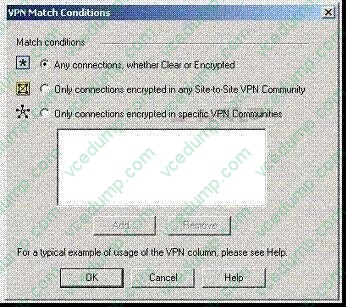
B. Steve must enable Advanced Routing on each Security Gateway.
C. Steve must enable VPN Directional Match on the VPN Advanced screen, in Global properties.
D. Steve must enable a dynamic routing protocol, such as OSPF, on the Gateways.
E. Steve must enable VPN Directional Match on the gateway object's VPN tab. -
Question 506:
You receive an alert indicating a suspicious FTP connection is trying to connect to one of your internal hosts. How do you block the connection in real time and verify the connection is successfully blocked?
A. Highlight the suspicious connection in SmartView Tracker > Active mode. Block the connection using the Tools > Block Intruder menu. Use the Active mode to confirm that the suspicious connection does not reappear.
B. Highlight the suspicious connection in SmartView Tracker > Log mode. Block the connection using Tools > Block Intruder menu. Use Log mode to confirm that the suspicious connection does not reappear.
C. Highlight the suspicious connection in SmartView Tracker > Active mode. Block the connection using Tools > Block Intruder menu. Use Active mode to confirm that the suspicious connection is dropped.
D. Highlight the suspicious connection in SmartView Tracker > Log mode. Block the connection using Tools > Block Intruder menu. Use the Log mode to confirm that the suspicious connection is dropped. -
Question 507:
When selecting a backup target using SmartProvisioning, which target is NOT available?
A. Locally on device
B. FTP
C. SCP
D. TFTP -
Question 508:
You have to uninstall the Check Point SmartWorkflow Software Blade on a SecurePlatform system. How can you perform this procedure?
A. To uninstall the SmartWorkflow Software Blade you can connect to the SecurePlatform WebUI ( ) and select: Device > Upgrade. You will be asked if you want uninstall the SmartWorkflow Software Blade.
B. To uninstall the SmartWorkflow Software Blade you must first connect to your Security Management System on command line level. Then in the directory /opt/CPUninstall/Check_Point_Workflow, run the command ./UnixInstallScript -u. Afterwards, follow the screen instructions and change to the directory /opt/CPUninstall/R70_HFA_10 and repeat the previous command.
C. To uninstall the SmartWorkflow Software Blade, you use SmartUpdate. Click on the symbol of the Security Management Server, right-click, select Get Gateway Data, select SmartWorkflow, right -click uninstall SmartWorkflow. You will see the progress in the Operaration Status windows.
D. To uninstall the SmartWorkflow Software Blade, you must first connect to your Security Management System on the command line level. Then in the directory /opt/CPuninstall/Check_Point_Workflow, run the command ./UnixInstallScript u. -
Question 509:
What is a task of the SmartEvent Server?
A. Assign a severity level to an event.
B. Display the received events.
C. Analyze each IPS log entry as it enters the Log server.
D. Forward what is known as an event to the SmartEvent Server. -
Question 510:
VPN routing can also be configured by editing which file?
A. $FWDIR\conf\vpn_route.c
B. $FWDIR\bin\vpn_route.conf
C. $FWDIR\conf\vpn_route.conf
D. $FWDIR\VPN\route_conf.c
Related Exams:
-
156-110
Check Point Certified Security Principles Associate (CCSPA) -
156-115.80
Check Point Certified Security Master - R80 -
156-215
Check Point Security Administration NGX -
156-215.1
Check Point Certified Security Administrator NGX -
156-215.70
Check Point Certified Security Administrator R70 -
156-215.71
Check Point Certified Security Administrator R71 -
156-215.75
Check Point Certified Security Administrator -
156-215.80
Check Point Certified Security Administrator (CCSA) -
156-215.81
Check Point Certified Security Administrator - R81 (CCSA) -
156-215.81.20
Check Point Certified Security Administrator - R81.20 (CCSA)
Tips on How to Prepare for the Exams
Nowadays, the certification exams become more and more important and required by more and more enterprises when applying for a job. But how to prepare for the exam effectively? How to prepare for the exam in a short time with less efforts? How to get a ideal result and how to find the most reliable resources? Here on Vcedump.com, you will find all the answers. Vcedump.com provide not only CheckPoint exam questions, answers and explanations but also complete assistance on your exam preparation and certification application. If you are confused on your 156-215.75 exam preparations and CheckPoint certification application, do not hesitate to visit our Vcedump.com to find your solutions here.